Views, Procedures and Triggers
In DbSchema, you write the SQL code of views, procedures, functions and triggers in the same design as your tables. For example, you can write a trigger that adds loyalty points to a customer after each payment, and create it in PostgreSQL from DbSchema.
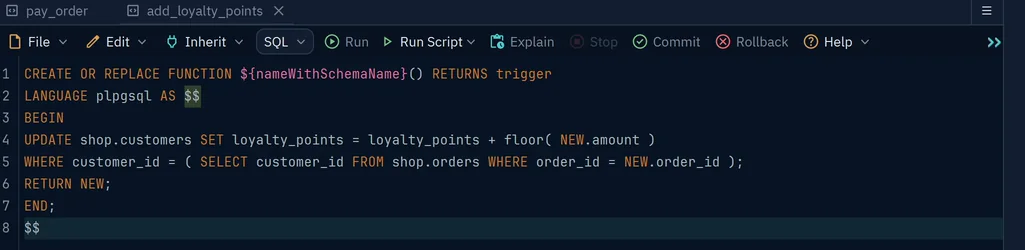
A view is a saved SELECT query. You query a view like a table. A procedure is code that the database stores, and runs when you call it. A function is similar, but returns a value, so you can use it inside a query. A trigger is code that the database runs by itself when rows of a table change. Database Terms explains views and the other words of database design.
In the tree on the left, each schema has a folder for each kind of object: Views, Procedures, Functions and Triggers.
When your changes reach the database
Some actions on this page change only the design. Others also change the database. The design, also called the model, is your DbSchema project: the tables, views and code that you see in DbSchema. The database is the real database on the server.
| Action | DbSchema connected | DbSchema offline |
|---|---|---|
| Create or edit a view, and press OK | Design and database at once | Design only |
| Write or edit a procedure, function or trigger | Design only, until you run Database → Create or Upgrade Model in the Database | Design only |
| Drop any of them | Design and database at once | Design only |
A view with Virtual ticked stays in the design only, connected or not.
In the scripts, a placeholder such as ${nameWithSchemaName} stands for the object's name.
Leave the placeholder as it is. DbSchema fills in the name each time it creates the object in the database. The script then keeps working after a rename.
Rename a view, procedure, function or trigger lists the placeholders.
Create a view
- Choose Model → Create Table, View... → Create View. You can also right-click an empty place on the diagram and choose Create View.
- In the New View dialog, type the Name, such as
customer_orders, and a Comment. - Under Definition, replace
SELECT ... FROM ...with your query. Leave the placeholder${nameWithSchemaName}unchanged. - Press OK.
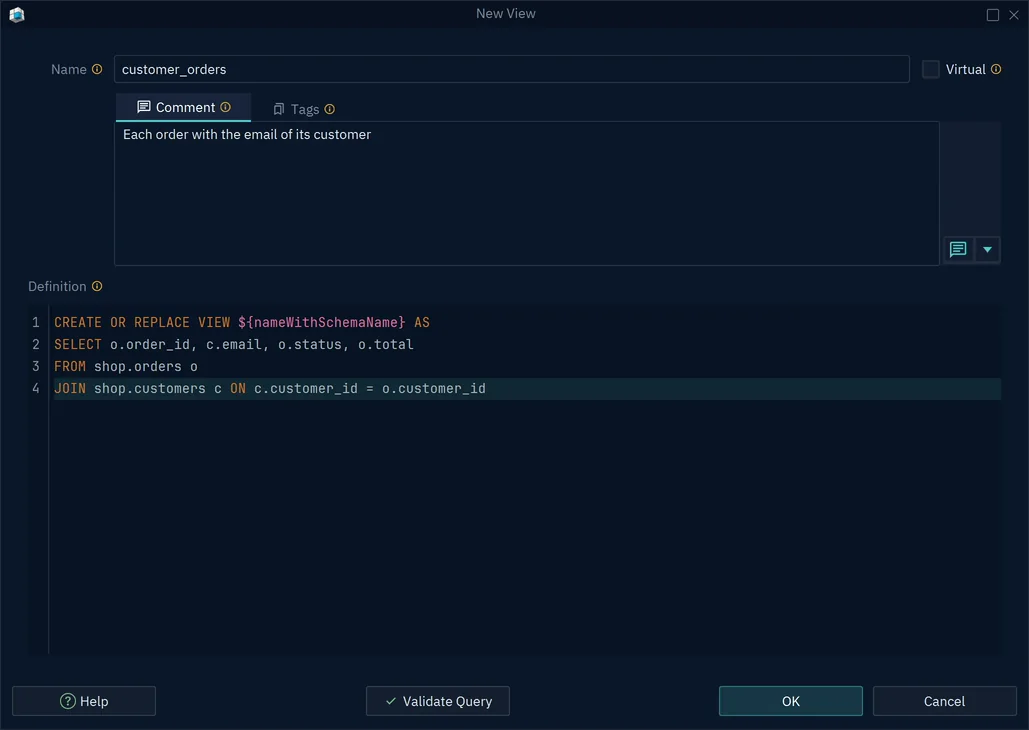
If DbSchema is connected to the database, pressing OK creates the view in both the design and the database at once. For this view, DbSchema ran in PostgreSQL:
CREATE OR REPLACE VIEW shop.customer_orders AS
SELECT o.order_id, c.email, o.status, o.total
FROM shop.orders o
JOIN shop.customers c ON c.customer_id = o.customer_id;
COMMENT ON VIEW shop.customer_orders IS 'Each order with the email of its customer';
If DbSchema is offline, the view goes into the design only. Schema Synchronization creates it in the database later.
The view shows on the diagram with its columns, like a table. Tick Virtual if the view should exist only in your design, not in the database.
Edit or drop a view
To edit a view, double-click it on the diagram or in the tree, or right-click it and choose Edit. The Edit View dialog opens. If DbSchema is connected, pressing OK runs CREATE OR REPLACE VIEW with the new definition.
To drop a view, which means to delete it, right-click it and choose Drop. Press Drop again to confirm.
Drop deletes the view from the design. If DbSchema is connected, it also runs DROP VIEW in the database at once.
To remove the view from the diagram only, choose Exclude from Diagram instead.
Create a procedure or a function
You write a procedure or a function in an editor tab, not in a dialog. DbSchema keeps the code in your design. A second step creates it in the database.
- Choose Model → Create Table, View... → Create Procedure, or Create Function.
- Type the name, such as
pay_order, and press OK. An editor tab opens below the diagram. The tab holds an SQL template to start from. - Replace the template with your code. Keep the placeholder
${nameWithSchemaName}in place of the name.
CREATE OR REPLACE PROCEDURE ${nameWithSchemaName}( p_order_id integer, p_method varchar )
LANGUAGE plpgsql AS $$
BEGIN
INSERT INTO shop.payments ( order_id, method, amount, paid_at )
SELECT order_id, p_method, total, now() FROM shop.orders WHERE order_id = p_order_id;
UPDATE shop.orders SET status = 'PAID' WHERE order_id = p_order_id;
END;
$$
The procedure now shows in the tree, under Procedures. It exists only in the design.
To create it in the database:
- Choose Database → Create or Upgrade Model in the Database.
- In Commit Changes into the Database, make sure that the schema is ticked, and press OK.
- The Execute Script In Database Dialog shows the statement, with the real name in place of the placeholder. Press Execute.
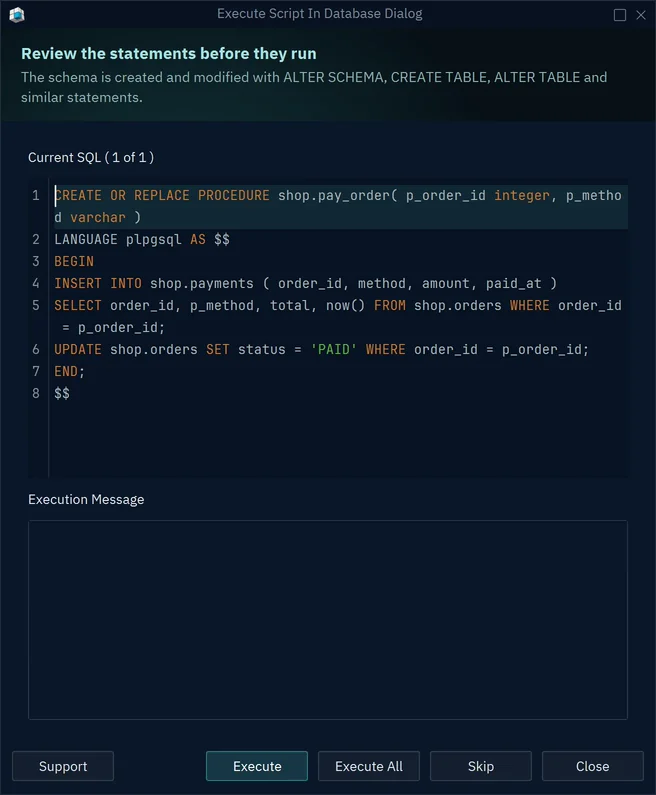
Create or Upgrade Model in the Database lists every difference between the design and the database in the schemas that you tick. The script can therefore hold statements for other changes too. Skip leaves out the statement shown. Create or Upgrade Model in the Database needs DbSchema Pro. Schema Synchronization explains the dialogs.
You can also run the code from the editor yourself. Replace ${nameWithSchemaName} with the real name, such as shop.pay_order, and press Run. The design then holds the real name in place of the placeholder.
Create a trigger
A trigger belongs to a table.
In PostgreSQL, a trigger calls a function. The return type of that function is trigger. Create that function first, as in the previous section. In this example, the trigger calls the function add_loyalty_points of the first picture on this page.
- Choose Model → Create Table, View... → Create Trigger.
- Type the name, such as
payments_loyalty, and press OK. - In Attach to Table, choose the table, such as
payments, and press OK. - In the editor tab, replace the template with the trigger. Keep the placeholder
${name}in place of the name.

Then create the trigger in the database with Database → Create or Upgrade Model in the Database, as for a procedure. For this trigger, DbSchema ran:
CREATE TRIGGER payments_loyalty AFTER INSERT ON shop.payments
FOR EACH ROW EXECUTE FUNCTION shop.add_loyalty_points();
Edit or drop a procedure, function or trigger
To edit one, double-click it in the tree. Its editor tab opens. Change the code, then create it in the database again with Database → Create or Upgrade Model in the Database. For a procedure or function, DbSchema runs CREATE OR REPLACE. For a trigger, it runs DROP TRIGGER, then CREATE TRIGGER.
To drop one, right-click it in the tree, choose Drop, and press Drop to confirm. Drop deletes it from the design. If DbSchema is connected, it also runs the drop in the database at once, such as:
DROP TRIGGER payments_loyalty ON shop.payments;
The same right-click menu holds Generate Flow Diagram. It draws the tables that the code reads and writes. Flow Diagrams explains it.
Rename a view, procedure, function or trigger
When you rename an object, change only its Name. Leave the placeholder unchanged, so that DbSchema can fill in the new name.
When DbSchema loads a view or trigger from the database, it replaces the object's name in the script with a placeholder. DbSchema does the same for a MySQL procedure or function. For a PostgreSQL view, the placeholder is ${view}:
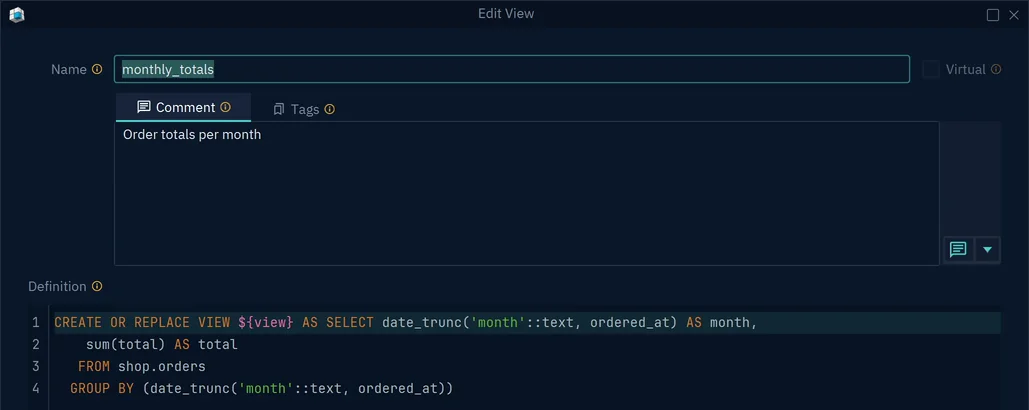
To rename a view, change its Name in the Edit View dialog and press OK.
When DbSchema is connected, it creates the view under the new name, and drops the old one. Renaming customer_orders to order_emails ran:
CREATE OR REPLACE VIEW shop.order_emails AS
SELECT o.order_id, c.email, o.status, o.total
FROM shop.orders o
JOIN shop.customers c ON c.customer_id = o.customer_id;
COMMENT ON VIEW shop.order_emails IS 'Each order with the email of its customer';
DROP VIEW shop.customer_orders;
To rename a procedure, function or trigger, right-click it in the tree and choose Rename.
The placeholders that a PostgreSQL view script can hold:
| Placeholder | Becomes |
|---|---|
${nameWithSchemaName}, ${view} | The schema and the name, such as shop.customer_orders |
${name}, ${viewName} | The name alone, such as customer_orders |
${schemaName} | The schema alone, such as shop |
Common problems
Run in the procedure editor fails with "syntax error at or near "$""
The editor sends the code to the database without replacing the placeholder ${nameWithSchemaName}. Create the procedure with Database → Create or Upgrade Model in the Database, which fills in the name. Or write the real name in place of the placeholder before you press Run.
Can I edit the name inside a view script?
Leave the placeholder in the script, and change the Name field instead. DbSchema fills in the new name when it creates the view.
My procedure is in the design but not in the database
Typing the code in the editor changes only the design. Create the procedure in the database with Database → Create or Upgrade Model in the Database.