Foreign Keys
An order that points at a customer who doesn't exist is a row the database should have refused. A foreign key makes the database refuse it, and in DbSchema you create one by dragging the child column onto the parent column. DbSchema then draws the foreign key as a line between the two tables.
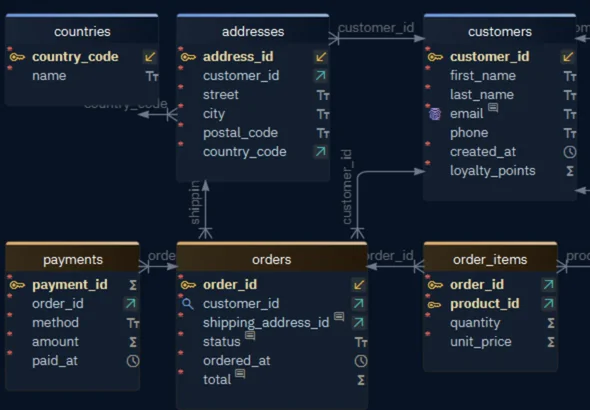
In the picture, orders.customer_id holds the customer_id of the customer who placed the order. The table that holds the foreign key is the child, here orders, and the table it points to is the parent, customers.
Create a foreign key
Dragging one column onto another creates the foreign key and fills in the dialog for you.
- Drag the child column, such as
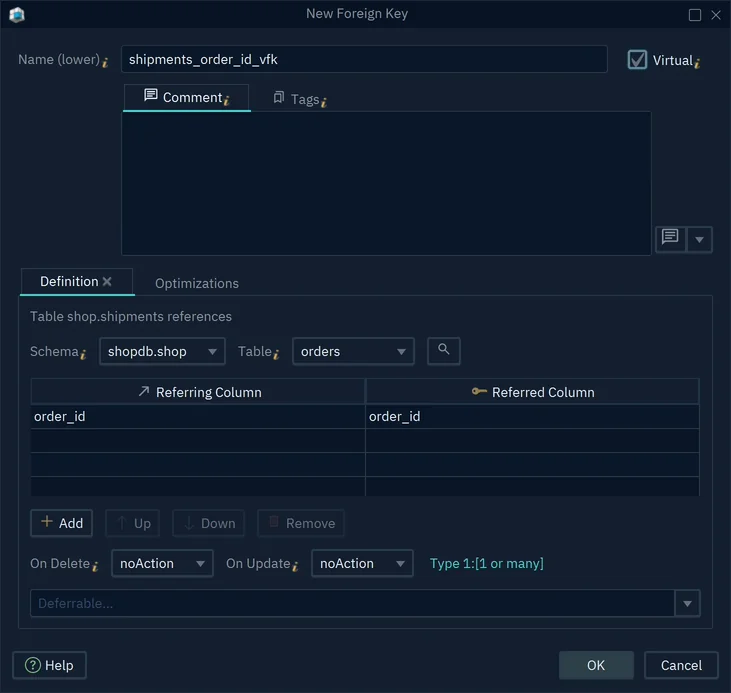
order_idinshipments, onto the parent column, such asorder_idinorders. - The New Foreign Key dialog opens, filled in. Check the name and the columns.
- Press OK, or Enter.
The new line joins the two tables. If you're connected, DbSchema creates the foreign key in the database at once. If you work offline, the foreign key stays in the model until you synchronize the model with the database, which needs DbSchema Pro.
The parent column must be a primary key or have a unique key, or the database refuses the foreign key. A foreign key to customers.last_name, which has no unique key, fails in PostgreSQL 17 with:
ERROR: there is no unique constraint matching given keys for referenced table "customers"
Edit a foreign key
Double-click the line to open the Edit Foreign Key dialog.
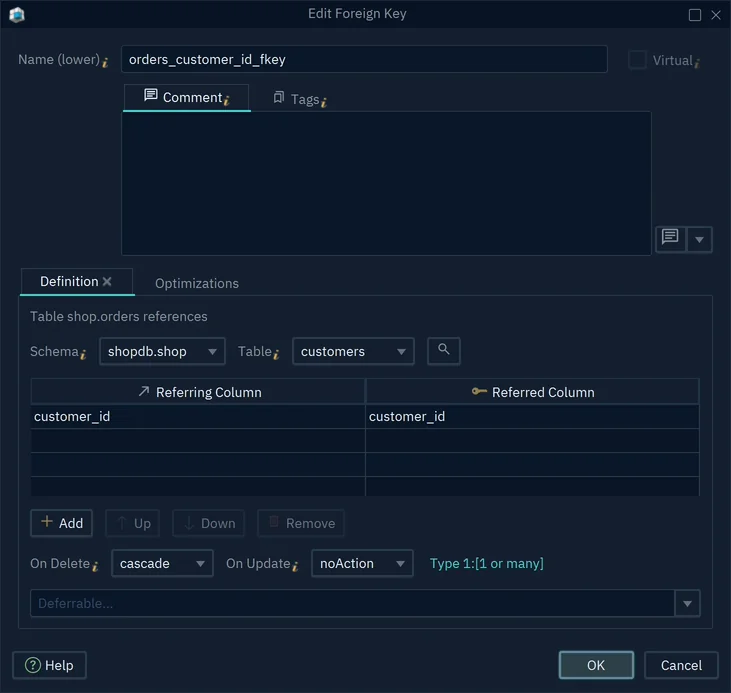
| Field | What it sets |
|---|---|
| Name | The name of the constraint in the database |
| Virtual | Whether the foreign key stays in the model only |
| Table | The parent table |
| Referring Column, Referred Column | One pair per column of the foreign key |
| On Delete, On Update | What the database does with the child rows |
| Type | The cardinality that the line shows |
A foreign key over two or more columns has one row of Referring Column and Referred Column per column, and Add adds a row. On Delete applies when the parent row is deleted, On Update when its key changes. Read the cardinality of a line explains Type, and Add a virtual foreign key explains Virtual.
The Optimizations tab has options that apply when you create a foreign key. Ensure Primary Key Index adds a unique key on the parent columns when they have none, and Optimize deletions by indexing the referring column(s) adds an index on the child columns.
On Delete and On Update
| Action | What the database does when the parent row goes |
|---|---|
| noAction | Refuses the delete while child rows exist |
| restrict | Refuses the delete, like noAction |
| cascade | Deletes the child rows too |
| setNull | Empties the child column |
With On Update, cascade copies the changed key to the child rows. setNull works only on a child column that allows empty values. The list offers only the actions that your database supports.
With noAction or restrict, delete the child rows first. PostgreSQL 17 refuses to delete an order that a payment still points at:
ERROR:  update or delete on table "orders" violates foreign key constraint "payments_order_id_fkey" on table "payments"
DETAIL:  Key (order_id)=(1) is still referenced from table "payments".
Read the cardinality of a line
Cardinality says how many rows on one side match a row on the other side, such as one customer having many orders. DbSchema draws it with marks at the two ends of each line.
A database has no setting for cardinality, so DbSchema reads it from the child columns:
| Child columns | Unique | Line ends, parent to child |
|---|---|---|
| Mandatory ( Not Null ) | No | 1 to 1 or many |
| Mandatory ( Not Null ) | Yes | 1 to 1 |
| Nullable | No | 0 or 1 to 0 or many |
| Nullable | Yes | 0 or 1 to 0 or 1 |
A column is unique when a primary key, a unique key or a unique index covers exactly the foreign key columns. In every notation but Idef1x, a line is dashed when its child column is nullable.
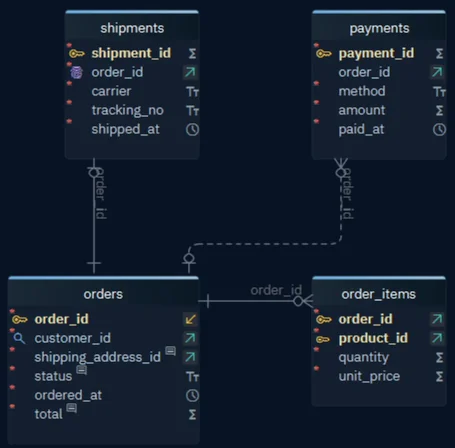
The pictures below show three foreign keys to orders. Their child columns are defined like this:
CREATE TABLE order_items (
    order_id   integer NOT NULL REFERENCES orders,
    product_id integer NOT NULL,
    PRIMARY KEY (order_id, product_id)
);

CREATE TABLE payments (
    payment_id integer PRIMARY KEY,
    order_id   integer REFERENCES orders
);

CREATE TABLE shipments (
    shipment_id integer PRIMARY KEY,
    order_id    integer NOT NULL UNIQUE REFERENCES orders
);
In the Information Engineering notation, DbSchema marks both ends of each line:
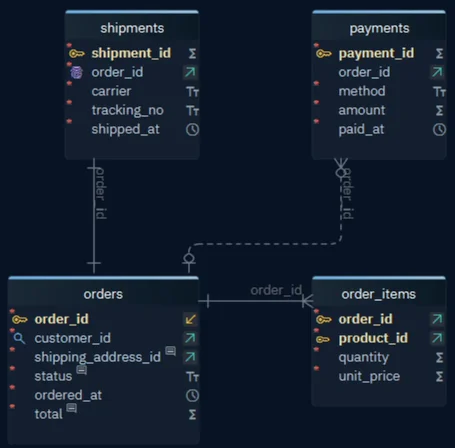
order_itemstoorders:order_idis mandatory, and it is only half of the primary key, so it isn't unique. A bar and a crow's foot at the child end mean one or many.paymentstoorders:order_idis nullable, so the line is dashed. A circle and a crow's foot mean zero or many, and the circle and bar at the parent end mean that a payment may have no order.shipmentstoorders:order_idis mandatory and unique. A single bar at each end means one to one.
The Type line of the foreign key dialog names the child end in words, such as Type 1:[1 or many] or Type 1:1.
Change the notation
Choose how DbSchema draws the line ends in View → Foreign Keys → Foreign Key Notation:
| Notation | How it marks the line |
|---|---|
| Information Engineering With Arrows | The default: the marks above at the child end, an arrow at the parent end |
| Information Engineering | Marks at both ends, as in the picture above |
| Barker | A crow's foot for many, a dashed half of the line for optional |
| Idef1x | A filled dot at the child end, with a letter for the cardinality |
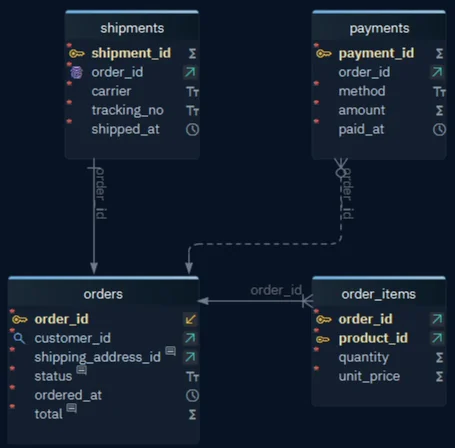
The notation changes only the diagram. The model and the database stay the same.
Change the cardinality
To change the cardinality, change the child column. That changes the table itself, so if you're connected, the change runs in the database.
For zero instead of one, clear Mandatory ( Not Null ) in the column dialog, so that the column accepts empty values. For one instead of many, add a unique key on the child column in the Primary Key / Unique / Indexes tab of the table, as Create an index shows.
To show zero or many without changing the column, tick View → Foreign Keys → Foreign Key Notation → Use Strict Conventions. DbSchema then reads the child end from uniqueness alone: a mandatory column that isn't unique shows zero or many, and a unique one shows zero or one.
To set the cardinality yourself, without columns, use logical design, which needs DbSchema Architect. There, the foreign key dialog offers Optional or Mandatory, and Zero or More, One or More, Zero or One or One.
Add a virtual foreign key
A virtual foreign key exists only in the DbSchema model, and DbSchema never creates it in the database. Use one when the data links two tables that have no foreign key in the database.
- Drag the child column onto the parent column, as in Create a foreign key.
- Tick Virtual in the dialog.
- Press OK.
DbSchema draws a virtual foreign key in another color:
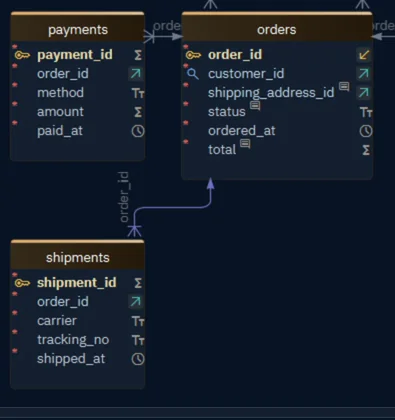
Because the virtual foreign key lives in the model, keeping it means saving the model file, which needs DbSchema Pro. The Query Builder and the Data Explorer, both in DbSchema Pro, follow virtual foreign keys like real ones. Model → Find Virtual Foreign Keys suggests virtual foreign keys between columns with matching names.
When you're connected, you can't make an existing foreign key of the database virtual: the Virtual box is disabled.
Common problems
The cardinality is stuck at 1:1
The child columns are unique, because a primary key or a unique key covers exactly the foreign key columns. The usual case is a foreign key column that is also the whole primary key of the child table. To get one to many, give the child table a key of its own and drop the unique key on the foreign key columns.
All my lines show 1:[1 or many], but I need 0..n
The child columns are Mandatory ( Not Null ), which DbSchema reads as "at least one". Tick Use Strict Conventions to show zero or many without changing the columns, as Change the cardinality shows.
How do I make the parent side optional?
In the Information Engineering notation, the parent end shows a circle when the child column is nullable, while the default notation always draws an arrow there. To set it yourself, use the Optional and Mandatory choices of logical design.
Why is my line dashed?
The child column is nullable. Tick Mandatory ( Not Null ) in the column dialog to make the line solid. A deduced foreign key, which View → Diagram Display → Deduced Foreign Keys shows, is always dashed.