Data Loader
The Data Loader bulk-imports data from files directly into your database tables. It supports delimited text (CSV, TSV, and other separators), XML, and Excel (XLS/XLSX) files.
How to Access
Open the Data Loader in either of these ways:
- From the menu: Data Tools → Import Data From File
- Right-click a table on the diagram and choose Import Data From File
Choose File & Target Table
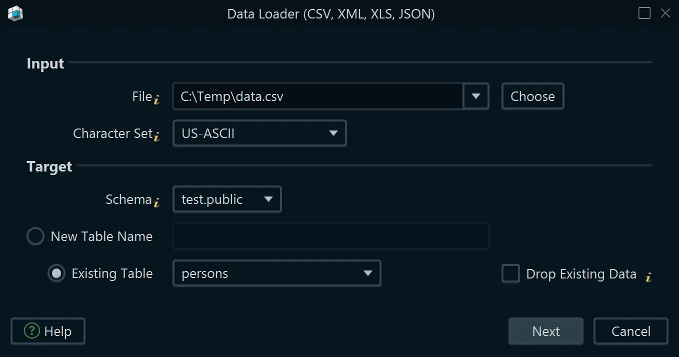
In the Data Loader dialog:
- Click Browse to select the source file.
- Choose the file type — delimited text, XML, or Excel.
- Select the target schema.
- Choose whether to import into an existing table or create a new table from the file structure.
Settings
Click the Settings button to configure how the file is parsed:
- First line is header — when enabled, the first row is used as column names and is not imported as data.
- Separator character — the character that separates values within a row. Common values: comma
,, tab\t, semicolon;, pipe|. DbSchema auto-detects this from the file, but you can override it. - Quote character — values that contain the separator must be wrapped in quotes. For example,
"Smith, John"is treated as a single field when the quote character is". - Escape character — used to include a literal quote character inside a quoted value.
For example,
"Smith\"John"where\is the escape character. - Date format & locale — if your data includes date, time, or timestamp columns, specify the
format here (e.g.
yyyy-MM-dd,dd/MM/yyyy HH:mm:ss). Refer to the Java SimpleDateFormat documentation for the full list of format codes.
Column Mapping

When importing into an existing table, DbSchema shows a mapping screen where you match file columns to database columns. You can also adjust column type, length, and nullable settings from this screen.
When importing into a new table, DbSchema infers column names and types from the file content. The table is created automatically when the import begins.
Error Handling
DbSchema processes the file row by row. Any row that fails — due to a type mismatch, constraint violation, or malformed value — is listed in the Error pane along with its line number. Rows without errors are committed to the database.
If you are connected in online mode, any column definition changes made in the mapping step are applied to the live table immediately before the import begins.
See also: Data Generator · SQL Editor