Database Terms
The database and DbSchema terms that the documentation uses are explained here in short paragraphs. Each term says where you find it in DbSchema, and links to the page with more information.
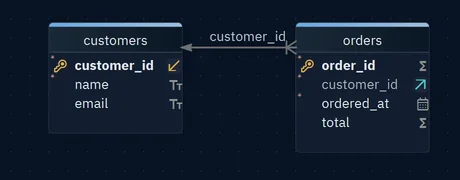
The examples use the two tables in the picture, customers and orders.
Design a Database from Scratch shows how to create them.
How a database stores data
Database
A database stores data so that programs can find and change it. It runs on a database server, a program that manages the data, such as PostgreSQL or MySQL. Or it lives in a file, such as an SQLite database. DbSchema reaches a database through a connection.
Table
A table stores data about one kind of thing, such as customers. On a DbSchema diagram, each table is a box. Double-click its header to edit it. See Tables, Columns and Indexes.
Row
A row is one item in a table, such as one customer. Each row has a value for every column, or NULL where the value is missing. The diagram shows no rows. To see them, open the table in the Data Explorer.
Column
A column holds one piece of information about each row, such as the email of a customer.
DbSchema lists the columns of a table inside its box on the diagram.
See Add a column.
Data type
The data type says what kind of value a column holds, such as integer for whole numbers, varchar(100) for text of up to 100 characters, or date.
Each database has its own data types. The New Column dialog of DbSchema lists those of your database.
NULL
NULL means that a row has no value in a column. NULL is different from zero and from an empty text. If you tick Mandatory ( Not Null ) for a column in DbSchema, the column can't contain NULL.
Schema
A schema is a named group of tables and other objects inside a database, such as docs_demo.
The word also means the structure of a database: its tables, columns and keys, without the rows of data.
In DbSchema, the schemas are under SCHEMAS in the Structure tree.
Keys and links between tables
Primary key
A primary key is the column whose value identifies each row, such as customer_id. It can also be a group of columns.
The value, or the combination of values, must be different in every row, and it can't be NULL.
DbSchema marks a primary key column with a key icon. See Set the primary key.
Foreign key
A foreign key is a column that points to a row in another table, such as orders.customer_id, which points to a customer. It can also be a group of columns, or point to a row of the same table.
The database rejects a value if the other table has no matching row. Where the column allows NULL, a NULL points to no row, and the database accepts it.
DbSchema draws each foreign key as a line between two tables. See Foreign Keys.
Cardinality
Cardinality describes how many rows of one table can be linked to a row of another table. For example, one customer can have many orders, and each order has one customer. DbSchema shows it with marks at the two ends of a foreign key line. See Read the cardinality of a line.
Virtual foreign key
A virtual foreign key exists only in the DbSchema model. DbSchema never creates it in the database. DbSchema draws it as a line between two tables. The line shows how the tables link, even where the database has no foreign key. See Add a virtual foreign key.
Rules, indexes and views
Constraint
A constraint is a rule that the data must follow. The database checks it when the data changes, and a change that breaks the rule fails with an error. Primary keys, foreign keys and NOT NULL are constraints. Unique keys and check constraints are constraints too. A unique key stops two rows from having the same value. A check constraint tests a condition, such as a price above zero. The table dialog of DbSchema has a tab for each kind: Primary Key / Unique / Indexes, Foreign Keys and Check Constraints.
Index
An index helps the database find rows quickly, just as the index of a book helps you find a page. A unique index also stops two rows from having the same values in its columns. DbSchema marks an indexed column with a magnifying glass. See Create an index.
View
A view is a saved SELECT query that you read like a table. It stores no rows of its own. DbSchema lists the views under Views in the Structure tree. Create one with Model → Create Table, View... → Create View.
DDL
DDL stands for Data Definition Language. It is the SQL that creates and changes the structure of a database, such as CREATE TABLE, ALTER TABLE and DROP TABLE.
DbSchema writes the DDL for you, and shows it before running it in the database.
File → Export As... → Export Schema & Data saves the DDL of the whole schema as a script.
How DbSchema keeps your design
Model
The model, also called the design, holds the structure of a database, and the diagrams that you draw in DbSchema. It holds no rows of data. You can draw a model from scratch, or read it from an existing database. The database changes only while you are connected, or when you write the model into it. See What is DbSchema?.
Diagram
A diagram shows some tables of the model and the foreign keys between them. A model can have many diagrams, each in a tab. Moving a table to another place on a diagram changes only the model, never the database. See Diagrams.
Project file (.dbs)
The project file stores your DbSchema model. Its name ends in .dbs.
The file uses XML, a text format. So Git, a tool that tracks the versions of files, can show what changed between two versions.
Saving and opening project files need DbSchema Pro. See Save the model.
Logical design
A logical design describes the data and its links, without choosing a database type. It uses entities in place of tables, attributes in place of columns, and relations in place of foreign keys. Later, DbSchema uses the logical design to generate a model for the database that you choose. Logical design needs DbSchema Architect. See Logical Design.
How DbSchema works with a database
Connection
A connection holds what DbSchema needs to reach a database: where the database runs, the user and password, and the database name. DbSchema saves your connections. You find them in the Database menu and under the connection button of the toolbar. See Connect to a database.
JDBC driver
A JDBC driver is the file that lets DbSchema talk to one kind of database, such as PostgreSQL. DbSchema downloads it the first time you connect. The JDBC Drivers button in Database → Manage Connections opens the JDBC Drivers Manager.
Connected and offline
Connected means that the model has a connection to a database. When you press OK in a table dialog, DbSchema changes the model and the database together. Offline means that the model has no connection. Your changes stay in the model, and the connection button in the toolbar reads Offline. See Work offline.
Reverse engineering
Reverse engineering creates a new model from the schema of an existing database. DbSchema does it when you connect from the Welcome Screen: the Reverse Engineer the Database dialog asks which schemas to load. It only reads from the database. See Connect to a database.
Synchronization
Synchronization compares the model with the database and lists the differences. For each difference, you choose whether to change the model or the database. Before the database changes, DbSchema shows the SQL. Synchronization needs DbSchema Pro. See Schema Synchronization.