Users & Roles
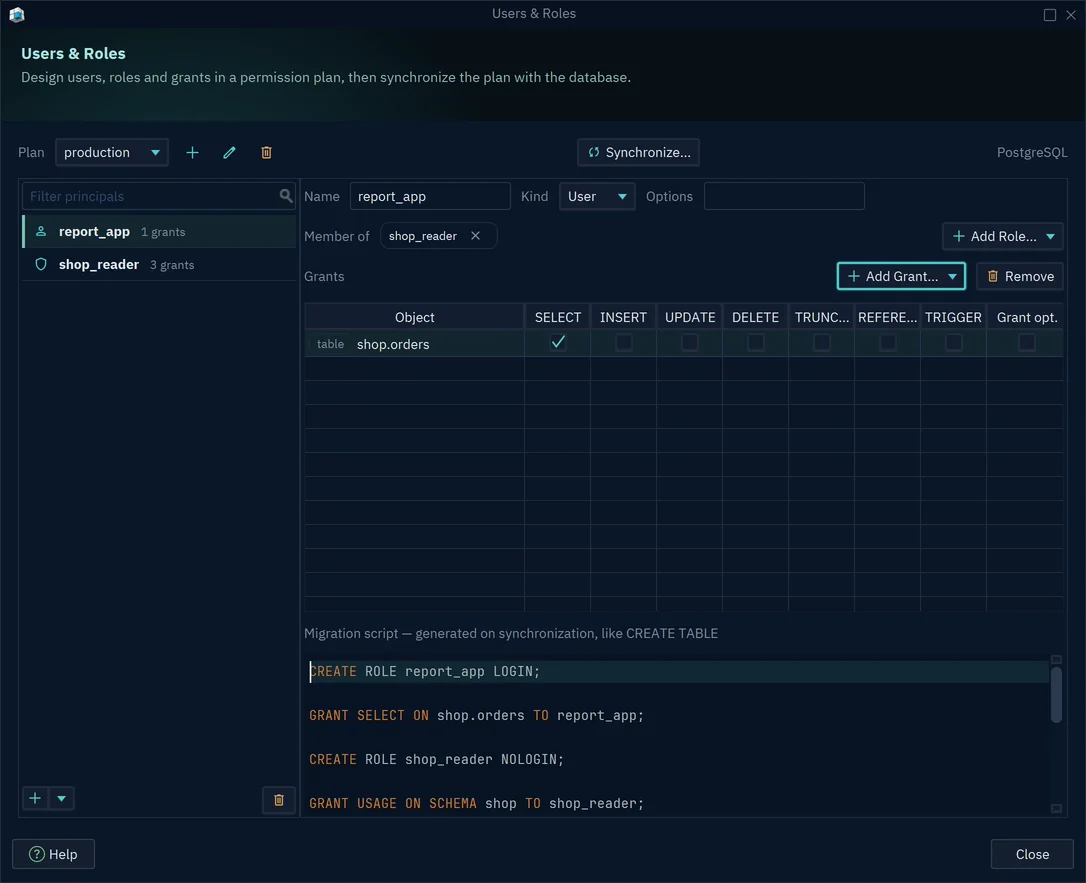
Your application needs a database user that can read the products table but not change it.
With Users & Roles, you design such users, their roles and their rights in a permission plan.
DbSchema then compares the plan with the database.
You review the CREATE ROLE and GRANT statements before they run.
In the current build, DbSchema writes these statements for PostgreSQL and MongoDB. For SQL Server, Oracle, MySQL and the other databases, DbSchema doesn't write them yet. Databases that support it gives the details.
Users, roles and grants
Users & Roles works with these words:
- A user is an account that logs in to the database, such as the account of your application.
- A role is a group of rights with a name, such as
shop_reader. When you give a role to a user, the user gets the rights of the role. The user is then a member of the role. - A grant is one right on one object, such as
SELECTon the tableshop.products. To revoke a grant means to take it away. - A permission plan defines users, roles, their memberships and their grants. DbSchema saves each plan in a file.
The work has these steps:
- Create a permission plan.
- Add roles, and their grants.
- Add users, and give them roles and grants.
- Synchronize the plan. DbSchema compares it with the database and shows the statements.
- Run the statements in the database.
Editing a plan changes only the plan file, and needs no connection. The database changes only in step 5.
Create a permission plan
- Choose Database → Users & Roles.
- Press the + button beside Plan.
- Type a name, such as
production, and press OK.

DbSchema saves the plan immediately, and saves every change after that. The pencil button renames the plan. The bin button removes it, and deletes its file.
You can keep several plans for one database type, such as production for the live database and staging for a test copy.
The Plan list shows only the plans for the database type of the open model.
The plan is not part of the model, the .dbs file that holds your tables and diagrams.
DbSchema saves each plan in a separate file, in the permissions folder inside its configuration folder.
By default, the configuration folder is .DbSchema/config in your home folder. Edit → Settings → File Locations → Configuration Folder changes it.
The file is named after the database type and the plan, such as PostgreSQL.production.dbp.
You can share the plan file, or keep it in Git like any other file.
Add a role and its grants
- Press the arrow beside the + button under the list on the left, and choose Role.
- Type the name of the role, such as
shop_reader, and press OK. - Press Add Grant..., choose the kind of object, such as Table, then the object, such as
shop.products. - In the Grants table, tick the rights that the role gets, such as SELECT.
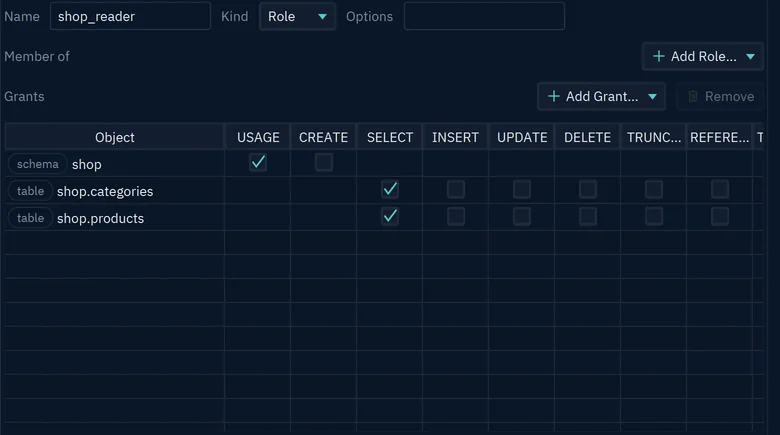
Add Grant... lists the objects in the open model, grouped by type: schemas, tables, views, sequences and more.
To grant a right on an object that is not in the model, choose Other... and enter its name.
In PostgreSQL, a role needs USAGE on a schema before it can read the tables in it. So the role above also has a grant on the schema shop.
A role can be a member of another role too: press Add Role... while the role is selected.
The Migration script box at the bottom shows the statements that create every user, role and grant of the plan:
CREATE ROLE shop_reader NOLOGIN;

GRANT USAGE ON SCHEMA shop TO shop_reader;

GRANT SELECT ON shop.categories TO shop_reader;

GRANT SELECT ON shop.products TO shop_reader;
Add a user
- Press the + button under the list on the left. It adds a user.
- Type the name of the user, such as
report_app, and press OK. - To give the user a role, press Add Role... and choose the role, such as
shop_reader. - To give a right directly to the user, press Add Grant..., just as you would for a role.
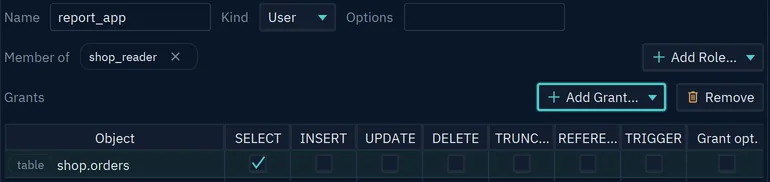
The user report_app now has the rights of shop_reader, and SELECT on shop.orders.
In PostgreSQL, DbSchema creates a user with CREATE ROLE … LOGIN. LOGIN means that the account can log in.
It creates a role with CREATE ROLE … NOLOGIN.
Use Options to add SQL to the end of that statement, such as VALID UNTIL '2027-01-01'.
DbSchema doesn't store passwords in the plan. In PostgreSQL, it creates the user without a password. After the synchronization, set the password in the SQL Editor. This keeps the password out of the plan file:
ALTER ROLE report_app PASSWORD 'choose-a-password';
Synchronize the plan with the database
Before you run the statements, check what the synchronization changes in the database:
- It creates the users and roles of the plan that the database doesn't have.
- For each user and role in the plan, it adds the grants and role memberships that the plan lists.
- For each user and role in the plan, it also revokes the grants and role memberships that the plan doesn't list. DbSchema reads the grants only on the schemas of the model, so grants on other schemas stay as they are.
- It never drops a user or a role.
A user or role that is not in the plan never shows in the comparison. The synchronization never changes it.
This also applies to users and roles that you remove from the plan. They remain in the database.
PostgreSQL's own roles, such as postgres and the roles that start with pg_, are never compared either.
- In Users & Roles, choose the plan and press Synchronize....
- If DbSchema asks for a connection, choose the database.
- In Compare the permission plan with the database, select an action for each row, or set every row to Database.
- Select a row to preview the SQL statements of its action.
- Press Commit in the database.
- In the Execute Script In Database Dialog, press Execute All, then OK.
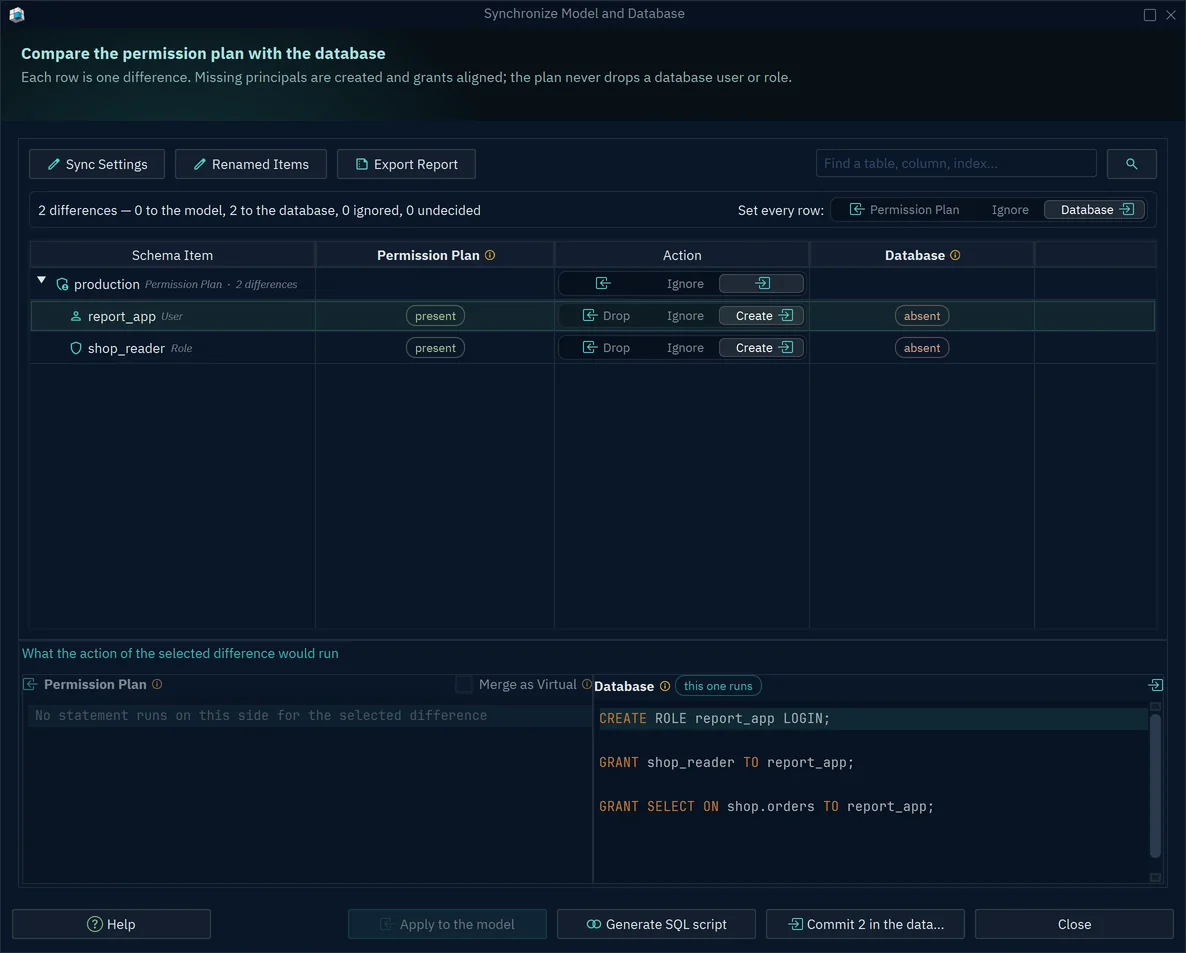
Each row is a user or a role. Present means that the user or role exists on that side. Absent means that it is missing there. Set every row to Database makes the database match the plan.
| Action | What it does |
|---|---|
| Create | Points to Database: runs the statements in the database |
| Drop | Points to Permission Plan: changes only the plan, never the database |
| Ignore | Leaves the row out |
Generate SQL script writes the statements to an SQL Editor without running them. After the commit, synchronize again: DbSchema answers The permission plan and the database are identical.
Databases that support it
DbSchema keeps the statements of Users & Roles in the settings of each database type. Users & Roles works only where those settings hold them. The PostgreSQL row was checked against a running database. The other rows describe the statements that DbSchema holds for those databases.
| Database | What DbSchema does |
|---|---|
| PostgreSQL | Creates users and roles, adds and revokes grants and memberships, and compares with the existing ones |
| Databases that DbSchema treats as PostgreSQL, such as TimescaleDB, Greenplum and Supabase | The same statements as PostgreSQL |
| MongoDB | Creates users and roles in an authentication database, gives roles to users, and grants actions on collections. The createUser statement asks for the password with passwordPrompt(). DbSchema doesn't read the existing MongoDB users, so every user of the plan shows as missing. |
| SQL Server, Oracle, MySQL and the other databases | None yet: the synchronization has no statements to run |
Common problems
I removed a user from the plan, but it is still in the database
Removing a user or a role from the plan never drops it in the database. To drop it, run DROP ROLE in the SQL Editor.
The synchronization wants to revoke a grant that I gave by hand
The user or role is in the plan, and the plan doesn't list that grant. Add the grant to the plan, or set the row to Ignore.
The new user cannot log in
DbSchema creates the user without a password. Set one with ALTER ROLE … PASSWORD, as Add a user shows.