Generate Documentation
DbSchema can generate schema documentation in three formats: HTML5 (interactive, browser-based), PDF (printable), and Markdown (plain text, ideal for GitHub or wikis). We recommend creating multiple diagrams first — each focused on a specific area of the schema — so the documentation is well organised.
Opening the Documentation Dialog
Go to Diagram → Export HTML5 or PDF Documentation to open the dialog.

Choose:
- Format — HTML5, PDF, or Markdown.
- Diagrams to include — current diagram, all open diagrams, selected diagrams, or all diagrams tagged
documentation(the tag value controls sort order). - Content — which schema elements to include (tables, columns, foreign keys, indexes, comments, etc.).
For PDF output with non-Latin characters (Russian, Chinese, Japanese, etc.), enable Embed Unicode Font in the PDF options.
Adding Comments to Tables and Columns
Descriptions entered in the Description field of a table or column appear as content in every documentation format. In HTML5 output they also appear as mouse-over tooltips when you hover over a table or column name.
Beside free-text descriptions, DbSchema supports comment tags — key-value pairs attached to any table or column. Tags are a convenient way to store structured metadata (owner, sensitivity level, deprecation status, etc.) alongside the schema. They appear in the generated documentation and are accessible from Automation Scripts.
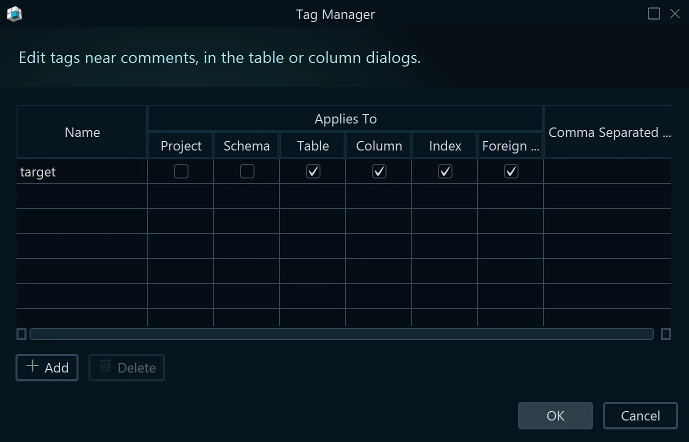

HTML5 Interactive Documentation
The HTML5 output opens in any browser — no server required. It includes the diagram as a vector image, a searchable table list, and full column details. Click on a table to jump to its definition; hover over columns to see their descriptions.
PDF Documentation
A clean, printable report containing the full schema structure, diagram images, table details, and all column descriptions. Suitable for formal reviews, audits, or sharing with non-technical stakeholders.
Markdown Documentation
Exports each table as a Markdown section with columns, types, and descriptions in a readable text table. Ideal for committing alongside source code in GitHub repositories or publishing to internal wikis.
Programmatic Generation via Groovy
Documentation can also be generated without the GUI using a Groovy script. This is useful for automated pipelines — for example, regenerating docs on every CI build. See the Automation Scripts page for examples and the full DbSchema API reference.