Data Generator
Use the Data Generator to fill database tables with realistic test data. Each column is assigned a pattern that controls how values are generated — from simple numbers and dates to reverse regular expressions and custom Groovy scripts. Patterns are saved in the .dbs model file and reused across sessions.
Opening the Data Generator
Open the Data Generator from Data Tools → Generate Random Data in the application menu, or right-click any table header and choose Generate Random Data.
First, create a diagram containing the tables you want to populate. Saving the model file preserves all diagram layouts and generator settings together.
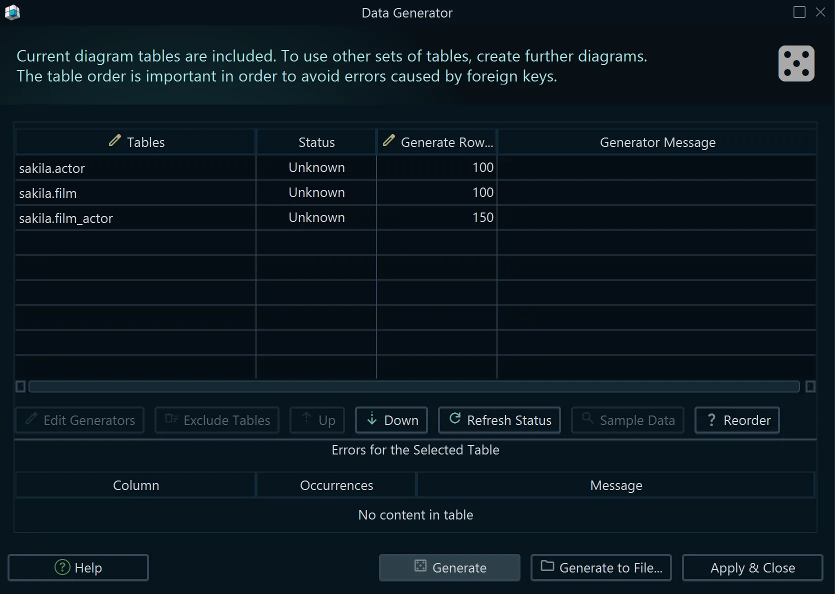
In the generator dialog you can:
- Set the number of rows to generate per table
- Review each table's current status (empty or has existing data)
- Reorder tables to satisfy foreign key constraints — a table referenced by a foreign key must be populated before the referring table
- Double-click any table row to open its column pattern editor
Note: When you click Generate, DbSchema asks whether to drop existing data first. Never drop data on production databases.
Editing Column Patterns
Double-click a table in the generator dialog to open its column pattern editor. For each column you can configure:
- Pattern — the generator pattern (see types below)
- Nulls — percentage of NULL values; columns marked NOT NULL always receive a generated value
- Seed — integer for reproducibility; two columns sharing the same seed generate the same sequence of values
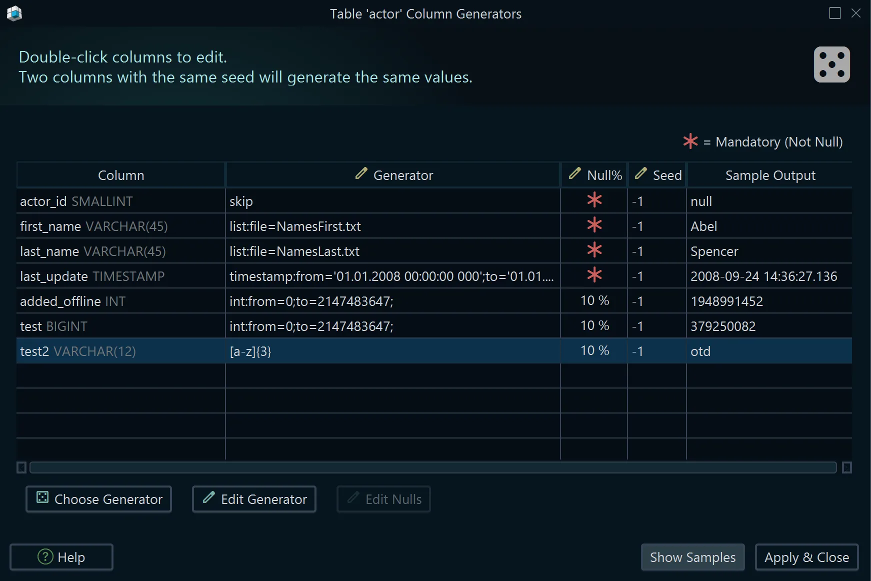
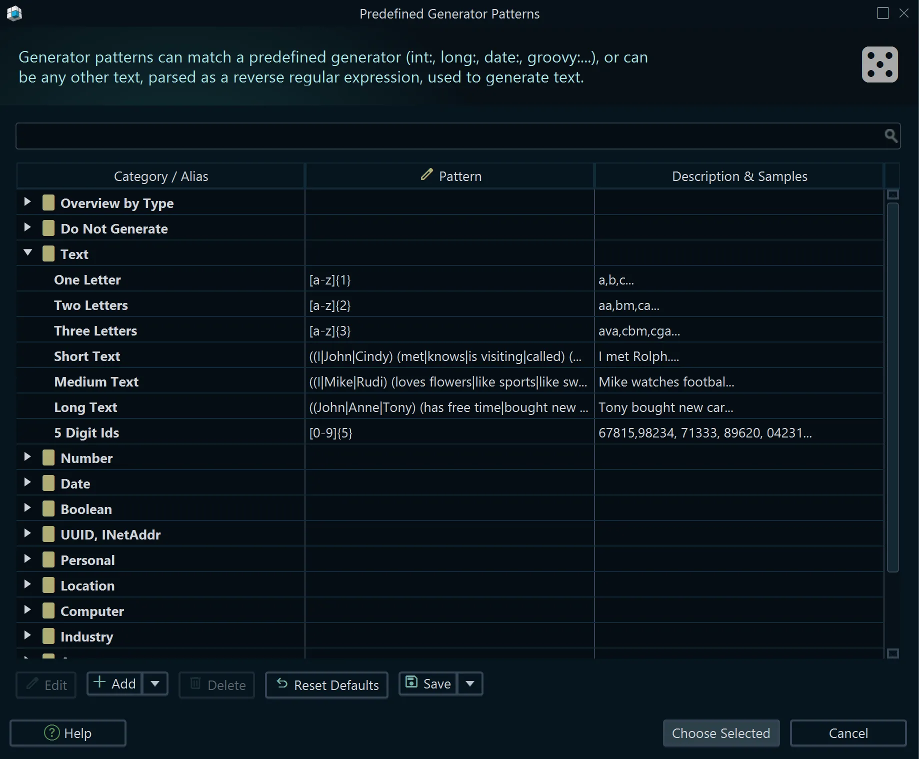
DbSchema auto-detects a pattern for each column on first use — review and adjust as needed. Click the ... button to open the pattern repository and pick a predefined pattern.
Pattern Repository
The pattern repository contains a library of predefined patterns for common data types: first names, last names, cities, email addresses, phone numbers, and more. Select a pattern and optionally edit it before applying.
Generator Pattern Types
Boolean
boolean:percent_true=0.7
Set percent_true to a value between 0 and 1 to control the density of true vs false. Default is 0.5.
Numeric
Use int, integer, long, double, float, or short with from and to bounds:
int:from=0;to=100
double:from=0.5;to=5.5;format=#.##
The format parameter follows Java's DecimalFormat syntax and controls decimal digits.
Sequence
sequence:from=1;step=1;
Generates sequential integers starting at from, incrementing by step for each row.
Identity
identity:
Marks a column as database-managed (auto-increment / identity column). The data generator skips this column entirely.
Skip
skip:
Excludes the column from data generation without marking it as identity.
Date and Timestamp
date:from='01.01.2020';to='01.01.2024';
timestamp:from='01.01.2020 00:00:00 000';to='01.01.2024 00:00:00 000';
Date and timestamp formats are configured in Edit → Configuration.
Values from File
list:<path_to_file>
Reads lines from a plain-text file and randomly picks one per generated row. Built-in lists (first names, last names, cities, etc.) are bundled inside dbschema.jar under /generator. Add custom files to ~/.DbSchema/config/generator/.
Foreign Key Values: load_values_from_pk
load_values_from_pk
For columns that participate in a foreign key, this pattern loads existing primary key values from the referenced table and picks one at random. The referenced table must already contain data before generation starts. If the FK column has a unique constraint, the number of generated rows is capped by the PK row count.
Combine Patterns
User-$Sequence
Prefix or suffix any literal text with $PatternName to embed a repository pattern inline. The example above generates User-1, User-2, and so on.
Reference a Repository Pattern
ref:name=generatorName
Reuses a single named pattern across multiple columns. Editing the shared pattern updates all columns that reference it.
Reverse Regular Expressions
Any pattern that does not start with a recognised keyword is interpreted as a reverse regular expression — a template that generates random text matching the expression:
(My|Your|Their) friend (John|Mike)
This generates values such as My friend John, Your friend Mike, etc.
Common syntax supported:
| Symbol | Meaning |
|---|---|
. | Any single character |
[abc] | Any of a, b, or c |
[a-e] | Range a through e |
[^abc] | Any character except a, b, c |
x\|y | x or y |
x? | Zero or one x |
x* | Zero or more x |
x+ | One or more x |
x{n,m} | Between n and m repetitions of x |
\d | Any digit [0-9] |
\D | Any non-digit |
\w | Any word character [a-zA-Z_0-9] |
\s | Any whitespace character |
Groovy Patterns
Use Groovy for fully custom generation logic. Prefix the expression with groovy:. The built-in generate(pattern) helper generates a value using any other pattern:
groovy:
def map = [firstname: generate('(Anna|John|Cindy)'), lastname: generate('(Schwarz|Danin)')]
groovy.json.JsonOutput.toJson(map)
Combine values from already-generated columns in the same row:
groovy: income_cost + vat_cost
Apply conditional logic:
groovy: if (cost > 10) return cost * 2; else return cost + 5;
Generate a date that is at most 7 days after another date column:
groovy: return start_date + (int)(Math.random() * 7)
The generate() method signatures:
generate(String pattern)
generate(String pattern, int nullPercent)
generate(String pattern, int nullPercent, int seed)
Groovy is a Java-based scripting language — see Help → Code Samples in DbSchema for more examples.