JDBC Driver Manager
What Are JDBC Drivers?
JDBC stands for Java Database Connectivity. JDBC drivers are required for Java applications — including DbSchema — to communicate with a database. They are typically one or more .jar files provided by the same vendor that makes the database software.
Each database has its own driver. For example, PostgreSQL uses postgresql.jar, while MySQL uses mysql-connector-java.jar.
JDBC URL
The JDBC driver needs to know where the database is running. This information — including host, port, database name, and sometimes authentication — is bundled into a single string called the JDBC URL.
Example JDBC URLs:
- PostgreSQL:
jdbc:postgresql://localhost:5432/mydb - MySQL:
jdbc:mysql://localhost:3306/mydb - SQL Server:
jdbc:sqlserver://localhost:1433;databaseName=mydb
DbSchema can either build the URL automatically from individual fields (host, port, database), or let you enter the full URL manually.
Opening the Driver Manager
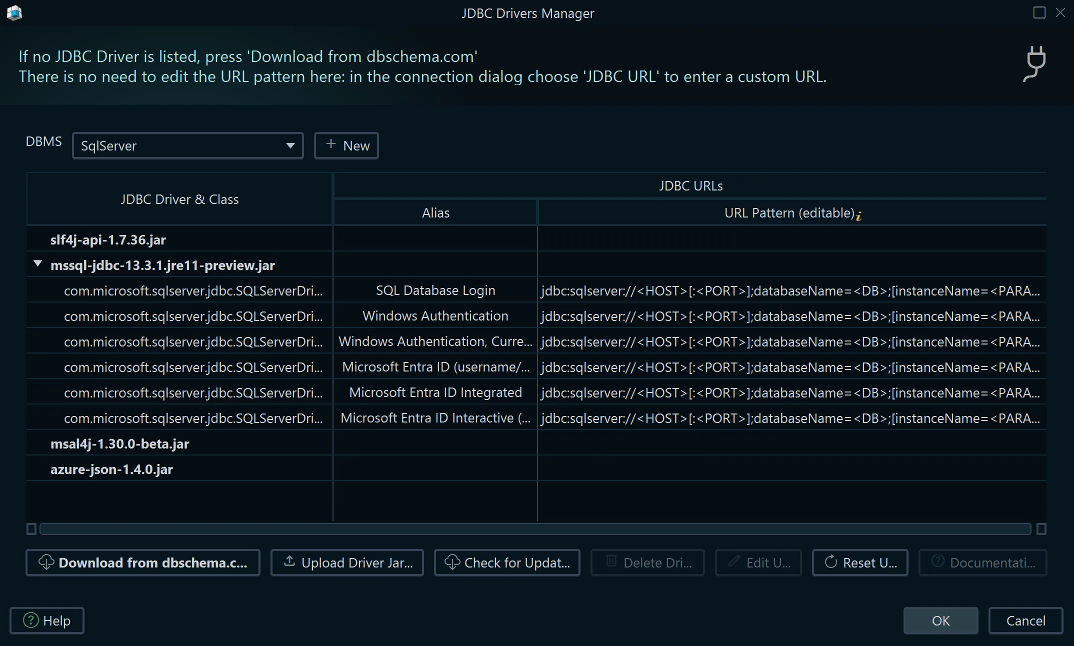
Access the Driver Manager from Connections → Manage JDBC Drivers.
What You Can Do in the Driver Manager
-
Add a new database — register a database type that is not already in the list.
-
Upload drivers — manually upload one or more
.jardriver files when automatic download is not available (e.g., in air-gapped environments). -
Download drivers from the DbSchema repository — DbSchema hosts a public driver repository and downloads the correct driver automatically when you select a database in the Connection Dialog.
-
Edit a JDBC URL pattern — URL patterns are predefined templates used when Automatic Compose URL mode is selected. DbSchema replaces the
<host>,<port>, and<db>placeholders with the values you enter in the Connection Dialog. -
Restore URL patterns — reset a modified URL pattern back to the built-in default.
Removing JDBC Drivers
JDBC driver files are locked by DbSchema while the application is running and cannot be deleted. To remove a driver:
- Click Remove Driver in the Driver Manager — DbSchema will show the folder path where the driver file is stored.
- Close DbSchema completely.
- Navigate to that folder and delete the
.jarfile.