Documenting a PostgreSQL Database
For the architect who owns a PostgreSQL schema and has to hand a readable description of it to people without database credentials; the catalog queries are shown with their output.
On this page
A question about what one column actually holds arrives in chat, gets answered there, and is gone by the time the next person asks it. PostgreSQL has a place to keep that answer. COMMENT ON stores a description in the system catalogs beside the object it describes, and everything that reads the catalog picks it up: psql, your own queries, and DbSchema when it reverse-engineers the database into a diagram.
The examples run on PostgreSQL 18 against this table:
CREATE TABLE orders (
  order_id bigint PRIMARY KEY,
  customer_id bigint NOT NULL,
  total_amount bigint NOT NULL
);
CREATE INDEX orders_customer_id_idx ON orders (customer_id);
COMMENT ON TABLE orders IS 'Customer order headers and their settlement state.';
COMMENT ON COLUMN orders.total_amount IS 'Final order cost in cents, including tax and discounts.';
COMMENT ON INDEX orders_customer_id_idx IS 'Supports the per-customer order lookup.';
What a schema description has to answer
A useful description answers the questions somebody reading the application has to look up anyway: what each table is for; every column with its type, its default and whether it accepts nulls; the primary and unique keys; the foreign keys and what they do to child rows on delete; the indexes, B-tree, GIN, GiST or BRIN, and the queries they exist for; and the triggers, partitions and grants that change behavior without showing up in a SELECT. Those are also the facts a normalization review argues from, because that argument is about keys and dependence.
Almost all of it is already inside the database, in the system catalogs, which is where PostgreSQL keeps the metadata about tables and columns, in what are themselves ordinary tables[1]. A query can read it, psql can print it, and DbSchema can draw it. The part the catalog cannot give you is the sentence saying what a column means, and that part you write once, with COMMENT ON.
Where COMMENT ON puts the text
COMMENT ON attaches an arbitrary string to a database object, and the string lives in the catalog rather than in a separate document that has to be found and updated on its own. Keep the statements in a versioned .sql file and apply them with psql -f after each migration, so the descriptions arrive with the schema they describe.
| Object | COMMENT ON form |
|---|---|
| Table | COMMENT ON TABLE table_name IS 'text' |
| Column | COMMENT ON COLUMN table_name.column_name IS 'text' |
| Index | COMMENT ON INDEX index_name IS 'text' |
| View | COMMENT ON VIEW view_name IS 'text' |
| Constraint | COMMENT ON CONSTRAINT constraint_name ON table_name IS 'text' |
Only one comment string is stored for each object, so a second COMMENT command on the same object replaces the first, and NULL or an empty string removes it[2]. There is no separate delete syntax:
COMMENT ON TABLE orders IS NULL;
Comments are dropped automatically when their object is dropped[2], so a rebuilt table comes back undescribed unless the COMMENT statements are in the migration that rebuilds it. One property decides what may go in the string: there is presently no security mechanism for viewing comments, and any user connected to a database can see all the comments for objects in that database, while comments on shared objects such as databases, roles and tablespaces are visible from any database in the cluster[2]. Keep credentials, tokens and personal data out of the literal.
Reading the comments back out of pg_catalog
Comments land in pg_description, one row per described object[3].
| Column | Type | What it holds |
|---|---|---|
| objoid | oid | The OID of the object the description is about |
| classoid | oid | The OID of the system catalog the object appears in |
| objsubid | int4 | The column number for a column comment, zero otherwise |
| description | text | The text itself |
The objsubid column is the one that catches people out. For a comment on a table column, objoid and classoid refer to the table, not to the column, and objsubid carries the column number[3]. So a data dictionary joins pg_description to pg_attribute on the column number and to pg_class on the table:
SELECT c.relname AS table_name,
       a.attname AS column_name,
       pg_catalog.format_type(a.atttypid, a.atttypmod) AS data_type,
       d.description
FROM pg_catalog.pg_class c
JOIN pg_catalog.pg_namespace n ON n.oid = c.relnamespace
JOIN pg_catalog.pg_attribute a ON a.attrelid = c.oid AND a.attnum > 0 AND NOT a.attisdropped
LEFT JOIN pg_catalog.pg_description d ON d.objoid = c.oid AND d.objsubid = a.attnum
WHERE n.nspname = 'public' AND c.relkind IN ('r', 'v', 'm')
ORDER BY c.relname, a.attnum;
| table_name | column_name | data_type | description |
|---|---|---|---|
| orders | order_id | bigint | |
| orders | customer_id | bigint | |
| orders | total_amount | bigint | Final order cost in cents, including tax and discounts. |
The LEFT JOIN is what makes the query worth running on a schedule: the columns with no description come back with an empty last cell, so counting those rows tells you how much of the schema is still undescribed.
The index comment from the opening block is absent here, because the query keeps only ordinary tables, views and materialized views. Comments on other kinds of object follow the same pattern with different coordinates. An index comment is a pg_description row whose objoid is the index's own pg_class entry, and whose objsubid is zero. Widen relkind to include 'i' and it comes into the same report.
What psql shows in a terminal
Connect with the ordinary client options, and the meta-commands print what the catalog holds without a query of your own:
psql -h localhost -p 5432 -U postgres -d shop
\d+ on a table adds to \d any comments associated with the columns of the table, along with the view definition, the replica identity and the access method[4]. \dt+ lists the tables with their persistence, their size on disk and their description. To send that straight to a file, redirect the output around the command and reset it afterwards:
\o /tmp/orders_schema.txt
\d+ public.orders
\o
| Command or flag | What it gives you |
|---|---|
\d+ orders | Columns, types, indexes, triggers and column comments |
\dt+ | Tables with persistence, size and description |
-f filename | Read commands from a file instead of standard input |
-o filename | Put all query output into a file |
-H | HTML output mode |
Two more meta-commands answer what otherwise sends you to a second terminal. \l lists every database on the server, including one you have just made with CREATE DATABASE, and \c switches the session to another one, because PostgreSQL has no USE statement. Inside a database, \dn lists the schemas and \dt lists the tables. Combining -f with -H and -o writes the data dictionary query above to an HTML table on every continuous integration run, so the raw listing is always current.
The diagram DbSchema draws from the same catalog
A data dictionary gives you precision and no shape. Which tables hang off which, and how far a delete cascades, are questions a picture answers faster, which is what an ER diagram is for.
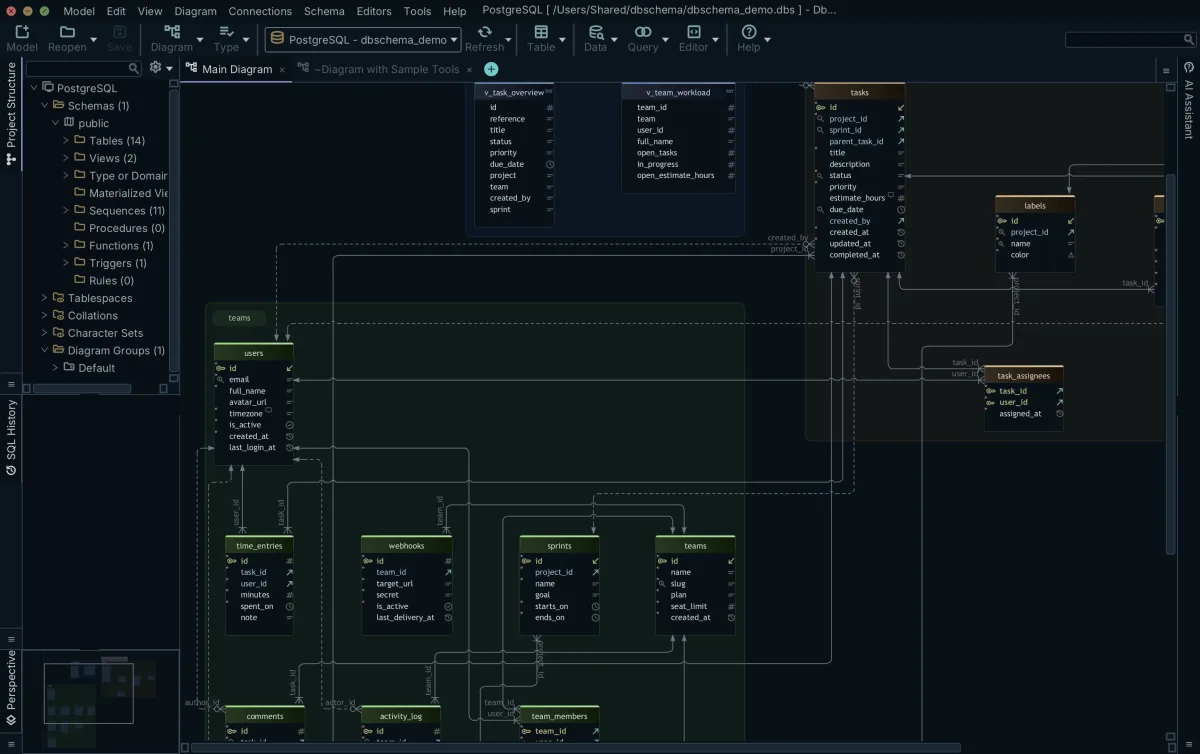
DbSchema connects over JDBC, reads those same system catalogs and lays the tables out with the foreign key lines already drawn, so the connectors match the constraints the server enforces rather than somebody's recollection. Connecting, reverse-engineering and reading the diagram are free in the Community edition. On a large PostgreSQL schema the diagram doubles as an index of what exists, and DbSchema gives you three ways to keep it readable: right-click the canvas and choose New Group to cluster related tables into one named, colored group you can move as a unit, add a second diagram from the Diagram menu for a different audience, and use Diagram → Auto Arrange after a reverse-engineering run to untangle the layout.
Descriptions have a home in DbSchema too. Text entered in the Description field of a table or column appears as content in every documentation format DbSchema generates, and as a mouse-over tooltip in the HTML5 output. Where those edits land depends on the mode you are in: connected, every schema change you make is applied to the database as you make it and logged in the SQL History pane; disconnected, it is saved only to the .dbs design model file until you synchronize. Saving that model to a file is a Pro edition feature.
One HTML5 file for the people without credentials
A product manager and the developer joining next week both need to read the schema, and neither should need a database client and a password to do it. DbSchema exports the model as HTML5, PDF or Markdown; the HTML5 output opens in any browser with no server behind it, carrying the diagram as a vector image, a searchable table list and the full column detail. Click a table to jump to its definition, hover a column to read its description. The sample HTML5 documentation is a generated one you can click through.
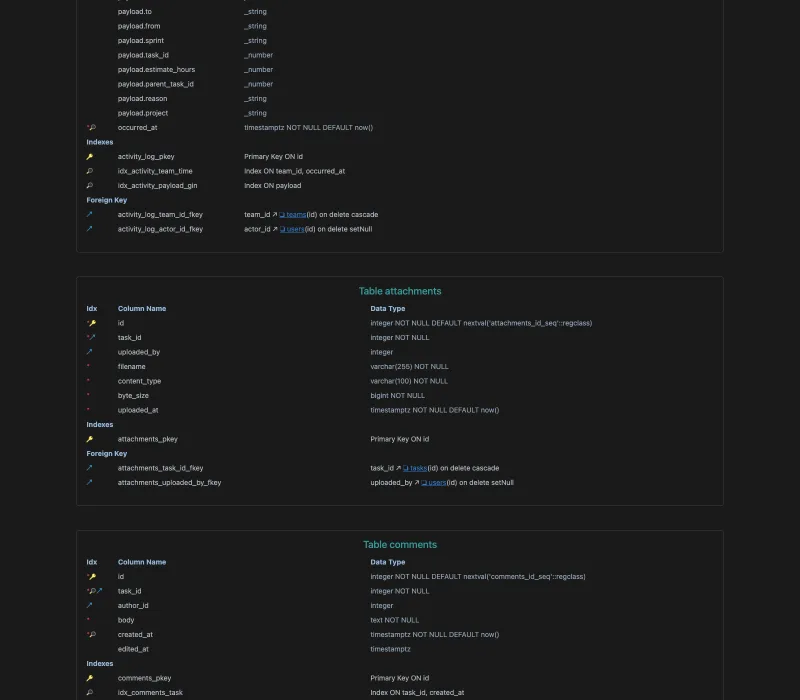
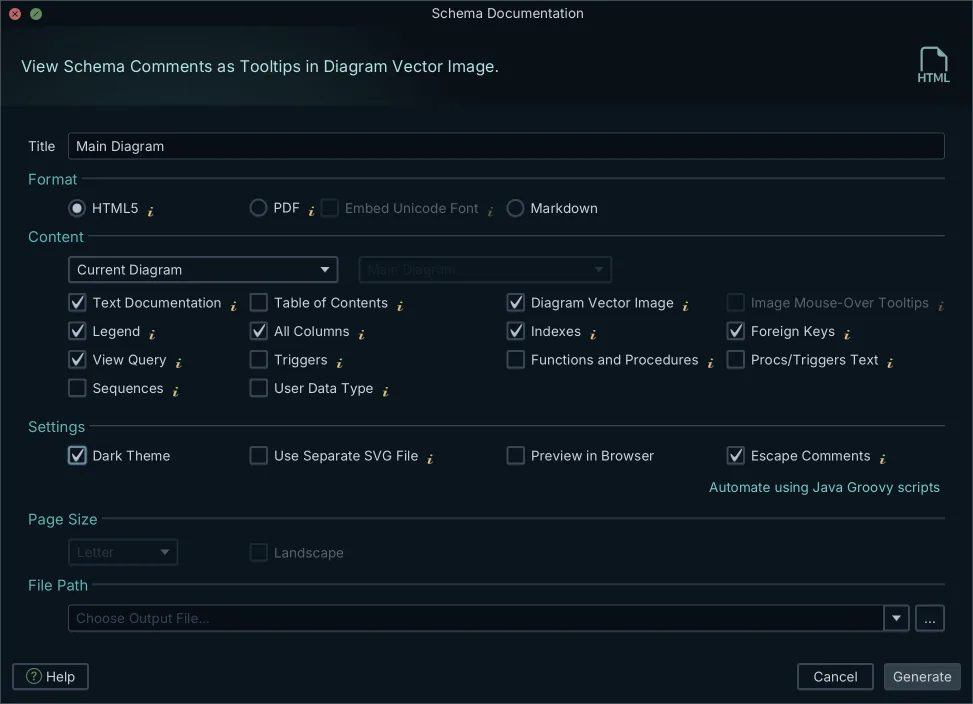
Open the PostgreSQL model in DbSchema, either freshly reverse-engineered or reopened from a saved .dbs file, then go to Diagram → Export HTML5 or PDF Documentation. The dialog asks for three choices.
- The format, which is HTML5, PDF or Markdown.
- The diagrams to include, which is the current diagram, all open diagrams, a selection of them, or every diagram tagged
documentation, whose tag value controls the sort order. - The content, meaning which schema elements the export carries, among them tables, columns, foreign keys, indexes and comments.
For PDF output with non-Latin characters, enable Embed Unicode Font in the PDF options.
Comment tags carry the metadata the schema itself has no field for. They are key-value pairs you attach to any table or column in DbSchema, which is where an owner, a sensitivity level or a deprecation date goes, and they appear in the generated documentation and are readable from Automation Scripts. The same documentation can also be generated from a Groovy script without opening the interface, which is what puts it in a build. The export itself is a folder of ordinary files, so it goes wherever your team already reads things: an internal web server, a documentation portal, a static bucket, or committed next to the schema. Generating it is a Pro edition feature, covered by the 15-day trial, and picking a database documentation tool that writes plain files rather than locking the output in a viewer is what makes that choice yours.
Keeping the documentation in step with the schema
An export is accurate on the day it is made. Migrations then add a column, widen a type, drop a table, and the file on the intranet quietly stops describing the database. Two habits keep the gap closed.
The first is the COMMENT statements travelling in the migration that changes the object, so the catalog and the schema move together and every reader downstream, psql included, picks up the new text. The second is regenerating from a model you have just refreshed. In DbSchema, Schema → Refresh Schema from Database pulls the server's current structure into the design model, and Schema → Compare Model with Database opens the Synchronization Dialog to show what moved and in which direction, the routine comparing two database schemas works through. Export again from the refreshed model, or let the Groovy script do it in the build, and the HTML5 file matches what is deployed. Schema comparison and synchronization are Pro edition features.
Put the COMMENT statements in your next migration, then open the schema in DbSchema and export the file the rest of the team will actually read. Download it at https://dbschema.com/download.html: connecting to PostgreSQL, reverse-engineering it and reading the diagram are free in the Community edition, and the HTML5, PDF and Markdown export is a Pro edition feature with a 15-day trial.
Frequently asked questions
How do I view table comments in PostgreSQL?
Run \d+ on a table in psql and the column comments print with the columns; \dt+ lists the tables of the current schema with their descriptions. \dd covers a different set of comments, those on constraints, rules, triggers, operator classes and operator families. Every other kind is read through the backslash command for that object type.
Where does PostgreSQL store database comments?
Comments on tables, columns and indexes go into the pg_description catalog, keyed the way the data dictionary query above reads them. A comment on an object shared across the cluster (a database, a role, a tablespace) goes into pg_shdescription instead, so a query against pg_description never returns it.
Can I generate HTML documentation from a PostgreSQL database?
DbSchema reverse-engineers the schema and exports it from Diagram → Export HTML5 or PDF Documentation, where HTML5 is the format that opens in any browser with nothing installed. The same dialog writes a printable PDF for a review or an audit. Markdown is the third format, one section per table with its columns, types and descriptions, ready to commit beside the source code.
What is the PostgreSQL COMMENT ON command?
COMMENT ON attaches a text description to a database object and stores it in the system catalogs. Tables, columns and indexes are the usual targets, and the same command describes schemas, sequences, functions, triggers, extensions and roles as well.
Does database documentation stay in sync with schema changes?
The documentation stays current when the COMMENT statements ride along in the migration and the export is regenerated from a refreshed model. The refresh belongs in the build beside the export. DbSchema's schema synchronization runs headless from a Groovy automation script or the DbSchemaCLI, so one run can check the model against the live PostgreSQL database and regenerate the file.
Sources
Document your PostgreSQL schema in one file
DbSchema reverse-engineers PostgreSQL over JDBC and exports the diagram, the comments and the full data dictionary as one interactive HTML5 file that opens in any browser. Connecting and diagramming are free in the Community Edition; the documentation export is a Pro feature with a 15-day trial.









