Comparing Two Database Schemas
For the developer or DBA holding two versions of the same schema who needs the migration script between them; the engine-specific meaning of the word schema is explained where it matters.
On this page
Two databases built from the same migration files answer differently, and the ALTER script that reconciles them has to come from whatever actually differs. Reverse-engineer both sides, match the objects, and generate the DDL from the difference list. DbSchema does that between a design model and a live database, and between two saved model files.
What a schema is on each engine
The word schema names a different container on each engine, and that decides what a comparison can line up. In PostgreSQL 18, a database cluster contains one or more named databases, and a database contains one or more named schemas, which in turn contain tables, and also other kinds of named objects, including data types, functions, and operators[1]. A table created without a schema qualification goes into public. In Oracle AI Database 26ai, a database user owns a database schema, which has the same name as the user name[2], so the account and the container are created together. SQL Server treats a schema as a named container for database objects that groups objects into separate namespaces, and any database principal can own one. dbo is the default schema of every database[3]. In MySQL 8.4, CREATE SCHEMA is a synonym for CREATE DATABASE[4].
| Engine | What a schema is | Schemas per database | Default schema |
|---|---|---|---|
| PostgreSQL 18 | Namespace inside a database | Many | public |
| Oracle AI Database 26ai | Container owned by a user account | One per user account | The user's name |
| SQL Server 2022 | Named container for objects | Many | dbo |
| MySQL 8.4 | The database catalog itself | One | The database name |
Everything a comparison reports is expressed inside that boundary: the tables, columns, data types, defaults, keys, constraints, indexes, views and routines that belong to the named schema on each side.
Where two schemas drift apart
A hotfix applied during an outage is the change least likely to reach version control. The incident closes, and the migration that would have recorded the new index never gets written. Feature branches produce the same result more slowly: two developers add a column to the same table under different names, both branches merge, and the two environments now disagree about which name is real. Test environments accumulate what nobody removes, the mock tables and the indexes left behind by a deployment that was abandoned halfway. In a system that gives each customer its own database, one failed migration leaves that catalog a release behind while every other catalog moves on.
None of it surfaces until a deployment runs against the environment nobody checked. Storing the DbSchema design as a plain XML .dbs file in Git gives the comparison a fixed side to work from, the shape the schema is meant to have, versioned next to the application code that expects it.
How a schema comparison works
A comparison reads metadata and nothing else. It asks the system catalogs, or the JDBC metadata over the same connection, for column types, nullability, default expressions, constraints, indexes, triggers and views on each side. No table data is read and none is transferred. It then matches objects by name and reports the result as the set of actions that would make the target match the source, under options that suppress the differences you do not want reported, such as whitespace or column order[5]. The actions are then ordered by dependency, so that a table is created before the foreign key that references it.
In DbSchema the result lands in the Synchronization Dialog, a per-object tree with the model's value on one side and the database's on the other. Each difference offers the same three answers: apply it to the database, update the model, or generate a migration script and run nothing yet.
A worked comparison of two model versions
DbSchema opens two .dbs files at once and synchronizes between them, which is how you compare two versions of a schema without connecting to anything. Comparing two models of the same PostgreSQL task-app schema, the Synchronization Dialog put the open model in one column and the file in the other, and listed exactly two differences.
| Schema item | Open model | Model from file | Action offered |
|---|---|---|---|
| labels.name | varchar(40) NOT NULL | varchar(80) NOT NULL | Change, either direction |
| teams.billing_email | missing | present | Create in the model, or drop from the file |
| Diagram layout, colors, virtual foreign keys | differ | differ | not listed |
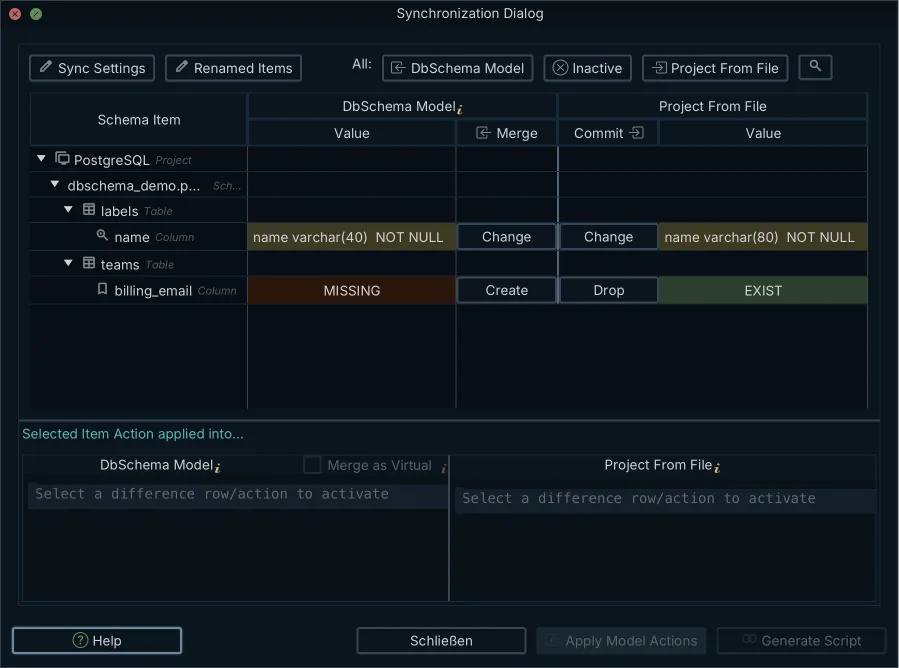
The third row is why the model-to-model comparison is the one to reach for. Layout, colors and virtual foreign keys live in the same file as the schema, and the comparison steps over them instead of reporting them as drift. Each row carries its own direction, so a column that was widened in production can be merged back into the model while a column nobody wanted is dropped from the file.
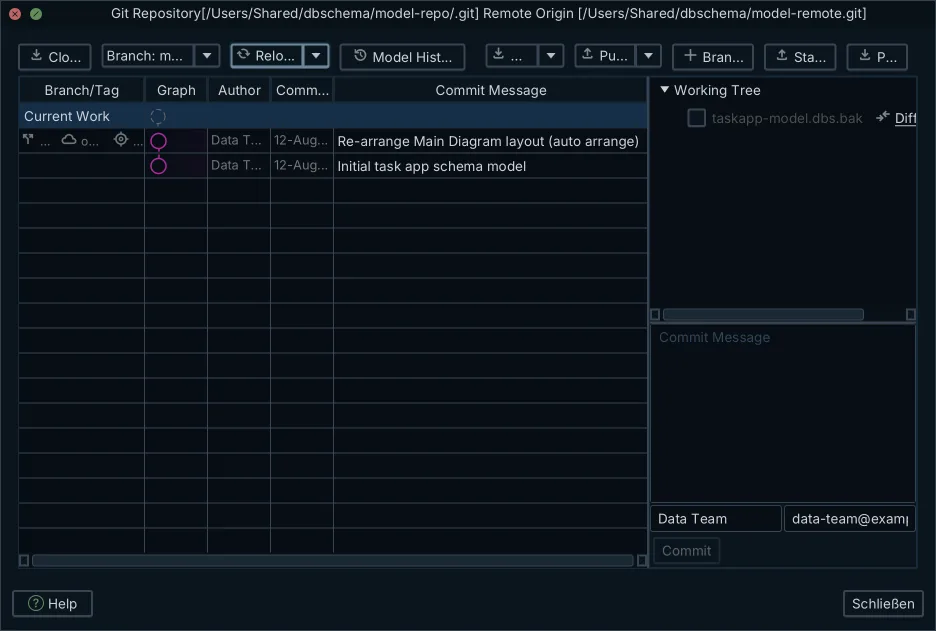
Because the .dbs file is indented, human-readable XML, those same two changes are visible as a text diff before anyone opens the application. The widened column shows up in the pull request the way an application change does. DbSchema commits the file from the same window that edits it: Git — Collaborative Design on the Model menu opens a Git client with Stage, Commit, Push, Pull, Stash and Create Branch, and Compare with Current opens the Synchronization Dialog on whatever the pull brought in.
Nothing in this comparison has touched a database. Both sides are files, and the migration script it produces is a file too. The database changes only when you apply the difference list in that direction, and DbSchema then steps through the generated DDL one statement at a time, so each statement is approved before it runs. Turning that output into something safe to deploy is covered in turning a schema diff into a safe migration script.
Why two live databases compare badly
Synchronization identifies a schema by its catalog as well as its schema name. Build a model from one database, repoint the connection at a second database on the same server, and you do not get a short drift report. In a run against two PostgreSQL databases holding the same 14-table schema with twelve deliberate differences, the result was 75 statements that recreate the schema from scratch, because the first catalog's public schema has no counterpart in the second catalog. The Synchronization Dialog says as much, listing each side's public schema as present on one side and missing on the other.
Schema Mapping, on the connection's Settings tab, shows a schema from the model under a different name in this database, which is a different problem: where both sides are already called public, there is nothing for it to map. Two arrangements compare cleanly instead. Compare databases that carry the same catalog and schema names on different servers, or reverse-engineer each side into its own .dbs file and compare the two models, which is the arrangement the previous section walks through. Where the source of truth should live is a separate decision, covered in visual schema diff or a code-only migration library.
How to compare schemas in SQL Server
DbSchema connects to SQL Server over JDBC from Windows, macOS or Linux, reverse-engineers the schema into a .dbs model, and compares that model against another database or another model file the same way it does for any other engine. The catalog views it reads are the ones you would query by hand for the same answer.
| Catalog view | Scope | What it carries |
|---|---|---|
| sys.tables | Tables | Names, schema ownership, partition schemes |
| sys.columns | Columns | Names, data types, precision, nullability, defaults |
| sys.foreign_keys | Relationships | Referenced tables, parent columns, cascade rules |
| sys.indexes | Indexes | Index types, uniqueness, included columns, filters |
Microsoft ships its own schema comparison in Visual Studio, in Visual Studio Code through the MSSQL extension and SQL database projects, and on the command line. It compares any combination of connected databases, SQL database projects, and compiled .dacpac files[5]. In Visual Studio, open the Tools menu, choose SQL Server, then New Schema Comparison, pick a source and a target, set Options to control which object types are compared, and select Compare. The results grid groups the differing objects by action, and from there you exclude individual differences, apply the changes, or generate an update script[5].
Choosing what to compare SQL Server schemas with
The choice turns on where your team works and what the comparison has to produce. Run this short list of checks against whichever ones you shortlist.
DbSchema is the fit for a team that is not all on Windows, or that wants the schema in version control as a file it can read. It runs on Windows, macOS and Linux, connects to SQL Server over JDBC, keeps the design as plain XML you can diff and commit, compares a model against a live database or against another model, and generates the migration DDL for the engine the model targets. It also draws the schema as an interactive diagram, and in the Pro edition it browses data across several tables over virtual foreign keys and exports HTML5, PDF and Markdown documentation. Microsoft's schema comparison is built into Visual Studio and compiles schemas into .dacpac packages that MSBuild deploys on Windows. For pipeline work, DbSchema runs schema tasks and documentation generation headless from Groovy automation scripts or DbSchemaCLI, which the CI pipeline can call; how that sits next to changelog files is covered in Liquibase, Flyway or a visual schema compare.
| Tool | Platforms | What it compares | What Git holds |
|---|---|---|---|
| DbSchema | Windows, macOS, Linux | Model against database, model against model | Plain XML .dbs model files |
| Microsoft SSDT | Windows | Database, SQL database project, .dacpac | SQL database projects (.sqlproj) |
Comparing two schemas is free up to a point. The DbSchema Community Edition is free forever and covers every supported database, connecting and reverse-engineering, interactive diagrams, creating tables and columns, and the SQL editor, which is enough to open both schemas and read them side by side. Schema synchronization, the comparison that produces the difference list and the migration script, is in the Pro edition, along with saving the model to a file, and a new installation starts a 15-day free Architect trial that includes both. Redgate SQL Compare, the other name that comes up on this question, is sold under a paid per-user annual subscription with a free trial, priced in the visitor's currency on its pricing page. Where the sticking point is which operating system the comparison has to run on rather than the licence, Redgate SQL Compare alternatives covers what else compares SQL Server schemas.
What to check in the generated script
A generated migration script is a proposal, not a plan, and five things are worth reading before it runs against a database migration target.
- Search the script for DROP TABLE, DROP COLUMN, and any ALTER that reduces a type's length or precision. Each of those loses the values already stored.
- Confirm that every table appears before the foreign key that references it, and that the cascade rules on the recreated keys are the ones the application expects.
- Check that a new NOT NULL column carries a DEFAULT. Without one, the statement fails on a table that already has rows.
- Run the script against a staging copy at production data volume, and time it. Lock duration and index build time are the numbers a small dataset will not give you.
- Save the model to its
.dbsfile and commit it, so the next comparison starts from the shape you just deployed.
A comparison you can run in a minute is one you will run before the release rather than during the incident. Download DbSchema at https://dbschema.com/download.html, open a model against your own database, and compare it with the model of the version you are deploying. Schema synchronization, saving the model to a file, the relational data browse over virtual foreign keys and the HTML5, PDF and Markdown documentation export are all in the Pro edition; the free Community Edition connects, reverse-engineers, draws the diagrams and runs the SQL editor.
Frequently asked questions
What is a database schema?
PostgreSQL 18 describes schemas as analogous to directories at the operating system level, except that schemas cannot be nested[1], so a database holds one flat level of them and each one holds the tables, keys, indexes, views and routines. Which container a schema itself sits in differs per engine, and the table in the section on what a schema is on each engine has the four side by side.
How do I list all schemas in PostgreSQL?
Run \dn in psql, which lists the schemas in the connected database. For ownership and access privileges alongside the names, query pg_catalog.pg_namespace instead, or work through list all schemas for the variants.
How do you sync two database schemas without data loss?
Save the model to its .dbs file before you synchronize, which is what the DbSchema documentation advises, because the previous state can then be restored from that file. Then read the generated script for the statements that destroy values, DROP COLUMN, DROP TABLE and any type narrowing, and skip them the way the section on checking the generated script describes.
Can you compare SQL Server schemas using Visual Studio?
Microsoft's schema comparison compares a connected database, a SQL database project or a .dacpac file against another of those three, and the section above on SQL Server walks through it. DbSchema compares the same SQL Server database from Windows, macOS or Linux over JDBC, and downloads the SQL Server driver itself when you create the connection.
Can you compare two database schemas for free?
The free DbSchema Community Edition reaches all 70 or more SQL and NoSQL databases DbSchema supports over JDBC, so both schemas open side by side at no cost. Listing the differences between them and generating the migration script is schema synchronization, which is in the Pro edition and in the 15-day free Architect trial a new installation starts with.
Sources
Compare two schemas without hand-writing the DDL
DbSchema reverse-engineers each side into a plain-XML .dbs model you can diff in Git, lists the differences object by object, and generates the migration script between two versions. Schema synchronization is a Pro Edition feature; the free Community Edition covers connecting, reverse-engineering, interactive diagrams and the SQL editor.









