Comparing Production and Staging Schemas
For the person who rehearses a release on staging and has to know the production schema still matches it; the PostgreSQL catalog queries are written out where they appear.
On this page
The release passed on staging and failed on production, on a column staging has and production does not. Before the next one, ask the two catalogs what differs and reconcile them: either read information_schema on both sides and diff the exports, or compare a design model against each database in DbSchema and generate the DDL from the difference list.
What a staging database is for
Staging exists so that a schema change runs somewhere real before it runs where the money is. It sits between the developers' test databases and production, on the same engine and version, and it is the last place a migration can fail without a customer noticing.
Four things get rehearsed there. The DDL itself runs against a data volume close to production's, so an index build or a table rewrite shows its true duration. The application runs against the resulting structure, so an ORM mapping that no longer matches a renamed column fails in front of you rather than in front of a user. Slow queries surface on realistic row counts, where a missing index actually costs something. And the service account's grants are exercised, so a migration that needs a privilege nobody granted fails on staging instead of halfway through the production window.
What separates production from staging
The two environments run the same engine and are meant to hold the same structure, but everything around that structure differs.
| Dimension | Production | Staging |
|---|---|---|
| Traffic | Live users, external APIs, background jobs | Test suites, QA sessions, CI pipelines |
| Data | Real customer records | Masked, scrubbed or synthetic |
| Access | Least privilege, monitored | Broad developer and QA access |
| Downtime | Governed by a service level agreement | Planned restarts, flexible windows |
The data row is what makes the schemas drift rather than stay in step. Production rows carry personal data, so staging is loaded from a masked copy or from generated data, which means the two databases are never restored from each other cleanly. Each one is refreshed on its own schedule, by its own process, and a schema change that reaches one has no mechanism that carries it to the other.
So staging is never an exact copy of production, and the structures come apart in four recognizable ways. A hotfix goes straight onto production during an incident and is never backported into a migration file. A migration fails on staging against test data, someone marks it applied to unblock the pipeline, and staging keeps the old table shape. A restore rebuilds staging from a snapshot taken before the last few migrations ran. And the two servers are configured separately, so a collation, an extension version or a database parameter changes on one and not the other.
One row is not on that table, because it is the row that has to be identical: the structure. The tables, columns, data types, defaults, keys, constraints and indexes are what the release was written against, and they are the only part of staging a rehearsal actually tests. The engine and its major version belong in the same bracket. The DDL forms an engine accepts, and the locks each form takes, change between major versions, so a migration timed on one version is not a measurement of the other. Everything else on the table is allowed to differ, and does.
What drift costs on deployment day
A structural difference between the two environments is invisible until the deployment that trips over it, and then it is an incident rather than a bug. The code was written against the schema staging had, the migration was tested against the schema staging had, and production answers with something else.
| What differs | Why the deployment fails | What the user sees |
|---|---|---|
| Column missing in production | Queries reference a field that exists only in staging | Failed requests on the affected endpoint |
| Index missing in production | The plan that was fast in staging has no index to use | Query timeouts, connections held open |
| Stricter constraint in production | Staging accepted rows production rejects | Batch job aborts, writes blocked |
| Different foreign key rule | A delete cascades in one environment and not the other | Orphaned rows, or rows deleted that should not be |
What makes drift expensive is how long it stays quiet. The difference was introduced weeks earlier, by a hotfix or a migration that only half applied, and the database served traffic perfectly the whole time. The bill arrives at the one moment nobody wants it, in a release window, with a rollback plan that was also written against the schema staging had. Reversing the deployment then lands the database in a third shape, matching neither release, which is the failure rolling back a database schema change walks through.
Running the comparison as a pre-flight check turns each of those into a line in a difference list before the release window opens, while there is still time to decide whether the fix is a migration or a change to the release.
How to compare schemas using SQL
The information schema gives you both structures as ordinary result sets. In PostgreSQL 18, the view columns contains information about all table columns (or view columns) in the database, and only those columns are shown that the current user has access to. Its documented columns include table_schema, table_name, column_name, ordinal_position, column_default, is_nullable and data_type[1]. MySQL 8.4 exposes an equivalent view, so the same approach works on either engine.
Save this as columns.sql. The ORDER BY matters, because a diff of two unsorted exports reports every row as changed:
SELECT table_name, column_name, data_type, is_nullable, column_default
FROM information_schema.columns
WHERE table_schema = 'public'
ORDER BY table_name, ordinal_position;
Run it against each database and diff the two files, which reports a column that exists on one side only, a changed data type, and a default that was set in one environment and not the other:
psql -h staging -d appdb -A -t -f columns.sql > staging_columns.txt
psql -h production -d appdb -A -t -f columns.sql > production_columns.txt
diff staging_columns.txt production_columns.txt
Columns are one object type out of several. Constraints need their own pass over information_schema.table_constraints and information_schema.referential_constraints, and indexes need pg_indexes, so that is four queries per environment and eight exports to diff before a single ALTER statement is written. Every one of them is a chance to miss a nullability change or a partial index predicate during a maintenance window. Automating the comparison is the job a database migration tool exists to do.
Diffing the two schemas in DbSchema
DbSchema replaces those exports with one comparison. Reverse-engineer the schema into a design model, connect to the other database, and the Synchronization Dialog lists every object that differs, with the model's value on one side and the database's on the other. Each row offers three answers: update the model, push the change to the database, or leave the difference alone. Schema synchronization is in the Pro edition; the free Community Edition connects, reverse-engineers, draws the diagrams and runs the SQL editor.
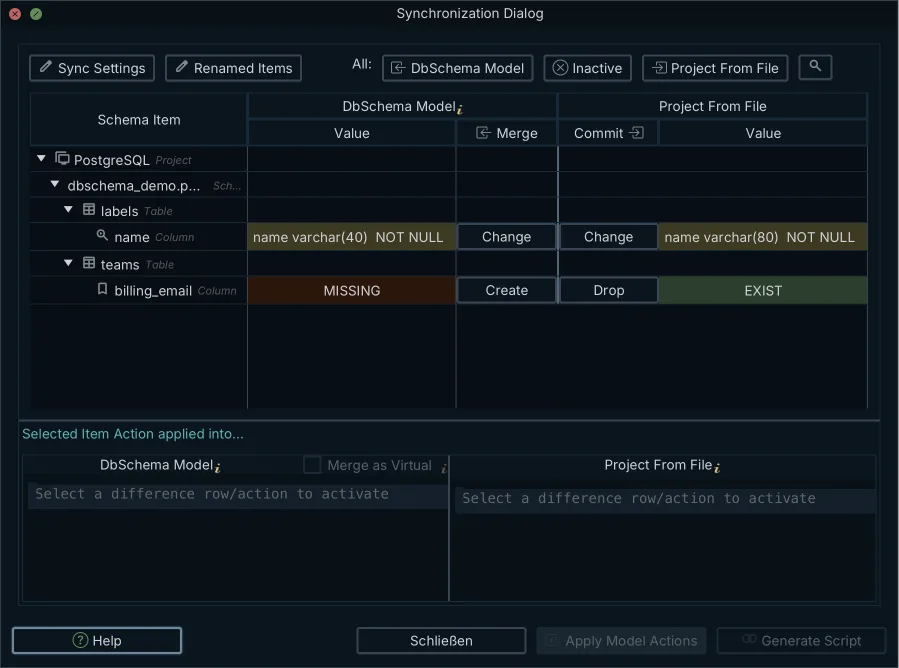
Which side changes is worth being exact about, because the two directions are not symmetrical. Reverse-engineering and updating the model change the .dbs file on your disk and nothing else. Pushing a difference to the database opens the generated DDL one statement at a time, with a message per statement and the choice to run it, run the rest, or skip it, and only that step alters the live schema. Run it against a database that already matches and DbSchema reports the schemas as up to date and generates nothing. On the production connection itself, turn on Read Only Connection on the connection's Settings tab, which blocks every schema and data modification made through DbSchema, so the production side of the comparison can only ever be read.
| Object | Staging | Production | Generated action |
|---|---|---|---|
| orders.payment_status | varchar(32) NOT NULL | missing | ADD COLUMN |
| customers.email | NOT NULL, unique | nullable | SET NOT NULL, ADD CONSTRAINT |
| idx_orders_created_at | present | missing | CREATE INDEX |
| audit_logs.retention_days | default 90 | default 30 | SET DEFAULT |
Which two things you point at each other
DbSchema matches a schema by its catalog name as well as its schema name, and that decides whether you get a drift report or a rebuild. Two arrangements work. Compare databases that carry the same catalog and schema names on different servers, or reverse-engineer each environment into its own .dbs file and compare the two models, which DbSchema does with both files open and no connection at all. Schema Mapping shows a schema from the model under a different name in this database, so it solves a different problem: where both sides are already called public, there is nothing left for it to map.
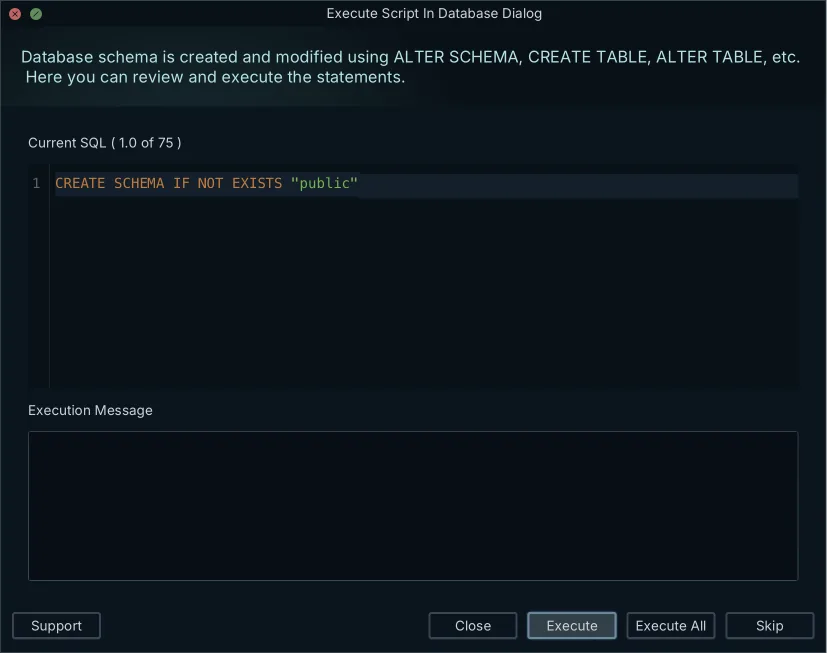
Point a model built from one catalog at a second catalog with a different name and every object reads as missing on one side, so the generated script opens with CREATE SCHEMA IF NOT EXISTS public and rebuilds the schema instead of listing the drift, as the screenshot shows. When the catalog names differ, build one .dbs model per environment and compare the two models.
Because the .dbs file is plain XML, the model of each environment lives in Git next to the application code, and a widened column shows up in a pull request as a one-line change. Git — Collaborative Design on the Model menu opens a Git client inside DbSchema with Stage, Commit, Push, Pull, Stash and Create Branch, so the model is committed from the window that edits it. Saving the model to a file is in the Pro edition, along with schema synchronization. The wider question of versioning schemas this way is covered in schema versioning for PostgreSQL.
What to check after the migration runs
Production is not reconciled the moment the last statement returns. Four checks close the release.
- Confirm each new index actually built. PostgreSQL's
pg_indexcatalog carriesindisvalid: if true the index is currently valid for queries, and false means the index is possibly incomplete, so it must still be modified by INSERT and UPDATE operations but cannot safely be used for queries[2]. - Insert and delete a test row across a parent and child table, so the recreated foreign keys and their cascade rules are exercised rather than assumed.
- Check that the migration's locks are gone from the session and lock views, before the traffic that was queued behind them arrives.
- Run EXPLAIN ANALYZE on the queries the release was written for, and read the plan for the new index rather than trusting that the planner found it.
Then run the comparison one more time, in the other direction: production against the model, to confirm the difference list is now empty. Download DbSchema at https://dbschema.com/download.html, reverse-engineer staging into a model, and compare it against production before the next release rather than after it. Schema synchronization and saving the model to a .dbs file are in the Pro edition; the free Community Edition connects to both databases and draws them, so you can see what you are working with first.
Frequently asked questions
What is the difference between staging and production database?
Production serves live user traffic under a service level agreement, and staging runs the same engine and version against masked or synthetic data. DbSchema marks the difference on the connection itself: Highlight, on the Settings tab, colors a connection as Normal, Production, Development or Test, so a production connection is recognizable at a glance. What staging is there to rehearse is in the section on what a staging database is for.
What causes database schema drift?
A change that reaches one environment without a mechanism that carries it to the other. The section on what separates production from staging names the four recognizable ways that happens, from a hotfix during an incident to a restore taken before the last migrations ran.
Is a staging database exactly the same as prod?
Staging never matches production exactly, because it trails by however long its refresh cycle is and its data is masked or generated rather than copied. The section on what separates production from staging says which parts are allowed to differ, and which one, the structure, is not.
How do database administrators compare schemas manually?
By exporting the catalog from both databases and diffing the two files. The section on comparing schemas using SQL carries the information_schema query, the psql commands that write the two exports, and the object types that each need a pass of their own.
What is a schema migration script?
A file of DDL statements that moves a database from one structure to another, holding the ALTER TABLE, CREATE INDEX and ADD CONSTRAINT statements that close the gap between the two environments. It can be written by hand, produced by a changelog-based library, or generated from a comparison.
How does DbSchema synchronize staging and production?
DbSchema works connected or disconnected. Online, a schema change you make is executed against the database as you make it and logged in the SQL History pane; offline it goes only to the .dbs file, and you review the accumulated differences when you reconnect. Which side each choice changes is in the section on diffing the two schemas in DbSchema.
Sources
Compare your staging and production schemas
DbSchema reverse-engineers both databases, lists every structural difference side by side, and generates the migration script. Schema synchronization is a Pro Edition feature; the free Community Edition connects and draws the diagrams.









