What a Database Migration Tool Does
For backend developers who change a database schema as part of their work; migrations, schema diffs and transactional DDL are explained where they appear.
On this page
In short
A database migration tool turns a schema change into SQL that each database runs once, in a fixed order. It also records which changes already ran there. Some tools keep numbered scripts, others compare a desired schema with the real one and generate the script.
Table of contents
- What a database migration tool does
- Versioned scripts and schema comparison
- Where a migration breaks: a run on PostgreSQL 16
- Schema changes come before data transfer
- Keeping the design model in Git
- Comparing two versions of the model in DbSchema
- Frequently asked questions
- Sources
Key takeaways
- Every schema change becomes a script, so dev, staging and production get the same change in the same order.
- Script-based tools number each migration and log the applied ones in a table inside the database.
- Comparison-based tools diff a model or a second database against the target and write the SQL for you.
- Test a migration on a copy of the target first: dependent views and NULL rows break scripts that looked fine.
- Move the schema first, then the data.
You added a column on your machine, and now staging and production need it too. Doing that by hand works once. By the third environment, nobody knows which change ran where. A database migration tool fixes that. It turns each schema change into SQL that every database runs once, in the same order, and it keeps a record of what already ran.
What a database migration tool does
A database migration tool does three jobs. It stores each schema change as SQL. It runs those changes in a fixed order. And it remembers, per database, which changes are already applied.
Martin Fowler's Evolutionary Database Design[1] describes the usual mechanism. Each migration gets a sequence number. A changelog table in the database stores the numbers that already ran. On the next deploy, only the scripts whose numbers are missing run.
That record is the point. Your laptop, the CI database and production can sit at different versions. Each one moves forward from wherever it is. Nobody has to remember that staging skipped last Tuesday's change.
Versioned scripts and schema comparison
Migration tools follow one of two approaches. You either write each change as a script, or you describe the target schema and let a tool work out the change.
With versioned scripts, you write ALTER TABLE by hand and commit it under the next number. The scripts are the history. You see exactly what will run, but you also own every detail, such as the order of statements.
With comparison, you keep a model of the schema as it should be. A tool compares that model with a live database and lists every difference. You decide, row by row, which side wins. The comparison then produces the SQL. In DbSchema this is Schema Synchronization, which shows the generated SQL before it runs.
Both approaches end in the same place: a script that changes one database. You can also combine them. Generate the script from a comparison, review it, and commit it as the next versioned migration. Turning a schema diff into a safe migration script covers that review step.
Where a migration breaks: a run on PostgreSQL 16
A migration that looks right can still fail on the target. We tested this on 25 October 2026 with PostgreSQL 16.14. We used a 14-table demo schema in two copies: a dev database and a staging database with deliberate drift.
First, the drift. This query lists three columns of the tasks table in each database:
SELECT column_name, data_type, is_nullable
FROM information_schema.columns
WHERE table_schema = 'public' AND table_name = 'tasks'
  AND column_name IN ('completed_at', 'blocked_reason', 'priority')
ORDER BY column_name;
On dev:
| column_name | data_type | is_nullable |
|---|---|---|
| completed_at | timestamp with time zone | YES |
| priority | USER-DEFINED | NO |
On staging:
| column_name | data_type | is_nullable |
|---|---|---|
| blocked_reason | character varying | YES |
| priority | USER-DEFINED | YES |
Staging lacks completed_at, and priority there allows NULL. Staging also stores projects.key as varchar(20), while dev uses varchar(10). The obvious migration brings staging in line with three statements. We ran it on a copy of the staging database:
BEGIN;
ALTER TABLE tasks ADD COLUMN completed_at timestamptz;
ALTER TABLE tasks ALTER COLUMN priority SET NOT NULL;
ALTER TABLE projects ALTER COLUMN key TYPE varchar(10);
COMMIT;
PostgreSQL refused the third statement:
ERROR:  cannot alter type of a column used by a view or rule
DETAIL:  rule _RETURN on view v_task_overview depends on column "key"
A view reads projects.key, so PostgreSQL won't change the column's type under it. The PostgreSQL documentation on dependency tracking[2] explains this rule. Objects that others depend on can't be dropped or changed without dealing with the dependents.
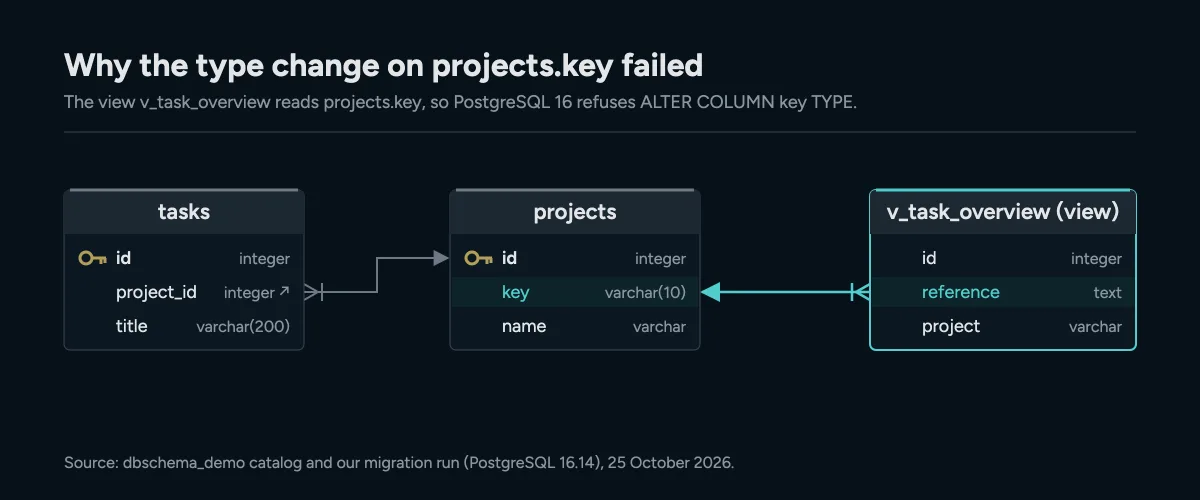
The view v_task_overview builds its reference column from projects.key, so PostgreSQL 16 refuses to change the column's type until you drop the view.
The failure undid the first two statements as well. After the error, completed_at did not exist. PostgreSQL runs DDL inside transactions, so the whole script applied "atomically or not at all", as the PostgreSQL wiki on transactional DDL[3] puts it. Not every engine works this way. The same page notes that MySQL commits DDL implicitly, so there the first two changes would have stayed.
The fixed script drops the view, changes the column and creates the view again:
BEGIN;
ALTER TABLE tasks ADD COLUMN completed_at timestamptz;
ALTER TABLE tasks ALTER COLUMN priority SET NOT NULL;
DROP VIEW v_task_overview;
ALTER TABLE projects ALTER COLUMN key TYPE varchar(10);
CREATE VIEW v_task_overview AS
SELECT t.id, pr.key || '-' || t.id AS reference, t.title, t.status, t.priority,
       t.due_date, pr.name AS project, tm.name AS team,
       u.full_name AS created_by, s.name AS sprint
FROM tasks t
JOIN projects pr ON pr.id = t.project_id
JOIN teams tm    ON tm.id = pr.team_id
LEFT JOIN users u   ON u.id = t.created_by
LEFT JOIN sprints s ON s.id = t.sprint_id;
COMMIT;
This one committed. The tasks table on the copy now had completed_at, and priority was NOT NULL. It still held 31 rows, the same as before.
The SET NOT NULL step only worked because no task on staging had a NULL priority. The ALTER TABLE reference[4] says SET NOT NULL "may only be applied to a column provided none of the records in the table contain a NULL value". On real staging data, check that first.
Schema changes come before data transfer
A schema migration and a data transfer are different jobs. The schema migration changes tables, columns, keys and views with DDL. The data transfer copies or reshapes rows with DML, such as INSERT and UPDATE.
Run the schema step first. Rows can't land in a column that doesn't exist yet. A foreign key can't point at a table that was never created.
Moving a whole database to a new server is a third job. A dump and restore does that. pg_dump[5] makes a consistent copy even while the database is in use. But a restore builds the target from scratch. A migration changes the target in place. That's why the staging copy above kept its 31 rows.
Keeping the design model in Git
A comparison needs a reference: the schema as it should be. In DbSchema, that reference is the design model, saved as a .dbs file. The Git documentation describes how DbSchema keeps that file in a repository, with Git built in.
The file is plain XML. The model DbSchema saved for our 14-table demo schema is 28,621 bytes, and each column is one line:
<column name="completed_at" type="timestamptz" />
We copied the model into a Git repository and added an archived_at line in the same format. Git showed exactly one changed line:
@@ -230,6 +230,7 @@
 			<column name="completed_at" type="timestamptz" />
+			<column name="archived_at" type="timestamptz" />
 			<index name="tasks_pkey" unique="PRIMARY_KEY" >
 dbschema_demo.dbs | 1 +
 1 file changed, 1 insertion(+)
A reviewer can read that diff in a pull request. Git changes only the model file, though. The database changes when you synchronize the model with it. Putting a database schema in Git walks through the setup.
Comparing two versions of the model in DbSchema
DbSchema compares the model with a live database or with a second .dbs file. Both comparisons open the same dialog. It lists one row per difference, and you click which side wins.
Comparing the model with another model file is the "between two versions" case. The second file can be last month's version or another environment's model. The dialog shows it as Project From File. Its buttons are Apply to the model and Generate SQL script, and nothing runs in a database. Generate SQL script writes the statements without running them, so you can commit the script as the next migration.
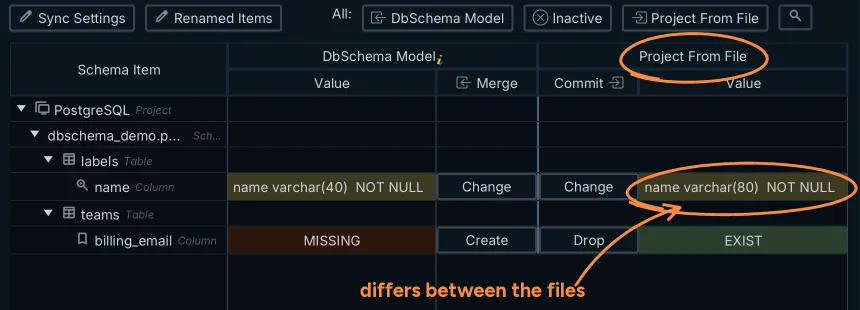
Comparing the model with a second .dbs file lists each difference with Change, Create or Drop per side; Schema Synchronization is a DbSchema Pro feature.
Against a live database, Commit in the database runs the chosen statements one at a time. DbSchema then compares again and lists what is left. A renamed column becomes a RENAME instead of a drop and a create, because the model remembers the previous name. Export Report saves the differences as HTML or Markdown for the release notes.
Dependent views need the same care in a generated script. When a view changes, the synchronization documentation says the script starts with a plain DROP VIEW, which PostgreSQL rejects while other views depend on it. The fix is the same: generate the script, then drop and recreate the dependents in the SQL Editor before you run it. Comparing two database schemas shows the comparison on a full drift list, and rolling back a database schema change covers the way back.
Saving the model to a file and Schema Synchronization are in DbSchema Pro. Download DbSchema, connect to your own database, save the model, and compare it with the database before your next deploy.
Frequently asked questions
Is a database migration tool the same as a backup tool?
No. A backup tool copies a whole database so you can restore it. A migration tool changes an existing database in place, one recorded step at a time, and keeps its rows.
Can a migration tool move data between two different database engines?
Schema migration tools change the structure of one database. Copying rows between engines is a separate data transfer step that runs after the target schema exists.
Why test a migration on a copy of production?
Production often differs from what you expect: a view depends on a column, or old rows hold NULLs. Those differences break scripts that passed on dev.
Sources
Compare your model with the database before you deploy
DbSchema keeps the schema as a design model, compares it with any database and shows the migration SQL before it runs. Connect and reverse-engineer free with Community Edition.









