Rolling Back a Database Schema Change
For DBAs who just deployed a schema change that went wrong; transactional DDL and reverse scripts are explained where they come up.
On this page
In short
A release went out and the new schema breaks the application. Whether you can roll back the database schema change depends on two things: the engine, and whether the change destroyed data. PostgreSQL and SQL Server undo DDL inside an open transaction, MySQL commits every DDL statement at once, and dropped data never returns.
Key takeaways
- PostgreSQL and SQL Server roll back an ALTER TABLE that is still inside an open transaction. MySQL 8.4 cannot, because each DDL statement commits.
- A reverse script restores the shape of the schema, never the data a DROP COLUMN or a narrowed type removed.
- Rows the application wrote after the deploy can block the reverse script, so find them with two SELECTs before you run it.
- On PostgreSQL, run the whole reverse script in one transaction, so the first error leaves nothing half done.
- DbSchema generates the reverse script by comparing the current model with the previous version from Git.
You have just deployed a migration, and the application throws errors. The first question is whether the change can be reversed at all. The answer depends on the engine:
| Engine | ALTER TABLE inside BEGIN ... ROLLBACK | Once committed |
|---|---|---|
| PostgreSQL 16 to 18 | Rolled back, no trace left | Needs a reverse script |
| SQL Server 2016 and later | Rolled back, except under snapshot isolation | Needs a reverse script |
| MySQL 8.4 | Not possible: each DDL statement commits | Needs a reverse script |
Data is a separate question. A dropped column, a dropped table or a narrowed type has removed values that no reverse script brings back.
Which engines can roll back DDL in a transaction
PostgreSQL runs DDL inside transactions. We ran this on PostgreSQL 16.14 on 25 October 2026, against a copy of a 14-table demo schema:
BEGIN;
ALTER TABLE tasks ADD COLUMN review_state varchar(20) NOT NULL DEFAULT 'open';
SELECT mode, granted FROM pg_locks
WHERE relation = 'tasks'::regclass AND mode = 'AccessExclusiveLock';
ROLLBACK;
Inside the transaction, tasks holds the strictest lock:
| mode | granted |
|---|---|
| AccessExclusiveLock | t |
After ROLLBACK, information_schema.columns lists no review_state column. The ALTER TABLE documentation[1] says "an ACCESS EXCLUSIVE lock is acquired unless explicitly noted". The explicit locking chapter[2] adds that a lock "is normally held until the end of the transaction". So a migration that is still open and blocking the table ends the moment you roll it back. The PostgreSQL transactions guide covers BEGIN and savepoints in more detail.
SQL Server 2016 and later behaves the same way for most DDL. Microsoft's locking and row versioning guide[3] says you "can use all Transact-SQL statements in an explicit transaction". The exceptions are a short list, such as CREATE DATABASE, BACKUP and RESTORE. ROLLBACK TRANSACTION[4] then erases the modifications. One exception matters during an incident. Under snapshot isolation, ALTER TABLE, CREATE INDEX, ALTER INDEX and DROP INDEX "aren't permitted" after BEGIN TRANSACTION, because the engine does not version metadata.
MySQL is different, and getting this wrong is costly. MySQL 8.4 has atomic DDL, which means one statement either completes or leaves no change. The Atomic Data Definition Statement Support page of the MySQL 8.4 Reference Manual is explicit: "Atomic DDL is not transactional DDL." Its page on statements that cause an implicit commit adds that each DDL statement ends the open transaction "as if you had done a COMMIT". We ran this on MySQL 8.4.11 on 25 October 2026:
START TRANSACTION;
UPDATE tasks SET title = CONCAT(title, ' (edited)') WHERE id = 1;
ALTER TABLE tasks ADD COLUMN review_state VARCHAR(20) NOT NULL DEFAULT 'open';
ROLLBACK;
After the ROLLBACK, both changes are still there:
| review_state_columns | update_survived |
|---|---|
| 1 | 1 |
The ALTER TABLE committed the UPDATE before it, too. On MySQL, the only way back is a reverse script.
Why a dropped column does not come back
A reverse script rebuilds the schema's shape. It never restores the values that a committed change removed. Three changes destroy data on every engine:
DROP COLUMNremoves the values in every row.ADD COLUMNlater creates an empty column.DROP TABLEremoves the rows.CREATE TABLElater creates an empty table.- A narrowed type can change values. Reversing the type does not change them back.
The demo schema shows the first case. Before the deploy, tasks held 31 rows, and 30 of them had an estimate, 252.00 hours in total. The deploy dropped estimate_hours, and the reverse script added it back. Afterwards, the column existed and 0 of the 31 rows had an estimate.
The third case is easy to miss. PostgreSQL 16 rejects a varchar narrowing that would cut a value, as the next section shows. A narrower numeric scale is different. It rounds without an error:
ALTER TABLE task_estimates ALTER COLUMN estimate_hours TYPE numeric(5,0);
ALTER TABLE task_estimates ALTER COLUMN estimate_hours TYPE numeric(5,2);
We ran both statements on a temporary copy of two rows, inside a transaction we rolled back:
| id | before | after numeric(5,0) | after widening again |
|---|---|---|---|
| 2 | 5.50 | 6 | 6.00 |
| 8 | 3.50 | 4 | 4.00 |
Widening the type restored the scale, not the values. If any of these changes ran, the data has to come from a backup or a staging copy. The reverse script can only give the application its old schema back.
Generating the reverse script from two model versions
A reverse script does not have to be written by hand. If your design lives in a model file in Git, the previous schema version is one checkout away. DbSchema Pro saves the whole design to a .dbs model file, which is plain XML that you commit with your code. The Git workflow in DbSchema commits and pushes that file from inside DbSchema. The schema versioning guides for PostgreSQL and MySQL show the setup.
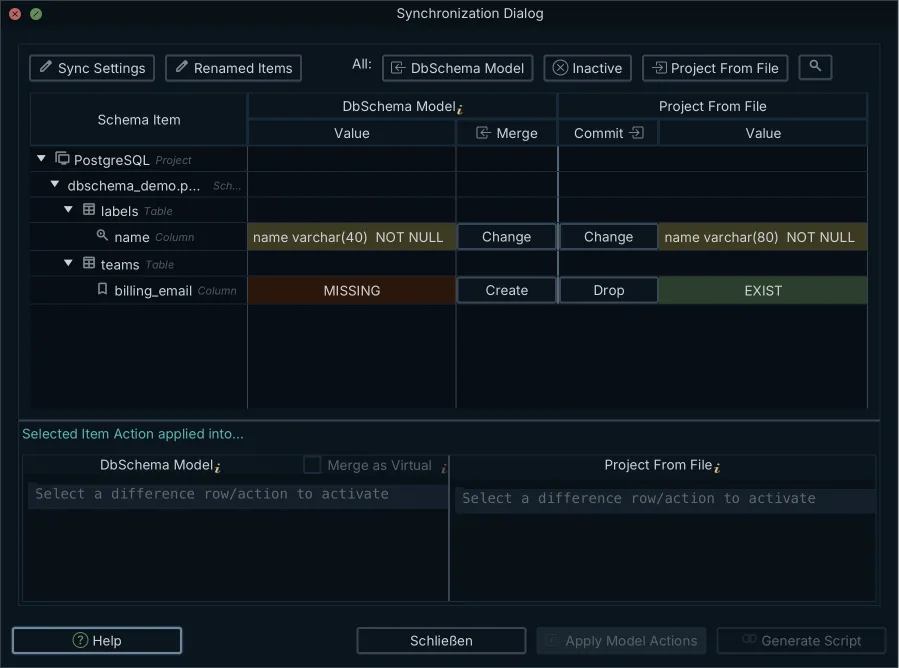
The reverse script is a comparison with the two versions swapped. In DbSchema 10.5.2, the steps are:
- Save the model as it was before the release, for example with
git show HEAD~1:schema/model.dbs > previous.dbs. - Open the current model in DbSchema.
- Choose Model, then Compare Model with Other Model From File, and pick
previous.dbs. - Review each difference and choose which side wins.
- Press Generate SQL script to get the statements without running them.
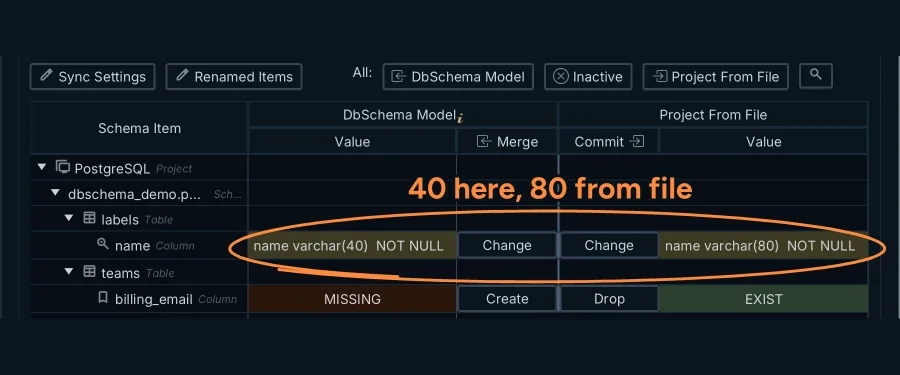
Compare Model with Other Model From File lists each difference between two versions of the model; saving the model to a file and synchronization are Pro edition features.
The schema synchronization documentation describes the same dialog. Generate SQL script writes the statements to the SQL Editor or a file, and changes nothing. Commit in the database opens the Execute Script In Database Dialog, which runs one statement at a time with Execute, Execute All and Skip.
A comparison also catches the change that a hand-written reverse script tends to miss. That is often a dropped view, as the next section shows. Turning the forward change into a script is a separate topic, covered in turning a schema diff into a safe migration script.
Rolling back after the application has written data
The application keeps writing while the release is live. Those rows can make the reverse script fail. Here is the forward migration we shipped on the demo copy:
BEGIN;
ALTER TABLE labels DROP CONSTRAINT labels_project_id_name_key;
ALTER TABLE labels ALTER COLUMN name TYPE varchar(80);
ALTER TABLE tasks DROP COLUMN estimate_hours CASCADE;
COMMIT;
The CASCADE was needed. Without it, PostgreSQL refused the drop:
ERROR:  cannot drop column estimate_hours of table tasks because other objects depend on it
DETAIL:  view v_team_workload depends on column estimate_hours of table tasks
HINT:  Use DROP ... CASCADE to drop the dependent objects too.
With it, PostgreSQL answered NOTICE: drop cascades to view v_team_workload. The view was gone too. While the release was live, the application added a second label called bug to project 1, and a label name of 41 characters.
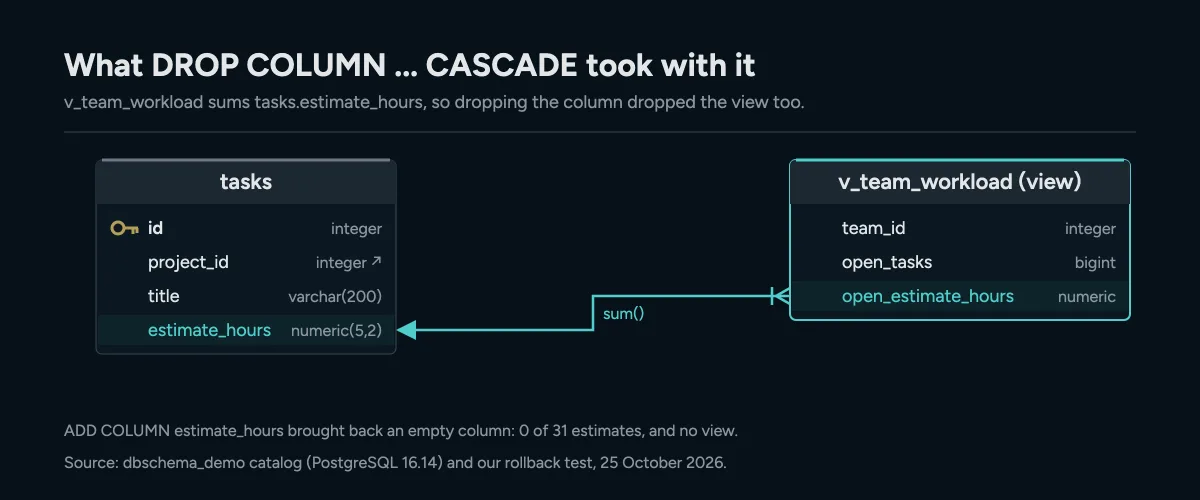
A view that reads the column is dropped with it, and adding the column back restores neither the view nor the values.
The reverse script is the forward change turned around:
ALTER TABLE tasks ADD COLUMN estimate_hours numeric(5,2);
ALTER TABLE labels ALTER COLUMN name TYPE varchar(40);
ALTER TABLE labels ADD CONSTRAINT labels_project_id_name_key UNIQUE (project_id, name);
Run statement by statement, the first one worked and the other two failed:
ERROR:  value too long for type character varying(40)
ERROR:  could not create unique index "labels_project_id_name_key"
DETAIL:  Key (project_id, name)=(1, bug) is duplicated.
That left the schema in a third state, neither the old one nor the new one. Two habits prevent this.
First, on PostgreSQL, wrap the reverse script in one transaction. We ran the same three statements between BEGIN and COMMIT. The first error aborted the block with current transaction is aborted, commands ignored until end of transaction block, and COMMIT answered ROLLBACK. Nothing was half applied. On MySQL, this safety net does not exist, so the next habit matters more.
Second, find the blocking rows before you run anything:
SELECT project_id, name, count(*) FROM labels
GROUP BY project_id, name HAVING count(*) > 1;
SELECT id, name, length(name) FROM labels WHERE length(name) > 40;
The two queries named the duplicate pair (1, bug) and label 13 with 41 characters. We removed the duplicate, shortened the long name, and ran the reverse script again in one transaction. This time it committed.
When the rollback runs but the application still fails
A deploy often holds more than one change. If the reverse script undoes only some of them, the schema matches neither release. The application then fails on the part that was left behind. In the demo, that part was v_team_workload. The column came back, but the view the CASCADE had dropped did not, because no statement recreated it.
Do not reverse a release file by file. Compare the whole live schema with the model version you are going back to. Then generate one script from that difference, and add the CREATE VIEW for every view the forward change dropped.
What to verify once the reversal has run
A clean run is not proof. Check the result before traffic goes back to the database:
- Compare the live schema with the previous model version. In DbSchema, Compare Schemas with Database lists every difference that is left. The goal is no differences.
- List the views and constraints. On the demo copy,
information_schema.viewsreturnedv_task_overviewandv_team_workload.pg_constraintshowedlabels_pkey,labels_project_id_fkeyandlabels_project_id_name_key. - Query the restored objects.
SELECT sum(open_estimate_hours) FROM v_team_workloadreturned NULL, because the estimates were gone. The view works, but the data it reads has to come from a backup. - Restart or flush the application's connection pool. Pooled connections can hold prepared statements that still expect the dropped or added columns.
- Record the rollback in your migration ledger, such as the table Liquibase or Flyway keeps. Do not just lower the version number. The next deploy must know the forward version was reversed.
To try this on your own database, download DbSchema, open the model, and compare it with the version from before your last release. Saving the model to a file and schema synchronization are DbSchema Pro features, and every download starts with a 15-day trial of all features.
Frequently asked questions
Can you roll back a schema migration in MySQL?
Not with ROLLBACK. Every DDL statement in MySQL 8.4 commits the open transaction, so you need a reverse script.
Can you undo an ALTER TABLE in PostgreSQL?
Yes, while the transaction is still open. Run ROLLBACK and the change leaves no trace. After COMMIT, you need a reverse script.
Does a reverse script restore deleted data?
No. It restores the columns and tables, but they come back empty. The values have to come from a backup or a copy.
Why does a reverse script fail after a rollback window?
Rows written under the new schema can break the old rules. Typical cases are a duplicate under a unique key and a value too long for the old type. Find those rows with a SELECT first.
Sources
Generate the reverse script for your next rollback
DbSchema compares two versions of your schema model and generates the migration script to reverse a change, so the rollback is ready before you need it.









