PostgreSQL Schema Migration: Deploying Changes Safely
For the backend developer shipping DDL to a PostgreSQL database that is serving traffic; lock levels and ALTER TABLE behavior are cited from the PostgreSQL 18 documentation.
On this page
The release adds one column, and four minutes later the ALTER TABLE is still running. The size of the change is not what went wrong. ALTER TABLE takes an ACCESS EXCLUSIVE lock, and a transaction seeking a table-level lock waits indefinitely for conflicting locks to be released[1]. Two habits fix it: bound the wait with lock_timeout, and pick the DDL forms that leave the existing rows alone.
The statements below run on PostgreSQL 18 against this table:
CREATE TABLE orders (
  order_id bigint PRIMARY KEY,
  customer_id bigint,
  total numeric(10,2) NOT NULL
);
What ACCESS EXCLUSIVE blocks while ALTER TABLE holds it
ACCESS EXCLUSIVE is acquired by DROP TABLE, TRUNCATE, REINDEX, CLUSTER, VACUUM FULL and REFRESH MATERIALIZED VIEW without CONCURRENTLY, and many forms of ALTER INDEX and ALTER TABLE also acquire a lock at this level[1]. It conflicts with locks of all modes, and it is the only mode that blocks a plain SELECT[1].
| Lock mode | Taken by | Blocks SELECT | Blocks INSERT, UPDATE, DELETE |
|---|---|---|---|
| ACCESS SHARE | SELECT | No | No |
| ROW EXCLUSIVE | INSERT, UPDATE, DELETE, MERGE | No | No |
| SHARE UPDATE EXCLUSIVE | VACUUM, ANALYZE, CREATE INDEX CONCURRENTLY | No | No |
| SHARE | CREATE INDEX | No | Yes |
| ACCESS EXCLUSIVE | ALTER TABLE, DROP TABLE, TRUNCATE, VACUUM FULL | Yes | Yes |
Two properties turn that lock into an outage rather than a pause. A lock is normally held until the end of the transaction[1], so the table stays shut for as long as the migration transaction stays open, not for as long as the statement runs. And the wait in front of the lock is unbounded by default, so an ALTER TABLE aimed at a table that a reporting query is reading sits there until that query finishes. Four minutes of blocked traffic can come from a statement that would have taken a millisecond.
Setting lock_timeout before the DDL runs
lock_timeout aborts any statement that waits longer than the specified amount of time while attempting to acquire a lock, and a value without units is taken as milliseconds. Zero, the default, disables the timeout[2]. Set it in the migration session, in front of the DDL:
SET lock_timeout = '100ms';
BEGIN;
ALTER TABLE orders ADD COLUMN currency text NOT NULL DEFAULT 'EUR';
COMMIT;
When the lock is not free inside that window, the statement fails with SQLSTATE 55P03, lock_not_available[3], and gives up its place. Match your deployment runner on that code rather than on the message text. The PostgreSQL documentation notes that error codes are less likely to change across releases, and that they are not subject to the localization the message text goes through[3]. A failed attempt is cheap, so wrap it in a loop:
- Set lock_timeout to a tight window in the migration session.
- Run the DDL inside an explicit transaction block.
- Catch SQLSTATE 55P03 in the deployment runner.
- Wait a randomized, growing interval, then run the same script again.
statement_timeout is the other half, and it also defaults to zero[2]. lock_timeout bounds the wait for the lock; statement_timeout bounds the work once the lock is granted, which is what stops a table rewrite you did not expect from holding ACCESS EXCLUSIVE for an hour.
DDL forms that skip the table rewrite
ALTER TABLE acquires an ACCESS EXCLUSIVE lock unless a subform is explicitly noted otherwise, and several subforms are: ADD FOREIGN KEY requires only SHARE ROW EXCLUSIVE, and VALIDATE CONSTRAINT acquires SHARE UPDATE EXCLUSIVE[4]. Choosing among the subforms is most of the work.
Add the column with a constant default
When a column is added with ADD COLUMN and a non-volatile DEFAULT is specified, PostgreSQL evaluates the default once, stores the result in the table's metadata, and returns it when an existing row is accessed, which makes the ALTER TABLE very fast even on large tables[4]. PostgreSQL 11 introduced that, for a default value that is a constant[5]:
ALTER TABLE orders ADD COLUMN currency text NOT NULL DEFAULT 'EUR';
Swap the constant for a volatile expression and every row has to be written, because no single stored value can stand for all of them:
ALTER TABLE orders ADD COLUMN imported_at timestamptz NOT NULL DEFAULT clock_timestamp();
Split the constraint into NOT VALID and VALIDATE
Adding a constraint normally scans the table to verify that every existing row satisfies it, and NOT VALID skips that scan. The constraint is still applied against subsequent inserts and updates, but PostgreSQL will not assume it holds for the rows already there until you validate it[4]:
ALTER TABLE orders ADD CONSTRAINT orders_total_positive CHECK (total > 0) NOT VALID;
ALTER TABLE orders VALIDATE CONSTRAINT orders_total_positive;
The second statement is the one that reads the whole table. Validation checks only the pre-existing rows, because other transactions are already enforcing the constraint on the rows they write. That scan is also the cheap one to hold, since VALIDATE CONSTRAINT acquires only a SHARE UPDATE EXCLUSIVE lock[4]. NOT VALID is allowed for foreign-key, CHECK and not-null constraints[4].
The same split gives you a NOT NULL column without a blocking scan. SET NOT NULL ordinarily scans the whole table, but if a valid CHECK constraint exists that proves no NULL can be there, the scan is skipped[4]:
ALTER TABLE orders ADD CONSTRAINT orders_customer_id_present CHECK (customer_id IS NOT NULL) NOT VALID;
ALTER TABLE orders VALIDATE CONSTRAINT orders_customer_id_present;
ALTER TABLE orders ALTER COLUMN customer_id SET NOT NULL;
Build the index with CONCURRENTLY
CREATE INDEX without CONCURRENTLY takes a SHARE lock, which conflicts with the ROW EXCLUSIVE lock that INSERT, UPDATE and DELETE take, so writes wait for the build to finish[1]. CONCURRENTLY takes SHARE UPDATE EXCLUSIVE instead, and reads and writes carry on:
CREATE INDEX CONCURRENTLY orders_customer_id_idx ON orders (customer_id);
Two consequences come with it. The command cannot run inside a transaction block, so it lives outside the BEGIN and COMMIT the rest of the migration uses, and it scans the table twice, which makes it slower in wall-clock terms than a regular build[6]. If the build hits a deadlock or a uniqueness violation it leaves an invalid index behind, which queries ignore; drop it and run the command again, or rebuild it with REINDEX INDEX CONCURRENTLY[6].
Expand and contract, for a change the running code cannot take
Renaming a column, splitting a table, or narrowing a type breaks the application version that is still running while the migration lands. No lock setting helps there, because the problem is the shape of the change rather than its duration. Deploy it as four releases, each one of which leaves both the old and the new code able to run:
- Add the new column beside the old one, nullable and with no default, so nothing has to be written into the existing rows.
- Deploy the application version that writes both columns and still reads the old one.
- Backfill the historical rows in batches, committing each batch, so no single transaction holds a lock for the length of the copy.
- Deploy the version that reads the new column only, then drop the old one.
Moving total from a numeric to an integer count of cents starts here:
ALTER TABLE orders ADD COLUMN total_cents bigint;
and ends, one release after the reads have moved, here:
ALTER TABLE orders DROP COLUMN total;
Each of those four steps is a deployment you can take back on its own, which is the property rolling back a database schema change turns on.
State-based and artifact-based migrations
Both approaches end in a script that runs against the database. They differ in where the script comes from. An artifact-based workflow keeps a numbered sequence of change scripts, V1__create_orders.sql and V2__add_currency.sql, and a tracking table recording which ones have run. A state-based workflow keeps one model of the schema as it should be, compares it against the live database, and generates the DDL that closes the gap.
| Criterion | Artifact-based | State-based |
|---|---|---|
| Source of truth | Numbered change scripts | One model file of the target state |
| Change definition | You write the up and down SQL | The comparison generates the DDL |
| Drift | The next script runs regardless | The comparison lists it |
| Reading the current schema | Replay the scripts in order | Open the model |
Use the state-based comparison to write the script and the artifact-based sequence to run it, which is what the rest of this article does. The one case for writing the script by hand is a change the comparison cannot see, a backfill or a data transformation, which lives in the numbered file next to the generated DDL. Schema migration tools compared goes through the runners that execute the sequence.
Generating the migration script from a schema comparison
DbSchema keeps the schema in a design model, a local .dbs file of plain XML holding the tables, columns, keys, diagrams and comments. Keep it in the Git repository next to the code, and a schema change is reviewable in a pull request before any DDL reaches a server.
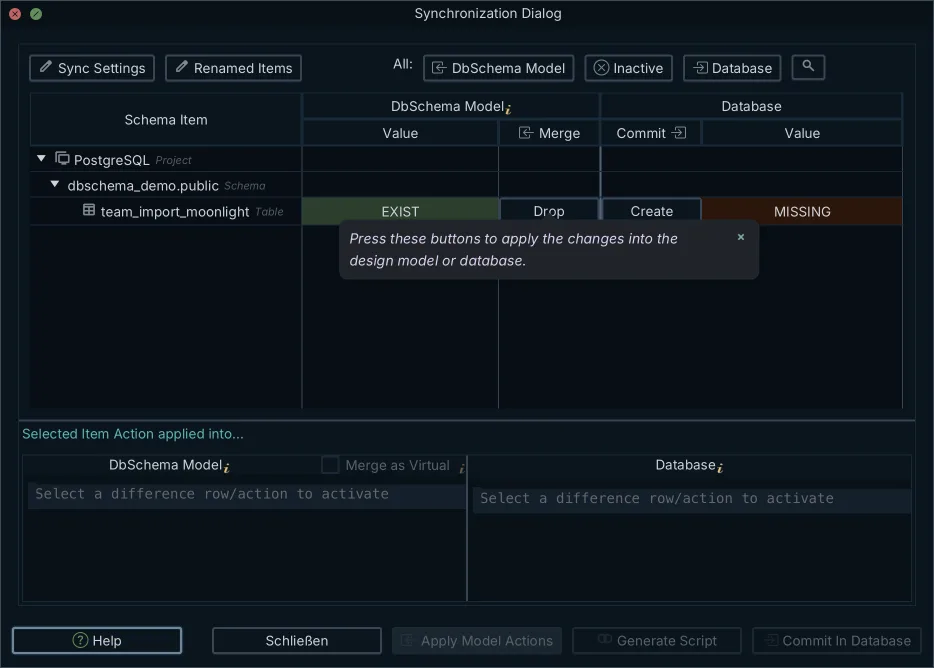
Synchronization between that model and PostgreSQL happens when you ask for it. Schema → Refresh Schema from Database pulls the server's structure into the model, Schema → Create or Upgrade Schema in Database goes the other way, and Schema → Compare Model with Database opens the Synchronization Dialog, where DbSchema lists every difference with the model on one side and the database on the other.
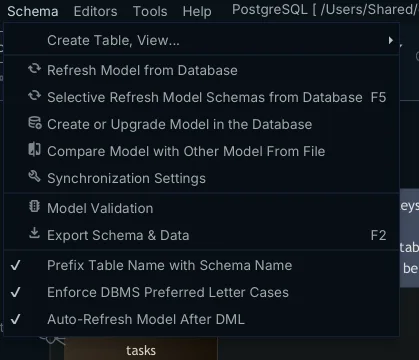
For each difference you choose one of three directions, and they land in different places. Update the model and DbSchema rewrites that object in the local .dbs file, which is how an index somebody created straight on the server gets adopted into the design; nothing is sent to PostgreSQL. Push the change to the database and DbSchema takes the model's definition as the winner, which is the direction for something you designed in the model. Skip it and neither side moves, so DbSchema lists the difference again the next time you compare.
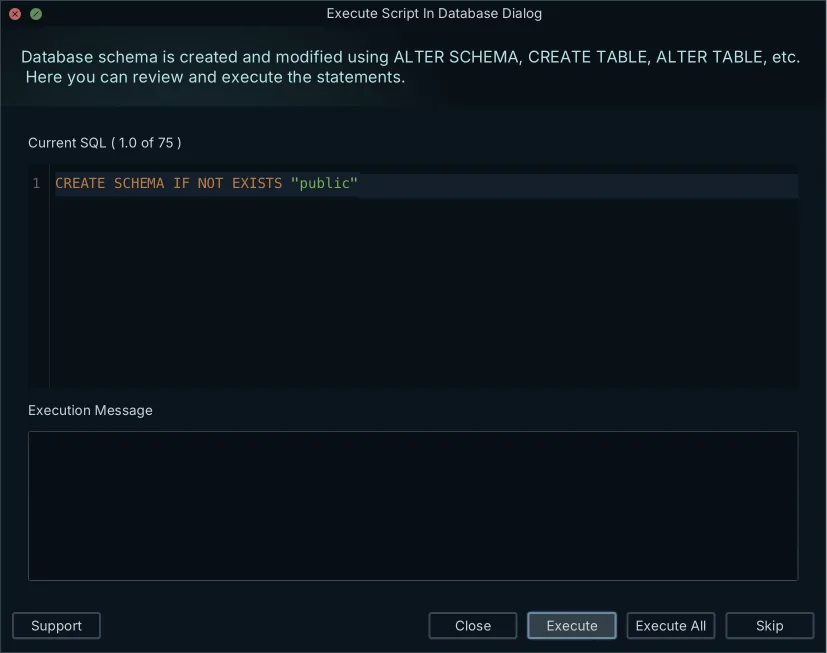
Schema → Synchronize Model with Database then generates the SQL for the directions you set. DbSchema shows the statements before anything runs, and you can edit them in place, which is where the lock_timeout and statement_timeout preamble goes; Execute applies them. Save the model to a .dbs file in DbSchema before you synchronize, so the previous state is on disk if you want it back, and commit the script next to the model. Reading a generated script before running it is the same review described in comparing two database schemas and in reviewing an AI-proposed schema change. Schema comparison and synchronization are Pro edition features, covered by the 15-day trial.
Schema drift, and the checks before the script runs
A generated script is aimed at the database you compared against. Drift is what moves the target: an emergency patch, an index added by hand at two in the morning, a column somebody put in staging and never in production. Run the DbSchema comparison against each environment shortly before the deployment rather than trusting one script across all of them, which is the routine in comparing production and staging schemas.
On a large PostgreSQL schema the review is the work rather than the DDL. DbSchema's diff view lists the added, removed and modified objects, tables, columns, indexes and foreign keys, so a hundred-table model is read one object at a time, which is how turning a schema diff into a safe migration script goes about it. Four checks belong in the deployment runner, whatever generated the script:
- lock_timeout and statement_timeout are set in the session before the first DDL statement.
- Each transactional statement runs inside an explicit transaction block, so a failure leaves no half-applied change.
- Every CREATE INDEX CONCURRENTLY sits outside the transaction blocks.
- Foreign keys and check constraints are added NOT VALID, with VALIDATE CONSTRAINT in a later step.
Deploying PostgreSQL schema changes safely comes down to three habits: a lock_timeout in front of every DDL statement, DDL forms that leave the existing rows alone, and a schema comparison you read before you run what it generated. Download DbSchema at https://dbschema.com/download.html, open your design model against your own PostgreSQL database, and compare the two to see what they disagree about. Schema comparison and synchronization are in the Pro edition, and connecting, reverse-engineering and the diagrams are free in the Community edition.
Frequently asked questions
What happens if a PostgreSQL migration script is run without lock_timeout?
lock_timeout is zero by default, which disables the timeout, so the DDL statement waits for the conflicting locks on the table as long as they last. Once you do set it, the limit applies separately to each lock acquisition attempt, so a statement that locks several tables can wait the full window more than once. Set it in the migration session rather than in postgresql.conf, where it would apply to every session on the server.
Is it safe to add a new column to a large PostgreSQL table?
Adding the column is safe when its default is a constant, which is the ADD COLUMN form shown above. A volatile default such as clock_timestamp() rewrites the whole table and its indexes, and so do a stored generated column, an identity column, and a column whose domain type carries constraints.
How do I add a NOT NULL constraint without a blocking scan?
Add the CHECK constraint NOT VALID, validate it, then SET NOT NULL, which is the three-statement sequence shown above. That sequence assumes the column holds no NULL already: SET NOT NULL may only be applied when no record in the table contains a NULL for that column. Backfill the existing NULLs before you start.
What is the difference between state-based and artifact-based schema migrations?
Where the script comes from is the difference, which the table above sets out side by side. DbSchema takes the state-based side: it compares two .dbs model files as readily as it compares a model against a live database, so a migration script between two branches of the schema comes out of that comparison.
Does DbSchema sync schema changes to production on its own?
DbSchema synchronizes when you ask it to, from the Schema menu, and shows you the generated SQL before anything runs. Where you want that inside a pipeline instead, schema synchronization also runs headless from a Groovy automation script or the DbSchemaCLI.
Sources
See what your model and your database disagree about
DbSchema reverse-engineers your PostgreSQL schema into a design model, compares the two on demand, and generates the DDL for the differences you choose to commit.









