PostgreSQL Schema Version Control: Methods and Tools
For backend developers on PostgreSQL who want schema changes reviewed in Git next to the application code.
On this page
Your code goes through pull requests, but the database still changes when someone runs a script by hand. PostgreSQL schema version control fixes that. Keep a text file that describes the schema in Git, and change the database only from that file. In DbSchema, that file is the .dbs design model, and schema synchronization writes the migration SQL for you.
In short
Put a text version of the schema in Git and review every change as a diff. Generate the migration from the difference between two versions. Run it on PostgreSQL inside one transaction, with a lock timeout.
Key takeaways
- Git needs a text file: a DbSchema model file, a schema-only dump, or numbered migration scripts.
- Since PostgreSQL 16.10, pg_dump writes a random key line by default, so two dumps of the same schema never match.
- DbSchema compares the model with the database and shows the SQL before it runs.
- PostgreSQL rolls back a whole migration when one statement in its transaction fails.
- Set lock_timeout before ALTER TABLE, so a busy table makes the migration fail fast instead of wait.
What to keep in Git for a PostgreSQL schema
You have three choices for the file in the repository. Each one diffs differently.
| File in Git | What a diff shows | How the database changes |
|---|---|---|
| DbSchema model file (.dbs) | The schema before and after | Schema synchronization generates the SQL |
| Schema-only dump (pg_dump) | The schema before and after, plus noise | You write the SQL yourself |
| Numbered migration scripts | One new script | The scripts run in order |
The first two are state-based: Git holds the schema as it should be. The third is migration-based: Git holds every step. A state file is easier to review, because the diff shows the schema itself. If you want the state approach without a framework, see schema versioning without a migration framework.
A schema-only dump in Git, and the two lines that change every time
A schema-only dump puts a PostgreSQL schema into Git with one command. We dumped our 14-table demo schema with pg_dump 16.14:
pg_dump --schema-only --no-owner -d dbschema_demo -f schema.sql
The file had 1,210 lines. We committed it, added one column on a copy of the database, and dumped again:
ALTER TABLE public.projects ADD COLUMN archived_at timestamptz;
git diff changed seven lines. Three are the column. The other four are these:
-\restrict U8EBHmugYky1GBtzrcrKE6lFeUDedkXPhGR09xoyNbkXsU3P9KjQbFic5XXXEpP
+\restrict UnsXgMCEavK436dSIgTpALXomIBeagxA019gCWsKaf7jWQ40OF6v3gWeaJXTuvH
The same pair repeats with \unrestrict at the end of the file. PostgreSQL 16.10[1] added the \restrict command to psql and taught pg_dump to issue it, as a guard against a hostile source server. Without a key option, pg_dump picks a random one each time. We dumped the unchanged schema twice, a second apart, and the two files differed in exactly those two lines.
The pg_dump documentation[2] offers --restrict-key for repeatable output, such as comparing dump files. With --restrict-key=schemav1, our two dumps were identical. The same page says the option is not for general use, because a server that knows the key can inject code into a restore. Use a fixed key only for dumps you diff, never for dumps you restore from a server you don't trust.
A dump has a second limit. It shows the schema, but you still write the ALTER statements by hand.
The DbSchema model file as the version in Git
DbSchema keeps its own copy of the schema, the design model, in a .dbs file. The file is XML, so Git diffs it line by line. Saving the model to a file needs DbSchema Pro.
The model file DbSchema saved for our 14-table PostgreSQL demo schema is plain XML, 28,621 bytes. We added the same archived_at column to it by hand, in the format DbSchema writes. git diff shows one added line:
 			<column name="created_at" type="timestamptz" mandatory="y" >
 				<defo><![CDATA[now()]]></defo>
 			</column>
+			<column name="archived_at" type="timestamptz" />
There is no key line and no other noise. A reviewer sees the table, the column and its type. What the rest of the file holds is explained in what a .dbs file is.
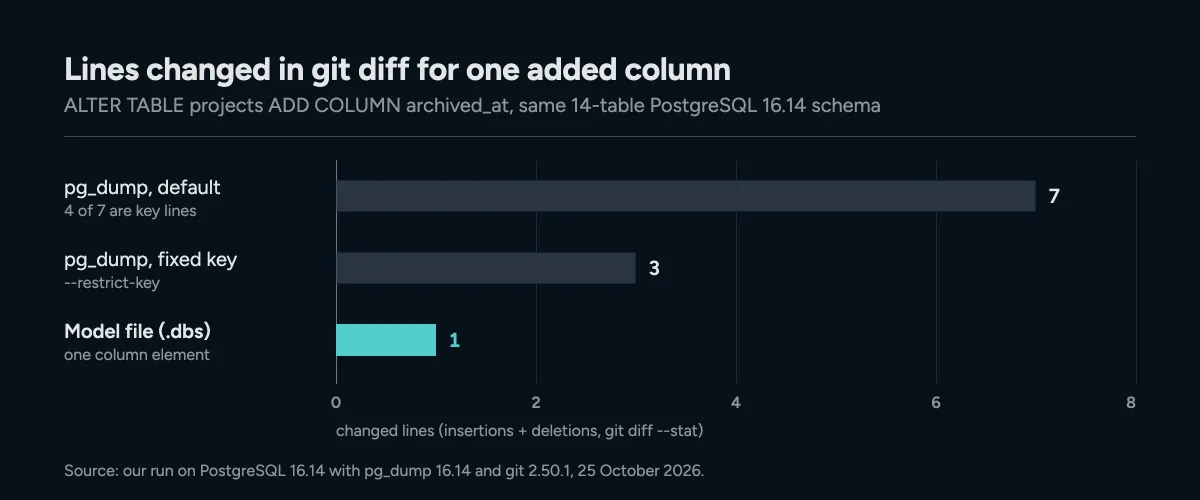
One added column, three files in Git: the default dump also changes its two random key lines. Measured on PostgreSQL 16.14, 25 October 2026.
DbSchema has Git built in. Choose File → Git Collaboration to commit, push and pull, and press Model History to list every commit that changed the model file. Branches and merge conflicts in a model file are covered in putting a database schema in Git.
Generating the migration between two versions
Git changes only the model file. To change the database, you synchronize. Schema synchronization compares the model with the database and lists every difference. For each one, you choose whether the model or the database wins. DbSchema then writes the SQL for the database side and shows it before it runs. Synchronization needs DbSchema Pro.
For a new column that goes to the database, the DbSchema documentation shows this statement:
ALTER TABLE shop.customers ADD birth_date date;
You don't have to run it from DbSchema. Generate SQL script writes the statements without running them, so you can commit the script or hand it to a deployment job.
You can also compare two versions of the model. A second .dbs file can hold an older version of the schema. Check out the old commit's file and run Compare Model with Other Model From File. The dialog then offers only Apply to the model and Generate SQL script, so nothing runs in a database.
Renames are where a plain dump diff goes wrong. A dump only sees a column that vanished and a new one that appeared. When you rename a table or column in DbSchema, synchronization uses RENAME instead of a drop and a create, which would lose the data in the column.
Running the migration in one transaction
PostgreSQL runs DDL inside transactions. The PostgreSQL wiki[3] describes how this lets you back out even large changes, such as creating a table. So wrap the whole migration in BEGIN and COMMIT. If one statement fails, nothing is applied.
We tested it on PostgreSQL 16.14 with a migration whose second statement fails:
BEGIN;
ALTER TABLE public.projects ADD COLUMN owner_id integer;
ALTER TABLE public.tasks ADD CONSTRAINT tasks_title_short CHECK (length(title) <= 10);
COMMIT;
PostgreSQL answered:
BEGIN
ALTER TABLE
ERROR:  check constraint "tasks_title_short" of relation "tasks" is violated by some row
ROLLBACK
The first statement had succeeded, yet afterwards projects had no owner_id column. The failed COMMIT rolled back both. Your schema stays at the version in Git, not halfway to the next one. For changes that already ran, see rolling back a database schema change.
One statement refuses to run in a transaction. A regular CREATE INDEX can, but CREATE INDEX CONCURRENTLY cannot:
BEGIN;
CREATE INDEX CONCURRENTLY idx_projects_archived_at ON public.projects (archived_at);
ROLLBACK;
ERROR: CREATE INDEX CONCURRENTLY cannot run inside a transaction block
Run that statement on its own, after the transaction. Outside a transaction block, the same statement succeeded.
Keeping ALTER TABLE from blocking production
On PostgreSQL 16, ALTER TABLE[4] takes an ACCESS EXCLUSIVE lock unless a subform says otherwise. That lock conflicts with every other lock mode[5], even the one a plain SELECT holds. So the ALTER waits for running transactions on the table to finish.
Set lock_timeout[6] first, and the migration gives up instead of waiting. We kept a read transaction open on tasks in one session and ran this in a second one:
SET lock_timeout = '2s';
ALTER TABLE public.tasks ADD COLUMN review_note text;
After about two seconds, PostgreSQL stopped the statement:
ERROR: canceling statement due to lock timeout
The column was not added, and you can retry when the table is quiet. Check the change itself too. Adding a column without a DEFAULT uses NULL and needs no table rewrite. A volatile DEFAULT or a column type change rewrites the whole table and its indexes, which holds the lock much longer.
Download DbSchema and reverse-engineer your PostgreSQL database into a model. The free Community edition connects, reverse-engineers, draws diagrams and runs SQL. Save the model to your Git repository and synchronize it with DbSchema Pro, which costs $294.00 one-time and covers saving the model to a file and schema synchronization.
Frequently asked questions
Can I version a PostgreSQL schema without a migration framework?
Yes. Keep the schema itself in Git, as a DbSchema model file or a schema-only dump, and generate the migration from the difference between two versions.
Why does my pg_dump file change when the schema did not?
Since PostgreSQL 16.10, pg_dump writes a random key in the \restrict and \unrestrict lines. Two dumps of the same schema differ in those two lines.
Does a Git pull change my database?
No. A pull changes only the model file. The database changes when you synchronize or run the generated script.
Should a migration run in one transaction?
Yes, on PostgreSQL. A failed statement then rolls back the whole migration. Run CREATE INDEX CONCURRENTLY separately, because it cannot run inside a transaction block.
Sources
Version your PostgreSQL schema in Git
DbSchema reverse-engineers your PostgreSQL database into an interactive diagram and saves the model as a .dbs XML file that diffs in a pull request, then generates the migration script between any two versions.









