Top 5 Database GUI Clients with Git Integration in 2026
For the developer or DBA whose team keeps overwriting each other's schema changes, and who is choosing a database client that puts those changes under Git.
On this page
When two people change the same schema, whoever deploys second overwrites the first without knowing it. Git fixes that, and the five clients here commit different things. DbSchema is the pick for this, because it commits the design itself: the .dbs model file, from its own Git dialog. DataGrip, Toad for SQL Server, SQL Developer and DBeaver commit SQL scripts and project files.
Why a database team needs Git
A schema changed by hand keeps no record of who changed it or why. Git gives the schema the history that application code already has. Each change is a commit with an author, a message and a diff. A branch holds a feature or an environment, and a merge is a change somebody reviewed.
That history pays off in four ways. You see what changed, and who changed it, without asking anybody. Two people work on the same schema without overwriting each other, because a merge is explicit rather than accidental. A change that breaks something is undone by going back to the commit before it. And the review happens in a pull request, before the change reaches the database, not in an incident report afterwards.
The repository can live on GitHub, GitLab or Bitbucket, or on a Git server inside your company's network, so the design never leaves the organization.
What goes into Git is the structure, not the data. A database holds the live rows and the structures in force right now, while Git holds a timeline of text files. The rows stay in the database. The definitions go to Git: the tables, the columns and the views, and with DbSchema also the diagrams and the virtual foreign keys drawn on them.
If commits, branches and the staging area are new to you, what Git is explains the model, and the Git basics page adds the conventions that suit a schema repository: a folder per database, a branch per environment, and one logical change per commit.
The five clients compared
| Client | Databases | Where Git is available | What goes into Git |
|---|---|---|---|
| DbSchema | relational and NoSQL, over JDBC | Pro and Architect editions | the .dbs design model |
| DataGrip | relational and NoSQL | a plugin, installed from Settings | the files of the project, such as SQL scripts |
| Toad for SQL Server | SQL Server | version control, with Git's own client beside it (6.6 help) | database objects and SQL scripts |
| SQL Developer | Oracle | built in, on the Team menu | the files you work on, such as SQL scripts |
| DBeaver | relational and NoSQL | Enterprise and Ultimate; Community through an extension | the project: scripts, diagrams, configuration |
The last column is the one to read. Four of the five commit the text you write in a SQL editor, so a reviewer reads a schema change as lines added to and removed from a script. DbSchema commits the model, and its Synchronization Dialog turns the difference between the model and a database into the SQL that closes it. Either way, the database changes only when somebody runs a script.
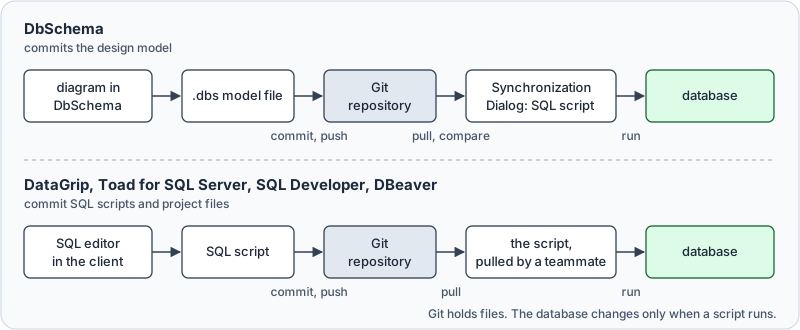
The third column deserves a look before a purchase, because the tiers do not line up. DataGrip adds Git through a plugin. Toad needs the version control system's own client beside it. DBeaver builds it into Enterprise and Ultimate and leaves Community to an extension. In DbSchema, Git arrives with Pro, the same edition that saves the model to a file, since the model file is what Git versions.
What one schema change looks like in Git
Take a table defined in a script under Git:
CREATE TABLE customers (
    id   integer NOT NULL,
    name varchar(100) NOT NULL
);
Someone adds an email column in the SQL editor and commits. git diff shows the reviewer this:
 CREATE TABLE customers (
-    id   integer NOT NULL,
-    name varchar(100) NOT NULL
+    id    integer NOT NULL,
+    name  varchar(100) NOT NULL,
+    email varchar(200)
 );
One column was added, and the diff shows three lines added and two removed: name gained a comma, and the author re-aligned the columns. The reviewer has to work out which of those lines change the schema. The diff also carries no ALTER TABLE for a database that already has the table.
DbSchema saves the same table into the .dbs file as XML. This is the file DbSchema 10.5.2 writes for it, with the table placed on one diagram:
<?xml version="1.0" encoding="UTF-8" ?>
<project name="shop" database="PostgreSQL" id="b474c8d5-7846-4889-a32f-f893d0dc650b" >
	<schema name="public" >
		<table name="customers" >
			<column name="id" type="integer" mandatory="y" />
			<column name="name" type="varchar" length="100" mandatory="y" />
		</table>
	</schema>
	<diagram_group name="Default" id="ce2aa11c-600b-4399-ab7a-23db583951a6" >
		<diagram name="shop" id="dcd94012-8117-40d6-9daa-ffcbace76f52" show_relation="columns" >
			<entity schema="public" name="customers" color="3986C1" x="57" y="57" />
		</diagram>
	</diagram_group>
</project>
Adding the column in DbSchema and saving the model changes one line of that file:
 		<table name="customers" >
 			<column name="id" type="integer" mandatory="y" />
 			<column name="name" type="varchar" length="100" mandatory="y" />
+			<column name="email" type="varchar" length="200" />
 		</table>
Neither commit touched a database. Comparing the new model with the old one, DbSchema generates the statement that turns one into the other:
ALTER TABLE "public".customers ADD email varchar(200) ;
A script diff is exact about syntax, and a model diff is exact about structure, one line per column. DbSchema gives the reviewer the second and writes the ALTER TABLE from it.
How DbSchema versions the model in Git
DbSchema saves the whole design into one .dbs file: tables, columns, foreign keys, and the diagrams laid out over them. Put that file in a Git repository and the schema gets the same branches, merges and rollbacks as source code. One repository can hold several .dbs files, one per database or per component.
In the Model menu, Git — Collaborative Design opens the Git dialog, and the whole cycle runs inside DbSchema:
- Paste the repository URL and choose an empty local folder, and DbSchema clones the repository into it.
- Select the changed files and click Stage, then type a message and click Commit.
- Click Push to send your commits to the shared repository. GitHub and Bitbucket want a personal access token instead of your account password.

- Click Pull to fetch and merge what your teammates pushed, then click Compare with Current to open their changes in the Synchronization Dialog.
- In the Synchronization Dialog, apply the differences to your local database, or generate an SQL migration script.
Stash and Pop park uncommitted work while you pull or switch branches, and Create Branch isolates a feature or an environment.
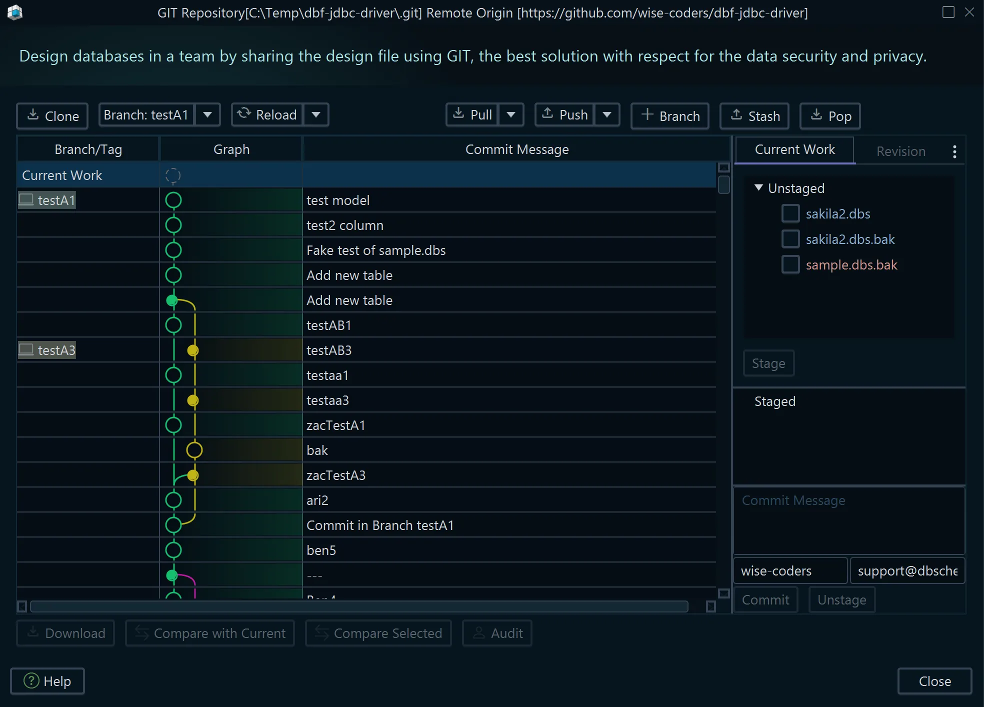
Pull, merge and commit change the .dbs file and nothing else. The database stays as it was until you run the script that the Synchronization Dialog produced, which is the step that turns a schema diff into a migration.
If SSH key authentication fails, convert the private key to the classic OpenSSH format:
ssh-keygen -p -f <privateKeyFile> -m pem -P passphrase -N passphrase
How the other four clients use Git
DataGrip by JetBrains
DataGrip works with Git, Subversion and Mercurial through plugins. JetBrains' FAQ states that the version control support is not bundled, and you install the plugin from Settings, Plugins[1]. Git then versions the files of your DataGrip project, such as your SQL scripts, and a reviewer reads a text diff like the first one above. DataGrip is free for non-commercial use, Git included, and JetBrains requires a commercial license for work you are paid for[2]. For how DataGrip compares on schema design rather than on version control, see DataGrip alternatives.
Toad for SQL Server
Toad for SQL Server keeps revisions of database objects and SQL scripts under version control: tables, views, stored procedures, functions, sequences, and the other object types its help lists[3]. That help, for Toad 6.6, names Subversion and Team Foundation Server as providers, plus a file-system-based provider for any other system. With that provider, Toad works on a local folder and you commit with the version control system's own client, which for Git means git or another Git client installed beside Toad. Renaming an object under version control drops its history, and the renamed object starts a new one.
SQL Developer by Oracle
SQL Developer has integrated support for Git and Subversion, reached from the Team menu[4]. Its preferences carry a "Versioning: Git" pane, where you choose, for instance, whether new files in the working copy are added to the repository when you commit. What goes into Git is the files you work on, which for a schema means its SQL scripts, and the review is the text diff between two versions of a script.
DBeaver
DBeaver's Git integration is in the Enterprise and Ultimate editions, and Community users install a Git extension to get it[5]. It keeps the project's configuration, scripts, diagrams and bookmarks in the repository, and it is built on the Eclipse platform's Git support. For the design-tool comparison rather than the Git one, see DBeaver alternative.
Two ways teams share a database
In the Git-based workflow, each person pulls the latest version, changes a local copy and pushes it back to the shared repository. Everybody works from the most recent version, and every change carries a name. Before a release, a visual schema diff shows whether the merged model is the one you meant to deploy, and DbSchema generates the DDL from it. For where a visual diff fits against a code-only tool, see visual schema diff or a code-only migration library.
In the shared environment workflow, everyone connects to the same development database and changes it in place. Git is not involved, so nothing records who changed what, and the coordination is people telling each other what they are about to alter before somebody else deploys.
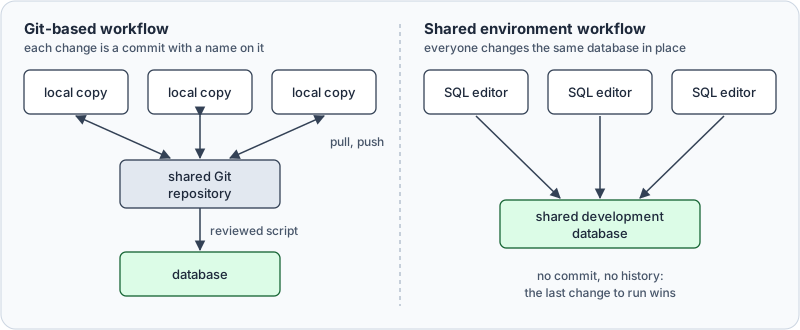
Which of the two you are in decides what to install. The shared environment needs no Git client at all. The Git-based workflow needs one, and what it commits decides what your reviewer reads. If the design should be reviewed before it lands, DbSchema keeps the model in Git and applies it through the Synchronization Dialog, so the review is a model diff rather than a wall of DDL.
Once the model file is in Git, a teammate's schema change reaches you as a commit you can read, rather than as a database that stopped matching your diagram. Download DbSchema from https://dbschema.com/download.html, connect to your database, reverse-engineer the schema, save it as a .dbs file and commit it from the Git dialog to a repository your team can reach. The Git dialog, saving the model to a file and schema synchronization are Pro and Architect features, which the 15-day Architect trial covers; the free Community Edition connects, reverse-engineers and draws the diagrams.
Sources
- DataGrip FAQ, "What about version control systems?" (JetBrains documentation)
- DataGrip is now free for non-commercial use (JetBrains blog, 2025-10-01)
- Toad for SQL Server 6.6 help, "About Version Control"
- SQL Developer User's Guide, "Using Versioning" (Oracle documentation, release 24.3)
- DBeaver, GIT integration (DBeaver documentation)
Put your schema under version control
DbSchema saves your design as a single .dbs file you can commit, branch and review in Git, and compares it against a live database before you deploy. The Git dialog and schema synchronization are Pro and Architect features; the Community Edition is free and the Architect trial runs 15 days.









