DBeaver Alternative for 2026: Why DbSchema Fits Database Design Better
For the person who already runs DBeaver and now has to design a schema, document it and get it reviewed before it reaches a server.
On this page
DBeaver has the live database open in front of you, and the next job is a table nobody has created yet: drawn, reviewed and agreed before it reaches a server. DbSchema is the DBeaver alternative for that work. It keeps the design in a model file that your team reviews in Git, exports documentation anyone can open in a browser, and compares the file with the live database before the change is deployed.
Both products start free. The DbSchema Community Edition connects to every supported database, reverse-engineers it into an interactive diagram, and includes the SQL editor. DBeaver Community covers connections, the data editor and the SQL editor[2]. Past that, the design work on this page is in DbSchema Pro, while DBeaver puts diagram editing, schema compare and Git in its Enterprise and Ultimate editions[1].
Why DBeaver users look for an alternative
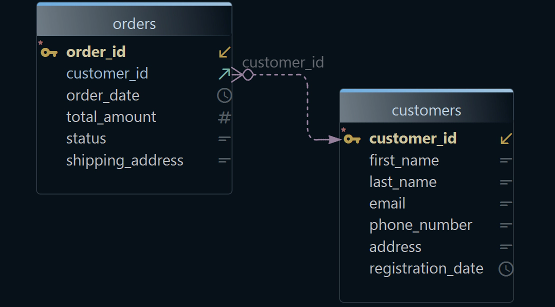
The search usually starts when the job changes from reading a database to designing one. Diagrams in DBeaver are read-only by default[3], and a custom diagram can hold only objects that already exist in a connected database[5]. Edit mode turns the diagram into a schema editor where you can add a new table, but it ships in the Enterprise and Ultimate editions only. When you click Save, DBeaver shows the SQL script generated from your edits and applies it to the database[4].
Designing a schema asks for more than that. You want to see the whole database as a diagram and draw new tables on it before any server has them. You want to share the design with your team and review each change the way you review code. And you want documentation that stays current without anyone writing it by hand, plus a way to look at related rows without writing the joins.
The difference between the two products is where the design lives while that happens:
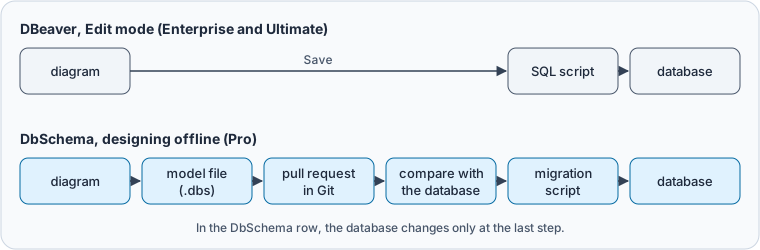
When you design offline in DbSchema, a diagram edit goes to the model file and nowhere else. The database changes only when you compare the file with it and run the migration script, so a colleague can review the design in a pull request before any server sees it.
DbSchema vs DBeaver, capability by capability
Each row names the edition a capability needs, because the edition decides the bill.
| Capability | DbSchema | DBeaver |
|---|---|---|
| Diagram of an existing database | Community, editable | Community, read-only by default |
| New table on the diagram | Community, created in the connected database; offline in the model file, Pro | Edit mode, Enterprise and Ultimate, applied to the database |
| Reverse engineering | Community | Community, over any JDBC driver |
| Schema comparison | Model against database, or model against model, Pro | Two databases, Enterprise and Ultimate |
| Documentation output | Interactive HTML5, PDF and Markdown, Pro | Diagram image as PNG, GIF or BMP, or GraphML; SVG in the PRO editions |
| Version control | One model file, from inside DbSchema, Pro | The whole project through Eclipse EGit, Enterprise and Ultimate |
| MongoDB | Community | Lite, Enterprise and Ultimate |
| Visual query builder | Pro | Lite, Enterprise and Ultimate |
| SQL editor | Community | Community |
| License | Perpetual with one year of updates, or monthly subscription | Yearly or monthly subscription |
The two schema comparisons answer different questions. DBeaver's shows how two servers differ. DbSchema's shows how far the database has drifted from the design your team agreed. If that answer feeds a deployment, read the security questions to ask about a schema sync tool before either product gets write access.
DbSchema Pro is sold as a perpetual license or a monthly subscription. The perpetual license includes one year of updates and support; after that you keep the version you're entitled to, and a renewal buys the later releases. The purchase page shows the current price in your own currency, on separate tabs for Business, Personal and Universities & Students. DBeaver bills 113, 255 and 510 USD a year for Lite, Enterprise and Ultimate[1], and its visual query builder starts at Lite[11]. It stopped selling perpetual licenses after version 23.3, and an expired subscription blocks access[10].
Designing and reviewing a schema in DbSchema
Design tables before the database has them
To create a table in DbSchema, right-click the empty canvas of the diagram, then name the table and add its columns in the table dialog. To draw a foreign key, drag a column of the child table onto the column it references in the parent table. A wide schema splits into several diagrams in one model, each with its own layout and its own set of tables.
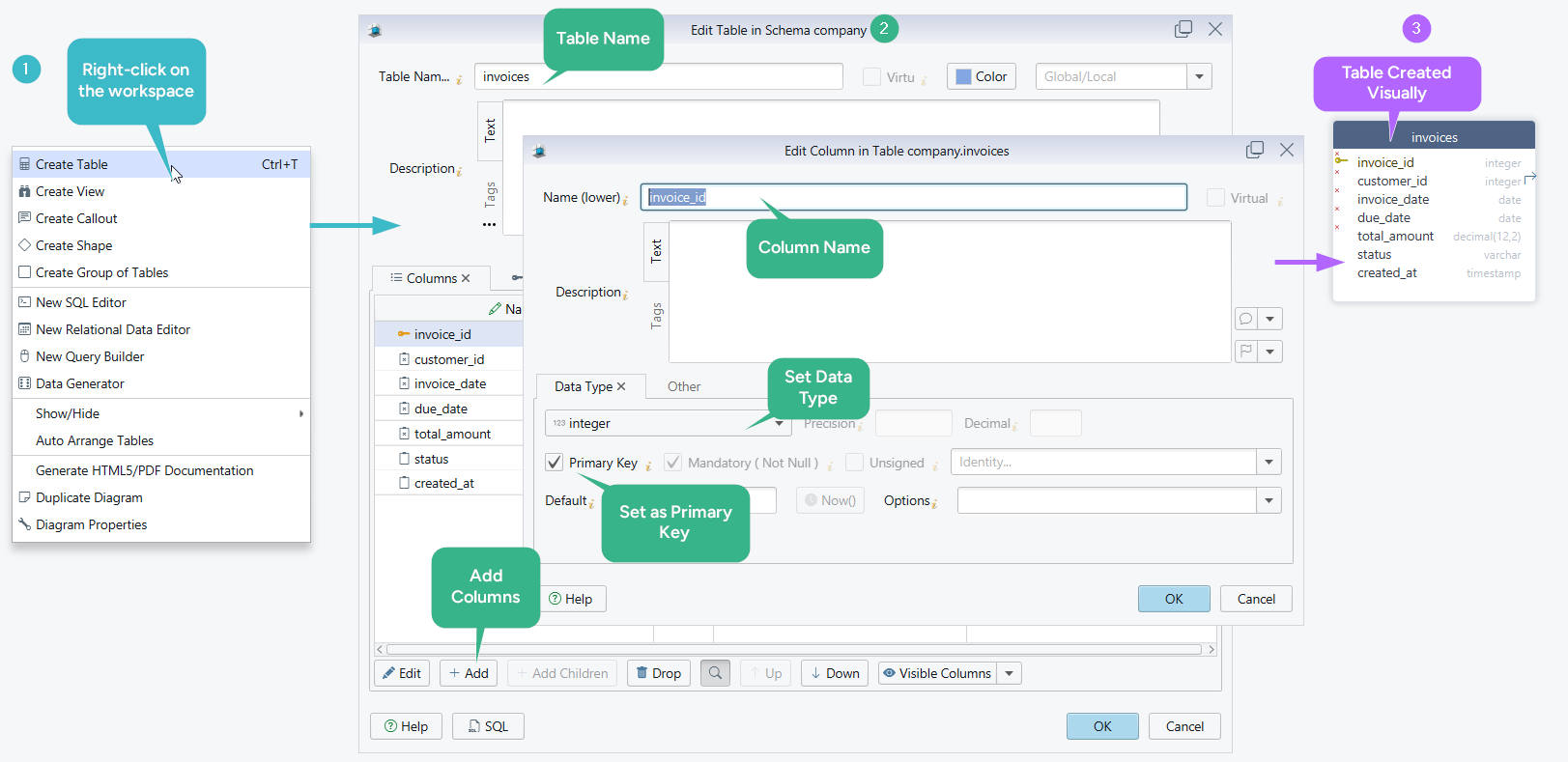
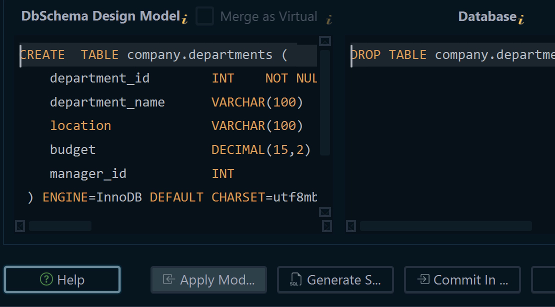
While DbSchema is connected, a new table is created in the database and in the model at the same time. Choose Disconnected from the connection menu and every edit goes to the model file only, which is how you design a schema that no server has yet. Designing offline and saving the model to a file are Pro. The logical design guide covers the Architect layer above the tables, and ER diagram tools for large schemas covers layouts for hundreds of tables.
Review each schema change in Git
DbSchema saves the design as one model file, plain XML that holds the tables, columns, foreign keys, diagrams and comments. Because the file is text, a pull request shows a schema change as a few changed lines. Here is the diff for one new column:
    <table name="teams" row_count="0" spec="" >
      <column name="id" type="integer" length="32" mandatory="y" >
        <identity><![CDATA[GENERATED BY DEFAULT AS IDENTITY]]></identity>
      </column>
      <column name="name" type="varchar" length="100" mandatory="y" />
      <column name="city" type="varchar" length="100" />
+     <column name="founded_year" type="integer" length="32" />
      <index name="pk_teams" unique="PRIMARY_KEY" >
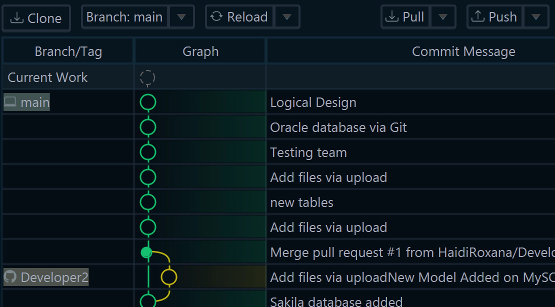
A reviewer reads that teams gains an integer column founded_year. The attribute mandatory="y" is the column dialog's Mandatory (Not Null) checkbox, so its absence says the new column accepts NULL. Clone, pull, branch, commit and push the file from DbSchema's Git dialog. After a pull, Compare with Current opens the Synchronization Dialog on what changed. Committing changes only the repository; the database changes when you synchronize. Model versioning is Pro.
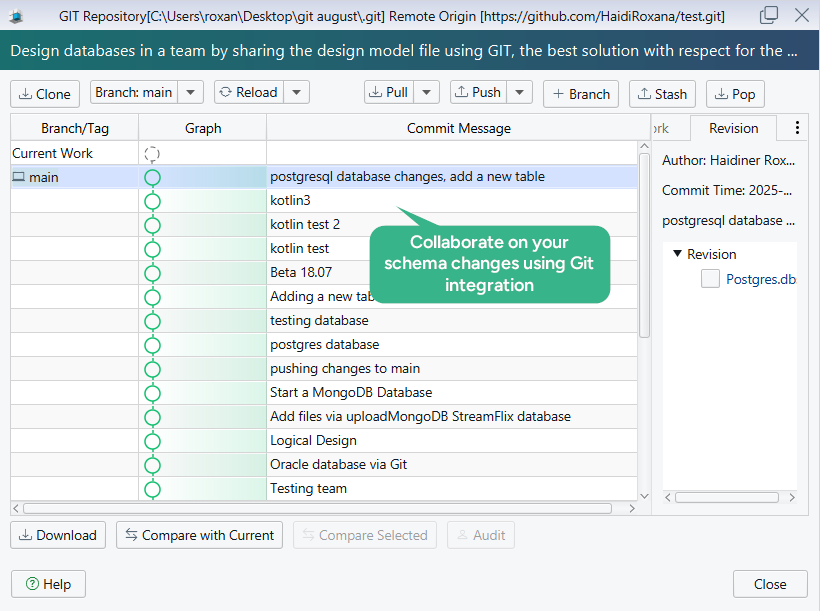
DBeaver versions through Eclipse EGit, bundled in Enterprise and Ultimate and available to Community as a manual extension. What it puts in the repository is the project: configurations, scripts, diagrams and bookmarks[8]. DBeaver commits a workspace; DbSchema commits a model.
Documentation, comparison and data from the model
Publish documentation from the model
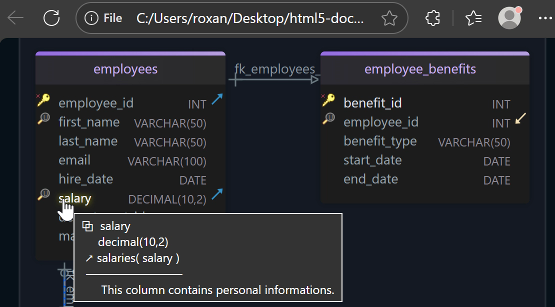
DbSchema Pro exports the model as HTML5, PDF or Markdown from Diagram → Export HTML5 or PDF Documentation. You choose which diagrams go in and which elements, down to indexes and comments (schema documentation). The HTML5 output opens in any browser with no server behind it. It carries the diagram as a vector image, a searchable table list and full column details, and the descriptions of tables and columns show as mouse-over tooltips. The Markdown output can sit next to the source code in the same repository.
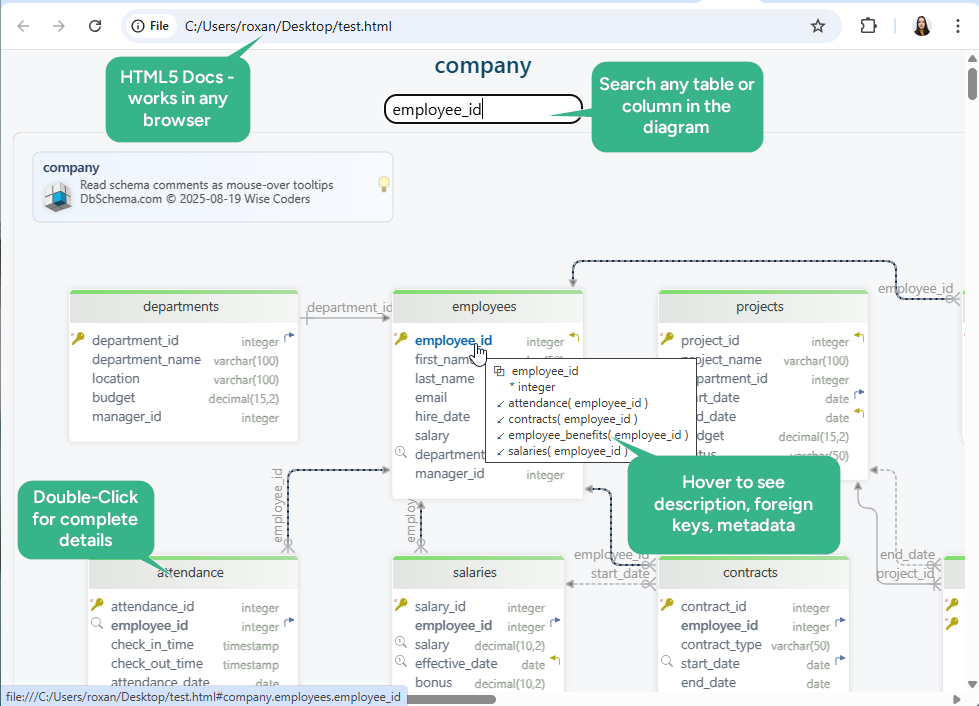
DBeaver's documentation describes no documentation generator. Its diagram export produces images and GraphML[3], which are pictures and a graph format rather than a data dictionary.
Compare the model with the database
When the design and the database drift apart, DbSchema Pro compares them object by object, from Schema → Compare Model with Database. For each difference you choose whether to update the model, push the change to the database, or skip it, and the Synchronization Dialog generates the SQL statements for the database side. The same comparison runs between two model files, so two saved designs can be compared with no server involved.
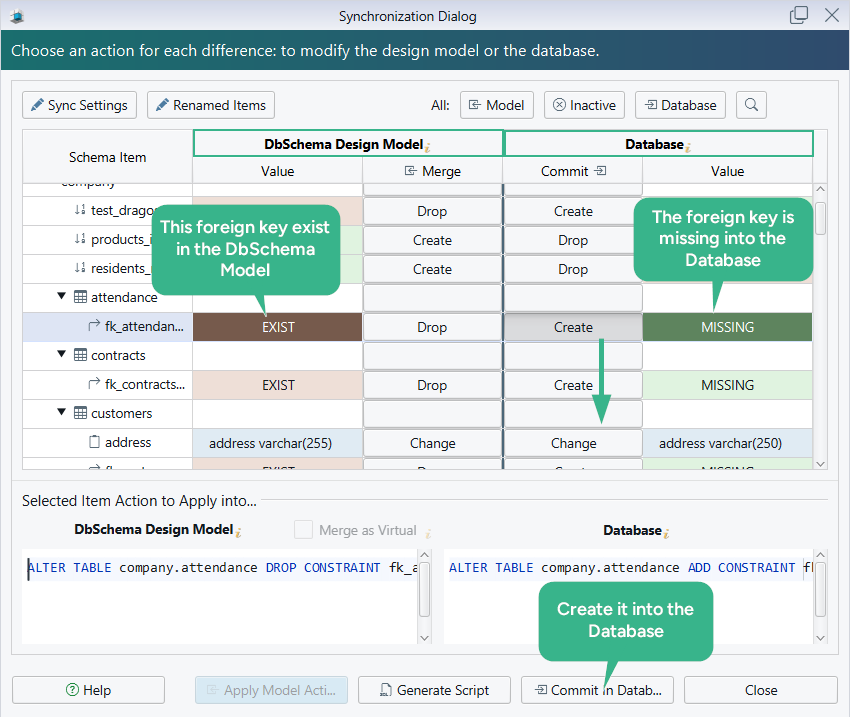
DBeaver has a schema compare in Enterprise and Ultimate that reads both sides with Liquibase snapshots and generates the DDL to make a target match a source[7]. Both sides of that comparison are databases, the difference that the capability table explains.
Browse related data and fill test rows
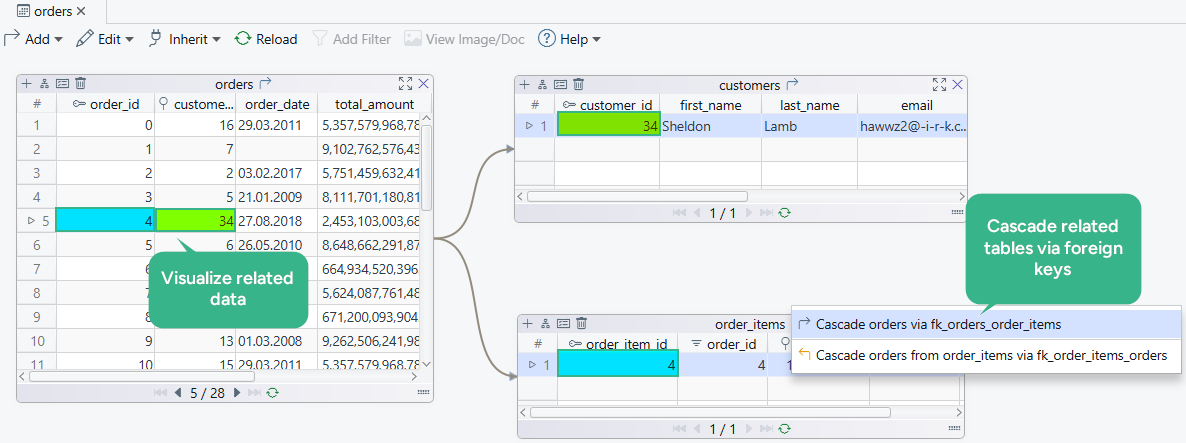
Two Pro tools cover the work that starts once the model exists. The Relational Data Editor opens a parent table with its child tables over the foreign keys. Select a row in the parent and every child pane shows only the matching rows, cascading as many levels as the schema has. The Data Generator fills a new schema with test rows, populating each referenced table before the tables that point at it.
Other DBeaver alternatives and what their diagrams do
Most DBeaver alternatives are SQL clients. For the work on this page, what separates them is what their diagram is: a design you can change before the database has it, or a picture of foreign keys that already exist.
| Tool | What the diagram is | Saved or exported as |
|---|---|---|
| DbSchema | the design, edited on the diagram, offline in Pro | a model file (.dbs) in plain XML |
| Navicat | a model designed from scratch | a model workspace, shared through Navicat Collaboration |
| dbForge Studio | a database diagram with visual table design | a .dbd diagram file |
| DataGrip | the structure of existing database objects | PNG, Mermaid, PlantUML, draw.io and other formats |
| DbVisualizer | a references graph of existing primary and foreign keys | PNG, SVG, PDF and other image formats |
Navicat Premium designs a database graphically from scratch and connects to MySQL, PostgreSQL, MongoDB, MariaDB, SQL Server, Oracle, SQLite, Redis and Snowflake. It shares model workspaces with coworkers through Navicat Collaboration, a cloud sync[12]. Navicat Data Modeler, the separate modeling product, compares a model with a database through Synchronize to Database and prints models to files[13].
dbForge Edge bundles one dbForge Studio each for SQL Server, MySQL and MariaDB, Oracle and PostgreSQL, with schema compare, source control and a documenter[14]. A dbForge diagram saves as a .dbd file[15], and the documenter writes HTML, PDF and Markdown[16]. dbForge Studio is a Windows application that runs on macOS and Linux through CodeWeavers CrossOver[17].
DataGrip's diagrams show the structure of the database. You add a table to one by dragging it from the Database Explorer, and you export the diagram as PNG or to Mermaid, PlantUML, draw.io and other formats[18]. DbVisualizer draws its references graph from the primary and foreign keys that exist, in both Free and Pro[19], and compares schemas one object type at a time in Pro[20]. Beekeeper Studio has a free Community Edition and paid plans, and shows an interactive, auto-generated ERD of the tables, columns and relationships[21].
In DbSchema, the design is a plain XML file that goes through your own Git review and is compared with the database before it's deployed, and the free Community Edition connects to every database DbSchema supports. For the wider field, see Best Database Schema Design Tools, Best ER Diagram Tools, Best Tools for Database Documentation and DBeaver alternatives for visual database design.
The jobs DBeaver is built for
DBeaver's paid editions reach into running the server. Database backup tools, server health dashboards, the task scheduler and data migration are in Enterprise and Ultimate, and native AWS, Google Cloud and Azure support and the cloud explorer are in Ultimate[1]. DBeaver also sells CloudBeaver and a Team Edition.
Engine coverage is tiered on that side too. DBeaver's MongoDB support ships in the Lite, Enterprise and Ultimate editions[9], while every engine DbSchema supports is in the free Community Edition, MongoDB included. For a MongoDB collection, DbSchema reads a configurable sample of its documents and infers the structure: field names, BSON types, nested objects and arrays. That structure describes what the documents contain, not a schema MongoDB enforces.
Comparing two live servers belongs on the same list, as the capability table shows. If your team owns both servers and schemas, the two questions land on different desks, and DbSchema answers the schema one.
Best fit by role
| Role or need | Fit | Why |
|---|---|---|
| designing a schema before implementation | DbSchema | tables are drawn before they exist, offline in Pro |
| shareable database documentation | DbSchema | HTML5, PDF and Markdown from the model, Pro |
| onboarding to an unfamiliar schema | DbSchema | several diagrams, plus data browsing over the foreign keys |
| gating a schema change before release | DbSchema | model-against-database comparison and a reviewable script |
| learning how a database fits together | DbSchema | any database reverse-engineered into a diagram, free |
| backups, monitoring and scheduled tasks | DBeaver | administration features in Enterprise and Ultimate |
| working inside AWS, Google Cloud or Azure | DBeaver | native cloud support in Ultimate |
Switching from DBeaver to DbSchema
The move is short, because both products reach the database over JDBC[6]. They disagree only about where the truth lives: DBeaver's truth is the server, and DbSchema's is the model file.
- Download DbSchema and install it. A new installation starts a 15-day free Architect trial, which covers the Pro features; after it ends, DbSchema reverts to Community.
- Choose Connect to Database, pick the database type, and enter the host, user and password you use in DBeaver. DbSchema downloads the JDBC driver for you.
- Select the schemas to reverse-engineer. DbSchema draws their tables and foreign keys as a diagram.
- Split the tables into the diagrams your team wants, then save the model file and commit it to Git. Saving the model is Pro.
- Open your saved
.sqlscripts in the DbSchema SQL editor, which is in Community.
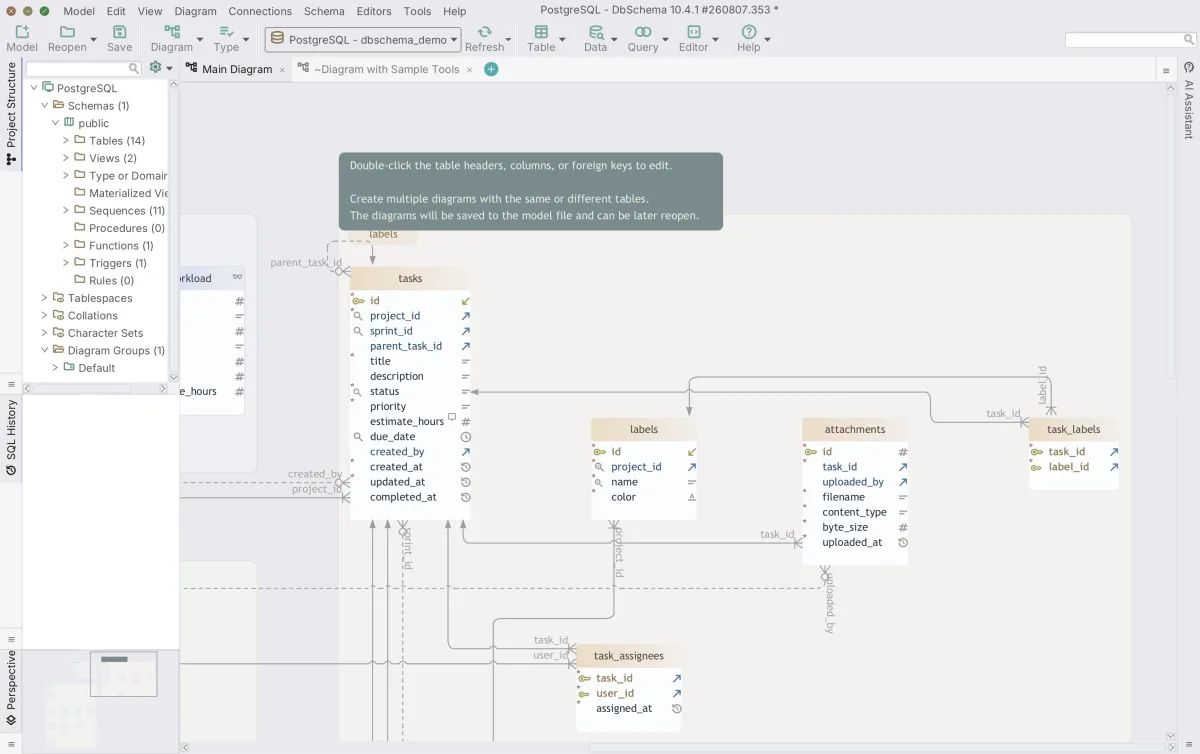
Diagram layouts are the one thing you arrange again. DBeaver exports a diagram as an image or GraphML[3], while DbSchema imports a design from SQL DDL, CSV or Excel files or from a folder of migration scripts, so the layout starts fresh. Eclipse perspectives and plugins stay with DBeaver. Once you've arranged the diagrams, their layout is saved in the model file.
Download DbSchema at https://dbschema.com/download.html, connect it to a database you already run in DBeaver, and let it reverse-engineer the schema into a diagram you can edit. Connecting, reverse engineering, the interactive diagrams and the SQL editor are in the free Community Edition. Documentation, schema synchronization, the Query Builder and saving the model to a file for Git are in DbSchema Pro, and logical and conceptual design is in Architect. The purchase page shows the current prices.
FAQ
What is the best DBeaver alternative for database design?
DbSchema, because its diagram is a design saved in a model file, which you document, review in Git and compare with the live database. DBeaver puts diagram editing behind Edit mode in Enterprise and Ultimate[4], and its edits go to the database when you save.
Which other tools do people use instead of DBeaver?
DataGrip, DbVisualizer, Beekeeper Studio, Navicat and dbForge Studio are SQL clients that connect to several engines. The table of other alternatives compares what their diagrams do.
Can DbSchema connect to existing databases like DBeaver?
DbSchema connects over JDBC from the free Community Edition, reverse-engineers the schemas you select, and draws them as interactive diagrams. Documentation, synchronization and saving the model to a file are Pro.
Which tool is better for ER diagrams, DbSchema or DBeaver?
DbSchema, if you intend to edit the diagram, because the diagram is the design surface and its layout is saved with the model. DBeaver's diagrams are read-only by default, and editing them needs Edit mode in Enterprise or Ultimate.
Should I switch from DBeaver to DbSchema?
Switch when your team keeps asking for editable diagrams, shareable documentation, a review gate for schema changes or a schema model in Git. Those are Pro features, and the Architect trial runs 15 days and can be extended by another 15, so you can run the whole workflow on your own schema first.
Sources
- DBeaver, compare products and pricing
- DBeaver Community, free open-source database management tool
- DBeaver documentation, entity relation diagrams
- DBeaver documentation, diagram edit mode
- DBeaver documentation, custom diagrams
- About DBeaver Community
- DBeaver documentation, structure and data compare
- DBeaver documentation, Git integration
- DBeaver documentation, MongoDB authentication
- DBeaver documentation, license types
- DBeaver documentation, Visual Query Builder
- Navicat Premium
- Navicat Data Modeler
- dbForge Edge
- dbForge Studio for SQL Server documentation, creating a database diagram
- dbForge Documenter for SQL Server, documentation formats
- dbForge Studio for MySQL, installing on Linux and macOS
- DataGrip documentation, database diagrams
- DbVisualizer, references graphs
- DbVisualizer documentation, comparing schemas
- Beekeeper Studio features
Switch to a design-first workflow
DbSchema covers ER diagrams, documentation, Git-friendly model files and schema sync. Start on the free Community Edition and upgrade when your team is ready.