Best ER Diagram Tools in 2026: Free and Paid Comparison
For the developer or architect picking an ER diagram tool, who needs the diagram to still be useful a month after the first screenshot.
On this page
An ER diagram tool gets asked to do three different jobs: draw a schema before it exists, read a database somebody left behind, and hand that shape to people who never open a database client. DbSchema is the pick because it does all three out of one model file. It reverse-engineers a live schema into a diagram you edit, splits a large schema across several diagrams in one project, compares the model against the database before you deploy, and exports the result as interactive HTML5.
DBeaver, MySQL Workbench, pgModeler and dbdiagram.io each take on part of that path, and the table below is arranged so you can see which part.
Best ER diagram tools at a glance
| Tool | Live reverse engineering | Engines supported | Free vs paid | Offline desktop | Large schema layouts | Export and docs | Team and Git sync |
|---|---|---|---|---|---|---|---|
| DbSchema | Yes, SQL and NoSQL | 70+ engines | Free Community, paid Pro | Yes: Windows, Mac, Linux | Multiple diagrams per project | Interactive HTML5 and PDF | XML model file in Git |
| DBeaver | Yes | 100+ engines | Free Community, paid editions | Yes | Basic auto-layout | Image export | Git sync in Enterprise, Ultimate, Team |
| MySQL Workbench | Yes | MySQL only | Free | Yes | Single canvas | PDF and image | Manual file sharing |
| pgModeler | Yes | PostgreSQL only | Paid, or build from source | Yes | Single canvas | SQL and HTML | Manual file sharing |
| dbdiagram.io | No, SQL script import only | PostgreSQL, MySQL, SQL Server | Free and paid | No, browser only | Basic grouping | PDF, PNG, SQL | Paid team sharing |
Two columns decide most shortlists. Live reverse engineering is what separates a tool you point at an existing database from one you retype the schema into, and dbdiagram.io is on the far side of that line: it imports a SQL script rather than reading a server. Large schema layouts is the column nobody weighs until a hundred tables land on one canvas at once.
Engine coverage only counts against your own estate. A tool that reaches a hundred engines and a tool that reaches one are the same tool to a team that runs MySQL and nothing else. The number matters the moment a second engine appears, because a single-engine tool then becomes a second license, a second diagram, and a second thing to keep in step with the first.
How to choose an ER diagram tool
Start from where the schema is. If the database already exists, live reverse engineering is the feature that matters, because without it you copy the structure across by hand and it is wrong the first time someone deploys. If the database does not exist yet, offline design is the one, since a browser tool that wants a connection cannot help you draw what nothing has created.
Engine coverage is the second filter, and it changes the shortlist more than any other. A MySQL-only team can also weigh MySQL-only tools, and DbSchema covers MySQL design, synchronization and HTML5 documentation as well. A team running PostgreSQL on one side and MongoDB on the other cannot, and that is the point at which the cross-engine tools separate from the single-engine ones.
Free tiers cover the drawing. dbdiagram.io, and the Community editions of DBeaver and DbSchema, all produce a schema diagram without a license, so the free-versus-paid question is not about whether you get a picture. What the paid tiers add is everything after the picture: an offline model file, schema synchronization, interactive HTML documentation, and a design that Git can version. In DbSchema those are the Pro edition, and the diagrams themselves stay free.
DbSchema
DbSchema treats the ER diagram as a model it keeps rather than a picture it exported once. Connect to a database and it reads the schema into a diagram with the foreign key lines already drawn; connecting, reverse-engineering and the diagrams are in the free Community Edition.
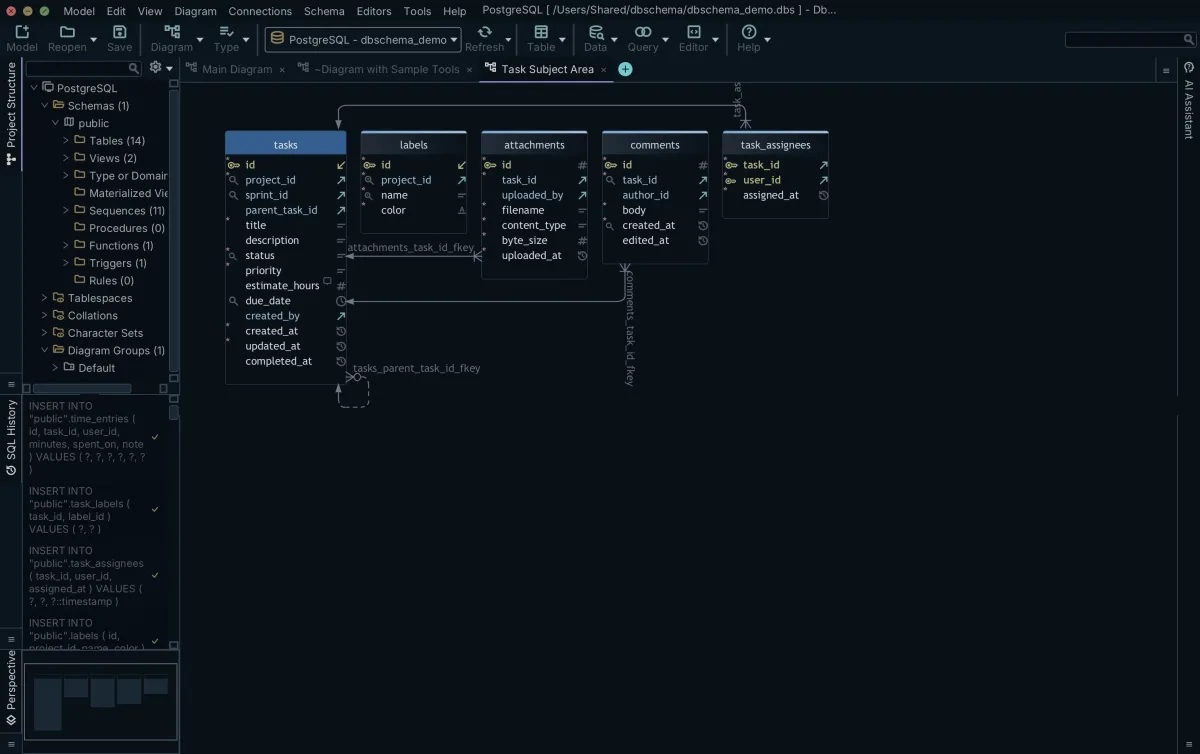
The diagram is editable in place. Right-click the canvas and choose New Table, double-click a table header to open the Table Dialog and manage columns, indexes and foreign keys, and drag from a column in the child table to the matching column in the parent to draw a foreign key. Where the database enforces no foreign keys, the same drag creates a virtual foreign key that is stored in the project file and never sent to the database, and both the Query Builder and the Relational Data Editor follow it as though it were real.
Large schemas get two answers. Diagram → Auto Arrange lays out overlapping tables with a graph algorithm, and one project holds many diagrams, added from the Diagram menu or the "+" tab, each with its own layout and its own set of visible tables. A hundred-table database becomes four diagrams a colleague will actually read. File → Export writes any of them as PNG, SVG, PDF, Markdown or HTML5, and the HTML5 output is searchable, zoomable and carries column descriptions as tooltips.
It is worth being precise about what changes where. Editing a table on the diagram changes the .dbs model file and nothing else. The database changes only when you open Schema → Synchronize Model with Database and execute the SQL it generates from the difference. Saving that model file, the documentation export and schema synchronization are Pro; logical and conceptual design is Architect. The product page is Database Design Tool.
Other tools worth comparing
DBeaver draws its ER diagram from the connection you have open, in the same window you run queries in, and reaches any database with a JDBC driver. MySQL Workbench is Oracle's own tool for MySQL and covers EER diagrams with forward and reverse engineering on a single canvas. pgModeler goes deep into PostgreSQL-specific objects and no others; its Community edition is source code you compile, and the pre-built binaries belong to the paid edition. dbdiagram.io needs no install at all: you type DBML or import a SQL script in the browser and share the diagram by URL, without a connection to a running database.
Each of those answers a narrower question than the one this page opened with, whether that is one engine, one canvas, or a diagram with nothing to install. DbSchema answers all three of the reasons at the top out of the same model file, which is what the last three columns of the table measure. For the wider field, see Best Database Schema Design Tools in 2026 and DBeaver Alternative, DbSchema.
Reverse engineering an ER diagram from an existing database
Inheriting an undocumented database is one reason to go looking for an ER diagram tool. Reverse engineering means connecting to the live database, reading its metadata, and drawing the tables, columns and foreign keys without typing any of it in.
In DbSchema that happens as soon as the connection opens: the schema arrives as a diagram with the foreign key lines in place, and it lands in the .dbs project file rather than in the database, which the read leaves exactly as it was. Diagram → Auto Arrange untangles the overlap, and you split the result across several diagrams so that each covers one subject area instead of the whole estate.
The relations a database never declared are the gap that reverse engineering alone cannot close. MongoDB does not enforce foreign keys, MySQL on MyISAM does not, and legacy schemas frequently carry none. Drag a column onto the column it references and DbSchema asks whether to create a real foreign key or a virtual one; the virtual one is kept in the project file, drawn on the diagram like any other line, and used for joins by the Query Builder and the Relational Data Editor.
Database-specific ER diagram guides
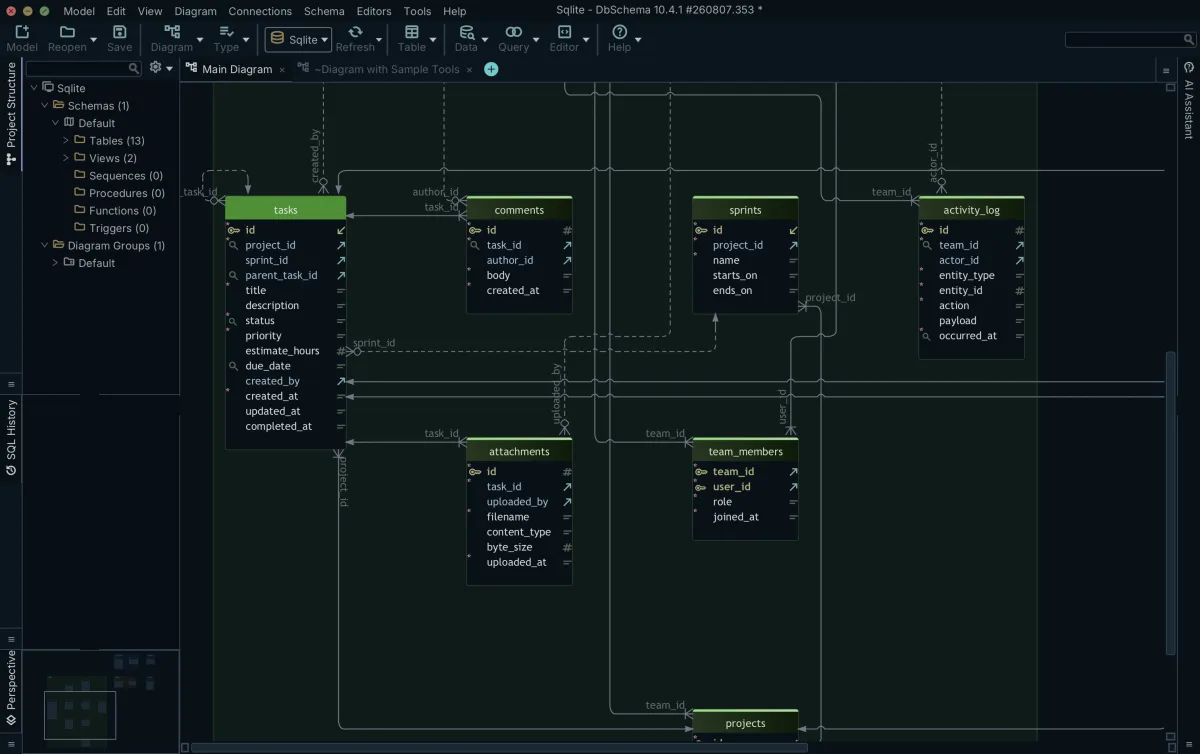
Engine-specific tutorials show these steps against a real schema. On SQLite, DbSchema opens the local file and draws its tables, views and declared foreign keys; where the file declares no relation between two tables, you drag one column onto the other and DbSchema keeps the result in the project file as a virtual foreign key. The same pattern repeats on the other engines below.
- PostgreSQL ER diagrams
- MySQL ER diagrams
- SQLite ER diagrams
- MongoDB database diagrams
- Top free ER diagram tools
Drawing a diagram stops being the whole job as soon as the schema needs review, documentation and a way to reach the database, and a single model file is what carries all three. Download DbSchema at https://dbschema.com/download.html, connect to the database nobody has drawn yet, and split what comes back across as many diagrams as it takes to keep each one readable. The diagrams are free in Community Edition. The model file you save afterwards, the HTML5 and PDF export and schema synchronization belong to Pro.
Create ER diagrams in minutes
DbSchema reverse-engineers your database into an editable diagram, splits a large schema across several diagrams, and exports interactive HTML5 documentation. The diagrams are in the free Community Edition; documentation export and schema synchronization are Pro.









