Top Free PostgreSQL ER Diagram Tools (2026): Compared
For the developer or architect who has to diagram a PostgreSQL schema without a budget, whether the database already exists or is still on paper.
On this page
You have a PostgreSQL database with forty tables and no picture of it, and the budget for a diagram tool is zero. DbSchema is the free one to start with: its Community Edition connects to PostgreSQL over JDBC and reverse-engineers the live schema into interactive diagrams, with no signup and no expiry date.
Seven other tools want the same job, and they split into three groups.
- pgModeler and Luna Modeler are desktop modelers you install
- DBeaver is a SQL client that draws a diagram of the connection you already have open
- SQLDBM, dbdiagram.io, ChartDB and QuickDBD run in a browser tab
If you want a PostgreSQL-specific walkthrough, also read Create ER Diagrams for PostgreSQL and Design a PostgreSQL Schema.
What separates one free PostgreSQL diagram tool from another
Four things separate them, and the free tiers differ on all four.
- reading a running PostgreSQL server, rather than parsing a SQL dump you paste in
- designing a schema that does not exist yet, which half of these tools cannot do
- writing changes back to the server as DDL
- the table limit at which the free tier stops
The last one decides the question fastest. A free tier capped at 10 tables cannot draw the forty-table database you started with, whatever else it offers.
| Tool | Free tier | Reads a live database | Runs on the desktop | Writes DDL back |
|---|---|---|---|---|
| DbSchema | Community Edition, no expiry | Yes | Yes | Yes, with Pro schema synchronization |
| pgModeler | Source code under GPLv3 | In the paid Plus edition | Yes | In the paid Plus edition |
| DBeaver | Community Edition, open source | Yes | Yes | Not from the diagram |
| SQLDBM | None listed, quote on request | From a DDL import or a cloud connector | No | Scripts you run yourself |
| dbdiagram.io | 10 diagrams | Only through the command-line connector | No | No |
| ChartDB | 1 database, 10 tables | Through a query you run yourself | No | No |
| QuickDBD | 1 public diagram, 10 tables | No, SQL import only | No | No |
| Luna Modeler | 14-day trial | Yes | Yes | Yes, as a sync script |
DbSchema
DbSchema installs on Windows, macOS and Linux, and every new installation starts with a 15-day trial of the Pro features that needs no credit card. When the trial ends the application reverts to the free Community Edition, which gives you:
- a connection to PostgreSQL through its JDBC driver
- the live schema reverse-engineered into interactive diagrams
- the SQL editor in the same window, running against the connection the diagram came from
- the same treatment for over 100 other databases, so a diagram drawn against MySQL, Oracle or MongoDB works the way the PostgreSQL one does
The same table can appear on several diagrams, so a large schema becomes a handful of readable views of one subsystem each instead of one wall of boxes. Saving that design to a .dbs file, schema synchronization against the live database and interactive HTML5 documentation are Pro features. The .dbs file is plain XML, so a design change is reviewed in Git like a code change.
The DbSchema ER diagram tool page covers the diagram canvas on any of the databases DbSchema reads.
pgModeler
pgModeler is a PostgreSQL-only desktop modeler built with Qt, and its Community Edition source is published under GPLv3, free forever. Compile it yourself and you get:
- the visual designer
- SQL export and model validation
- the command-line interface
Reverse engineering from a live database, incremental diff and sync, the database management module, SSH tunneling and the Git-friendly split-model format sit in pgModeler Plus. The pre-built binaries belong to Plus too, from $59.90 per six months. pgModeler covers PostgreSQL and no other engine.
DBeaver
DBeaver Community Edition is free, open source under the Apache licence, and connects to anything with a JDBC driver. On the desktop it gives you:
- a SQL editor
- a data editor
- an ER diagram generated from the connection you have open
That diagram is a view of the server. The paid editions are listed at $113 a year for Lite, $255 for Enterprise and $510 for Ultimate, with CloudBeaver, the browser deployment, at $1,025 a year.
SQLDBM
SQLDBM runs entirely in a browser tab, with nothing to install and one workspace the whole team signs into. It builds a PostgreSQL model from an imported DDL script or a cloud connector, then generates forward and alter scripts for you to run against the server yourself.
Its two plans, Data Modeling and Context Layer, are both quote-based, and the page lists no free tier and no figure. Alongside PostgreSQL it names Snowflake, Databricks, BigQuery, Amazon Redshift, Azure Synapse and Microsoft Fabric.
dbdiagram.io
dbdiagram.io is code-first. You type DBML in the left pane, and the diagram in the right pane redraws as you type. The free tier covers 10 diagrams.
The web editor never touches a running server: you paste a SQL dump and it parses that. Pulling a schema from PostgreSQL itself needs the separate @dbml/connector command-line module, and neither route writes anything back. Private diagrams, unlimited tables and version history are on the paid Personal Pro plan, priced on the dbdiagram.io pricing page.
ChartDB
ChartDB is a browser application, and its open-source build can be self-hosted instead. It never asks for credentials. You run a read-only metadata query against PostgreSQL yourself and paste the JSON output in, and ChartDB draws the diagram from that, so no connection string leaves your network.
The hosted free plan stops at one user, one database and up to 10 tables. Pro at $25 a month raises the ceiling to 100 tables. Teams at $59 a month covers three users, five databases and 200 tables per database.
QuickDBD
QuickDBD is a text box that draws. You type a table name, then its columns one per line, and the diagram appears beside them as you go. It never connects to a database, so a schema gets in and out only as an imported or exported SQL file.
The free plan is one public diagram of up to 10 tables, with image, SQL, PDF and RTF export and real-time collaboration included. Private diagrams and 10 diagrams of any size are Pro, at $7 for a single week, $14 a month or $95 a year.
Luna Modeler
Luna Modeler is the one entry here with no permanent free tier: a 14-day trial with no card required, then a one-time licence at $99 for Basic, $189 for Professional or $349 for Ultimate.
Inside the trial it reverse-engineers a live PostgreSQL database, PostGIS types included, and generates a targeted synchronization script that applies model changes back. Its engine list is PostgreSQL, Oracle, SQL Server, Azure SQL Database, MySQL, MariaDB and SQLite.
How to reverse-engineer PostgreSQL in DbSchema
Turning an existing PostgreSQL database into a diagram takes four steps.
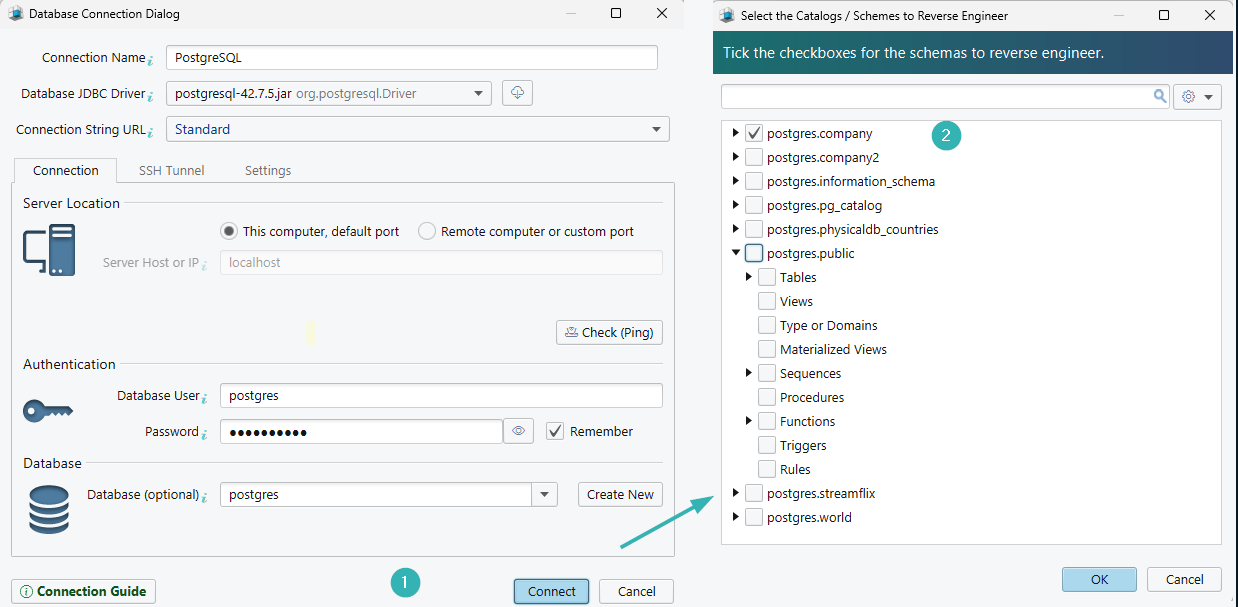
- Select Connect to Database, choose PostgreSQL, and fill in the Connection Dialog. DbSchema downloads the PostgreSQL JDBC driver itself.
- Pick the schemas to read. DbSchema reverse-engineers the tables, columns, keys and indexes and lays them out as a diagram.
- Drag the tables of one subsystem onto a diagram of their own, and add notes where the model needs an explanation.
- Export the result from Diagram → Export HTML5 or PDF Documentation as interactive HTML5 documentation.
None of those four steps changes the database. The layout, the extra diagrams and the notes are written to the .dbs model file, and PostgreSQL is only ever read. DbSchema writes to the server in one place, the Synchronization Dialog, which compares the model against the database and lets you apply a difference or generate the migration script instead. Saving the model file and the export in step 4 are Pro features.
That path is the one to take when the schema already exists and what you need is documentation, onboarding material, or a cleaner way to review the next change. If you are designing before implementation, pair it with Entity Relationship Diagram and Steps to Design a Relational Schema.
Best tool by use case
| If you need to | Tool |
|---|---|
| reverse-engineer a live PostgreSQL database, diagram it and document it | DbSchema |
| compile a PostgreSQL-only modeler from source | pgModeler |
| write SQL all day with a diagram of the open connection beside it | DBeaver |
| model in a browser with nothing installed | SQLDBM or ChartDB |
| type a schema as text and share the picture | dbdiagram.io or QuickDBD |
| keep one desktop model for PostgreSQL, Oracle, SQL Server, MySQL and SQLite | Luna Modeler |
Start with the free DbSchema Community Edition: download it at https://dbschema.com/download.html, connect to your PostgreSQL database, and let it draw the diagram. The 15-day trial in the same installer covers the Pro features described here, the .dbs model file, schema synchronization and the HTML5 documentation, so you can see the whole path before you decide.
FAQ
What is the best free ER diagram tool for PostgreSQL?
DbSchema, because its free Community Edition reverse-engineers the live database itself rather than parsing a dump you paste in. DbSchema then splits the result across as many diagrams as the schema needs.
Can I create a PostgreSQL ER diagram from an existing database?
DbSchema, DBeaver and Luna Modeler read a running PostgreSQL server directly and draw the schema from what they find. ChartDB gets there by a query you run yourself, and pgModeler needs its paid Plus edition for it.
Which PostgreSQL ER diagram tool exports documentation?
DbSchema exports the model as interactive HTML5, PDF or Markdown, where the HTML5 output carries a vector diagram, a searchable table list and column descriptions as mouse-over tooltips. That export is a Pro feature.
What is the fastest way to understand a large PostgreSQL schema?
Reverse-engineer it into DbSchema, then split the tables into one diagram per subsystem instead of reading a single crowded canvas. Publishing the HTML5 documentation afterwards gives everyone else the same picture without installing anything.









