PostgreSQL Database Design Tools: Visual Comparison
For the developer or architect who designs a PostgreSQL schema before it ships, and needs each change reviewed, kept in Git and deployed as a script.
On this page
The next release adds tables to a PostgreSQL database that already runs in production, and someone has to review the change before it reaches the server. DbSchema is the PostgreSQL design tool for that job: it reverse-engineers the live database into a model file, lets you change the model without touching the server, and then compares the two and writes the migration script.
The tools that rank for this search are of four kinds, and the kind decides more than any single feature:
- DbSchema, pgModeler and Navicat Data Modeler are desktop modelers, which keep the design in a file on your disk and compare it with the database.
- pgAdmin, the PostgreSQL project's own client, draws a diagram from the server in its ERD Tool.
- SqlDBM and ChartDB are browser modelers, which keep the design in the vendor's workspace.
- dbdiagram.io draws the diagram from schema code that you type.
This comparison covers design and modeling. For everyday PostgreSQL clients, see Best PostgreSQL Database Tools.
Four kinds of PostgreSQL design tool
The kinds differ in where the design lives between releases, and in what connects it to the database:
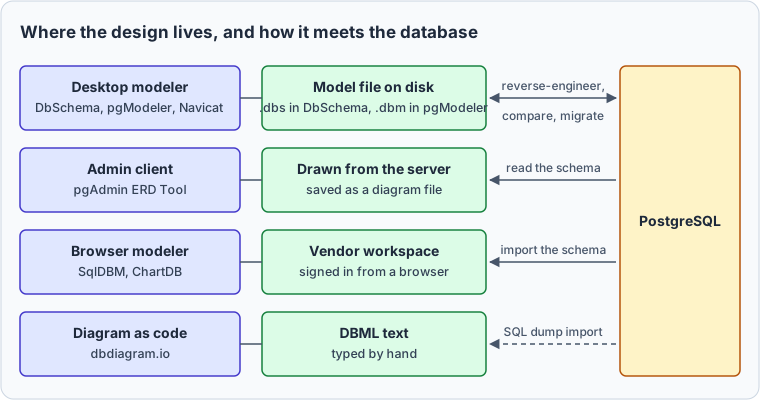
A review needs something to compare. When the design is a file, a pull request shows the change line by line, and a compare step turns the approved file into ALTER statements. The table shows which tools compare a design with the live database, and in which edition. Every competitor value was read on the vendor's own site on 29 October 2026.
| Tool | Runs on | Reads a live PostgreSQL database | Compares the design with the database | Free option |
|---|---|---|---|---|
| DbSchema | Windows, macOS, Linux | Community Edition | Pro | Community Edition |
| pgModeler | Windows, macOS, Linux | Plus | Plus | Source code under GPLv3, compiled yourself |
| Navicat Data Modeler | Windows, macOS, Linux | Enterprise | Enterprise, model to database | Lite |
| pgAdmin 4 ERD Tool | Inside pgAdmin 4 | Yes | Schema Diff compares two databases or schemas | All of pgAdmin |
| SqlDBM | Browser | DDL upload or a direct connection | Live DB Compare, enabled on request | None on the pricing page |
| ChartDB | Browser or self-hosted | A query you run and paste | Team plan lists Auto-Sync | 10 tables, or self-hosted |
| dbdiagram.io | Browser | SQL import, or the db2dbml command | None described | 10 diagrams |
Offline design and schema synchronization in DbSchema
DbSchema keeps two things apart: the design model, saved as a .dbs file, and the live database. While you're connected, a change that you confirm with OK runs in the database at once. Click the connection button and choose Offline (connect later), and your changes stay in the model while the database stays as it was (schema synchronization).
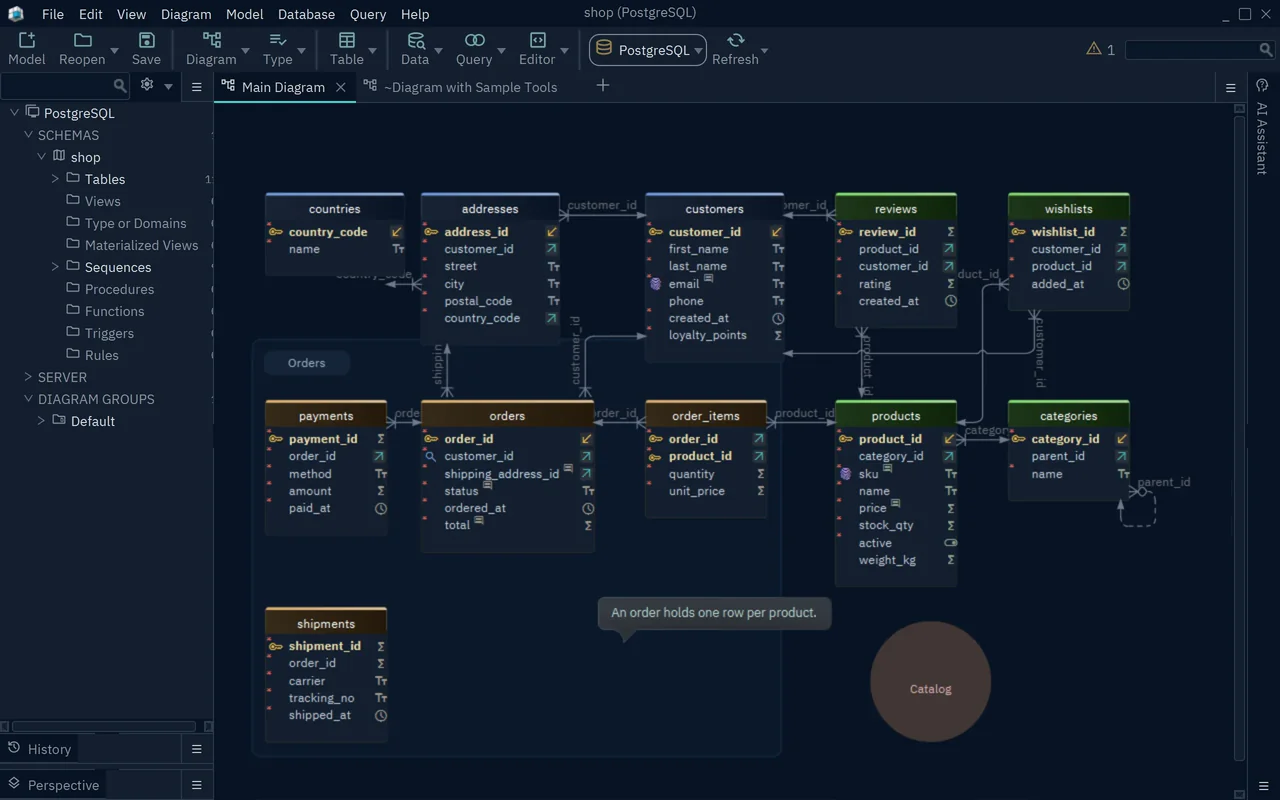
The .dbs file is XML text, so Git shows what changed between two versions of it. File → Git Collaboration commits, pushes and pulls the model from inside DbSchema (Git collaboration).
When the change is approved, connect again and let DbSchema compare the model with the database. The Synchronize Model and Database dialog has one row per difference. For each row you pick the side that wins, and the lower pane shows the SQL that will run:
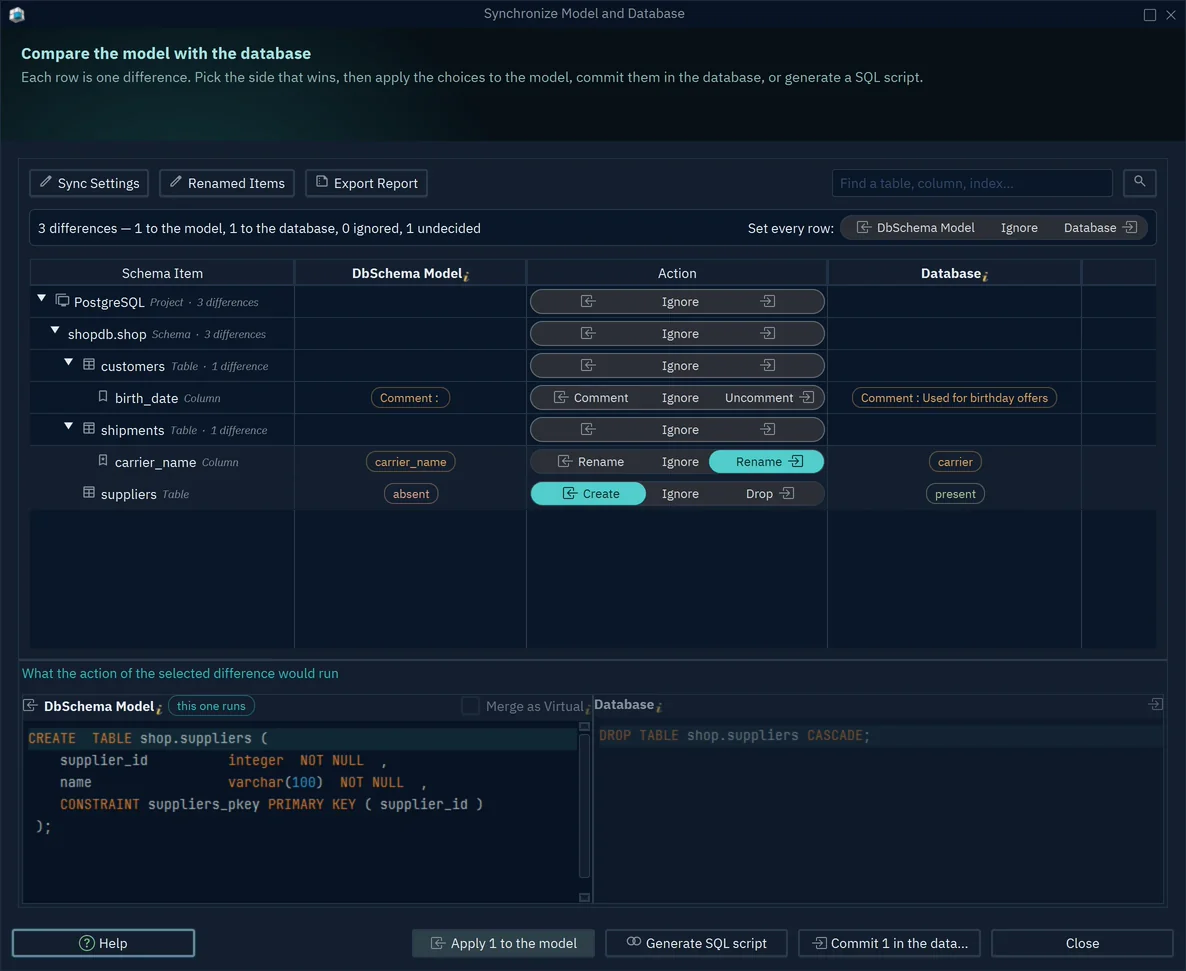
Commit in the database runs the statements one at a time. Generate SQL script writes them to an SQL Editor or a file without running anything, for the change to go through review first. A renamed column becomes RENAME COLUMN rather than a drop and a create, because the model remembers the previous name.
If your project deploys with Flyway, Model → Flyway Migrations... compares the model with the migration folder and writes the difference as the next numbered script (import and export the model):
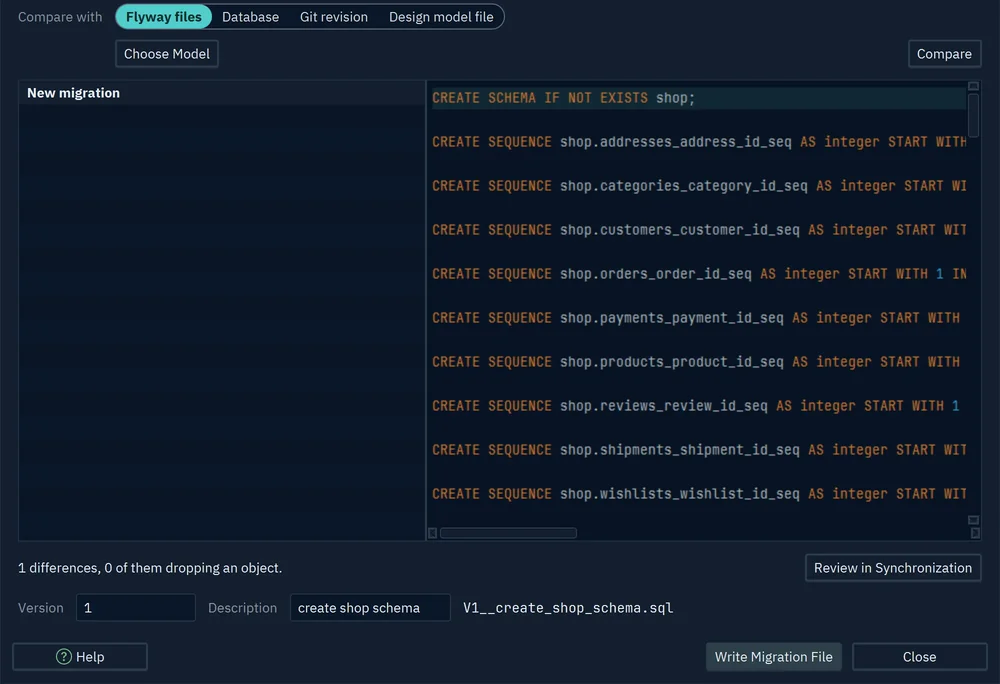
The same model exports as HTML5, PDF or Markdown documentation through File → Export As... → HTML5/PDF Documentation, for readers who never open a database client.
Connecting, reverse-engineering, the diagrams and the SQL editor are in the free Community Edition. Saving the model file, synchronization, the Flyway migration file and the documentation export are in DbSchema Pro. Logical design, where the model holds entities before it holds PostgreSQL tables, is in Architect.
How to reverse-engineer a live PostgreSQL database
Reverse engineering reads the PostgreSQL catalog and draws what it finds. In DbSchema it takes these steps (connect to a database):
- Choose File → New Model, keep Connect to Database selected, and click PostgreSQL.
- Choose New Connection and press Connect to PostgreSQL.
- Choose the Method Standard, then Remote computer or custom port, and fill in Server Host, Port, Database User, Password and Database.
- Press Test Connection, then Connect. DbSchema downloads the JDBC driver the first time.
- In Reverse Engineer the Database, tick the schemas to import and press Import.
- Save the model with File → Save Model to File, which needs DbSchema Pro.
Connecting and importing only read from the database. For a production server, tick Read Only Connection on the Access and Model tab of the connection dialog, and DbSchema refuses to change the schema through that connection. A step-by-step PostgreSQL schema design starts from the model in the same way.
PostgreSQL types that a design tool has to keep
A diagram that shows a column as varchar(120) has lost something when the column was declared with a domain. Every statement below ran on PostgreSQL 17.9 and 18.6, with the same results:
CREATE SCHEMA shop;
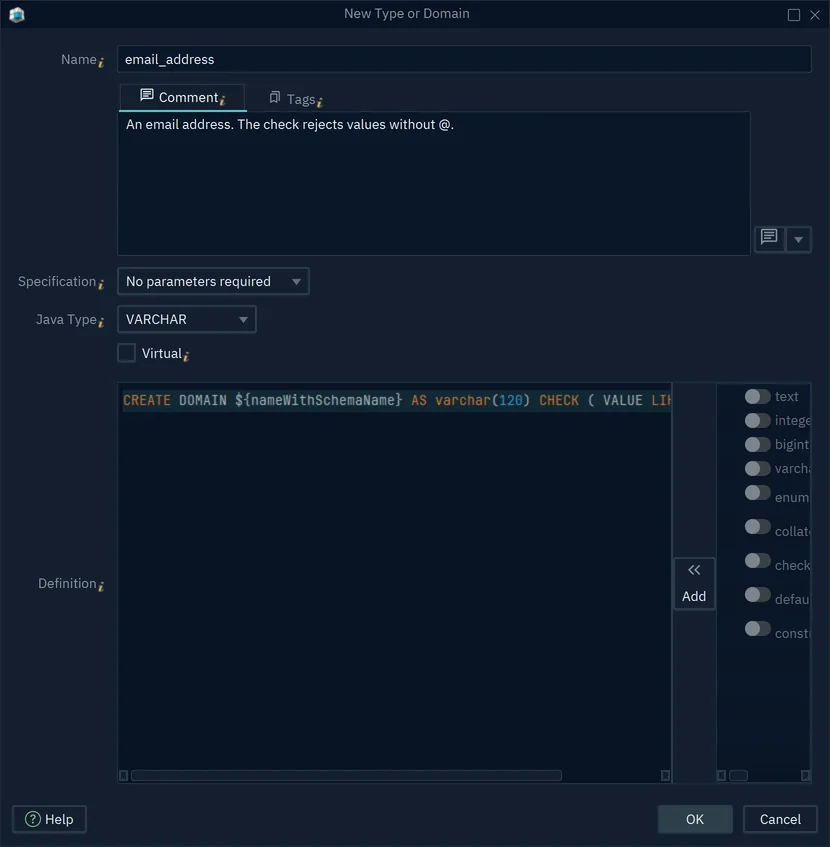
CREATE DOMAIN shop.email_address AS varchar(120) CHECK (VALUE LIKE '%@%');
CREATE TYPE shop.order_status AS ENUM ('new', 'paid', 'shipped');

CREATE TABLE shop.customers (
  customer_id bigint GENERATED ALWAYS AS IDENTITY PRIMARY KEY,
  email       shop.email_address NOT NULL UNIQUE
);
CREATE TABLE shop.orders (
  order_id    bigint GENERATED ALWAYS AS IDENTITY PRIMARY KEY,
  customer_id bigint NOT NULL REFERENCES shop.customers,
  status      shop.order_status NOT NULL DEFAULT 'new'
);
The domain carries a rule that the table definition doesn't show:
INSERT INTO shop.customers (email) VALUES ('ana.example.com');
ERROR: value for domain shop.email_address violates check constraint "email_address_check"
The standard catalog view reports the underlying type of a domain column, and names the domain in a separate column (information_schema.columns):
SELECT column_name, data_type, domain_name, udt_name
FROM information_schema.columns
WHERE table_schema = 'shop' AND column_name IN ('email', 'status')
ORDER BY 1;
| column_name | data_type | domain_name | udt_name |
|---|---|---|---|
| character varying | email_address | varchar | |
| status | USER-DEFINED | order_status |
A design tool that reads only data_type draws email as character varying, and the check drops out of the design. DbSchema lists domains and enum types under Type or Domains in its tree, keeps each one's CREATE DOMAIN or CREATE TYPE statement, and lets columns use it (user data types):
Enum types change in one direction. Adding a value works:
ALTER TYPE shop.order_status ADD VALUE 'refunded' AFTER 'paid';
SELECT enum_range(NULL::shop.order_status);
| enum_range |
|---|
| {new,paid,refunded,shipped} |
Removing one doesn't:
ALTER TYPE shop.order_status DROP VALUE 'refunded';
ERROR: dropping an enum value is not implemented
The enum documentation says that existing values can't be removed or reordered short of dropping and re-creating the type. Dropping it fails while a column still uses it:
ERROR:  cannot drop type shop.order_status because other objects depend on it
DETAIL:  column status of table shop.orders depends on type shop.order_status
So when a design removes an enum value, the migration has to move the column to a new type before it drops the old one. That is a script to read before it runs, which is what Generate SQL script in DbSchema gives you.
pgModeler, built for PostgreSQL alone
pgModeler models PostgreSQL and no other engine. Its site counts more than 30 PostgreSQL object types, among them domains, custom types, row-level security, table inheritance, partitioning and PostGIS geometry. The model is stored as XML in a .dbm file.
pgModeler comes in two editions. Community is the source code under GPLv3, which you compile yourself. Plus adds pre-built binaries for Windows, macOS and Linux, and the features that work against a running server: reverse engineering, incremental diff and sync with a live database, SSH tunnels, and a split format that writes one XML file per object. The download page lists Plus licences such as a single user for 6 or 12 months. The stable release is 1.2.3, and 2.0.0-beta1 came out on 14 September 2026.
Navicat Data Modeler
Navicat Data Modeler models MySQL, PostgreSQL, MongoDB, MariaDB, SQL Server, Oracle, SQLite and Snowflake in one desktop application, with conceptual, logical and physical models. Its feature matrix puts reverse engineering a database into a model, importing SQL, exporting the model as SQL, and synchronizing the model to a database in the Enterprise edition. The free Lite edition has none of those four.
The ERD Tool and Schema Diff in pgAdmin
pgAdmin 4, at version 9.18 on 29 October 2026, is free under the PostgreSQL licence. Its ERD Tool draws a diagram of a database, a schema or a table, and lets you add tables and relationships. Generate SQL writes the DDL for the diagram and opens it in the Query Tool, so nothing reaches the server until you run it there. The diagram saves to a file and exports as an image.
Schema Diff compares objects between two databases or two schemas and generates a script that synchronizes them. Its documentation describes comparisons between live sources only, not between a saved diagram and a database.
SqlDBM and browser-based enterprise modeling
SqlDBM is a cloud-based modeling platform for PostgreSQL, Snowflake, SQL Server, Oracle, MySQL, BigQuery, Redshift, Databricks and other engines. A PostgreSQL project starts from an uploaded DDL script, or from a direct connection that asks for the server, port, database, user name and password. Models go from conceptual through logical to physical.
SqlDBM keeps every saved revision of a project, and its forward engineering writes either the full script or an alter script with what changed between two revisions. The help page states that SqlDBM makes no changes to your database directly, so you run the script yourself. Live DB Compare, which compares a revision with an existing database, may need to be enabled on request. The pricing page quotes prices on request, scaled by seats.
ChartDB and its single-query diagram
ChartDB imports a PostgreSQL schema without a connection. You run one metadata query against your database, paste the JSON it returns, and ChartDB draws the diagram, so no credentials reach ChartDB. The diagram exports as an image or as DDL, and the repository is open source under AGPL-3.0, with a Docker image for self-hosting.
On the pricing page, the free cloud plan covers one database with up to 10 tables. Pro costs US$25 a month for one person and up to 100 tables. Team is US$59, for 3 users, 5 databases and up to 200 tables per database, and it is the plan that lists Auto-Sync and Database Migration.
Writing a schema as DBML in dbdiagram.io
dbdiagram.io draws the diagram from DBML, a short text syntax for tables, columns and references, as you type it. An existing schema comes in as a SQL import, or through the db2dbml command of the DBML CLI, which reads a PostgreSQL database from a connection string. A finished diagram exports as SQL, PNG, PDF or SVG.
The pricing page lists the free plan with up to 10 diagrams, private mode and SQL import and export. Personal Pro, listed at $8 a month, removes the diagram limit and adds version history. Team, listed at $75 a month, adds a shared workspace for 3 editors. Its pages describe no comparison between a diagram and a live database.
Download DbSchema at https://dbschema.com/download.html, connect to your PostgreSQL database and reverse-engineer it with the free Community Edition. Then choose Offline (connect later), make the release's changes in the model, commit the .dbs file for review, and generate the migration from the Synchronize Model and Database dialog. Saving the model, synchronization and the Flyway migration file are in DbSchema Pro, and a new installation starts with a 15-day trial of Architect, which has every feature.
Sources
Model your PostgreSQL schema offline, then sync it
DbSchema reverse-engineers a live PostgreSQL database, keeps the design in a .dbs model file that Git can diff, and writes the migration script from a comparison with the database. Connecting, diagrams and the SQL editor are in the free Community Edition.









