Turning a Schema Diff Into a Safe Migration Script
For the person holding a generated schema diff who has to decide which of its statements can run on production; the PostgreSQL locking behavior is cited where it decides the answer.
On this page
A schema comparison hands you a list of differences and offers to write the DDL that closes them. That script is a proposal, and the work is reading it and splitting it in two. The additive statements can run during traffic. The rest destroy values, or hold a lock that stops every other query, and in a difference tree the two kinds look alike.
What a migration script is
A migration script is a file of DDL, and sometimes DML, that moves a database from the structure it has to the structure you want, in a fixed order, with the existing rows preserved. It is a deployable artifact: reviewed like code, run once per environment, and kept so that the same transition can be replayed on the next database.
Two approaches produce that file, and they differ in where the truth lives. A migration-based workflow records every change as a numbered script committed alongside the application, applies each one exactly once in order, and treats an applied script as immutable, so the schema's history is the sum of the files. A state-based workflow keeps a definition of the finished schema, compares it against the live catalog, and computes the DDL at deployment time, so the schema's history is the history of that definition. Migration-based gives you an exact record of what ran; state-based gives you a description you can read in one place and a diff that always reflects the database in front of you. Which one suits your team is worked through in Liquibase, Flyway or a visual schema compare, and either way the database keeps a changelog table recording which migrations ran and when.
Why a generated diff is not yet a migration
The comparison reports what differs, not what it costs to close the difference. A column present in the database and absent from the model comes back as a DROP COLUMN, because that is what makes the two match, and the comparison has no way to know whether the column holds the only copy of something. A type narrowed in the model comes back as an ALTER that truncates or rejects the values already stored. Both statements sit in the tree next to an ADD COLUMN that is harmless, styled identically.
Order is the second thing the diff does not decide for you, though a good generator does: a foreign key cannot be added before the table it references exists, and a column cannot be dropped while a view selects from it. And the third is timing. An ALTER that runs in milliseconds on an empty development database can hold a table for minutes against production row counts, which turns a correct script into an outage. Reading the script answers all three questions before anything runs, and none of them can be answered from the difference list alone.
The four kinds of migration
Naming which kind you are doing decides the testing, the downtime window and the rollback plan, and most releases contain more than one of them at once.
| Kind | What changes | Typical work | Main risk |
|---|---|---|---|
| Schema | Structure | Add columns, alter types, create indexes, add keys | Locks, invalidated plans |
| Data | Rows | Backfills, splitting columns, re-encoding | Truncation, constraint violations |
| Application | The query layer | ORM mappings, SQL, data access code | Runtime errors on unmapped columns |
| Infrastructure | Where it runs | New host, major version upgrade, another engine | Driver and parameter differences |
A schema migration rarely arrives alone. Splitting a full_name column into two is a schema change that adds the columns, a data migration that fills them, and an application change that stops writing the old one, and the three have to be sequenced so that the running code works after each step. That is what makes a generated script only the first of the three: it covers the structure, and the backfill and the application change are yours to plan around it. An infrastructure migration is the outlier, because the schema is supposed to come out identical, and a comparison against the old database is how you prove it did.
The six phases of a migration
The phases are worth following in order, because each one produces the input for the next.
- Read the source database. Reverse-engineer the catalog, note the data volumes, and list the non-standard types, the foreign keys and the views that depend on the tables you are about to change.
- Define the target. Build the structure you want as a model, settle the naming, and write down the constraints that have to hold afterwards.
- Generate the script. Compare the target against the source, produce the DDL, and write the reverse script at the same time, while the two shapes are both in front of you.
- Rehearse at production volume. Run the script against a staging copy with a comparable number of rows, and time each statement rather than the whole file.
- Run the script against the live database with a lock timeout set, inside the window you sized in phase four.
- Compare the database against the target model once more, confirm the indexes built, and exercise the application's reads and writes.
Phase four is the one that gets skipped and the one that catches the real failures. A truncated dataset builds an index in a second and rewrites a table in no time at all, so it tells you the script is syntactically correct and nothing about whether you can afford to run it.
How to generate a migration file
DbSchema keeps the design as a single .dbs file, plain XML holding the tables, columns, data types, indexes, foreign keys, virtual foreign keys, comments and diagram layout. Because it is indented, human-readable XML, it belongs in the repository next to the application, and the change to a schema arrives as a reviewable diff in a pull request rather than as a description of one. Saving the model to a file is in the Pro edition; Git — Collaborative Design on the Model menu opens a Git client inside DbSchema with Stage, Commit, Push, Pull, Stash and Create Branch, so the file is committed from the window that edits it.
Here is what a reviewer sees when a release adds an active column and an index to an existing customers table:
  <table name="customers" spec="" >
     <column name="id" type="int4" jt="4" mandatory="y" />
     <column name="email" type="varchar" length="255" jt="12" mandatory="y" />
     <column name="created_at" type="timestamptz" jt="93" mandatory="y" />
+    <column name="active" type="bool" jt="16" mandatory="y" defo="true" />
     <index name="pk_customers" unique="PRIMARY_KEY" >
       <column name="id" />
     </index>
+    <index name="idx_customers_active" unique="NORMAL" >
+      <column name="active" />
+    </index>
   </table>
The type, the nullability and the default are all readable before any SQL exists, which is the point of reviewing at this level: mandatory="y" with defo="true" is a NOT NULL column with a default, and a reviewer who knows the table has forty million rows can say so while the change is still a text edit. DbSchema also opens two .dbs files at once and synchronizes between them, so the same comparison runs between two branches or two tagged releases without a database connection at all.
How to generate the SQL script
DbSchema turns the model into DDL through one more comparison, this time against the catalog the script has to run on, because the statements depend on what that database already has.
- Connect to the target. DbSchema reaches development, staging or production over JDBC, and a connection you only ever read from can be marked Read Only Connection on its Settings tab, which blocks every schema and data modification made through DbSchema.
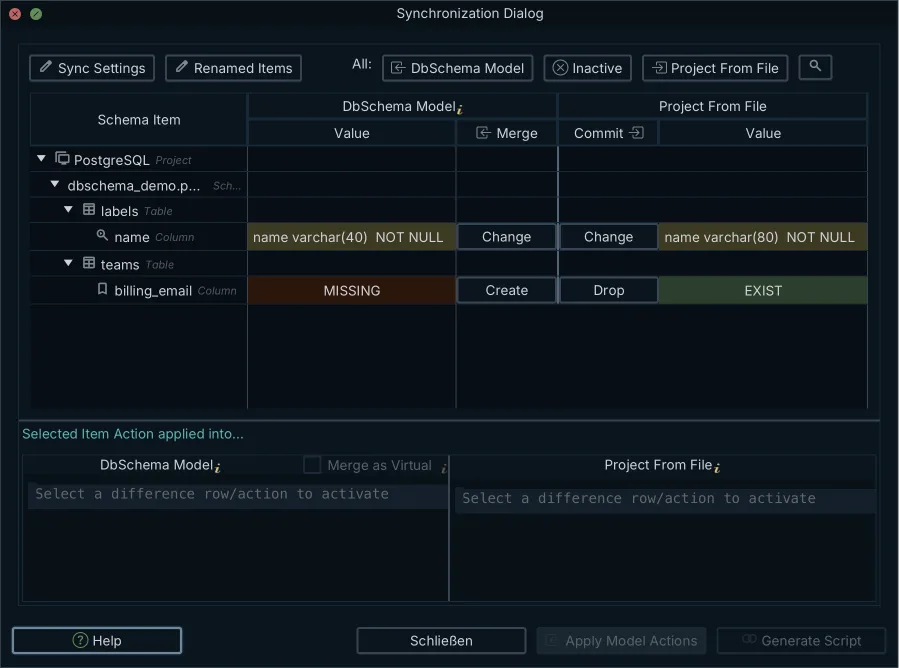
- Open Schema → Compare Model with Database. DbSchema reads the live catalog and lists every table, column, type, key and index that differs from the model.
- Read the difference tree and decide each row, pushing it to the database, pulling it into the model, or leaving it as it is.
- Open the Sync Dialog from Schema → Synchronize Model with Database, which generates the SQL statements that bring the database in line with the model. Review them there, and save the file into the migration pipeline if the script is to run later.
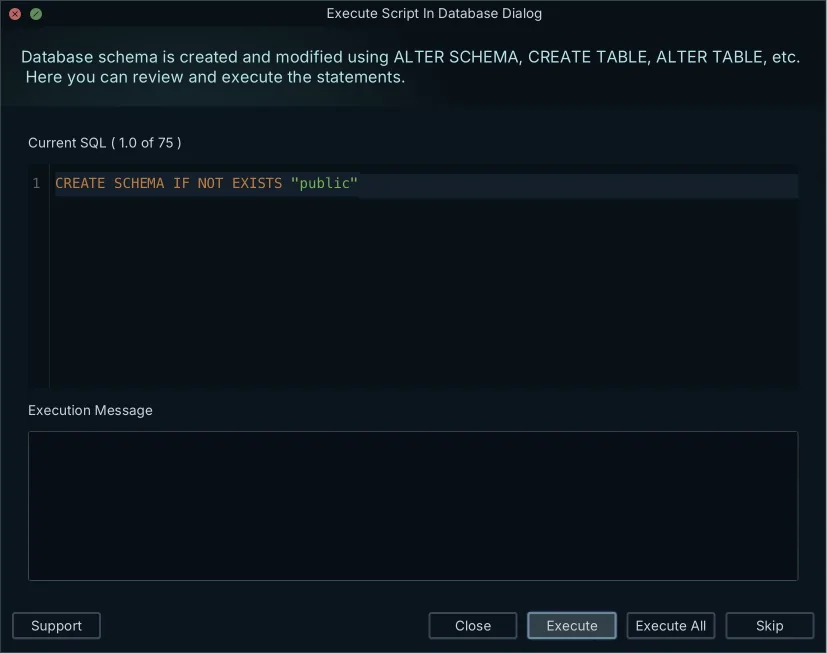
Nothing in steps one to three changes anything. Reading the catalog is a read, and pulling a difference into the model rewrites the .dbs file on your disk and leaves the database untouched. The database changes at one moment only, when you execute the generated statements, and DbSchema steps through them so that each one is approved as it goes. The DDL is written for the engine the model targets, so the same difference produces PostgreSQL, MySQL, SQL Server or Oracle syntax without you translating it.
One thing to set up before you compare: DbSchema identifies a schema by catalog name as well as schema name. Compare appdb.public against appdb_stg.public and every object reads as missing on one side, so the script rebuilds the schema instead of altering it. Compare across servers that use the same catalog and schema names, or reverse-engineer each side into its own .dbs file and compare the two models, which is covered in comparing two database schemas.
How to run a migration script safely
Split the generated script in two before you run any of it. Everything additive goes first: new tables, new nullable columns, new indexes, new constraints that are not yet enforced. Confirm the application still works against that shape, and it usually will, because nothing it reads has moved. Every DROP and every narrowing ALTER goes into a second script that runs after the code that used those objects is gone from every running instance. That sequencing is the expand and contract pattern, and deploying PostgreSQL schema changes safely works through the DDL forms it needs.
The lock is what decides whether the additive half can run during traffic. In PostgreSQL 18, ACCESS EXCLUSIVE conflicts with locks of all modes, and it guarantees that the holder is the only transaction accessing the table in any way. Many forms of ALTER TABLE and ALTER INDEX acquire a lock at that level, and only an ACCESS EXCLUSIVE lock blocks a plain SELECT[1]. Once acquired, a lock is normally held until the end of the transaction, and a transaction seeking a lock will wait indefinitely for conflicting locks to be released[1]. Bound that wait in the migration session before the DDL:
SET lock_timeout = '100ms';
ALTER TABLE orders ADD COLUMN payment_status varchar(32);
lock_timeout aborts any statement that waits longer than the specified amount of time while attempting to acquire a lock. The limit applies separately to each lock acquisition attempt, and a value with no unit is taken as milliseconds. Zero, the default, disables it[2], which is why it has to be set explicitly in the session that runs the migration.
Index creation is the statement most worth pulling out of the script and running on its own. A standard index build locks out writes on the table until it is done, while CREATE INDEX CONCURRENTLY builds the index without taking any locks that prevent concurrent inserts, updates, or deletes[3]. It comes with two conditions the generated script will not have arranged for you. A regular CREATE INDEX can be performed within a transaction block, but CREATE INDEX CONCURRENTLY cannot. And if a problem arises while scanning the table, such as a deadlock or a uniqueness violation in a unique index, the command fails but leaves behind an invalid index, which is ignored for querying purposes because it might be incomplete, though it still consumes update overhead; the recommended recovery is to drop the index and try again[3].
Generate the script from the comparison, read it, and split it before you run it. Download DbSchema at https://dbschema.com/download.html, open your model against a staging database, and generate the DDL from the differences it reports. Schema synchronization and saving the design to a .dbs file are in the Pro edition; the free Community Edition connects, reverse-engineers the schema and draws the diagram, which is enough to see what differs before you decide.
Frequently asked questions
What is a database schema migration script?
A file of DDL, sometimes with DML, that moves a database from one structure to another in a fixed order and preserves the rows already in it. The section on what a migration script is sets the two ways of producing that file, migration-based and state-based, against each other.
What are the 4 types of database migration?
The four are schema, data, application and infrastructure migrations. The table in the section on the four kinds gives each of them its typical work and its main risk, and says why a single release usually contains three at once.
What are the 6 phases of database migration?
Read the source catalog, define the target model, generate the script and its reverse together, rehearse at production row counts, deploy with a lock timeout set, and compare against the target model again. The section on the six phases says what each phase hands to the next, and why the rehearsal is the one that catches the failures that matter.
How do you generate a migration file?
One repository can hold several .dbs design files, one per database or project component, each committed from the Git client inside DbSchema and reviewed on its own. The section on generating a migration file reads the XML attributes a reviewer sees in that diff, before any SQL exists.
How do you generate a SQL script from a diff?
The statements DbSchema generates can be edited in the Sync Dialog before they execute, so one you want to run differently is changed there rather than in the model. Open the dialog from Schema → Synchronize Model with Database after comparing the model against the connected database, which the section on generating the SQL script walks through.
How do you run a migration script safely?
DROP TABLE, TRUNCATE, REINDEX, CLUSTER, VACUUM FULL and REFRESH MATERIALIZED VIEW without CONCURRENTLY each acquire an ACCESS EXCLUSIVE lock in PostgreSQL 18[1], so they belong in a window of their own rather than in the additive half. Run that additive half first and hold every DROP and narrowing ALTER until the old code is gone, as the section on running the script safely works through with the lock timeout and the concurrent index build.
Sources
Generate the migration script from your schema diff
DbSchema compares your design model against the live database, reports the differences object by object, and generates the DDL for your engine. Schema synchronization is a Pro feature; the Community Edition connects to your database and reverse-engineers the schema.









