Liquibase, Flyway or a Visual Schema Compare: Which to Use in 2026
Three ways to ship a schema change, compared on how they order changes, undo them, catch drift and are licensed, with a drift test on PostgreSQL 17.
On this page
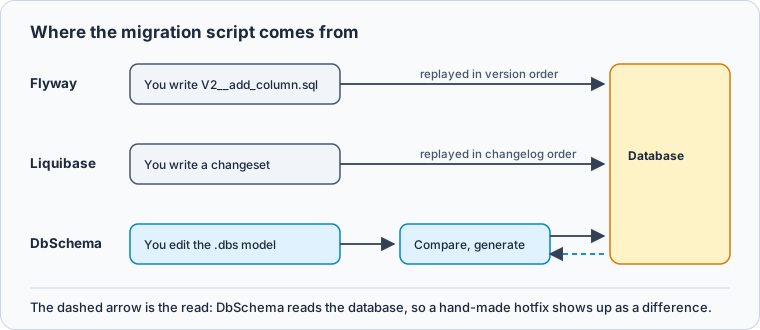
A change has to reach staging and production this week, and the open question is what you commit for it. DbSchema gives you the third answer and the one to pick: you edit the table on the diagram, DbSchema compares the .dbs model file with the target database, and it writes the migration script from what differs. Liquibase and Flyway take the other two routes, a changelog entry and a numbered SQL file.
Short answer
Choose DbSchema when the schema itself should be the thing you review and version, and the migration script should come from comparing it with the database. Flyway and Liquibase both make you write and order each change by hand, and both put drift detection in their paid editions.
- Flyway: numbered SQL files, applied once in version order.
- Liquibase: a changelog of changesets in SQL, XML, YAML or JSON.
- DbSchema: the design is the file you commit, and the script is generated from the difference.
Flyway applies numbered SQL files once, in version order
Flyway is Redgate's migration runner and is still documented and released. Its model is a directory of SQL files whose names carry the order. Redgate's Flyway documentation describes a versioned migration as a file with a version, a description and a checksum, applied to a target database in order and exactly once.
The first letter of the filename decides when the file runs:
| Prefix | Example filename | When Flyway runs it |
|---|---|---|
| V | V001.002__NewTwitterColumn.sql | Once, in version order |
| U | U001.002__UndoNewTwitterColumn.sql | On the undo command |
| R | R__SetDefaults.sql | Whenever its checksum changes |
The bookkeeping sits in the database itself. The flyway_schema_history table records which migrations ran, when, who ran them, their checksums and whether they succeeded. Edit a file that has already been applied and its checksum no longer matches the recorded one, so Flyway stops the run until the repair command resets the history.
Liquibase replays a changelog of changesets you write
Liquibase keeps the same history in a ledger you write yourself. According to the Liquibase documentation, the changelog lists every change made to the database, and Liquibase reads it to work out which ones are still undeployed. You can write it in SQL, XML, YAML or JSON; the XML, YAML and JSON forms use Liquibase change types instead of engine-specific DDL, so one file can target more than one engine.
A single change is a changeset. Its id and author, together with the changelog's path, form the identifier Liquibase records in the DATABASECHANGELOG table, and changesets run in the order they appear in the file.
Both tools only know the changes someone wrote down
Both tools treat the schema as a sequence of changes that a runner replays, and both record what they replayed in tables they create inside the target database. What they have in common is the file in the middle: a column you added on a diagram or in a local database has to be written again by hand as a migration before it deploys anywhere. Anything that reaches a database without passing through those files is invisible to the history table.
A hand-made hotfix shows up only when you compare schemas
A production database took a hotfix by hand and no longer matches staging. These two schemas reproduce it, with the hotfix applied to production only:
CREATE SCHEMA staging;
CREATE SCHEMA production;
CREATE TABLE staging.users    (id int PRIMARY KEY, email text NOT NULL);
CREATE TABLE production.users (id int PRIMARY KEY, email text NOT NULL);
ALTER TABLE production.users ADD COLUMN locked_until timestamp;
CREATE INDEX idx_users_email ON production.users (email);
Neither statement went through a migration file, so neither history table knows about them. Comparing the two catalogs finds both:
SELECT 'column' AS kind, column_name AS name, data_type FROM information_schema.columns
 WHERE table_schema = 'production' AND table_name = 'users'
EXCEPT
SELECT 'column', column_name, data_type FROM information_schema.columns
 WHERE table_schema = 'staging' AND table_name = 'users'
UNION ALL
SELECT 'index', indexname, NULL FROM pg_indexes
 WHERE schemaname = 'production' AND tablename = 'users'
   AND indexname NOT IN (SELECT indexname FROM pg_indexes WHERE schemaname = 'staging')
   AND indexname <> 'users_pkey';
Result · PostgreSQL 17.6
| kind | name | data_type |
|---|---|---|
| column | locked_until | timestamp without time zone |
| index | idx_users_email |
A query like this covers one table and two object types. A schema compare does the same for every table, column, index, foreign key and view, and turns each difference into the statement that removes it. That is the work DbSchema's schema synchronization does between the design model and a database.
Liquibase rolls back to a tag, Flyway runs an undo script
They differ most where you look first under pressure, which is undoing a change. Liquibase has a rollback command that reverts deployed changes in sequence until it reaches a tag. Flyway's equivalent is an undo migration, a U script you write with the same version as the migration it reverses.
Detecting drift is the second split. Flyway's check -drift command checks that a target environment is still in the expected state before a deployment, and its documentation marks it as Flyway Enterprise. Either way, the drift you are checking for is drift against the files. DbSchema starts from the schema: it reads the live database, compares it with the .dbs model, and lists the differences object by object.
Drift detection sits in the paid edition of all three tools
The vendors' own pages, read on 3 November 2026, put drift detection on the paid side in all three:
| Tool | Free edition | The paid edition adds |
|---|---|---|
| DbSchema | Community: diagrams, reverse engineering, SQL editor, for any use | Pro, 294 USD one-time: model file, schema synchronization, documentation |
| Liquibase | Community, licensed under the FSL | Secure, on quote: drift in Change Intelligence, procedures and triggers in generate-changelog |
| Flyway | Community, for individual developers and education | Enterprise: drift detection, undo script generation, comparison-based script generation |
The Liquibase FAQ states that Community is released under the FSL and Secure under a commercial EULA that runs only with a licence key, and its generate-changelog reference lists the object types that require Secure. Redgate's Flyway editions page now lists Flyway Community and Flyway Enterprise only, while the undo migration documentation still carries a Teams edition label. DbSchema Pro costs 294 USD one-time with the first year of updates, or 29.40 USD a month (DbSchema purchase page).
Committing the model file replaces the hand-written migration
The alternative is to commit the schema rather than the steps that produce it. DbSchema keeps the whole design in a .dbs model file: tables, columns, indexes, foreign keys, diagram layout and comments, with no rows. It goes into the application repository next to the code, and a pull request shows an added column as added lines.
-
Work on the model offline Pro
Click the connection button in the toolbar and choose Offline (connect later). Edit tables and columns on the diagram, then save with
File → Save Model to File. The database does not change. -
Commit the model Pro
Open
File → Git Collaboration, stage the.dbsfile, commit it with a message and push it (Git collaboration). -
Compare and generate the script Pro
Connect to the target database and choose Compare, then decide difference by difference. In the Synchronize Model and Database dialog, set each row to the model or the database, then press Generate SQL script to see the statements, or Commit in the database to run them.
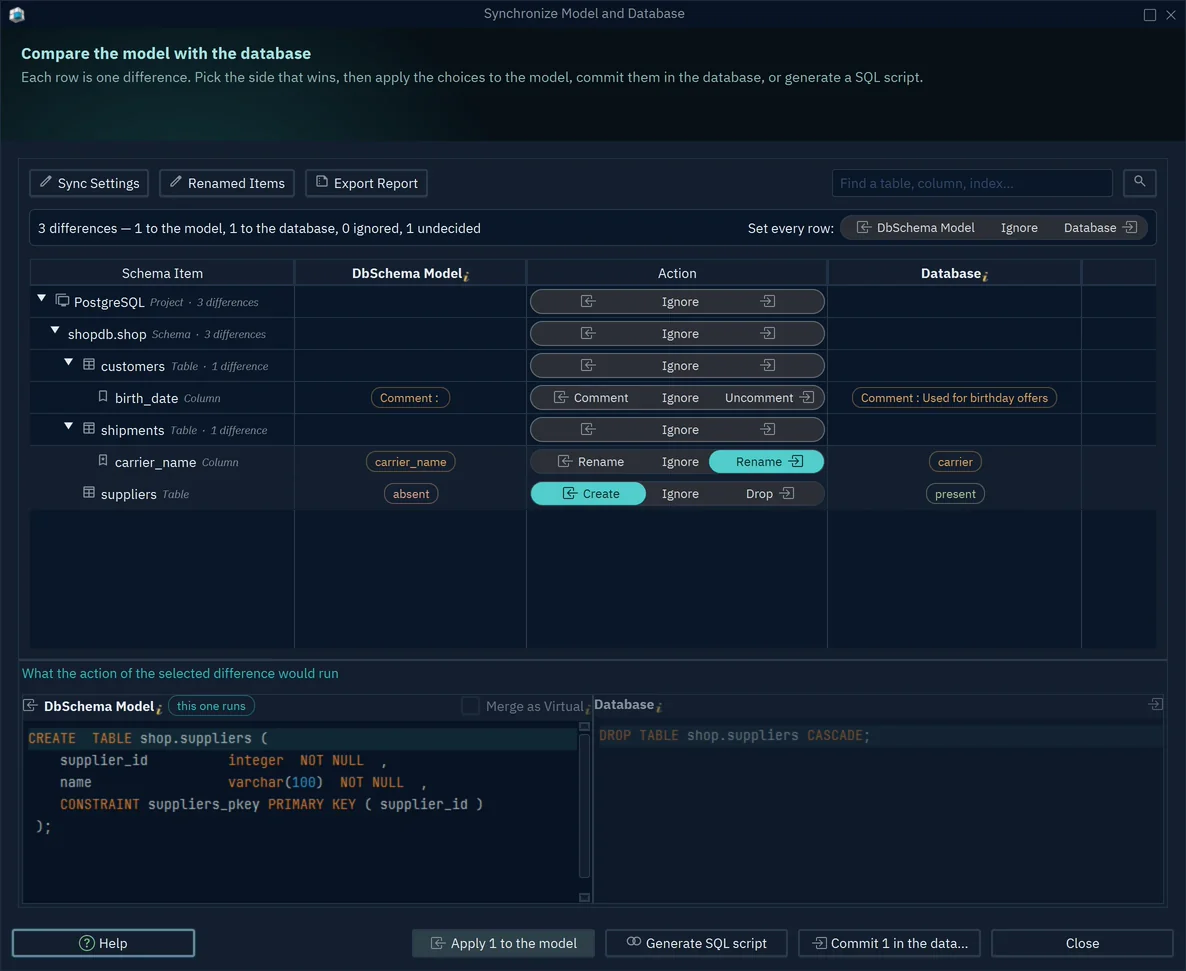
The same dialog works in the other direction. Where the hotfix is the change you want to keep, set the row to the model, and the .dbs file is what gets updated. A replayed changelog has no equivalent of that choice, because it knows only the changes somebody wrote down.
To judge the three on your own pipeline, download DbSchema, connect it to the database you deploy to and reverse-engineer it into a diagram, which the free Community Edition covers. Saving the model file, comparing it with the database and generating the script are in DbSchema Pro, which you can try for 15 days.
FAQ
What is the difference between Flyway and Liquibase?
Flyway orders work by filename and applies pending versioned migrations in version order. Liquibase orders work by position: changesets run in the order they appear in the changelog, each identified by its id, its author and the changelog path.
Are Liquibase and Flyway free to use?
Both have a free edition: Liquibase Community under the FSL, and Flyway Community for individual developers and education. The editions table shows what each paid edition adds.
How does Liquibase rollback a change?
The rollback command reverts deployed changes one at a time until it reaches the tag you name in DATABASECHANGELOG.
What is a visual schema compare, and does it generate migration scripts?
It compares a schema with another one and lists the added, removed and changed objects. In DbSchema the comparison runs between the design model and a database, each difference is applied to the model, applied to the database, or ignored, and Generate SQL script writes the statements for the differences set to the database without running them.
How do you version a database schema without Flyway?
Commit the design instead of the steps: the schema history becomes the commit history of the .dbs model file, and the migration script is generated from the difference when you deploy.
Sources
Generate the migration from the difference
DbSchema compares your design model with the live database and writes the CREATE and ALTER statements for what differs. Reverse engineering and diagrams are free in the Community Edition; schema synchronization and the model file are Pro.









