Reviewing an AI-Proposed Schema Change
For database architects who asked the DbSchema AI Assistant for a schema change and now have to decide whether to apply it.
On this page
In short
An AI-proposed schema change is a draft. The DbSchema AI Assistant reads only the table structure you attach, never the rows. Check the change against your data, merge it into the model while offline, and read the synchronization diff before anything runs in the database.
Table of contents
- What the AI Assistant actually worked from
- What the assistant can propose, and which part this covers
- What the assistant never saw
- Applying the suggestion to the model, not the database
- Reading the diff before executing it
- Checking what you got against what you asked
- Frequently asked questions
- Sources
Key takeaways
- The assistant sees the CREATE TABLE statements you attach and nothing else: no rows, no views you left out, no application code.
- A correct-looking change can fail on existing data, on a view that depends on a column, or on an index you already have.
- One kind of suggestion fails silently: a foreign key that PostgreSQL accepts but that links rows to the wrong table.
- Merge the suggestion into the DbSchema model while offline, so nothing reaches the database yet.
- Commit only the rows of the synchronization diff that match what you asked for.
You asked the AI Assistant to review a table, and it came back with five clean statements. They look right. The question is whether they are safe to run. Treat them as a draft. The assistant saw your table definitions but not your data. So check each statement against the rows, apply it to the DbSchema model first, and read the diff before the database sees it.
What the AI Assistant actually worked from
The AI Assistant answers from the structure you attach, not from your database. The AI Assistant documentation says the assistant "knows only what you send with the question". It works from the tables you attach, "never from the data in them".
You choose that structure yourself. Select the tables on the diagram, right-click one and choose Attach to AI. The Ask AI dialog then shows the Attachment, which holds the CREATE statements of those tables. You can edit them before you send. If you attach nothing, the dialog stops with "Attachment is required."
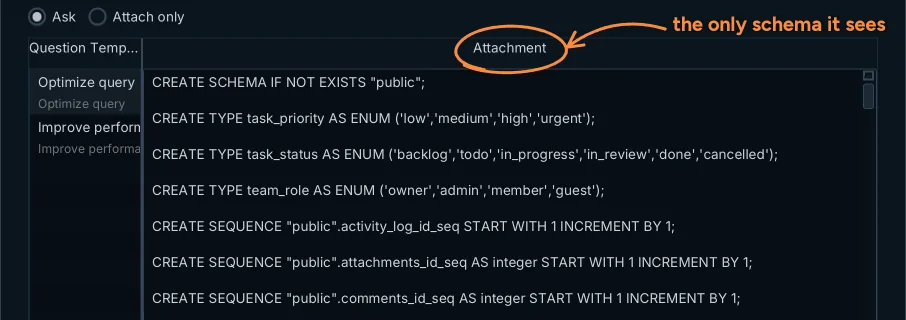
The Attachment pane holds the DDL of the tables you attached; you can edit it before you send the question.
That attachment is the whole picture the model had. A table you left out did not exist for it. A view that reads one of your columns did not exist either, unless you attached it too. So before you judge the answer, look at what you sent. What an AI Assistant Sees of Your Database covers the privacy side of this design.
What the assistant can propose, and which part this covers
The AI Assistant does three jobs. It writes SQL, it reviews table designs, and it generates CREATE TABLE statements that you can merge into the model. This article is about the last two: a proposed change to a schema you already have.
Queries need a different check. A query only reads, so you can test it against real rows and look at the result. Text-to-SQL Tools and When to Trust Them covers that case. A schema change writes. Once it runs, it can lock a table, rewrite it or reject your deploy.
You can make the review easier before you ask. The system message goes with every question, so put your rules there, such as your naming convention. Then ask about one real problem, such as a slow query on one table, and attach only the tables it touches. A specific question gets an answer you can check line by line.
What the assistant never saw
The assistant could not see four things: your rows, the views you left out, your existing indexes and what your columns mean. Each one can break a suggestion that reads well.
We tested this on 25 October 2026 with PostgreSQL 16.14. We used a copy of a 14-table demo schema with 31 tasks. The statements below are illustrative. They are the kind of change a schema review of these tables returns, not a recorded AI transcript. Every statement ran inside a transaction that we rolled back.
ALTER TABLE tasks ALTER COLUMN estimate_hours SET NOT NULL;
ALTER TABLE tasks ALTER COLUMN estimate_hours TYPE integer;
ALTER TABLE tasks ADD COLUMN reviewer_id integer NOT NULL REFERENCES users(id);
CREATE INDEX idx_tasks_project ON tasks (project_id);
ALTER TABLE activity_log ADD CONSTRAINT activity_log_entity_fk
  FOREIGN KEY (entity_id) REFERENCES tasks(id);
Existing rows block the change
PostgreSQL rejected the first statement:
ERROR: column "estimate_hours" of relation "tasks" contains null values
One of the 31 tasks has no estimate. The PostgreSQL 16 ALTER TABLE reference[1] says SET NOT NULL works only when no row "contain[s] a NULL value for the column". The third statement failed the same way, because a new NOT NULL column without a default starts empty on all 31 rows. Count the NULLs before you accept either change, and decide what the old rows should hold.
A view depends on the column
The type change failed for a reason the attachment could not show:
ERROR:  cannot alter type of a column used by a view or rule
DETAIL:  rule _RETURN on view v_team_workload depends on column "estimate_hours"
The view v_team_workload reads estimate_hours, and we had not attached it. On a large table the change also costs time. In most cases a type change makes PostgreSQL rewrite "the entire table and its indexes".
The index already exists
The suggested index on project_id duplicates one you have. The tasks table already carries idx_tasks_project_status on (project_id, status). A filter on project_id used it:
Index Scan using idx_tasks_project_status on tasks
  Index Cond: (project_id = 3)
We forced this plan with enable_seqscan off, because 31 rows are too few for PostgreSQL to choose an index on its own. The PostgreSQL docs on multicolumn indexes[2] explain why it works: such an index is "most efficient when there are constraints on the leading (leftmost) columns". A second index on project_id would cost writes and buy nothing.
The foreign key that passes and is wrong
The last statement ran without an error. That is the dangerous one. The activity_log table stores events about tasks, comments and projects in one entity_id column, with an entity_type column next to it. A foreign key[3] only checks that each value "match[es] the values appearing in some row of another table". In our copy, two rows that are not about a task had the id 5, and a task with id 5 exists:
| id | entity_type | entity_id | task it would point to |
|---|---|---|---|
| 3 | comment | 5 | Colour contrast below 4.5:1 on secondary buttons |
| 7 | project | 5 | Colour contrast below 4.5:1 on secondary buttons |
The constraint went in, and two events now point to the wrong task. No error log will ever show this. Only a look at the data does.
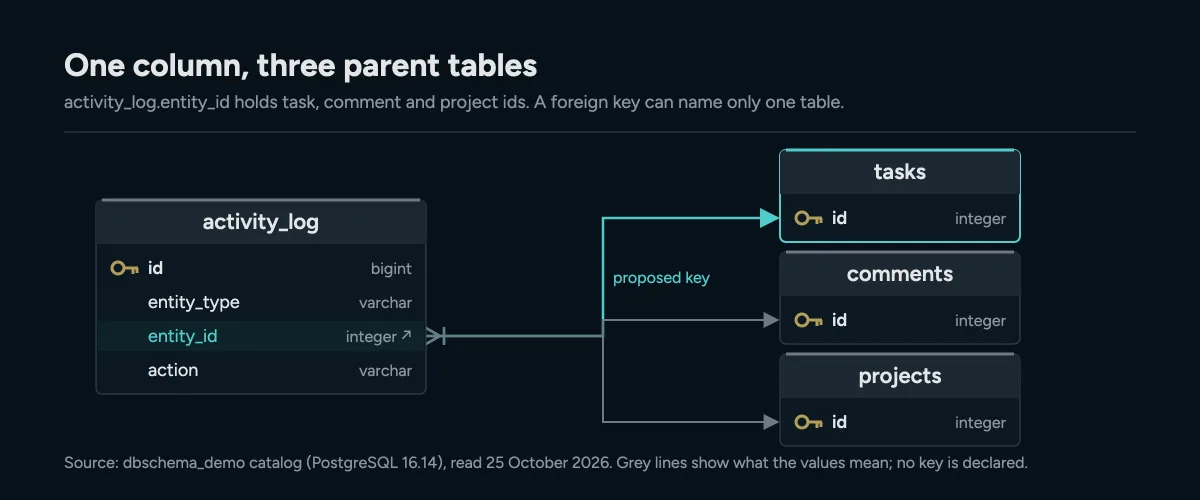
activity_log.entity_id refers to three tables, so a foreign key to tasks alone accepts rows that belong to comments and projects.
Applying the suggestion to the model, not the database
Apply the suggestion to the DbSchema model first, and only then to the database. The schema synchronization documentation explains why the order matters: "While you're connected, every change that you confirm with OK runs in the database at once."
So go offline before you merge. Click the connection button in the toolbar and choose Offline (connect later). Database → Offline (connect later) does the same. Offline, your changes stay in the model and the database does not change.
Now take the answer from the side bar. Each SQL block in the answer has buttons under it. Merge adds a CREATE or ALTER statement to the model. Preview shows a new CREATE TABLE on a preview diagram before you merge it. Merge only the statements that survived your checks, then save the model with File → Save Model to File. Saving the model needs DbSchema Pro.
Reading the diff before executing it
The diff shows what will really change, which can differ from what you meant to change. Connect again with the connection button and choose Compare, then decide difference by difference. DbSchema reads the database and opens the Synchronize Model and Database dialog. It "has one row per difference", with the model on one side and the database on the other.
Select a row to see the SQL that each side would run in the lower pane. For each row, decide which side wins, or ignore it. Then pick one of two safe ways forward:
- Generate SQL script writes the statements to an SQL Editor or a file without running them.
- Commit in the database opens the Execute Script In Database dialog, which runs one statement at a time and shows what the database answered.
Renames deserve one more look. DbSchema renames a column with RENAME when the model knows its previous name. Without one, the rename shows up as a drop and a create, which would lose the data in the column. Press Renamed Items and set the Previous Name before you commit. Synchronization needs DbSchema Pro.
Checking what you got against what you asked
Compare the rows in the diff with the question you asked. If you asked for one new index, the diff should hold one new index. A rename request that also changed a column's nullability shows up here as an extra row. Reject that row, even if the change looks harmless.
Then run the surviving statements against a copy of the database first, as we did above. The checks take four queries. Count the NULLs, list the views on the table and list its indexes. Then look at the rows a new foreign key will cover. Model validation rules can catch naming and key problems in the model before you compare.
Download DbSchema and ask the AI Assistant about a change you are planning on your own schema. The AI trial and credits work in every edition, including the free Community Edition. Working offline, saving the model and the synchronization diff are in DbSchema Pro.
Frequently asked questions
Can the DbSchema AI Assistant see the data in my tables?
No. It receives your question, the earlier questions of the conversation, the DDL of the tables you attach and the system message. Table rows, query results and passwords are never sent.
Why did a NOT NULL change from the assistant fail?
PostgreSQL refuses SET NOT NULL while any row holds NULL in that column. The assistant cannot count those rows, because it never sees the data.
Do I need a paid edition to use the AI Assistant?
No. The DbSchema AI trial and credits work in every edition, including Community. Using your own OpenAI, Anthropic or other provider key needs a DbSchema Pro or Architect license.
Sources
Review the AI's schema change before it reaches production
DbSchema's AI Assistant sees only the DDL of the tables you attach, never your data, and returns a SQL script you compare against your design model before anything is executed. Schema synchronization is a Pro feature; the AI Assistant is a credits subscription that works on every edition.









