What an AI Assistant Sees of Your Database
For the engineering manager who has to say what developers may paste into an AI tool; the retention terms and the payload are shown rather than summarized.
On this page
A developer wants indexing advice on a slow query, and the fastest route is to paste the table definitions into a chat window. Decide first what leaves the machine: a schema-aware assistant needs the CREATE TABLE text and nothing else, and DbSchema's AI Assistant sends exactly that, from a list of tables you tick, with the payload on screen before it goes.
Does AI keep your data private?
A consumer chat window keeps nothing private from the vendor running it, because the prompt is the input to a service on the vendor's own infrastructure. Paste a schema dump into one to debug a slow query and the table structures, the comments and any sample rows you copied along with them are now in a conversation history you do not control.
The commercial API is a different contract with the same provider. OpenAI's API documentation states that data sent to the OpenAI API is not used to train or improve OpenAI models unless you explicitly opt in, and that abuse monitoring logs are generated for all API feature usage and retained for up to 30 days, except where legal requirements demand longer[1]. Approved customers can enable Zero Data Retention, which excludes their content from those logs. Not training on your input and storing nothing are two different promises, and only the first comes as standard.
| Channel | Training on your input | Retention | What you control |
|---|---|---|---|
| Consumer chat window | Per the vendor's consumer terms | Conversation history | Only what you paste |
| Commercial API | Not by default at OpenAI | Abuse logs up to 30 days | The payload the client sends |
| Local model on your machine | None | None outside your disk | Everything |
The third row is the one that ends the argument, and the first two make the payload the decisive variable. Whichever provider answers the question, the exposure is set by what the application on your desk puts into the request, so the question worth asking a tool is not who it calls but what it sends.
What is the 30% rule in AI?
No standards body defines a 30% rule, and no vendor documentation states one. It circulates as a rule of thumb: automate the mechanical share of a workflow, keep the judgment, and do not let the ratio creep upward on its own. As a number it is arbitrary. As a boundary it is worth having.
For database work the boundary is easier to draw by statement than by percentage. Drafting is mechanical: a SELECT with three joins, a CREATE TABLE for a lookup table, a regular expression for a data generator pattern. Deciding is not: which column carries the natural key, what happens to child rows when a parent is deleted, whether a migration can run during business hours. Between those two sits the review, and the property that matters in an assistant is that the review cannot be skipped by accident.
An assistant that can execute SQL against your database has removed that gate. One that returns SQL as text in a panel has not, because the statement waits for a person to move it. DbSchema's AI Assistant works the second way, which is what makes the split enforceable rather than a matter of discipline.
What are the risks of data privacy with AI?
Shadow AI is the practical risk: not a policy anyone wrote, but a personal account used on a work laptop because the sanctioned route is slower. What goes into it is whatever was on the clipboard, and a clipboard in a database session holds more than the person notices.
A schema dump carries table names, column names, comments and default values, which together describe how the business works: the states an order can be in, the flags that grant access, the fields that hold money. A connection string carries an internal hostname, a port and a user name, which is reconnaissance rather than data. A query plan carries index names and row estimates, which describes the size of the system. A result set carries the customer records themselves, which is the only one of the four that is a reportable breach on its own, and the easiest to paste by accident because it is what you were looking at.
| What gets pasted | What it reveals | Safe substitute |
|---|---|---|
| Result rows | Customer records | The column names and types |
| Schema dump | Business rules in the comments | The tables the question needs |
| Connection string | Host, port, user name | A placeholder host |
| Query plan | Index names, row counts | The query and the table definitions |
None of it can be recalled. Revoking a key or rotating a password ends the exposure it created; a prompt already in a vendor's logs stays there for the retention period, whatever you do afterward. The only control that works is the one applied before the send.
Which AI tool is best for data privacy?
Judge a tool on three boundaries rather than on its privacy page. The database connection should be made locally by a JDBC driver on the developer's machine, so the credentials and the traffic never pass through a hosted service. The AI integration should have no path to row data at all, rather than a policy of not looking at it. And the context should be assembled by the developer, table by table, rather than collected automatically from the whole catalog.
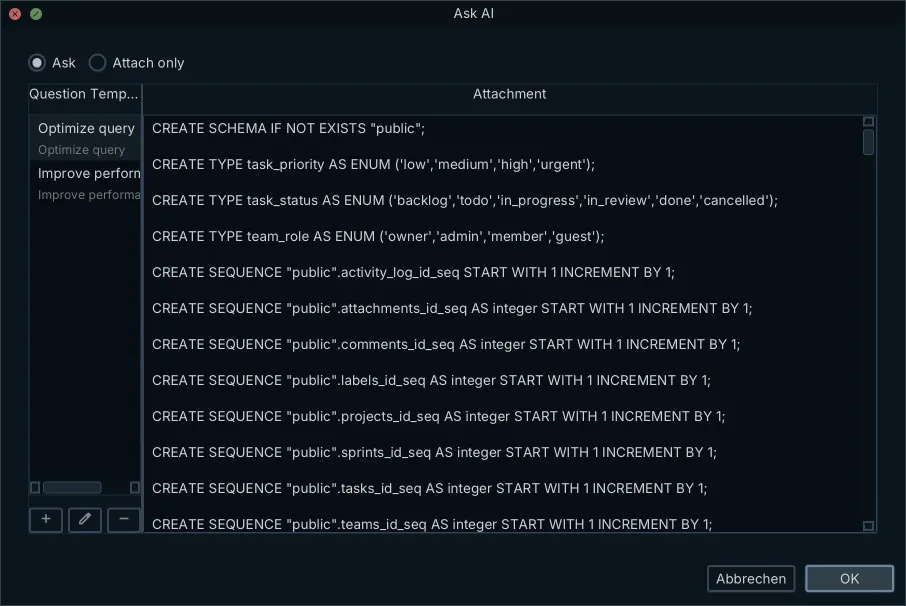
DbSchema meets all three, and the third one is visible: the AI Assistant sends only the DDL of the tables you attach, meaning table, column, type and relationship definitions, and it never connects to the database and never reads table contents. Query results, row values, passwords and connection details stay inside DbSchema. That is a property of what the application sends, not a promise about what the model does with it, which is why it survives a change of provider.
A tool that runs in a browser has to reach the database from somewhere, so it needs either a hosted connection or an agent inside your network, and both are more surface than a JDBC driver on one laptop. Where a data model should live follows from that, and the same security questions are worth asking of anything that holds a connection to production.
What shouldn't you tell ChatGPT?
Rows, credentials and connection strings, in that order of regret. A query that returns customer records should never be pasted with its output attached, and a debugging session is exactly when someone does it, because the output is the thing that looks wrong.
The useful part is smaller than people expect. A join query needs the names, the types and the relationship, and nothing else:
CREATE TABLE customers (customer_id int PRIMARY KEY, name text NOT NULL);
CREATE TABLE orders (
  order_id int PRIMARY KEY,
  customer_id int NOT NULL REFERENCES customers,
  placed_at timestamptz NOT NULL,
  total numeric(10,2) NOT NULL
);
Ask for the latest order per customer against that text and the model has everything it needs: it knows the join column from the REFERENCES clause, and it knows placed_at is a timestamp it can sort on. No row appears anywhere in the prompt, and no row is needed to answer. Working in offline design mode makes the same point structurally, since the model file holds the definitions and the database is not even connected.
Connection strings deserve a rule of their own, because they read as configuration rather than as secrets. Replace the host with a placeholder before the text goes anywhere, and keep the credentials in whatever secret store the rest of your infrastructure uses.
Which 3 jobs will not survive AI?
Three tasks rather than three jobs, and all three were already being automated before the models arrived. Writing routine CRUD statements and multi-table joins by hand is the first: the schema states the join conditions, so a query drafted from the table definitions is correct or obviously wrong, and either way it took seconds.
Reading an inherited database by querying the catalog is the second. Reverse engineering has produced diagrams from a live connection for years, and what an assistant adds on top is the prose: table comments, a data dictionary, a plain-English description of what a column of flags appears to mean. The judgment about whether that description is right stays with whoever knows the domain.
Hand-writing ALTER TABLE statements in dependency order is the third. A migration tool that compares a model against a live database generates the statements and orders them, which removes the transcription errors rather than the decisions. What to change, and whether the change can run while the application is up, is still the part nobody automates. The same is true of the rest of the chores it is now practical to automate away: the work that disappears is the typing.
What the DbSchema AI Assistant attaches to a question
Click the vertical AI Assistant tab on the right edge of the DbSchema window and the panel docks beside the diagram, where it stays open while you work next to an ER diagram, a SQL Editor or the Relational Data Editor. Its toolbar holds four actions: Attach, AI Settings, History and Send.
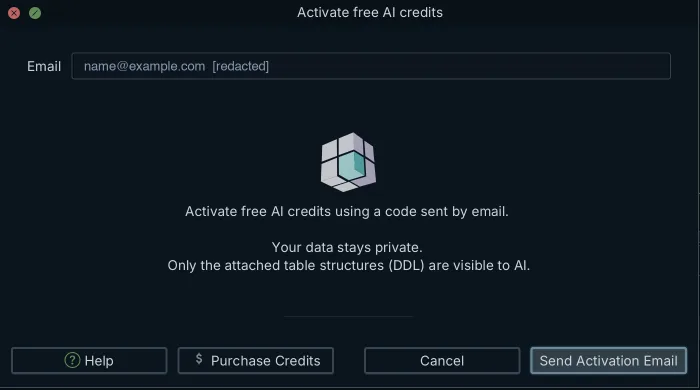
Attach opens the attachment list, and the plus button inside it opens Attach Table DDL, where you tick a whole schema or only the tables the question is about. Attaching less is both safer and better, because a focused context produces a more precise answer and less of the schema leaves the machine. The preview then shows the exact text that travels with the question, which is plain CREATE TABLE DDL and nothing else, so the payload is read rather than assumed. The same dialog keeps reusable question templates and an Attach only option that hands over the schema without asking anything.
AI Settings chooses who serves the model. The Subscription by dropdown offers DbSchema, billed in credits with nothing to configure beyond activation; your own account with OpenAI, AzureOpenAi, Claude, Gemini, DeepSeek, Grok, Mistral or Venice, where you supply the API key and the provider bills you; or Ollama, a model running on your own machine, where nothing leaves the computer at all. The Model dropdown then lists that provider's models, and a stronger one is worth choosing for a schema review while a smaller one handles routine SQL. If a policy forbids AI features on a machine entirely, clear the Enable checkbox under Edit → Settings → General → AI Assistant and the assistant is gone after a restart.
Reviewing the SQL that comes back
Answers arrive as Markdown with the SQL inside code blocks, ready to copy into an editor. Nothing runs on its own: you read the statement, then you paste it into the SQL Editor and execute it yourself, or, for a CREATE TABLE, merge it into the design model and let the model file carry it. Merging changes the .dbs file on disk and leaves the database untouched until you synchronize the model against it, which generates its own migration script to read first.
Download DbSchema, attach two tables to a question, and read the preview before you send it. The AI Assistant is a credits subscription that works on Community, Pro and Architect alike, so the free Community edition is enough to try the payload for yourself. Using your own provider key, Ollama included, requires the Architect edition, and a new installation starts with a 15-day Architect trial, so both routes are open on day one.
Frequently asked questions
Does AI keep your data private?
Not by the same rule everywhere. OpenAI's API documentation says API data is not used to train its models unless you opt in, while retaining abuse monitoring logs for up to 30 days unless Zero Data Retention is approved; a consumer chat window runs on separate consumer terms. The variable you control is the payload, and DbSchema's AI Assistant restricts it to the DDL of the tables you attach.
What is the 30% rule in AI?
The 30% rule is a rule of thumb, not a published standard: automate the mechanical part of a workflow and keep the judgment. Applied to a database it is less about the proportion than about the gate, which holds only while generated SQL waits for a person before it runs.
What are the risks of data privacy with AI?
The recurring one is a personal AI account used for a work problem, with whatever was on the clipboard pasted into it. A prompt cannot be recalled the way a leaked key can be rotated, so it stays in the provider's logs for their retention period regardless of what you do next.
Which AI tool is best for data privacy?
Look for a local database connection, no path from the AI integration to row data, and a context you assemble table by table. DbSchema's AI Assistant sends the DDL of the tables you attach and shows it to you first, and selecting Ollama in AI Settings runs the model on your own machine so nothing is sent at all.
What shouldn't you tell ChatGPT?
Result rows, database credentials and connection strings, none of which a model needs to write SQL. Table names, column types and the foreign keys between them are enough for a correct query, which is the whole context DbSchema attaches.
Sources
Open the model against your own database
DbSchema reverse-engineers your schema into an ER diagram, and its AI Assistant sends only the DDL of the tables you attach, never the rows behind them. The Community Edition is free.









