Putting a Database Schema in Git
For the backend developer or DBA whose application code is already in Git and who wants schema changes reviewed the same way.
On this page
Your repository holds every line of code that queries the database, and nothing at all about the database itself: not when the last column arrived, not who added it, not what shape production was in before the release. Putting the schema in Git means committing one text file that describes the whole design, then generating the SQL for each deployment from the difference between two commits of that file. The rest is the ordinary branch, review and merge you already run on code.
Why a database schema belongs in version control
Application code can be rebuilt from any commit. A database cannot, because it holds data, and every change lands in place on top of whatever the previous change left behind. That one asymmetry produces the four problems teams keep hitting.
Environments drift apart when a hotfix goes straight into production and is never written down. Nobody can say who added a column or why an index exists, because the only record is the catalog, which stores the result and not the reason. Hand-written DDL run in the wrong order fails halfway through a release. And reversing a change is guesswork when no recorded previous state exists to reverse to, which is where rolling back a database schema change has to start.
A schema kept as a file in the repository answers all four with the same mechanism. The file is what the pull request shows, what the history records, and what the next deployment script is generated from.
The three types of version control
Version control comes in three architectures, and only one of them suits a file that several people edit in parallel. Local version control keeps revisions in a database on one workstation. Centralized systems put every versioned file on a server, and you check a file out over the network before you can edit it. Distributed systems give every contributor a full clone of the repository, history included.
| Model | Where the history lives | Works offline | Fit for a schema file |
|---|---|---|---|
| Local | One workstation | Yes | No sharing, no review |
| Centralized | One server | No | Checkouts block on the network |
| Distributed | Every clone | Yes | Branch and merge like source code |
Distributed is the architecture the rest of this article assumes. Two people can change the same design file on two branches, and the merge happens when they are ready rather than when the server lets them.
Git as the system a schema file lives in
Git stores a commit as a snapshot of the whole project at that moment rather than as a list of changes per file, and where a file has not changed it stores a link to the copy it already has[1]. Most operations need only local files, so reading the full history of a design or branching from a commit made six months ago works with no network connection[1]. Everything is checksummed before it is stored and then referred to by that checksum, a 40-character SHA-1 hash, so nothing committed can change without Git knowing[1].
A schema file dropped into that repository inherits the lot. The design of a release becomes a commit, the review happens on a branch, and the audit trail is the commit history instead of a spreadsheet somebody maintains by hand.
The one condition is that the file has to be text. Git renders a comparison between two trees line by line[2], and a design saved as a compressed archive gives the reviewer a pull request that reports one changed file and nothing more.
What a database version looks like in practice
Two paradigms decide what actually lands in the repository. State-based version control commits the desired end state of the schema, and a comparison step works out the difference against the target database and generates the deployment script from it. Migration-based tracking commits discrete numbered scripts, V1__init.sql and V2__add_status.sql, each applying one step.
| Dimension | State-based | Migration-based |
|---|---|---|
| Source of truth | One schema model file | Ordered transition scripts |
| Artifact in Git | Single definition | Growing directory of files |
| Merging a branch | Text merge on the model file | Renumbering and ordering |
| Deployment script | Generated on demand | Written ahead of time |
The two combine well. Keep the declarative model in Git as the thing reviewers read, and generate a numbered migration script between two tagged versions for the pipeline to apply. The reviewer gets a readable diff and the deployment still gets an ordered, repeatable script.
Conventions that keep the repository honest
One repository holds the authoritative design, and no DDL is typed against production by hand. Everything after that follows from those two decisions.
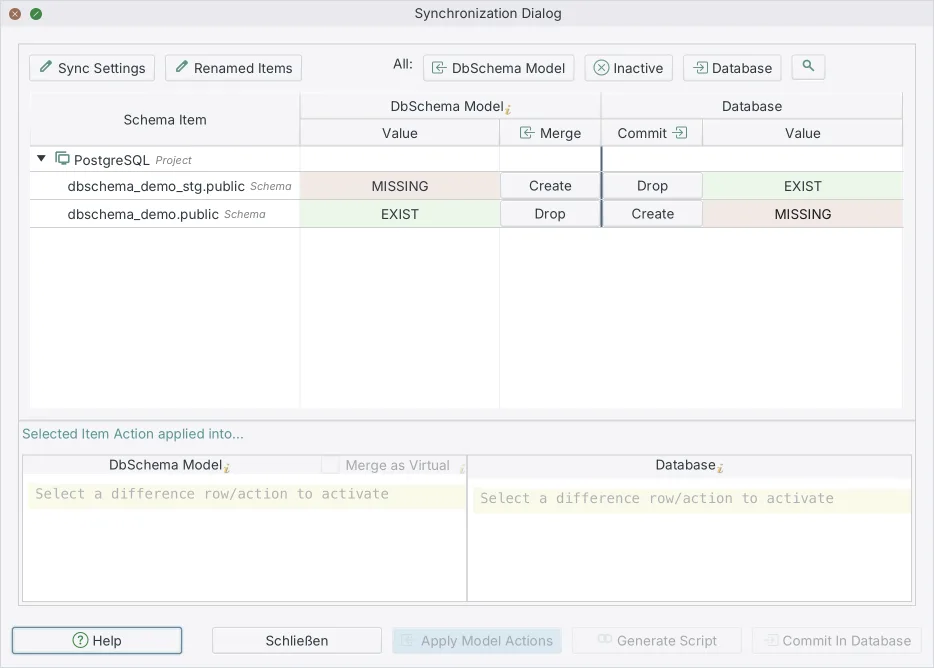
Schema changes go on feature branches, next to the application code that needs them, so a reviewer sees the column and the query that reads it in one pull request. Every change to the model file is reviewed before it merges, by the same people and the same process that review code. Continuous integration applies the generated script to a throwaway database, which catches a statement that will not parse or a constraint that the existing rows violate, long before the release window. And the live database is compared against the committed model on a schedule, because that comparison is the only thing that finds an edit somebody made outside the process.
What a design tool has to store for Git to be useful
DbSchema saves an entire project as one indented XML file with a .dbs extension: the tables, columns, data types, indexes, foreign keys, virtual foreign keys, comments and diagram layouts, in a format you can open in a text editor. That is what makes the pull request readable, because the reviewer compares two versions of a text file rather than two archives.
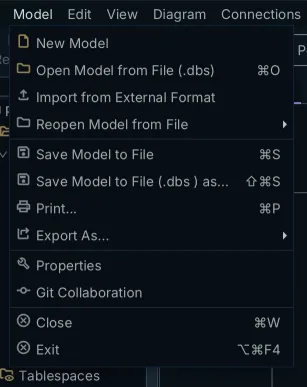
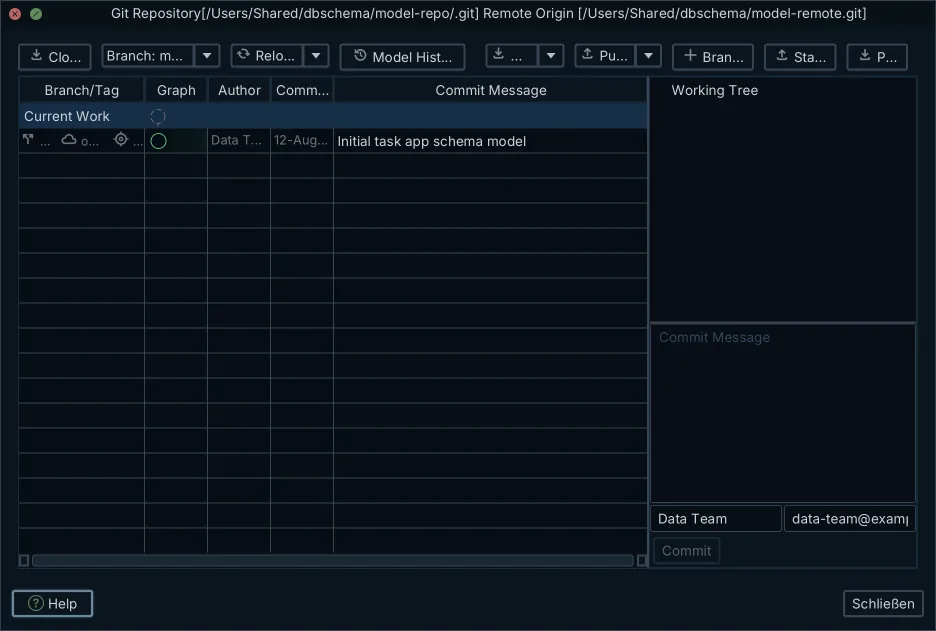
DbSchema also talks to the repository itself. Open the Model menu and choose Git — Collaborative Design, and the Git dialog opens on the repository holding your .dbs file. From there you stage the modified files, commit them with a message, and push to the remote. Pull brings your teammates' commits down, and Compare with Current opens the Synchronization Dialog on the version you just pulled, so you can read the change as a list of objects rather than as XML.
None of that touches a database. Staging, committing, pushing and pulling move the model file between your working directory and the remote repository; the live database is only involved when you choose to apply differences to it.
The walkthrough, from model file to reviewed pull request
- Connect DbSchema to your database and reverse-engineer the existing schema into a diagram, or build the tables from scratch in offline design mode.
- Save the model as a
.dbsfile inside your Git repository. - Check out a feature branch, then edit the tables, columns and foreign keys in the diagram and save the file again. This step changes the model file only.
- Commit the file and open the pull request. The reviewer reads the XML diff.
- After the merge, open the model against the target database and generate the migration script from the differences. This step is the one that changes the live database.
Step 4 is the one worth seeing. Adding a column and an index on it produces this diff in the .dbs file:
   <table name="orders" >
     <column name="id" type="serial" mandatory="y" />
     <column name="total" type="numeric" />
+    <column name="status" type="varchar" length="32" mandatory="y" />
+    <index name="idx_orders_status" unique="NORMAL" >
+      <column name="status" />
+    </index>
   </table>
A reviewer reads the column name, the type, the length, the fact that it is mandatory, and the index that will be built on it, straight from the pull request, with no tool installed and no database connection. That is the whole point of the format: the review happens where code review already happens.
Comparing that merged model against a live database is the step that produces the deployment SQL, and how to make that SQL safe to run under load is covered separately in turning a schema diff into a safe migration script. Whether you want the diff to be visual or expressed as migration code is a further choice, weighed in visual schema diff or a code-only migration library.
Start with the schema you already have rather than a design you have yet to write. Download DbSchema at https://dbschema.com/download.html, connect to your database, reverse-engineer it into a diagram, and save the model into the repository your application code is already in. Connecting, reverse-engineering and the interactive diagram are in the free Community Edition. Saving the design to a .dbs file and schema synchronization are Pro Edition features, and the installation kit carries a 15-day Architect trial.
Frequently asked questions
What are the three types of version control?
Local, centralized, and distributed. Git is distributed, which means each contributor holds the full project history locally and can read it, branch from it, and commit to it with no network connection[1].
What are the best practices for version control?
Start the change on a branch DbSchema creates for you: the Git dialog has a Create Branch command, so the schema edit is isolated from the main branch before you touch a table. The conventions that go with that branch, from one authoritative design file to a scheduled comparison against the live database, are in the section on keeping the repository honest.
What is the most common version control system?
Git is the system these workflows assume. Its distributed design is the reason: a commit is a snapshot of the whole project rather than a per-file delta, and everything is referred to by a 40-character SHA-1 checksum of its contents[1].
Can Git diff a database schema?
Git compares two versions of a file line by line[2], so it diffs a schema whenever the schema is stored as text. DbSchema saves the whole design, diagrams included, as one indented XML .dbs file for exactly that reason.
What is the difference between state-based and migration-based versioning?
State-based versioning commits the finished schema and generates the deployment script by comparing that state against the target database. Migration-based versioning commits numbered scripts such as V2__add_status.sql and applies them in order. State-based merges as a text file; migration-based needs someone to settle the ordering when two branches both add a script.
Sources
Put the schema in Git as reviewable text
DbSchema saves the whole design as one indented XML .dbs file, so a schema change reads as a line-by-line diff in a pull request. Saving the design to a file and schema synchronization are Pro Edition features.









