Reviewing a Schema Change in a Pull Request
For the architect or DBA who approves schema pull requests before they deploy; the PostgreSQL and SQL Server lock modes are explained where they appear.
On this page
The pull request in front of you touches one file, and the description says "add an email index". Approving it approves whatever SQL the deployment generates from that change, and the diff shows you none of it: not the statements, not the order they run in, not the lock each one takes. Read the diff for intent, then generate the migration script and read that for what production will do.
What a schema change looks like in a pull request
A schema change reaches a pull request as one of three artifacts, and the three do not carry the same information.
A handwritten migration file holds raw SQL, an ALTER TABLE or a CREATE INDEX. It states what the author intends to run, and says nothing about whether the target database is still in the state the author assumed when writing it. A migration generated by an object-relational mapper translates a changed entity class into DDL, which is a faithful translation of the class and not of the deployment: index storage parameters, lock timeouts and non-blocking keywords are not part of what the mapper was asked to express. A design model file records the intended state of tables, columns, data types, foreign keys and diagram layout in XML, so it shows the destination and not the route.
GitHub's review interface lets you inspect file diffs, comment on specific lines, and request changes before the branch merges[1]. Whichever artifact lands there, the gap between what you can read and what will execute is different in each case.
| Artifact in the pull request | What the diff shows | What it leaves out |
|---|---|---|
| Handwritten SQL | The statements | Drift from the live database, lock modes |
| ORM-generated migration | The generated statements | Lock timeouts, concurrent index flags |
| Design model file (.dbs) | Columns, types, constraints | Statement order, lock modes, backfills |
When the change was drafted by a model rather than typed by the author, the same three gaps are there plus one more, and reviewing an AI-proposed schema change covers that reading separately.
What the design model file shows a reviewer
DbSchema saves a project into a .dbs model file, a plain XML document holding the tables, columns, indexes, foreign keys and layout. Because it is structured text rather than an archive, Git tracks it across branches and renders the change line by line, and you read it in the web interface or in a terminal without installing DbSchema[2].
Here is a diff on a .dbs file where the author renamed one column, widened it, and added a unique index on it:
 <table name="customers" >
- <column name="customer_mail" type="varchar" length="100" decimal="0" jt="12" mandatory="y" />
+ <column name="email" type="varchar" length="255" decimal="0" jt="12" mandatory="y" />
  <column name="created_at" type="timestamp" decimal="0" jt="93" mandatory="y" />
+ <index name="idx_customers_email" unique="UNIQUE" >
+   <column name="email" />
+ </index>
 </table>
The intent is unambiguous: customer_mail became email, varchar(100) became varchar(255), and a unique index arrived on the new name. What the file cannot tell you is how that lands on a table with millions of rows. The rename breaks every query still using the old name, and the index build and the type change each take a lock whose mode the sections below name for PostgreSQL and for SQL Server.
A diff needs a common ancestor to be taken against, which is the argument for putting the database schema in Git before the first review rather than after the first incident.
Generating the migration script between two versions
Deployment DDL is not written by hand from scratch. DbSchema produces it by comparing two states: the model on the feature branch against the model on main, or the model against the live database. Both comparisons order the statements so that a table exists before the index on it and before the constraint that references it, which is the part a hand-written script gets wrong when the deployment spans several files.
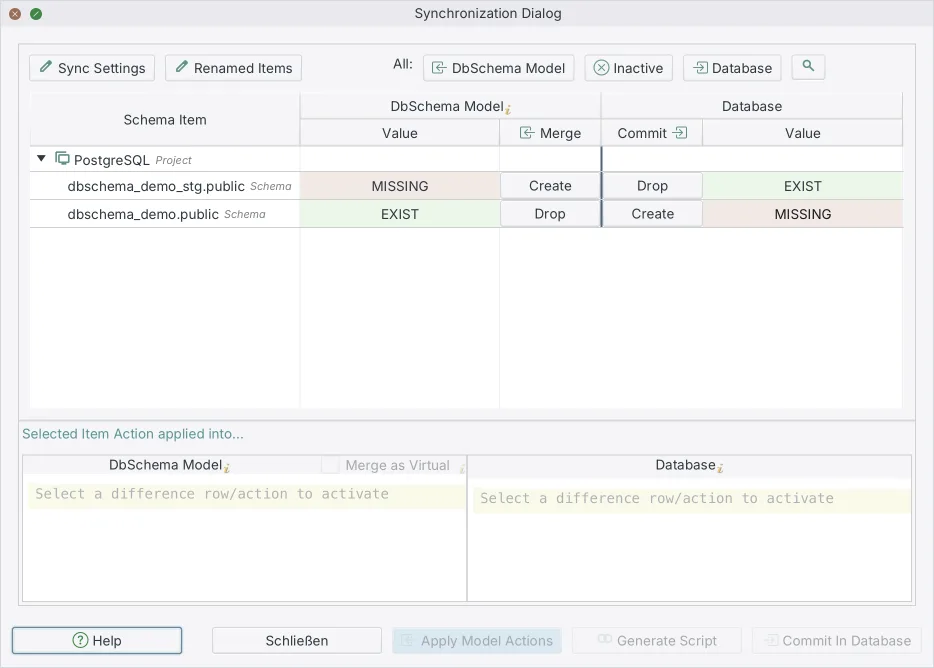
- Check out the feature branch holding the updated
.dbsfile. - Open that model in DbSchema. Opening a second
.dbsfile lets you synchronize between the two, and connecting instead lets you compare the model against a live database fromSchema → Compare Model with Database. - Read the Sync Dialog, which lists every table, column, foreign key and index that differs.
- Read the SQL it generates from those differences, and paste it into the pull request as the thing being approved.
- Leave the Execute button alone. Steps 1 to 4 read the model file and the catalog and change neither; the database changes only when someone clicks Execute.
Generating a migration script between two model versions is a Pro Edition feature of DbSchema. What the script contains is the subject of the review; making that script safe to run, backfills included, is a separate procedure covered in turning a schema diff into a safe migration script. The checks worth running against any schema comparison before you rely on it are listed in what to test before you buy.
The PostgreSQL locks a text diff hides
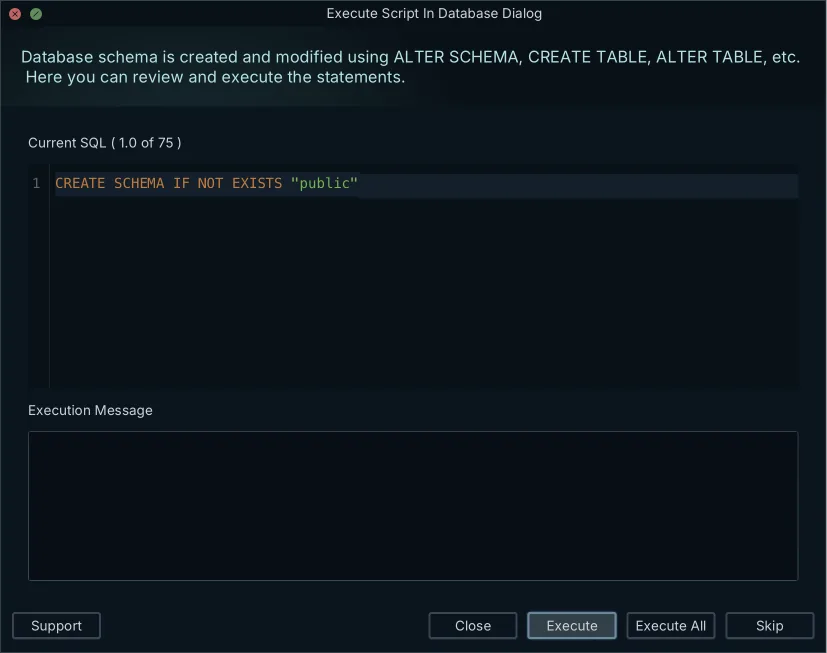
In PostgreSQL 18, ALTER TABLE acquires an ACCESS EXCLUSIVE lock unless a subform explicitly notes otherwise[3]. That mode conflicts with locks of all modes and guarantees the holder is the only transaction accessing the table in any way[4], so reads queue behind it as well as writes.
Column defaults decide whether the statement is instant or rewrites the table. With a non-volatile default, the value is evaluated once and stored in the table's metadata, returned when existing rows are accessed, and no rewrite is required[3]. With a volatile default such as clock_timestamp(), the entire table and its indexes are rewritten[3], and the ACCESS EXCLUSIVE lock is held for the whole rewrite.
-- Volatile default: rewrites the table while holding ACCESS EXCLUSIVE
ALTER TABLE orders ADD COLUMN generated_token text DEFAULT md5(random()::text);
-- Two steps: the column appears without a rewrite, the values arrive in batches
ALTER TABLE orders ADD COLUMN generated_token text;
UPDATE orders SET generated_token = md5(random()::text) WHERE id BETWEEN 1 AND 10000;
Index builds have the same split. CREATE INDEX without CONCURRENTLY acquires a SHARE lock, which conflicts with ROW EXCLUSIVE, the mode INSERT, UPDATE and DELETE take, so writes wait for the build to finish. CREATE INDEX CONCURRENTLY acquires SHARE UPDATE EXCLUSIVE instead, which conflicts with neither[4]. Require the concurrent form in review for any table that takes production traffic. The same reasoning applied to a whole release is set out in deploying PostgreSQL schema changes safely, and keeping those releases in order across environments is schema versioning for PostgreSQL.
| PostgreSQL 18 operation | Lock mode | Blocks reads | Blocks writes | Rewrites table |
|---|---|---|---|---|
| ADD COLUMN, non-volatile default | ACCESS EXCLUSIVE | Yes | Yes | No |
| ADD COLUMN, volatile default | ACCESS EXCLUSIVE | Yes | Yes | Yes |
| CREATE INDEX | SHARE | No | Yes | No |
| CREATE INDEX CONCURRENTLY | SHARE UPDATE EXCLUSIVE | No | No | No |
| DROP COLUMN | ACCESS EXCLUSIVE | Yes | Yes | No |
The SQL Server locks a text diff hides
SQL Server 2022 takes a schema modification (Sch-M) lock during a DDL operation such as adding a column or dropping a table, and that lock blocks all outside operations on the object until it is released[5]. Read queries hold a schema stability (Sch-S) lock while the Database Engine compiles and executes them, and a DDL operation that needs Sch-M is blocked by those Sch-S locks[5]. An ALTER TABLE behind a slow-compiling report therefore waits, and everything behind the ALTER TABLE waits with it.
Index builds are where a reviewer changes the outcome most. An index operation performed offline holds exclusive (X) locks on the underlying data and associated indexes, which prevents modifications and queries until the operation completes; the ONLINE option allows concurrent user access to the table and its nonclustered indexes for the duration[6]. Online index operations are not available in every edition of SQL Server[6], so check the target server's edition before you require the clause.
-- Offline build: holds exclusive locks until it finishes
CREATE NONCLUSTERED INDEX idx_orders_customer ON orders (customer_id);
-- Online build: concurrent access to the table continues
CREATE NONCLUSTERED INDEX idx_orders_customer ON orders (customer_id)
WITH (ONLINE = ON);
A column type change deserves the same question. ALTER TABLE ALTER COLUMN accepts WITH (ONLINE = ON), which carries out the alteration while the table stays available: queries run as usual and data modifications are permitted[7]. The restrictions are worth reading in the same review, because the online form does not cover every case: altering a column from NOT NULL to NULL is not supported online when a nonclustered index references the column, and more than one column cannot be altered online at the same time[7]. Where the online form does not apply, the change becomes an expand-and-contract sequence instead of one statement.
What to check before approving a schema change
Five questions decide the approval, and each has an answer the pull request either contains or does not.
Is the change reversible? Either a rollback script is in the branch, or the description states which statement is irreversible and why that is acceptable. Does the deployment drop or rename a column that the currently deployed application still writes to? If it does, the drop belongs in a later release, after the release that stops referencing the column. Do the index builds use the non-blocking form? PostgreSQL wants CONCURRENTLY, SQL Server wants ONLINE = ON on an edition that supports it, and MySQL 8.4 InnoDB adds a secondary index in place while the table stays available for reads and writes, with FULLTEXT and SPATIAL indexes as the exceptions that do not permit concurrent DML[8].
Then the two that reviewers skip. Do the design model and the generated script agree object for object? A column added in the model and missing from the script is a deployment that silently does less than the review approved. And does the script set a lock timeout, SET lock_timeout = '3s' in PostgreSQL, so a statement that cannot get its lock fails immediately instead of holding a queue of connections open behind it?
If any answer is missing, request changes rather than approving with a comment. A review process also assumes the model file has more than one reader: team collaboration in schema design covers how a team shares one .dbs file through Git without overwriting each other's tables.
When the diff is clean but the deploy is not
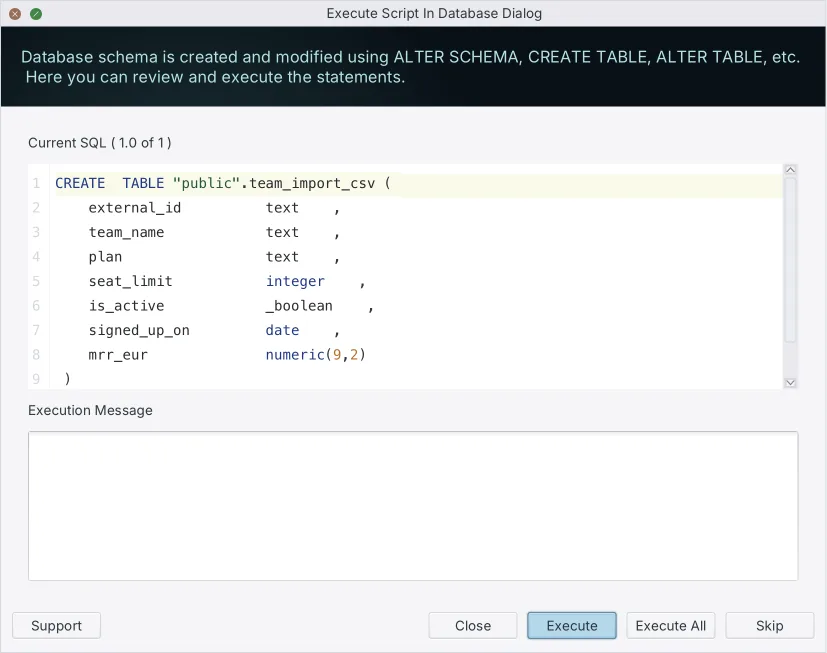
The failure everybody has seen once is a pull request that reads cleanly, passes every test in continuous integration, and takes the site down at deploy time. The tests ran against a small idle database, where an ACCESS EXCLUSIVE or Sch-M lock is taken and released faster than anything notices. On a production database serving thousands of transactions a second, the same statement queues behind an open transaction, and every query arriving after it queues behind the statement. The connection pool is exhausted long before the DDL completes.
Nothing in the text diff distinguishes those two outcomes, because the difference is not in the definition being changed but in the statement chosen to change it. That is why the generated script, and not the model diff, is the artifact worth arguing about in the review.
Download DbSchema at https://dbschema.com/download.html, open the branch's model file against the target database, and generate the migration script for the change currently sitting in review, so the statements are on the pull request before the vote instead of in the deployment log afterwards. Connecting, reverse-engineering and the diagram are in the free Community Edition; saving the design to a .dbs file and schema synchronization are Pro Edition features.
Frequently asked questions
What does a schema change look like in a pull request?
A schema change arrives as one of three artifacts, a handwritten migration file, DDL generated by an object-relational mapper, or a changed design model file, and none of the three shows the statements the deployment will run. The section on what reaches a pull request has what each artifact leaves out, side by side.
Why is reading a text diff not enough to approve a database change?
The diff shows the definition that changed, not the statement that will change it. In PostgreSQL 18 the same added column is instant with a non-volatile default and a full table rewrite with a volatile one[3], and both look identical in the model file.
Does adding a column lock the table in PostgreSQL?
ALTER TABLE acquires an ACCESS EXCLUSIVE lock unless a subform notes otherwise[3], and that mode conflicts with every other mode, so reads and writes both queue[4]. A volatile default rewrites the whole table while the lock is held.
What is a Sch-M lock in SQL Server?
A schema modification lock, taken during DDL such as adding a column or dropping a table, which blocks all outside operations on the object until it is released[5]. Because query compilation holds a Sch-S lock that conflicts with it, a DDL statement also waits for the queries already running.
How do you check a schema migration script before approving it?
Confirm the change is reversible, that no column is dropped while the live application still writes to it, that index builds use the concurrent or online form, and that the script sets a lock timeout. Then confirm the design model and the generated script list the same objects.
Can you review schema changes directly in GitHub?
GitHub's interface handles the diff, the line comments and the approve or request-changes decision[1]. The generated SQL is not in the pull request unless someone puts it there, which is what generating the script in DbSchema and pasting it into the review is for.
Sources
Review the actual migration, not just the diff
DbSchema reverse-engineers your database and generates the exact migration script between two model versions, so the review reads the statements before they run. Saving the design to a .dbs file and schema synchronization are Pro Edition features.









