Schema Versioning Without a Migration Framework
For the backend developer who wants schema changes tracked in Git without adding a migration runner to the application.
On this page
A migration framework asks for three things before it tracks anything: a runner wired into the service, a bookkeeping table inside your database, and a numbered file for every change anyone makes. You can have the versioning without any of it. Commit one declarative file that describes the schema you want, and let a comparison against the target database produce the SQL for each deployment.
The challenge of evolving databases without a framework
Without something recording the schema, the record is whatever people remember. A developer alters a table on the shared development instance, someone else pastes DDL into a chat channel, and an emergency fix goes into production and nowhere else. The structures diverge, and nothing in the repository says so.
The divergence shows up later, in four shapes worth naming because each one arrives disguised as an application bug. Newly deployed code queries a column that only exists on the developer's machine and the request fails at run time. A column that is numeric(10,2) in one environment and float in another produces two different answers to the same report, with no error anywhere. Nobody can say which DDL statements have already run on a given instance, so the next deployment is a guess. And a rollback fails because the state it assumes was quietly edited by hand during an incident three weeks ago.
The fix is to make the schema a version-controlled artifact in its own right, so the answer to "what shape should this database be in?" comes from a file rather than from a person.
State-based vs migration-based database versioning
The two paradigms differ in what you write down. Migration-based versioning writes down transitions: ordered SQL files, V1__create_users.sql then V2__add_email_idx.sql, applied in sequence, with a metadata table recording which have run. You state each step explicitly, and you also own the consequences: working out the intermediate state before each script, and settling the order when two branches both add one.
State-based versioning writes down the destination. One file holds the schema you want, and a comparison against the target database computes the difference and emits the DDL, which is the same operation as comparing two database schemas with one of the two sides being a file.
| Dimension | Migration-based | State-based |
|---|---|---|
| Source of truth | Accumulated DDL scripts | One schema model file |
| Merging two branches | Renumber and reorder | Text merge on one file |
| Drift detection | None | Compare model against database |
| Upgrade script | Written by hand | Generated from the difference |
| Runtime dependency | A runner in the app or CI | Plain SQL, run however you like |
Between the two, state-based is the one that costs less per change, because the routine additive change stops being a file somebody writes. Reserve hand-written SQL for what a comparison cannot infer: a destructive change, or a data transformation that has to run between two structural steps.
The database design as one XML model file
State-based versioning needs a file format that describes a whole schema with no server attached. DbSchema uses a .dbs project file for this, an indented XML document you can open in a text editor and read.
The file holds the structure and nothing else, so it stays small and carries no customer data:
- Table and view definitions, columns, data types, default values and nullability
- Primary keys, unique keys, composite foreign keys and indexes
- Virtual foreign keys, which record a relationship between two tables or two document collections that the database itself does not enforce
- Diagram layout coordinates, comments and grouping
Because the model is a file, you design against it while disconnected. In offline mode no statement is sent to the database and every change is saved to the .dbs file alone[2], which is what lets a schema change be reviewed before any database has heard of it.
Versioning the XML schema file in Git
Keep the .dbs file in the repository that holds the code reading those tables, and the schema follows the same lifecycle as the service. That is the argument for putting a database schema in Git rather than in a separate database repository nobody has checked out.
- Create a feature branch for the task, in the application repository.
- Open the
.dbsfile in DbSchema and make the structural changes offline. This step changes the model file only. - Save the file and read the change with
git diff, which renders the difference between the working tree and the index line by line[1]. - Commit the
.dbsfile in the same commit as the application code that depends on it. - Push the branch and open a pull request.
- Review the schema change in the pull request interface, alongside the code.
Every merge into the main branch is then a point where the application and the schema it expects are recorded together. Nothing has touched a database yet.
What a before-and-after schema diff looks like
Because the model is XML, the change arrives in the pull request as text a reviewer can read without installing anything.
A team widens one column from a fixed-length code to a variable string, and adds a second column with an index on it:
 <table name="accounts" >
-  <column name="account_tier" type="char" length="2" jt="1" mandatory="y" />
+  <column name="account_tier" type="varchar" length="32" jt="12" mandatory="y" />
+  <column name="verification_status" type="varchar" length="20" jt="12" mandatory="n" />
+  <index name="idx_accounts_status" unique="NORMAL" >
+    <column name="verification_status" />
+  </index>
 </table>
Four things are decidable from that diff. account_tier keeps its name, so no query breaks. It grows from two characters to thirty-two rather than shrinking, so no existing value is truncated. verification_status is not mandatory, so the change needs no backfill before it can be deployed. And idx_accounts_status is on that new column, so building it costs nothing on rows that are all NULL. A reviewer settles all four without opening a database client.
Generating the SQL migration scripts
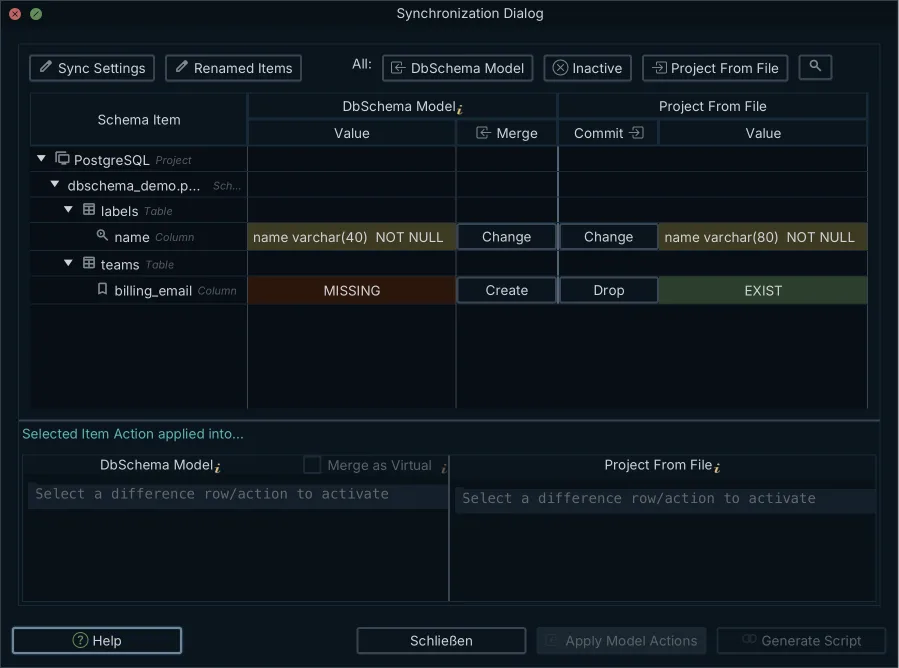
Once the branch merges, the model and the database disagree, and the disagreement is the migration. DbSchema connects over JDBC, introspects the live catalog, and compares it object by object against the .dbs model.
- Connect DbSchema to the target database and open the merged model.
- Choose
Schema → Compare Model with Databasefrom the menu. DbSchema reads the catalog and lists every table, column, data type, constraint and index that differs. - Decide per object whether the difference should go to the database or back into the model. A column somebody added by hand in production belongs in the model; a column your branch added belongs in the database.
- Read the SQL that the Sync Dialog generates from those decisions, in the dialect of the connected engine. You can edit the statements before running them.
- Click Execute to run the statements. This is the first step that changes the live database; everything before it read the catalog and wrote nothing.
Because the script is derived from the actual difference rather than from a list of files, it contains no statement that has already been applied and omits nothing that has not. Making that script safe to run under production traffic, with the backfills and the lock modes it implies, is the subject of turning a schema diff into a safe migration script.
How the same script reaches every environment
Generate the script against your development database first and run it there, because that is where a statement that will not parse or a constraint the existing rows violate costs you nothing. Run the same script against staging during integration testing, then check that the application's queries still return what they returned before, since a widened column or a new index changes plans as well as structure. Run it against production in the deployment window.
Then compare the model against production once more. A clean comparison is the only evidence that the deployment applied everything and that nobody edited the database around it. That final comparison is also the drift check you now get for free, every time, which the numbered-file approach cannot give you at all.
Download DbSchema at https://dbschema.com/download.html, connect it to your development database, and reverse-engineer the schema you already have into a model file. Commit that file, and the next change to it is a pull request rather than an announcement in a chat channel. Connecting, reverse-engineering and the interactive diagram are in the free Community Edition. Saving the design to a .dbs file and schema synchronization are Pro Edition features, and the installation kit is the same for both editions and carries a 15-day Architect trial.
Frequently asked questions
What is a state-based database migration?
A state-based migration declares the schema you want instead of the steps to reach it. The deployment script is computed by comparing that declaration against the target database, so the same declaration produces a different script for a database two releases behind than for one that is up to date.
How do you version control a database schema without a framework?
Save the design as a plain XML file and commit it beside the application code. There is no runner in the service and no bookkeeping table in the database: DbSchema compares the committed file against the target database and generates the SQL for that particular gap.
Why use an XML file for database schema design?
XML is text, so Git renders a schema change line by line[1] and a reviewer reads the column name, type, length and nullability straight from the pull request. A DbSchema .dbs file also carries the virtual foreign keys and diagram layout, neither of which exists in the database catalog to be reverse-engineered later.
Can you generate SQL migration scripts from a Git diff?
Not from the diff itself. DbSchema generates the script from the model file at a given commit compared against a live database, so what you check out decides the script: the merged model against production gives you the deployment, and last release's model against production gives you the reversal.
What is the difference between state-based and migration-based versioning?
Migration-based versioning stores the transitions as numbered SQL files applied in order. State-based versioning stores the destination as one file, and the transition is computed at deployment time. The practical difference shows up in a merge, where two branches that both changed a table produce one text conflict in a single file rather than two scripts with colliding numbers.
Sources
Version your schema in Git, without a migration framework
DbSchema saves your database design as a plain XML .dbs file you can diff and review in a pull request, then generates the SQL migration script between that file and the target database. Saving the design to a file and schema synchronization are Pro Edition features; the installation kit is the same for Community and Pro and carries a 15-day Architect trial.









