PostgreSQL List All Schemas: psql, information_schema, pg_namespace, and search_path
For SQL users landing in a PostgreSQL database somebody else organized, who need to know which schemas exist and which ones their role can use.
On this page
Somebody put the tables in a schema of their own, and a query that does not name that schema cannot find them. Inside psql the list of schemas comes from a meta-command:
\dn
From any other client it comes from a query:
SELECT schema_name
FROM information_schema.schemata
ORDER BY schema_name;
Everything below is for PostgreSQL 18, on this schema:
CREATE SCHEMA sales AUTHORIZATION app_user;
CREATE SCHEMA reporting AUTHORIZATION app_user;

CREATE TABLE sales.orders (order_id bigint PRIMARY KEY, customer_id bigint NOT NULL, total numeric(12,2) NOT NULL);

CREATE VIEW reporting.order_totals AS
SELECT customer_id, SUM(total) AS total FROM sales.orders GROUP BY customer_id;
What listing schemas means in PostgreSQL
A schema is a named container inside one database, and the question behind the listing is usually one of these:
- which schemas an application created here
- which schema holds the table you are looking for
- which schemas came with PostgreSQL rather than with your data
- what the role you are connected as can actually reach
Each way of asking shows a slightly different set, so a schema missing from your listing is not always a schema missing from the database:
| Method | Best when | What it gives you |
|---|---|---|
\dn in psql | a psql session is already open | the user schemas and their owners |
information_schema.schemata | portable SQL in a script | the schemas your role can access |
pg_catalog.pg_namespace | PostgreSQL-specific detail | every schema, including the system ones |
| DbSchema | browsing and documenting | schemas, their objects and the relations between them |
Two schemas turn up whatever you created. Each database carries a pg_catalog schema holding the system tables and the built-in types, functions and operators, and the information schema "automatically exists in all databases".
If the next step is the tables inside a schema, Show Tables in PostgreSQL and Describe Table in PostgreSQL pick up there.
List schemas with psql
\dn
         List of schemas
   Name    |       Owner
-----------+-------------------
 public    | pg_database_owner
 reporting | app_user
 sales     | app_user
Three schemas, and no sign of pg_catalog or information_schema. The three forms of the command differ in what they add:
\dnlists the user-created schemas with their owners.\dnSadds the system schemas, because "by default, only user-created objects are shown; supply a pattern or theSmodifier to include system objects".\dn+lists "each object ... with its associated permissions and description, if any", which is the fastest way to see who was granted what without writing a privilege query.
The owner of public catches the eye. PostgreSQL 15 changed it: the release notes record the switch of the public schema to "the new pg_database_owner role", so that each database's owner has ownership privileges on public inside their own database. A cluster upgraded from an older release keeps whatever owner it had, because "upgrading a cluster or restoring a database dump will preserve public's existing ownership specification".
List schemas with information_schema
The SQL standard view works in any client that can send a query, which is what makes it the right choice inside a migration script or an application. Add the owner column and it answers the same question \dn does:
SELECT schema_name,
       schema_owner
FROM information_schema.schemata
ORDER BY schema_name;
The result holds the three schemas above plus the system schemas your role can reach, pg_catalog and information_schema among them. What it holds depends on who you are. The PostgreSQL 18 documentation defines the view as holding "all schemas in the current database that the current user has access to (by way of being the owner or having some privilege)", so two roles running this query on the same database get two different answers, and neither of them is wrong. A list that comes back shorter than you expected is usually this: the schema is there, and the grant is not.
List schemas with pg_catalog
PostgreSQL's own catalog has no privilege filter, so pg_namespace is where you look when a schema exists and the standard view will not show it to you:
SELECT nspname AS schema_name,
       pg_catalog.pg_get_userbyid(nspowner) AS schema_owner,
       nspacl AS access_privileges
FROM pg_catalog.pg_namespace
ORDER BY nspname;
nspacl holds the raw access privileges, in the same notation \dn+ prints, and the listing includes the internal schemas: pg_toast for oversized values and a pg_temp_ schema per session that has created a temporary table.
Filter out the system schemas
Most work concerns the schemas somebody created on purpose. Two conditions remove the rest:
SELECT nspname AS schema_name
FROM pg_catalog.pg_namespace
WHERE nspname NOT LIKE 'pg\_%'
  AND nspname <> 'information_schema'
ORDER BY nspname;
| schema_name |
|---|
| public |
| reporting |
| sales |
The same pair of conditions works on information_schema.schemata, with schema_name in place of nspname. Reserving the prefix is what makes the filter safe: schema names beginning with pg_ "are reserved for system purposes and cannot be created by users", so nothing of yours can hide behind it.
Inspect schema owners and privileges
Ownership tells you who may drop the schema. What you can do in it is a separate question, and has_schema_privilege answers it for the role running the query:
SELECT n.nspname AS schema_name,
       pg_catalog.pg_get_userbyid(n.nspowner) AS schema_owner,
       has_schema_privilege(n.nspname, 'USAGE') AS can_use,
       has_schema_privilege(n.nspname, 'CREATE') AS can_create
FROM pg_catalog.pg_namespace n
WHERE n.nspname NOT LIKE 'pg\_%'
  AND n.nspname <> 'information_schema'
ORDER BY n.nspname;
Connected as app_user, who owns two of the three schemas:
| schema_name | schema_owner | can_use | can_create |
|---|---|---|---|
| public | pg_database_owner | t | f |
| reporting | app_user | t | t |
| sales | app_user | t | t |
can_create is false on public, and that is the second half of the PostgreSQL 15 change: the release notes list the removal of "PUBLIC creation permission on the public schema", applied to new clusters and to databases created after the upgrade. A script that has always ended with CREATE TABLE some_table and no schema name fails on a database created since then, and this query is how you find out before the script runs.
Check the current search_path
The listing tells you a schema exists. Whether an unqualified name reaches it is decided by the search path:
SHOW search_path;
| search_path |
|---|
| "$user", public |
The first entry is a schema named after the connected role, and it is skipped when no such schema exists. pg_catalog is never in that list and is searched anyway: it "is always effectively part of the search path", implicitly before everything else. To see the path as PostgreSQL actually applies it, ask for the expanded form:
SELECT current_schemas(true);
| current_schemas |
|---|
| {pg_catalog,public} |
Setting the path puts your schema in front for the rest of the session:
SET search_path = sales, public;
SELECT current_schemas(true);
| current_schemas |
|---|
| {pg_catalog,sales,public} |
From there, SELECT * FROM orders finds sales.orders without the prefix. SET lasts for the session and no longer, so to give a role the same path every time it connects, set it on the role itself with ALTER ROLE app_user SET search_path = sales, public;.
Browse schemas visually in DbSchema



A schema list answers where the tables are. DbSchema goes on to show what is in them and how they connect:
- Click Connect to Database, pick PostgreSQL in Choose Your Database, and fill in the Connection Dialog.
- Let DbSchema reverse-engineer the database. Every schema appears in the Project Structure panel on the left, and expanding one lists its tables, columns and indexes.
- Drag tables from two schemas onto the same diagram when a foreign key crosses the boundary between them, which is the case a flat listing hides.
- Open the SQL Editor from the Editors menu for the catalog queries above.
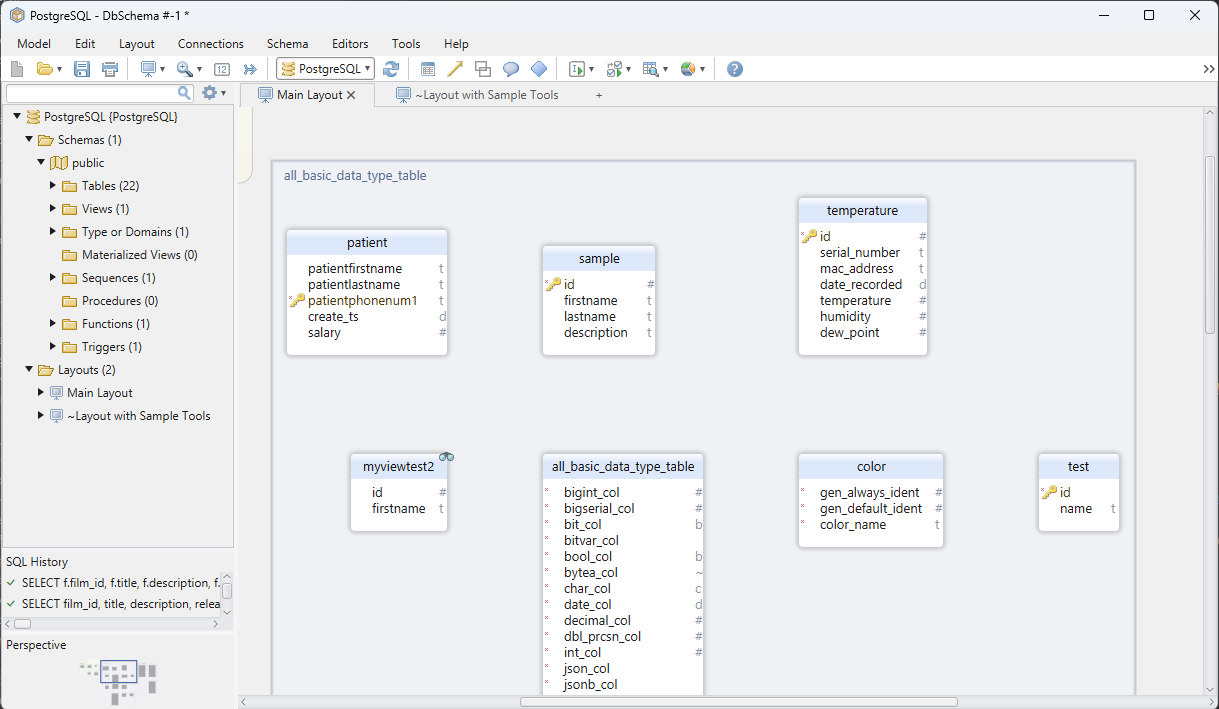
Reverse-engineering reads the database into the DbSchema model, and the diagrams are views of that model, so nothing you rearrange while exploring reaches PostgreSQL.
Once you know which schemas exist, the questions move inside them: which tables, which routines, which privileges. Download DbSchema at https://dbschema.com/download.html, connect to your PostgreSQL database, and expand a schema in the Project Structure panel. Connecting, reverse-engineering, the diagrams and the SQL Editor are in the free Community Edition. PostgreSQL Procedures covers the routines you will find next to the tables.
FAQ
What is the default schema in PostgreSQL?
There is no default schema setting: an unqualified name goes to the first schema in search_path that exists, which in a fresh database is public. Give your own tables a schema of their own and put it in front of the path with SET search_path = myschema, public;, and an unqualified CREATE TABLE lands where you meant it.
Why can two users see different schema lists?
Because information_schema.schemata filters on privileges and pg_catalog.pg_namespace does not. Run both, and every schema in the second listing that is missing from the first is one the role holds no privilege on.









