Working Across a Mixed Database Estate: Architect's Guide
For the architect responsible for several database engines at once who needs one design, one documentation set and one version history across all of them.
On this page
The estate you inherited runs a relational database for the orders, a document store for the product catalog, a key-value store in front of the session layer and a warehouse behind the reporting. Each has its own client and its own answer to the question of where the structure is written down. One design that covers all four, documented once and versioned like code, is what keeps such an estate governable, and DbSchema holds that design in a single model file.
Three types of schema in a mixed database estate
Separating the design into three abstraction tiers is what lets business logic survive a change of engine. The separation of user perspectives, conceptual business rules and physical storage was formalized as the ANSI/SPARC three-schema architecture, and it still describes how a design travels from a discussion with a domain expert to DDL that a specific engine accepts.
Conceptual, logical and physical schema layers
| Schema type | ANSI/SPARC layer | Main stakeholders | Deliverable |
|---|---|---|---|
| Conceptual | Conceptual level, the community view of the database | Domain experts, enterprise architects | Entity and relationship definitions, no storage rules |
| Logical | Between conceptual and internal, the data structure view | Database architects, software engineers | Normalized relational or document structures with keys, types and constraints |
| Physical | Internal level, the physical storage view | DBAs, DevOps, infrastructure engineers | DDL scripts, indexes, partitioning, storage allocation |
DbSchema lets you design engine-independent conceptual and logical models and then map them onto concrete physical schemas across relational and NoSQL engines. Adding an engine to the estate is never a new purchase, because every DbSchema edition covers every supported database, the free Community Edition included; engine-independent conceptual and logical design is the workflow the Architect edition adds on top. The wider question of how to pick a database design tool is worth settling before the estate grows, because one logical model has to convert into target DDL for PostgreSQL, MySQL, Oracle, Snowflake or MongoDB while holding the data types steady across all of them.
Four types of database in a modern estate
Engines get chosen for an access pattern rather than for a company standard, which is why a single application ends up spanning several of them. Four kinds cover the ground: the relational database, the document store, the key-value store and the graph database, and each one answers a different question about how the data is reached.
The four paradigms side by side
| Database type | Storage paradigm | Best-fit workload | Representative engines |
|---|---|---|---|
| Relational | Tables of rows and columns | ACID transactions, joins, financial records | PostgreSQL, MySQL, Oracle, SQL Server, IBM Db2 |
| Document store | BSON or JSON documents | Dynamic schemas, polymorphic entities | MongoDB, AWS DocumentDB, Couchbase |
| Key-value store | Key to value index | Caching, sessions, low-latency lookups | Redis, AWS DynamoDB, Memcached |
| Graph | Nodes, edges and properties | Interconnected data, fraud detection, recommendations | Neo4j, Amazon Neptune, OrientDB |
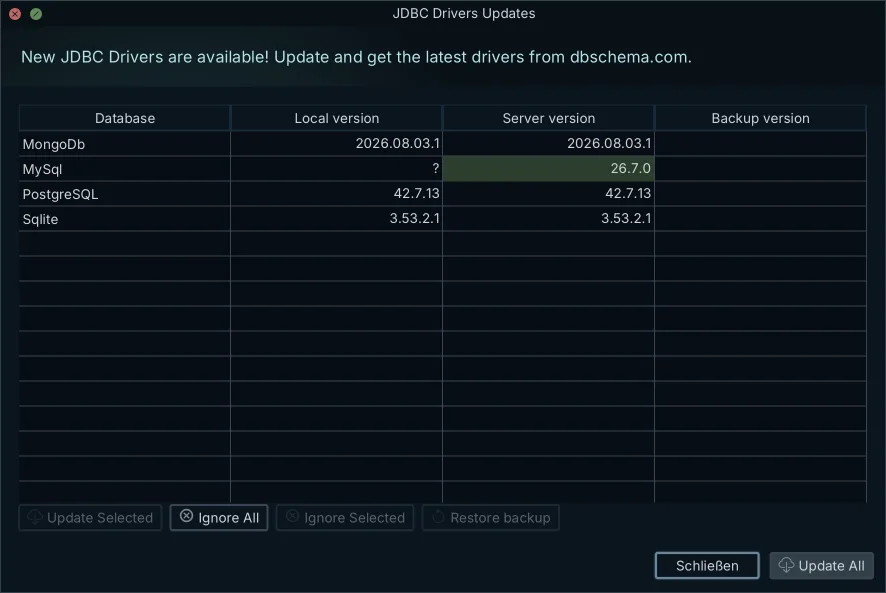
One client that reaches all four is what makes the estate workable from one desk. DbSchema connects to 70+ SQL and NoSQL databases and downloads the JDBC driver for you when you open a connection, so there is no classpath to configure and no jar to install by hand; the JDBC Driver Manager, under Connections → Manage JDBC Drivers, is there for the site that has to pin or swap a specific driver. From one application you inspect, model and query a legacy IBM Db2 instance, a DynamoDB table and a cloud warehouse.
Four types of documentation for a database estate
Documentation is what keeps a multi-engine estate from drifting, because an unrecorded schema change in one datastore is invisible to everyone working on the others. Four artifacts cover the lifecycle between them.
Visual ER diagrams carry the entities, primary keys, foreign keys and virtual relations across tables and collections, and they are the artifact a newcomer reads first. Data dictionaries go a level down: every table, column, data type, default value, index and field-level business description. API schemas and contracts, written as JSON Schema or OpenAPI definitions, document the payloads that move between application tiers, which is where a mixed estate leaks structure if nobody writes them. Deployment and migration scripts record the chronological schema transitions, the rollback procedures and the change history under version control.
Interactive vector documentation
DbSchema generates interactive HTML5 database documentation from the design model file, and the export carries a vector diagram in which table, collection and field comments are readable as mouse-over tooltips. A developer or an analyst pans, zooms and searches the layout in a browser without connecting to the database and without installing a client. Documentation export is a Pro feature.
Two types of data dictionary: active and passive
A data dictionary holds the metadata that says how information is structured and stored, and it comes in two forms. An active dictionary is the engine's own system catalog: the DBMS maintains it, so a DDL statement updates it in the same breath. A passive dictionary is kept outside the engine and updated deliberately, which makes it portable across engines and also makes it something that can fall out of date. Knowing which of the two you are reading is the difference between reporting the schema and reporting what someone meant the schema to be.
| Characteristic | Active dictionary | Passive dictionary |
|---|---|---|
| Where it lives | Inside the database engine, in the system catalog | Outside it, as a repository or model file |
| Update mechanism | By the DBMS, whenever DDL runs | By hand, or through a synchronization run |
| Access control | Enforces constraints and privileges at runtime | Descriptive reference for people |
| Cross-engine scope | One database instance | Several engines in one place |
Bridging the catalog and the offline model
DbSchema sits between the two by saving the complete design to a local XML model file. You review and change schemas offline, track the file in Git, and compare it against the live catalog to generate a deployment script for exactly the differences you approved. A dedicated data dictionary workflow is what preserves the design intent from one release to the next.
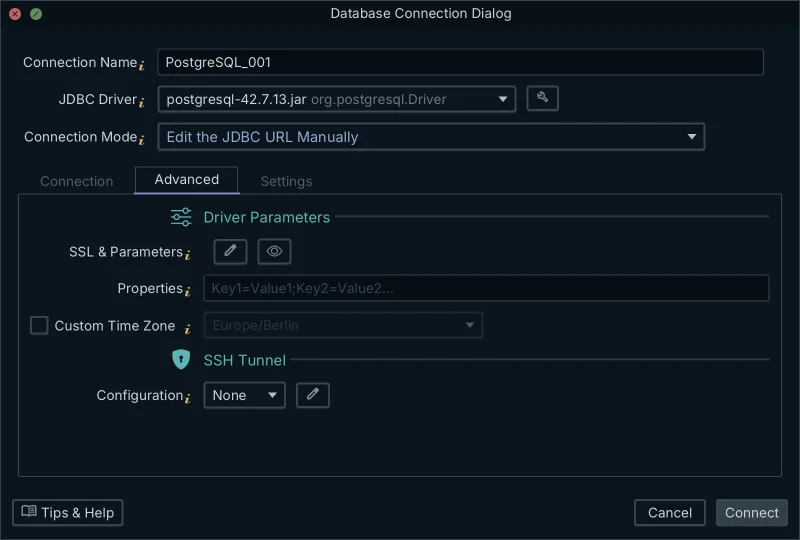
Connecting to those live catalogs has to satisfy whatever your security team already mandates. In DbSchema the Method list covers the ordinary cases per engine: a standard login and password, an SSL variant, and a Paste a JDBC URL entry for the URL a cloud console hands you. The Advanced tab of the Connection Dialog adds an SSL and Parameters editor, a free-form Properties field for driver settings, and an SSH Tunnel section. MongoDB carries its own mode list, with an entry per authentication method: password, SCRAM, X.509, AWS IAM, Kerberos and LDAP. Each of those comes in a Cloud variant for a mongodb+srv:// cluster and an On-Premise variant for mongodb://. Oracle with Kerberos is the case the connection documentation names for the Properties field, where settings go to the driver as key1=value1;key2=value2 instead of into the URL.
Four types of data model
Four modeling paradigms account for most of what you will meet across a long-lived estate, and the older two still shape the systems that carry them. The hierarchical model organizes data as an inverted tree with strict one-to-many parent-child links, which is what mainframe systems such as IBM IMS were built on. The network model extends it by letting a child record link to several parents, producing the many-to-many structures the CODASYL standard governed.
The relational model organizes data into tables of rows and columns, connects them through foreign keys and operates on them with SQL, and every relational engine in the table above implements it. The entity-relationship model sits above all of them as the conceptual and logical representation, mapping entities, attributes and cardinality before anything is implemented physically.
Relations in a schemaless store
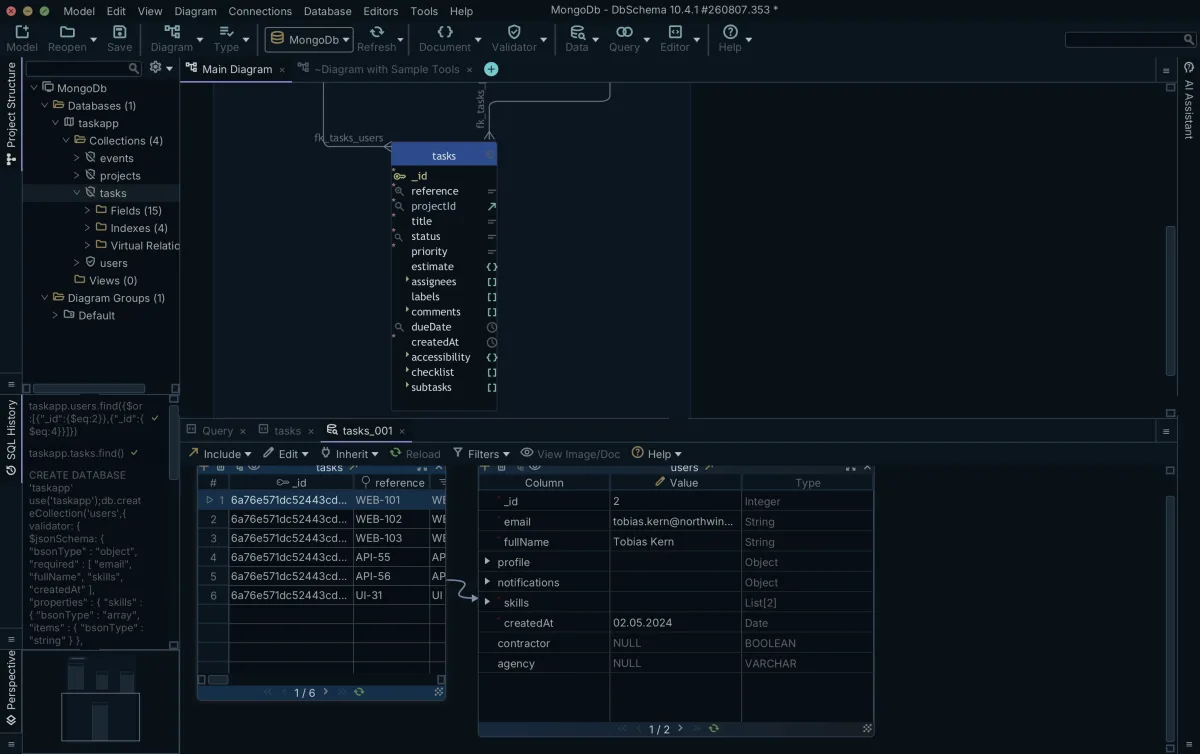
Document databases such as MongoDB declare no foreign key constraints between collections. In DbSchema you record the relations yourself by dragging one field onto another on the diagram canvas, which creates a virtual relation, also called a virtual foreign key, saved in the model file.
Those relations then do work. The Relational Data Editor opens several collections side by side over them, and selecting a record in the parent refilters every child pane to the documents whose field values match, cascading as many levels deep as needed. Checking a reference that way, before a change ships through a database migration tool, costs a click rather than a query.
Two types of dictionary: technical and business
Governance across a mixed estate depends on two documents that are easy to confuse. A technical data dictionary records the technical metadata of each table and field, the data types and the relationships, and technical teams own it. A business glossary defines the terms of the domain in plain language so that revenue means the same thing in the warehouse as it does in the board pack. One changes with every release; the other should barely move.
| Dimension | Technical data dictionary | Business glossary |
|---|---|---|
| Focus | Column names, SQL types, indexes, nullability, constraints | Domain definitions, terminology, ownership |
| Audience | Architects, backend developers, DBAs, data engineers | Analysts, compliance officers, product managers |
| Granularity | Field-level parameters and table relationships | Enterprise-wide concepts, independent of storage |
| Lifespan | Moves with every migration and schema release | A stable vocabulary held across releases |
What the offline model file keeps
The DbSchema model file stores the technical dictionary as human-readable, Git-friendly XML. Beside the table and column comments it holds the diagram layouts, custom data types, virtual foreign keys, the query builder structures and the SQL editor configuration, so reopening the file restores the working state rather than just the schema. Reviewing, editing and documenting the whole structure then happens offline, on a train or inside a network that never reaches production, with no connection open to a live database. The saved model file is a Pro feature.
Two types of data: structured and unstructured
Structured data follows a declared tabular schema with typed columns, enforceable constraints and transactional guarantees, which is what PostgreSQL and MySQL hold. Unstructured and semi-structured stores such as MongoDB and Couchbase take payloads whose shape varies between records and changes over time. The second kind is where an estate loses its documentation first, because there is no catalog entry to read.
How DbSchema derives a MongoDB structure
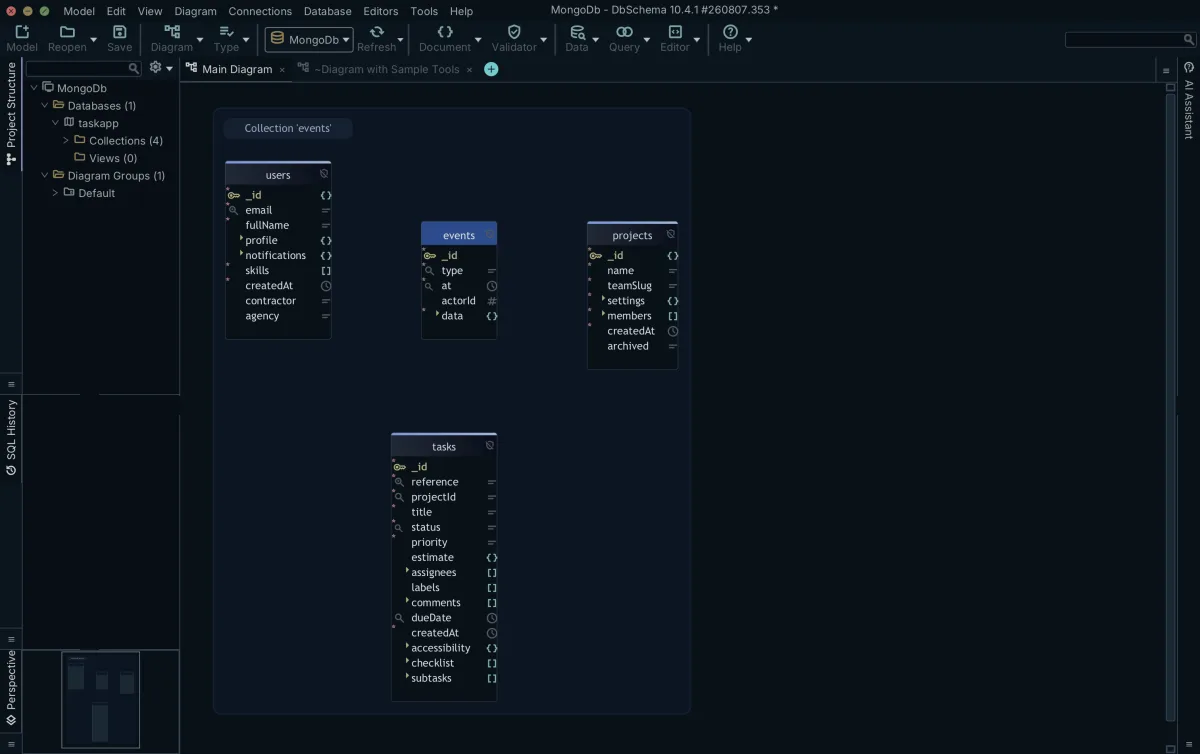
DbSchema reads a sample of the documents in each collection, configurable in size, and infers the field names, the BSON types, the nested objects and the arrays it finds there. The result is an approximation of what the documents contain rather than a schema MongoDB enforces, and the server goes on accepting a document that contradicts the sampled shape. Sampling also means a multi-gigabyte collection is characterized without being read end to end.
Where a collection carries a validation rule, DbSchema reverse-engineers that rule and treats it as the authoritative structure instead of the inferred one. Creating or editing a collection in DbSchema writes the validation rule back to the database and to the model file together. Virtual relations between collections stay on the DbSchema side: they drive the diagram, the Query Builder and the cascading Relational Data Editor, and the MongoDB server neither stores nor enforces them. Taken together, the inferred structure, the validation rule where one exists, the virtual relations, the multi-collection browsing over them and the interactive HTML5 export are what a document store gets from DbSchema that a diagram drawn by hand cannot give it.
Download DbSchema at https://dbschema.com/download.html, open a design project against the databases you already run, and put every engine in the estate on one canvas. Connecting, reverse-engineering and the interactive diagrams are in the free Community Edition, which covers every supported database; the saved model file, HTML5 documentation and the Relational Data Editor are in Pro, and engine-independent conceptual and logical design is in Architect.
Frequently asked questions
What are the three types of schema in a database architecture?
The three types are conceptual, logical and physical, and only the physical one is written as DDL for a named engine. DbSchema's logical design carries its own vocabulary for the layer above the DDL: a schema is a Subject Area, a table an Entity, a column an Attribute and a foreign key a Relation.
What are the 4 types of database commonly used in enterprises?
Relational, document, key-value and graph. They differ in how a record is reached rather than in what they can store, so one application can use several of them and still be designed in a single DbSchema model.
What are the 4 types of documentation for data environments?
Interactive ER diagrams, data dictionaries, API schemas and deployment scripts. The HTML5 documentation DbSchema exports covers the first two in one file, with field comments readable as tooltips over a vector diagram, so a reader needs no database access.
What are the two main types of data dictionaries?
Active dictionaries are the engine's own system catalog, updated by the DBMS as DDL runs; passive dictionaries are kept outside the engine, which is what makes them portable and what lets them fall behind. The table under active and passive dictionaries sets the two against each other on where they live, what updates them and how far they reach, and the paragraphs below it place the DbSchema model file between them.
What are the 4 types of data models?
Hierarchical, network, relational and entity-relationship. The entity-relationship model is the one you draw directly in DbSchema, where a relation between two entities is identifying or non-identifying, mandatory or optional, and carries a cardinality of 1:1, 1:n or many-to-many.
Which are the two main types of data?
Structured data, held in typed columns with enforceable constraints, and unstructured or semi-structured data, held as documents whose shape varies between records. For the second kind DbSchema keeps the structure it read as a local copy it calls the virtual schema, which you can compare against a second MongoDB instance to find what two environments differ on.
How does DbSchema connect to a mixed database estate?
Every connection is direct: the JDBC driver runs inside DbSchema on your own computer and talks to the database server itself, with no DbSchema server in between. DbSchema reaches 70+ SQL and NoSQL databases, downloads the driver when you open a connection, and runs it over a standard login, your own SSL settings or your own SSH tunnel.
Open one model against every database you run
DbSchema reverse-engineers SQL and NoSQL schemas from a single client, downloads the JDBC driver for you, and keeps the model as a file you can diff in Git. Every licence covers every supported engine, the free Community Edition included.









