How to Choose a Database Design Tool: Architect's Guide
For the architect who has to pick a database design tool and defend the choice to a budget owner and a security reviewer.
On this page
The shortlist for a database design tool usually has to satisfy three people at once: the engineer who wants the diagram to match the database, the budget owner who wants a number, and the reviewer who wants to know what leaves the network. DbSchema is where to start when the schema spans more than one engine, the design has to live in Git, and the migration script has to be readable before it runs. The enterprise suites, erwin Data Modeler, ER/Studio and SAP PowerDesigner, answer a different requirement: enterprise metadata governance and business process modeling. dbForge Studio is sold as one product per engine.
The decision criteria that matter
Four questions separate the candidates faster than a feature matrix does. Does one installation cover every engine in your estate, relational and document alike? Does the design survive as a file when no database is reachable? Does that file go through pull requests like source code, instead of through a vendor's repository server? And is the migration script one you can read, edit and reject before it touches a database?
Weight them by your own estate rather than by the vendor's ordering. A single-engine shop feels the first question later than a mixed estate does, and a team that approves schema changes in a governance board feels the third later than one that approves them in a pull request; both arrive the day a second engine or a second reviewer does, and a tool chosen without them has to be replaced then. The fourth has no later date attached, because that is the step where a design tool either prevents a bad deployment or causes one. A database design tool that only draws is answering a smaller question than the one you are asking.
Where DbSchema and dbForge Studio differ
Both are desktop tools aimed at developer speed rather than at a governance department, and the structural difference between them is packaging. DbSchema covers SQL and NoSQL engines from a single installation. Devart sells dbForge Studio as separate per-engine products for SQL Server, MySQL, Oracle and PostgreSQL, each with its own editions and its own price list, so a team that runs two engines licenses two products.
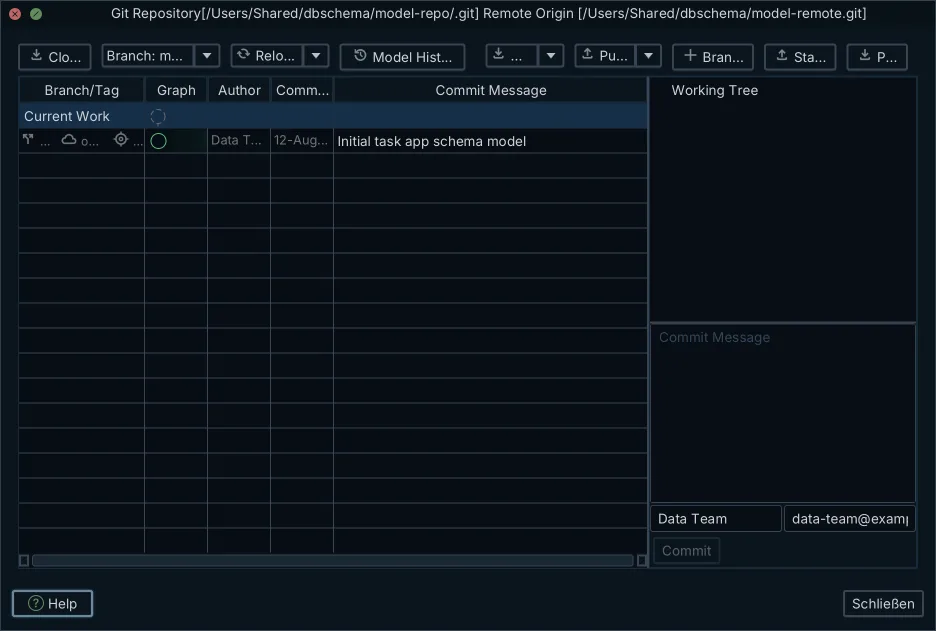
DbSchema works on a local .dbs project file saved as human-readable XML, which is what makes the Git half of the story work: the design is versioned in the repository the application code already lives in, reviewed as a diff, and merged like any other file. Git — Collaborative Design is built into DbSchema, reads the repository from the model file's location, and shows the commit graph in the app. With the connection dropped, offline design keeps every edit in that file until you reconnect. Saving the model to a file, schema synchronization and the documentation export are Pro features.
dbForge Studio pairs a SQL development environment with a visual database designer, query profiling and schema comparison, and Devart's own editions matrix puts the visual query builder, schema comparison and synchronization, and data generation in the paid tiers, with a free Express edition below them[1].
| Capability | DbSchema | dbForge Studio |
|---|---|---|
| Engine coverage | SQL and NoSQL, one installation | One engine per product |
| Design file | XML .dbs, human-readable | Per-product project files |
| Git workflow | Model file in the repository | Project files |
| Schema comparison | Visual diff, editable migration script | Schema and data comparison |
If the immediate job is drawing and publishing diagrams rather than choosing a platform, the round-up of ER diagram tools covers that ground, and what a free database design tool can actually do covers the free tier.
What the enterprise suites add
The three enterprise suites are built for a data governance function rather than for a sprint. Quest positions erwin Data Modeler as the layer that connects models to governed metadata and business context through erwin Data Intelligence and the wider Quest Data Management Platform, so that what ships in production matches the design[2]. Idera's pitch for ER/Studio runs along the same line: metadata imported, exported and integrated across platforms and databases, a web portal for enterprise-wide collaboration, and integration with governance catalogs such as Purview and Collibra[3].
SAP PowerDesigner reaches past the data model into process and architecture. Its documentation lists conceptual, logical and physical data models, business process models with BPMN among the supported process languages, an enterprise architecture model, and a repository-deployed glossary model that enforces naming standards[4].
| Capability | DbSchema | erwin Data Modeler | ER/Studio | SAP PowerDesigner |
|---|---|---|---|---|
| Design storage | XML .dbs file | Model file or Mart | Model file or repository | Model files or repository |
| Team sharing | Git | Mart Portal server | Team Server | Enterprise repository |
| Modeling layers | Physical, logical, conceptual | Physical and logical | Physical and logical | Data, process, architecture |
| Aimed at | Engineering teams | Governance teams | Governance teams | Process architects |
The practical consequence is scope. A suite whose job is a corporate glossary read by hundreds of non-technical stakeholders brings a repository server, a taxonomy and an approval cycle with it. A team whose deliverable is a schema that ships gets to skip all three, which is the case DbSchema is built for: the model file is the artifact, the pull request is the approval, and the migration script is the deployment.
How to test a design tool against your own database
Run the same four tests on every candidate, against a copy of your own schema rather than against the vendor's sample. What separates tools is what they do with the awkward parts of a real database.
- Reverse-engineer a legacy schema that contains views, materialized views, composite keys, triggers and partitioned tables, then compare the result object by object against the source catalog.
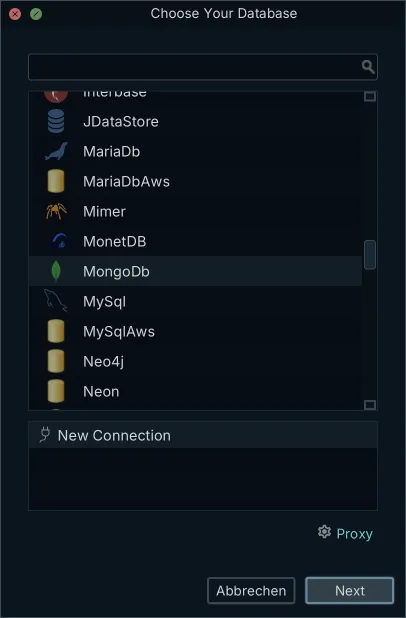
- Point each candidate at a MongoDB collection and compare what comes back. DbSchema introspects a configurable sample of documents per collection and infers field names, BSON types, nested objects and arrays, and where the collection carries a validation rule it reverse-engineers that rule instead.
- Change a column type and a column name in the design, generate the migration, and read the statements. Check the ordering, and check what happens to the data the change touches.
- Export the documentation and open it on a machine that has none of the tooling installed. Column comments and diagram tooltips are the parts that usually go missing.
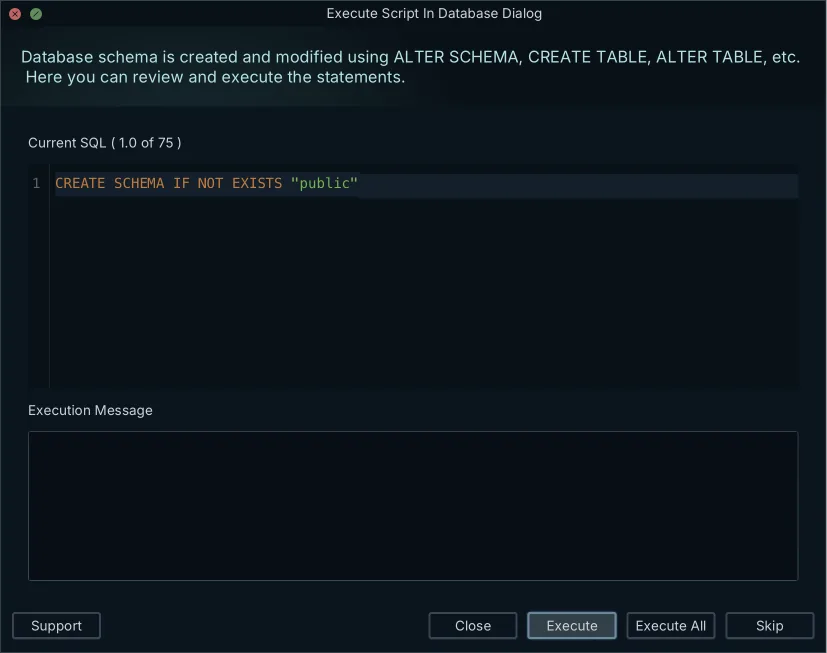
Test three is the one to run twice, because it is where a schema comparison tool earns its licence. In DbSchema the generated statements appear in the Synchronization Dialog, editable, and nothing reaches the database until you click Execute.
What the tools cost, and what recurs
Over three years the difference between these products is structural rather than a matter of discount, because the licensing shapes differ. DbSchema is bought once, with an optional renewal that buys new versions rather than continued access. The enterprise suites and dbForge are subscriptions, so year three costs what year one did.
| Product | Licensing | Listed price per user |
|---|---|---|
| DbSchema Pro | Perpetual, first year of updates included | 294.00 USD one time, Business tab |
| DbSchema Architect | Perpetual, first year of updates included | 470.40 USD one time, Business tab |
| dbForge Studio for PostgreSQL, Standard | Subscription, priced per engine edition | 89.95 USD |
| ER/Studio Data Architect | Subscription | 2,687.00 USD |
| erwin Data Modeler, Standard Edition | Annual subscription, per named user | 3,130.89 EUR |
Every figure above was read on the vendor's own store on 6 September 2026, and three of them move. Quest's store prices in the visitor's currency, so the erwin figure depends on where you open it[5], and Idera's page gives the ER/Studio price per user without naming the subscription term[3]. DbSchema's own figures are the ones its purchase page shows on the Business tab, the tab that applies to a commercial team; the Personal tab lists Pro at 196.00 USD and Architect at 313.60 USD, and the Universities & Students tab at 98.00 USD and 156.80 USD. That page prices in the visitor's own currency as well, so every DbSchema amount here is its US dollar rendering. Business-tab renewal after the first year of updates is optional: 75.00 USD a year for Pro and 120.00 USD a year for Architect, or 29.40 USD a month if you prefer a subscription[6]. SAP does not publish a PowerDesigner price. Sizing the tier to the team matters more than the headline number, which is the subject of the guide to picking a database tool edition.
The questions to ask a vendor before you buy
Take these five to the call, because each one has an answer that changes the total cost or the security review, and none of them appears on a feature matrix.
- Ask whether team collaboration needs a proprietary server, such as erwin Mart or Team Server, or whether the model is a text file versioned in Git.
- Ask which JDBC drivers and engine connectors are in the base licence, and which arrive as paid add-on packs.
- Ask whether the software runs with no outbound connectivity, and how a licence is activated on a machine that has none.
- Ask what the documentation export produces, and whether a colleague can read it without installing the vendor's client.
- Ask what the synchronization engine checks before it executes, which statements it reorders, and what it does about a change that would truncate data.
Those answers also settle the security criteria that a review will raise later. DbSchema answers the first four with a file, a bundled driver set, a self-hosted licence server for locked-down networks, and a self-contained HTML5 page.
Download DbSchema at https://dbschema.com/download.html, connect it to the database you are designing against, and run the four tests above on your own schema before the trial ends. Connecting, reverse-engineering, the interactive diagrams and the SQL editor are in the free Community edition. Schema synchronization, the Query Builder, the offline model file and the HTML5 documentation export are Pro, and the database-independent logical and conceptual layer is Architect.
Frequently asked questions
What is the true cost of erwin Data Modeler compared to DbSchema?
Quest sells erwin Data Modeler as an annual subscription per named user, listed in its own store at 3,130.89 EUR for the Standard Edition on 6 September 2026, in the visitor's currency[5]. DbSchema Pro is 294.00 USD once on the purchase page's Business tab, plus taxes, and 196.00 USD or 98.00 USD on the Personal and Universities & Students tabs, on a page that prices in the visitor's own currency as well[6]. The licence keeps working whether or not you renew, so the two shapes diverge from year two rather than from a discount.
Where do the enterprise suites cover ground DbSchema does not?
In the governance layer around the schema: a corporate glossary for non-technical stakeholders, formal lineage reporting, and business process modeling, all served from a repository. DbSchema is scoped to the schema itself, which is why the design, the documentation and the migration script all come out of one .dbs file.
How should I test a database design tool before purchasing?
Reverse-engineer a copy of your own legacy schema, change a column type in the model, generate the migration, and read every statement before executing it. A vendor's sample database has no partitioned tables, no composite keys and no triggers, which are the three places a reverse-engineering pass usually loses something.
Does DbSchema support MongoDB and other NoSQL databases?
MongoDB is an ordinary entry in DbSchema's engine picker, driven by a JDBC driver DbSchema ships itself. DbSchema introspects a configurable sample of documents per collection and infers field names, BSON types, nested objects and arrays, so the diagram approximates what the documents hold rather than a structure MongoDB enforces. Where a collection carries a validation rule, DbSchema reverse-engineers that rule as the authoritative structure, and creating or editing a collection writes the rule back to both the database and the model file.
Can a database design tool integrate with Git for team collaboration?
DbSchema saves the design as a local XML .dbs file, so schema changes are committed, reviewed and merged with standard Git workflows and no vendor server. Because the file is XML rather than a binary, a reviewer sees the added table in the diff itself.
Sources
Test DbSchema against your own database
DbSchema reverse-engineers SQL and NoSQL engines from one installation, keeps the model as a versionable file in Git, and generates migration scripts you can review before they run. The free Community Edition covers connecting, reverse-engineering and interactive diagrams; schema synchronization and HTML5 documentation are Pro.









