What a Free Database Design Tool Can Actually Do
For students and teachers on a database course who need a free tool to draw an ER diagram; basic SQL is assumed.
On this page
In short
A free database design tool is useful for coursework when it reads a real database and draws its tables and relationships. DbSchema Community does this for every supported database, for any use and with no time limit. Keeping the design as a file, documentation and schema sync are paid features.
Key takeaways
- DbSchema Community connects to a live database, reverse-engineers it, draws the diagram and runs SQL, free for any use.
- A login with SELECT rights only can hide every foreign key from information_schema in PostgreSQL 16.
- Several free tiers stop at a table cap, public diagrams, a trial period or no reverse engineering.
- Teachers can ask for a free DbSchema class license for the whole class.
Your course database has fourteen tables, and the assignment asks for an ER diagram of it. Drawing it by hand takes an evening, and the relationships are where mistakes happen. A free database design tool should do that work for you: connect to the database, read its structure and draw it. DbSchema Community does exactly that, and the pricing page calls it "Free Forever, for any use". What a free tool usually holds back is keeping the work, so check that part before the course starts.
What DbSchema Community does with a live database
DbSchema Community connects, reverse-engineers, draws diagrams and runs SQL at no cost. The Connect to Database page puts it plainly: "Connecting needs no license: the free Community edition connects to every database."
The steps are short. You pick the database, fill in the connection dialog and press Connect. In Reverse Engineer the Database, you tick the schemas and press Import. DbSchema then draws the imported tables in a new model. Connecting and importing only read from the database, so the course server stays as it is.
A diagram is only as good as the structure behind it. To see what it has to show, list the foreign keys from the catalog. We ran this query on 25 October 2026 against a 14-table PostgreSQL 16 demo schema:
SELECT tc.table_name, kcu.column_name, ccu.table_name AS references_table
FROM information_schema.table_constraints tc
JOIN information_schema.key_column_usage kcu
  ON tc.constraint_name = kcu.constraint_name AND tc.table_schema = kcu.table_schema
JOIN information_schema.constraint_column_usage ccu
  ON tc.constraint_name = ccu.constraint_name AND tc.table_schema = ccu.table_schema
WHERE tc.constraint_type = 'FOREIGN KEY' AND tc.table_schema = 'public'
ORDER BY 1, 2;
Five of the 23 rows it returned show the cases students most often draw wrong:
| table_name | column_name | references_table |
|---|---|---|
| task_assignees | task_id | tasks |
| task_assignees | user_id | users |
| task_labels | label_id | labels |
| task_labels | task_id | tasks |
| tasks | parent_task_id | tasks |
The first four rows are junction tables. Each one turns a many-to-many relationship into two one-to-many lines. The last row is a self-reference: a task can have a parent task. On the DbSchema diagram, every foreign key is a line between two tables. That makes both cases visible at a glance.
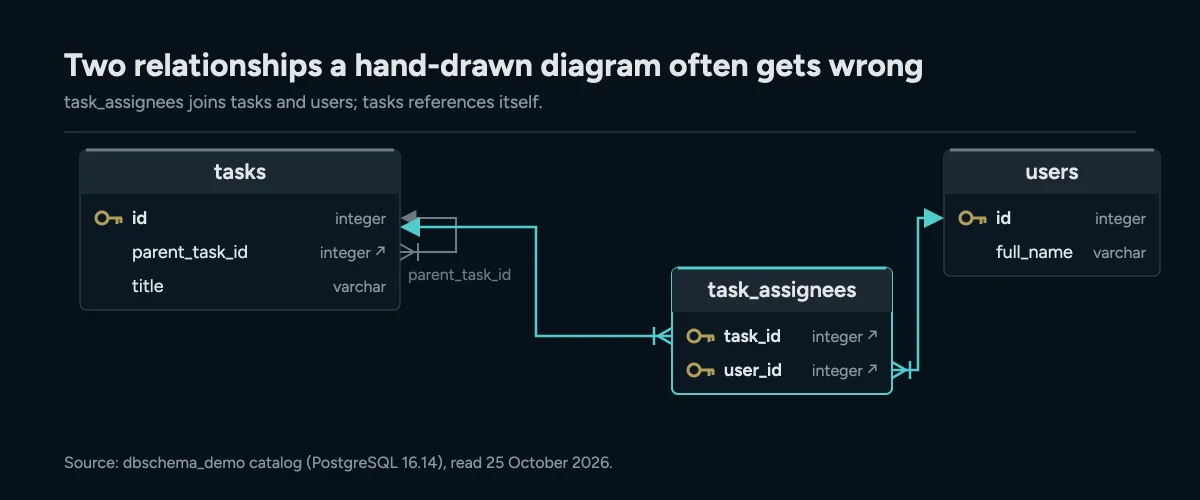
task_assignees turns a many-to-many relationship into two one-to-many lines, and tasks references itself through parent_task_id.
A free database engine for the coursework
You also need a database to design against, and the common teaching engines cost nothing. PostgreSQL is released under the PostgreSQL License[1], "a liberal Open Source license, similar to the BSD or MIT licenses". SQLite goes further: its authors dedicated all of its code "to the public domain", as the SQLite copyright page[2] says. MongoDB offers a Community Edition[3] to "develop locally with MongoDB, at no cost".
For a course, the engine choice decides what the class learns. PostgreSQL and SQLite teach relational design with declared foreign keys. MongoDB teaches document design, where relationships are a convention rather than a constraint. DbSchema Community connects to all three, so one tool covers a course that uses more than one engine. If the class works with SQLite files, the guide to reverse-engineering a SQLite database walks through that case.
Why a read-only class login can hide the relationships
Many courses hand out logins that can only read. That protects the server, but it changes what the catalog shows. The PostgreSQL 16 documentation[4] says table_constraints only lists constraints on tables that "the current user owns or has some privilege other than SELECT on".
We tested this on the same demo database. We created a login with SELECT rights only and ran two counts as that user:
SELECT count(*) AS foreign_keys
FROM information_schema.table_constraints
WHERE constraint_type = 'FOREIGN KEY' AND table_schema = 'public';

SELECT count(*) AS foreign_keys
FROM pg_catalog.pg_constraint c
JOIN pg_catalog.pg_namespace n ON n.oid = c.connamespace
WHERE c.contype = 'f' AND n.nspname = 'public';
The two catalogs disagree for that login:
| Catalog | Foreign keys returned |
|---|---|
| information_schema.table_constraints | 0 |
| pg_catalog.pg_constraint | 23 |
So the relationships exist, but the standard view hides them from a SELECT-only user. If a diagram or a query shows tables without relationships, check the login first. Run the pg_constraint count, and ask the teacher for a login that owns the schema if it differs.
Where other free design tools stop
Free tiers differ most in four places: table limits, private work, trials and reverse engineering. The table compares the free options of common design tools, with the limits their vendors publish (read on 25 October 2026).
| Tool | What it is | Free option | Where the free option stops |
|---|---|---|---|
| DbSchema Community | Desktop design tool for SQL and NoSQL databases | Free for any use, no time limit | Saving the model to a file, documentation and sync are in Pro |
| DrawSQL | Browser ER diagram editor | Free plan | Public diagrams only, up to 15 tables |
| Hackolade | Data modeller for NoSQL and SQL | Community Edition | 50 objects per model, no forward or reverse engineering |
| DataGrip | JetBrains database IDE | Free licence | Non-commercial use only |
| ER/Studio | Windows enterprise modelling suite | 14-day trial | No free edition |
| erwin Data Modeler | Desktop data modeller | 15-day trial | Academic Edition discontinued |
| pgAdmin | PostgreSQL administration tool | Free | PostgreSQL and EDB Postgres only |
| MySQL Workbench | MySQL desktop tool | Free | MySQL only |
For a course, the last column matters more than the feature list. A 15-table cap breaks on a realistic schema like the 14-table demo plus a few new tables. Public-only diagrams can clash with course rules on sharing work. A trial ends before the term does. A single-engine tool stops working when the course moves from PostgreSQL to MongoDB.
What the free edition does not keep
DbSchema Community reads and draws, but it does not save your design as a file. The pricing page lists saving the design, working offline, documentation and schema synchronization under Pro. Every download starts with a 15-day trial of all features. After it, DbSchema "switches to the free Community edition, which cannot open saved project files." Your files stay on your computer and open again once you have a license.
For coursework, this has a simple consequence. Use Community to connect, reverse-engineer and study the diagram. Use the trial weeks, or a Pro license, for the work you need to hand in as a file. The article on what you give up with a free database tool covers each missing feature in detail.
Teachers have a cheaper route. The Licensing and Registration page says a teacher "asks for a free class license with a support ticket sent from the school email address". The license is renewed for each school year on request, and each student registers with their own email. A student who wants Pro alone can buy the Educational license: $98.00 one-time or $9.80 a month, + taxes, on the purchase page.
How to pick a free tool for a database course
Pick the tool that reads the database your class actually uses. Then check five things before the first assignment:
- It connects to the course engine, and to the next one if the syllabus changes.
- It reverse-engineers the live schema, so the diagram matches what students built.
- Its free tier has no table cap below the size of your largest schema.
- Students can start without an account or a sign-up.
- It runs on the Windows, macOS and Linux machines your students bring.
DbSchema Community connects to every database it supports and reverse-engineers the live schema. Its pricing page states no table limit, the download page says "No registration required", and there are installers for Windows, macOS and Linux. When the class needs to hand in a saved design, the trial or a class license covers it.
Download DbSchema, connect DbSchema Community to your course database and import it with Reverse Engineer the Database. Every table and foreign key of the imported schemas appears in a new model. If you need to save the model or export documentation, the Pro trial and the free class license cover that.
Frequently asked questions
Is DbSchema Community free for students?
Yes. DbSchema Community is free for any use, with no time limit, and includes connecting, reverse engineering, diagrams and the SQL editor.
Can a free tool create an ER diagram from an existing database?
Yes, if it reverse-engineers a live connection. DbSchema Community imports the schemas you tick and draws the tables and their foreign keys in a new model.
How does a teacher get DbSchema for a whole class?
The teacher opens a support ticket from the school email address and asks for a free class license. It is renewed each school year on request.
Sources
Draw your course database for free
DbSchema Community connects to your database, reverse-engineers the schema and draws the ER diagram, free for any use.









