Reverse Engineering a SQLite Database
Learn how to reverse-engineer an unfamiliar SQLite database file into an ER diagram, extract its schema, and add the missing virtual foreign keys.
On this page
For backend and full-stack software developers examining an unfamiliar SQLite database file without documentation or foreign key constraints.
You have received a bare SQLite file with no data dictionary, no migration history, and no documented architecture. To turn that raw file into an accurate entity-relationship diagram, you must introspect the schema tables SQLite maintains, extract the underlying DDL, and draw in the implicit relationships that the database engine never explicitly enforced.
What SQLite records about its own schema
Every SQLite database records its complete structure in a single internal catalog table named sqlite_schema[1]. That name always works, and for historical compatibility SQLite also recognises the older name sqlite_master, which is what most existing systems, scripts and tutorials still use. Unlike client-server relational engines such as PostgreSQL or MySQL, SQLite provides no ANSI standard information_schema views out of the box.
The sqlite_schema table contains one row for every table, index, view, and trigger created in the database file. Rather than decomposing table structures into normalized catalog tables with separate rows for data types, precision, and default values, SQLite stores the literal DDL text used to create each object in its sql column. When you query sqlite_schema, SQLite returns the original CREATE statement text with a short list of normalizations applied: the leading CREATE, TABLE, VIEW, TRIGGER and INDEX keywords are upper-cased, a TEMP or TEMPORARY keyword and any database name qualifier are dropped, and leading and repeated spaces are collapsed. Comments written into the DDL are not stripped.
| Column Name | Data Type | Description |
|---|---|---|
| type | text | The object type: 'table', 'index', 'view', or 'trigger'. |
| name | text | The identifier name of the specific database object. |
| tbl_name | text | The associated table or view name that owns the object. |
| rootpage | integer | The root b-tree page number in the SQLite file layout. |
| sql | text | The original normalized DDL statement used to create the object. |
Because the sql column holds unparsed DDL, inspecting schemas purely through raw SQL queries requires parsing strings to discover individual columns, constraints, and defaults. Automatic reverse engineering tools read this table to reconstruct table definitions, but additional commands are required to extract structured column metadata.
What you need before opening the file
SQLite operates as an embedded database engine, meaning the entire database resides within a single file on disk, typically with a.sqlite,.db, or.sqlite3 extension. You do not need a running background daemon, a network port, or administrative user credentials to inspect it; you only need read access to the file on your local filesystem.
Java-based tools and applications reach the file through a JDBC driver such as org.xerial:sqlite-jdbc, a library for accessing and creating SQLite database files in Java[2]. It assembles native libraries for the major operating systems, including Windows, macOS and Linux, into a single JAR file, so it requires no configuration of separate native libraries on your workstation[2]. When comparing design environments in our SQLite Database Design Tools Compared in 2026 overview, driver management stands out as a common friction point.
- A valid SQLite database file (.db,.sqlite,.sqlite3) with read permissions on disk.
- A SQLite JDBC driver, normally bundled with the client tool you use.
- DbSchema, or another desktop modeling application that can reverse-engineer SQLite and draw ER diagrams.
DbSchema removes that step entirely. It ships a JDBC driver for every engine in its picker, so selecting SQLite in the connection dialog configures the driver for you and you can point straight to your database file on disk without editing a classpath by hand.
Reading the schema with PRAGMA and sqlite_schema
SQLite relies on PRAGMA statements to inspect table details, index layouts, and declared constraints directly through SQL commands[3]. When client tools or scripts introspect an SQLite database, they combine queries against sqlite_schema with table-valued PRAGMA functions instead of reading catalog tables such as the ones described in Reverse Engineering a MySQL Database.
To inspect column definitions programmatically, run PRAGMA table_info() with the table name. For declared foreign keys and index configurations, use PRAGMA foreign_key_list() and PRAGMA index_list():
PRAGMA table_info('orders');
PRAGMA foreign_key_list('orders');
PRAGMA index_list('orders');
The output from PRAGMA table_info() provides a structured row per column containing the column identifier, name, declared type string, nullability flag, default value, and primary key index status:
| cid | name | type | notnull | dflt_value | pk |
|---|---|---|---|---|---|
| 0 | order_id | INTEGER | 1 | null | 1 |
| 1 | customer_id | INTEGER | 1 | null | 0 |
| 2 | total_amount | REAL | 1 | 0.0 | 0 |
| 3 | created_at | TEXT | 0 | CURRENT_TIMESTAMP | 0 |
SQLite version 3.8.2 or later is required to use a WITHOUT ROWID table, which uses a clustered index as its primary key instead of the special rowid column that every ordinary row carries[4]. PRAGMA table_info returns the same content for both layouts, but PRAGMA index_info returns primary key information for a WITHOUT ROWID table while an ordinary table returns no rows, which is how you tell them apart[4].
Turning the file into an ER diagram
Opening an SQLite database file in DbSchema starts reverse engineering immediately. Choose Connect to Database, select SQLite, and browse to the path of your database file. DbSchema reads the sqlite_schema definitions, executes the necessary PRAGMA introspection commands, and populates a visual design model on the canvas without a separate export or migration step.
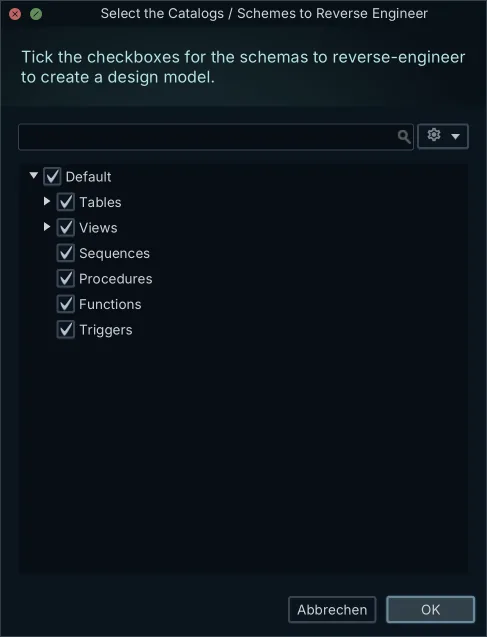
The reverse engineering engine extracts all tables, columns, data types, primary keys, and declared foreign keys into interactive diagram layouts. Tables appear as structured visual blocks with column lists and constraint indicators. If the database file contained explicit foreign key declarations, connector lines are drawn automatically between referencing columns and their target primary keys.
For databases with dozens of tables, one design model can hold several diagram tabs, and a single table can appear in more than one of them. You can place related subsets of tables into dedicated layout groups, adjust connector routing, and annotate structures. Using a Free Database Diagram Tool for Easy Design and Management allows you to understand complex schema structures without manually writing out table relationships.
Adding the relations SQLite never declared
In many SQLite databases, the diagram canvas displays isolated tables with no connector lines between them. SQLite added support for foreign key constraints in version 3.6.19, but foreign key enforcement is disabled by default in the database engine[5]. To enforce referential integrity at runtime, applications must execute PRAGMA foreign_keys = ON on every single database connection.
Because enforcement defaults to off, many developers omit FOREIGN KEY declarations entirely from their CREATE TABLE statements, handling consistency strictly in application code. As a result, standard reverse engineering cannot detect how tables relate to one another solely from the database file's DDL.
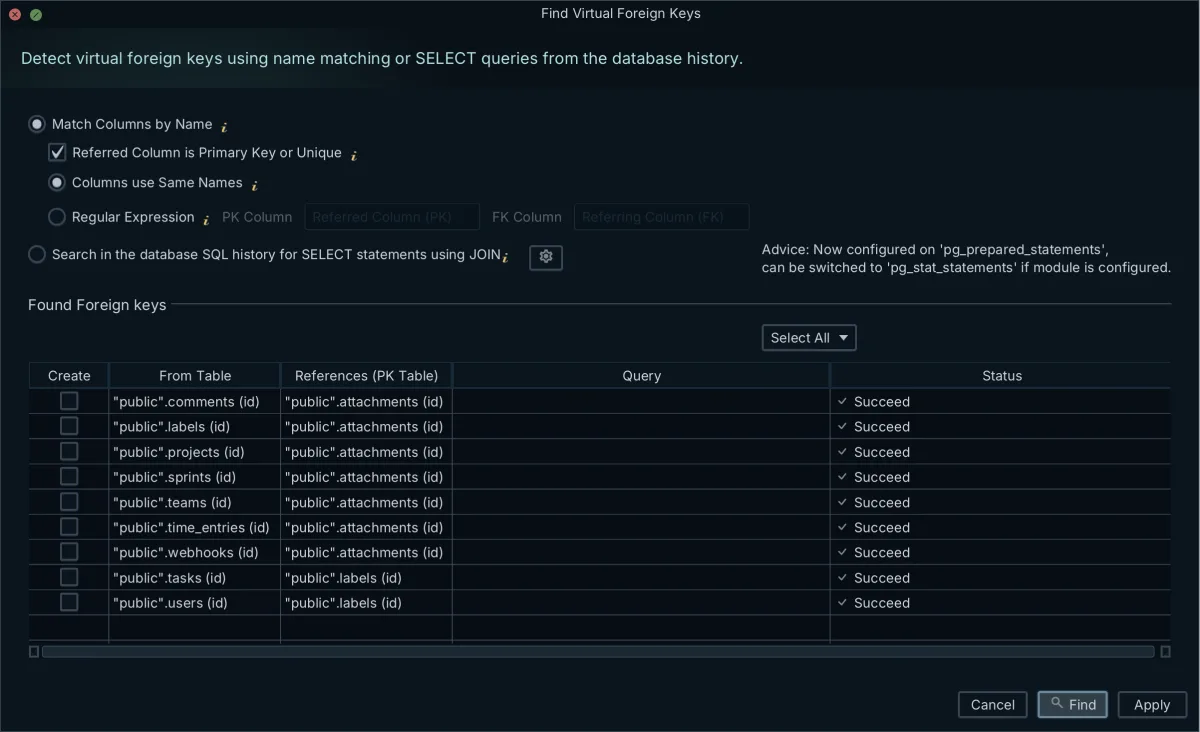
DbSchema closes this gap with virtual foreign keys. You create one by dragging a referencing column from one table and dropping it onto the corresponding primary key in another table on the diagram canvas. Virtual foreign keys exist purely inside the local design model file (.dbs) and never execute ALTER TABLE or any other DDL against your SQLite file. They provide the visual connector lines and drive relational data exploration without changing the underlying database.
Where SQLite introspection misleads you
Standard SQL database engines enforce strict static typing where a column's declared type determines what can be stored. SQLite uses a dynamic type system based on type affinity[6]. The type declared in a CREATE TABLE statement is advisory: SQLite attempts to convert incoming values to that type, but if conversion is not possible, it stores the data using its native storage class.
Because of type affinity, a column declared as INTEGER can legally hold text strings, floating-point numbers, or binary BLOBs. Whether you read the schema with PRAGMA table_info or through a diagramming tool, what you get back is the declared type found in the DDL. If the software that populated the database inserted incompatible values, the diagram's declared data type will not reflect the actual content stored in those records.
| Storage Class | Description | Affinity Behavior |
|---|---|---|
| NULL | The value is a NULL value. | Stored as NULL regardless of column affinity. |
| INTEGER | Signed integer stored in 0, 1, 2, 3, 4, 6, or 8 bytes. | Prefers integer storage; converts numeric strings to integers. |
| REAL | Floating point number stored as an 8-byte IEEE float. | Converts numeric strings to floating-point representation. |
| TEXT | Text string stored in UTF-8, UTF-16BE, or UTF-16LE. | Stores text directly; converts numbers to text representations. |
| BLOB | Binary large object stored exactly as input. | Stores raw bytes without automatic type conversions. |
Starting in SQLite 3.37.0, developers can append the STRICT keyword to table declarations to enforce rigid type checking[7]. In a STRICT table, SQLite validates data types on INSERT and UPDATE statements and rejects mismatches. When reverse engineering, check if the table DDL specifies STRICT; if it does not, you must verify the underlying data to confirm that stored values match their column labels as explored in Design and Manage SQLite Databases with a Modeling Tool.
Checking the diagram against the real data
To confirm that your visual ER diagram matches how the application actually uses the SQLite file, you have to inspect the data directly. The DbSchema Relational Data Editor, a Pro feature, browses records across connected tables at the same time, following declared and virtual foreign keys alike.
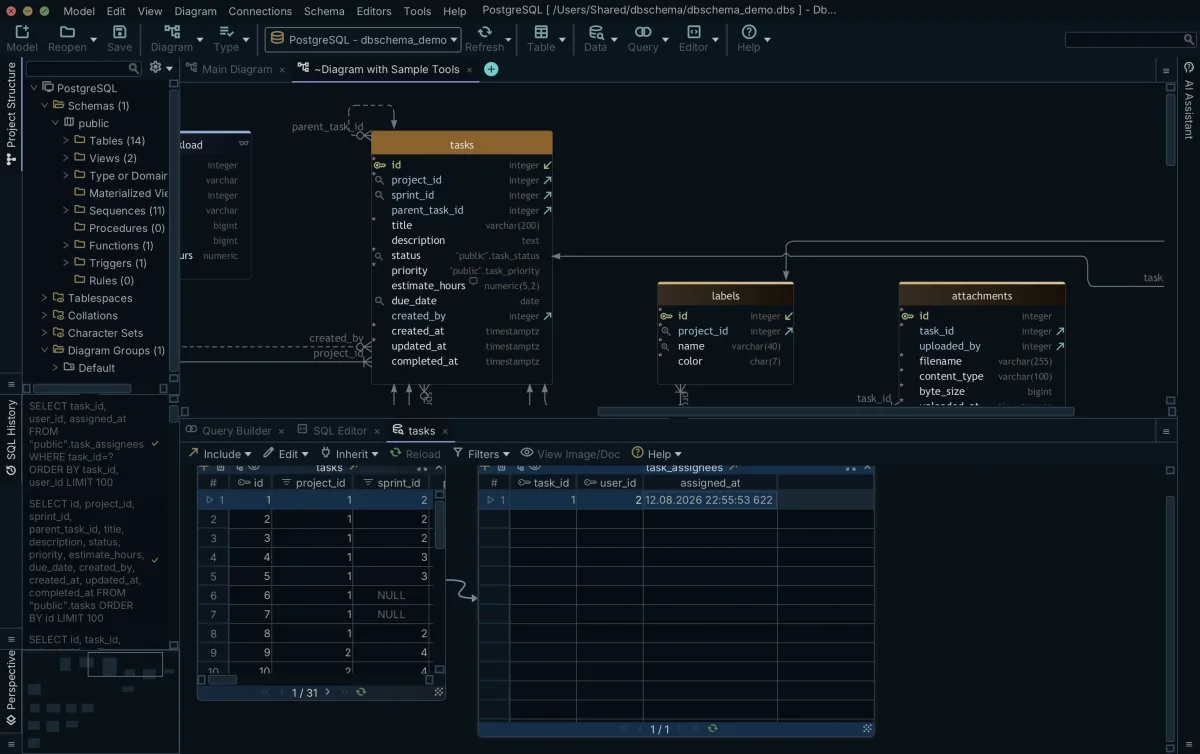
When you open a table in the Relational Data Editor, the records appear in an interactive grid. From that grid, you can expand child and parent tables linked by declared or virtual foreign keys. Selecting a specific record in the parent table automatically filters the child pane to show only rows with matching key values.
Navigating relationships in the Relational Data Editor quickly exposes orphaned records, broken reference values, and invalid type conversions that SQLite's permissive storage engine allowed. If a virtual foreign key returns zero matching child records for valid parent IDs, you can immediately adjust your key definitions on the diagram canvas.
Opening your own SQLite file in DbSchema
Reverse engineering an undocumented SQLite database turns an opaque local file into an interactive architecture map. You extract the original DDL from sqlite_schema, inspect column definitions via PRAGMA commands, render table structures visually, and restore missing business links using virtual foreign keys.
- Download and launch DbSchema on your computer.
- Click Connect to Database and select SQLite; DbSchema supplies the JDBC driver itself.
- Choose your SQLite file from disk to generate the visual ER diagram instantly.
- Drag columns between tables to define virtual foreign keys for undeclared relationships.
- Open the Relational Data Editor (Pro, included in the 15-day Architect trial) to verify data consistency across your newly mapped relations.
Download DbSchema Community Edition for free to reverse-engineer your SQLite files, generate interactive diagrams, and query your database with zero manual driver setup.
Frequently asked questions
How do I generate an ER diagram from a SQLite database?
Connect to your database file with DbSchema Community Edition. DbSchema automatically reads the sqlite_schema table and PRAGMA statements to map tables and columns, generating an interactive ER diagram without manual drawing.
What is the sqlite_schema table?
It is the internal table where SQLite stores the schema for the database, containing one row for every table, index, view, and trigger. Unlike other engines, it stores the original CREATE statement text. SQLite also recognises the older name sqlite_master for the same table, which is what most existing scripts and tutorials use.
Why does SQLite not enforce my foreign keys?
Foreign key constraints are disabled by default in SQLite for backwards compatibility. They must be enabled per connection using PRAGMA foreign_keys = ON. As a result, a SQLite database often contains data that violates its own schema definitions.
How can I see the relationships in a SQLite file that has none declared?
If the database lacks enforced foreign keys, you can create virtual foreign keys in DbSchema. These relationships are saved in your local design model to draw the diagram and explore data, without modifying the actual SQLite database file.
Can I read a SQLite schema without the command line?
Yes, opening the .sqlite file in a visual tool like DbSchema Community Edition automatically reverse-engineers the tables, columns, and indexes into a visual diagram, removing the need to manually query PRAGMA table_info().
What are common ER diagram mistakes when reverse engineering?
Assuming declared data types are binding is a major pitfall. Because of SQLite's dynamic typing, a column labeled INTEGER might contain text data, unless the table was created using the STRICT keyword introduced in SQLite 3.37.0.
Sources
Draw your SQLite file as a diagram
DbSchema reverse-engineers a SQLite file into an interactive ER diagram and lets you draw the relationships SQLite never enforced as virtual foreign keys that live in the model, not in the database. Reverse engineering, ER diagrams and the SQL editor are in the free Community Edition.









