Database Diagram Tools Compared: Free Options That Read Your Live Database
How a database diagram tool gets its tables, six tools side by side, and what a diagram tells you before you write the join.
On this page
The join you have to write next touches three tables you have never opened, and the person who designed them has left. A database diagram tool draws those tables as boxes with their columns and a line for every foreign key, so you see how they join before you write any SQL. For a database that already exists, use DbSchema: its free Community Edition connects to the database and reverse-engineers the schema into a diagram you can read and edit.
Short answer
A database diagram tool shows each table as a box listing its columns and each foreign key as a line between them. The tools differ in where the boxes come from: drawn by hand, generated from code you paste, or read from the database itself. DbSchema reads them from the database.
- A diagram that reads the live database stays true; one you draw or paste goes stale with every migration.
- DbSchema Community Edition is free, connects to 100+ SQL and NoSQL databases and reverse-engineers them.
- The line style tells you which joins drop rows before you run them.
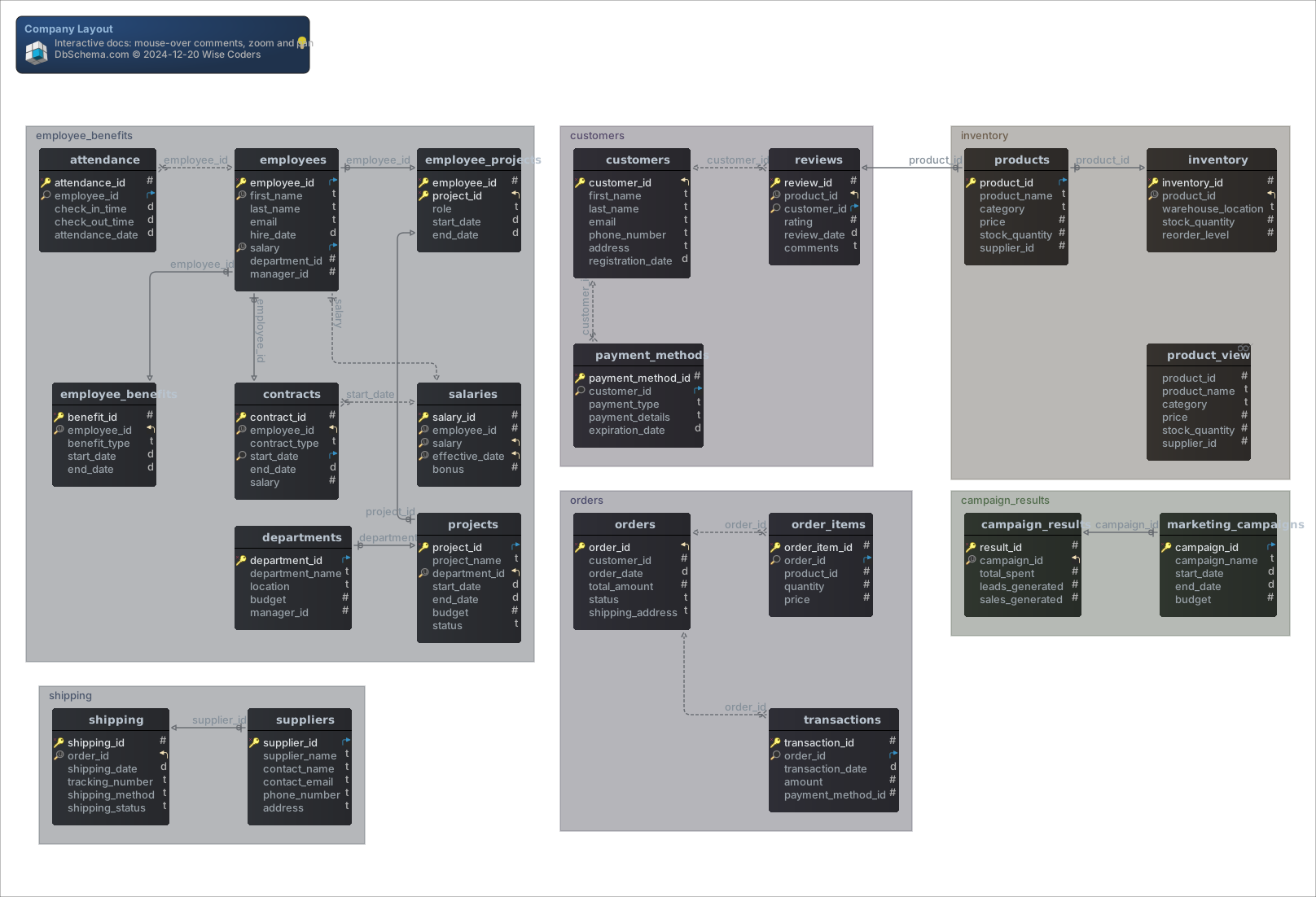
A database diagram shows how tables join before you write SQL
You need a diagram when the schema is bigger than anyone's memory of it: to write a correct join across tables you did not create, to see what a column change would break before you ship it, or to give a new colleague something readable on their first day. A diagram also shows problems that a list of tables hides, such as a table that no line reaches. If you are designing a structure from scratch rather than reading one, follow the step-by-step guide to designing a relational schema instead.
The lines say more than which tables are related. Here are three tables to show how:
CREATE TABLE customers (
    customer_id INT PRIMARY KEY,
    name        VARCHAR(50) NOT NULL
);

CREATE TABLE coupons (
    coupon_id INT PRIMARY KEY,
    code      VARCHAR(20) NOT NULL
);

CREATE TABLE orders (
    order_id    INT PRIMARY KEY,
    customer_id INT NOT NULL REFERENCES customers (customer_id),
    coupon_id   INT REFERENCES coupons (coupon_id)
);
Neither foreign key column in orders is UNIQUE, so both lines end in a crow's foot at orders: one customer has many orders, and one coupon can be used on many orders. The line to customers is solid because customer_id is NOT NULL, so every order has a customer. The line to coupons is dashed because coupon_id can be empty.
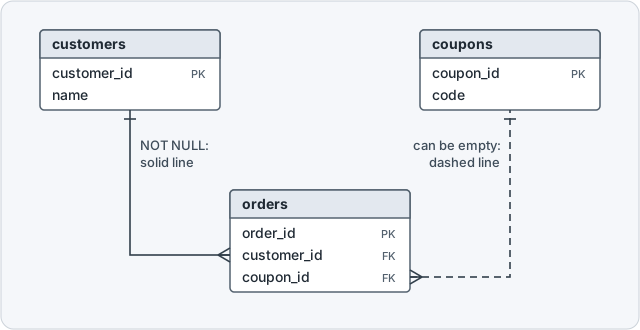
DbSchema picks the line from two constraints on the referencing column, as its foreign key documentation sets out. NOT NULL decides solid or dashed, and UNIQUE decides whether the crow's foot appears:
| NOT NULL | UNIQUE | Relationship | Line on the diagram |
|---|---|---|---|
| No | No | one to many, optional | dashed, crow's foot |
| Yes | No | one to many, mandatory | solid, crow's foot |
| No | Yes | one to zero or one | dashed |
| Yes | Yes | one to one | solid |
A dashed line warns you that an inner join drops rows
A dashed line is the first thing to look at when a query returns fewer rows than you expected. Add two customers, one coupon and two orders, one of them placed without a coupon, then join all three tables:
INSERT INTO customers VALUES (1, 'Ana'), (2, 'Ben');
INSERT INTO coupons VALUES (10, 'SPRING');
INSERT INTO orders VALUES (100, 1, 10), (101, 2, NULL);

SELECT o.order_id, c.name, p.code
FROM orders o
JOIN customers c ON c.customer_id = o.customer_id
JOIN coupons p ON p.coupon_id = o.coupon_id;
Order 101 is missing, because an inner join keeps only the orders whose coupon_id matches a coupon, and NULL matches nothing:
Result · PostgreSQL 17.6
| order_id | name | code |
|---|---|---|
| 100 | Ana | SPRING |
The dashed line to coupons told you this before you ran anything. Join along a dashed line with LEFT JOIN and every order comes back:
SELECT o.order_id, c.name, p.code
FROM orders o
JOIN customers c ON c.customer_id = o.customer_id
LEFT JOIN coupons p ON p.coupon_id = o.coupon_id
ORDER BY o.order_id;
Result · PostgreSQL 17.6
| order_id | name | code |
|---|---|---|
| 100 | Ana | SPRING |
| 101 | Ben | NULL |
The solid line to customers is safe to inner join, since the NOT NULL foreign key gives every order a customer.
Only diagrams that read the live database stay true after migrations
The tools that rank for "database diagram" do different jobs. Some draw what you type, some import what you paste, and some read the database. The values below come from each vendor's own pages, read on 3 November 2026.
Tools that read the live database
These three take the tables from the database itself, so the diagram matches the schema you run. Only DbSchema reads more than one family of engines and lets you edit the diagram in its free edition:
| Tool | Where the diagram comes from | Engines | Free edition |
|---|---|---|---|
| DbSchema | Connects and reverse-engineers the database | 100+ SQL and NoSQL databases | Community: connect, reverse-engineer, diagrams, edit tables, SQL editor |
| pgAdmin ERD tool | Reads a PostgreSQL database, schema or table | PostgreSQL and EDB Postgres | Open source |
| DBeaver | Reads the database catalog, read-only by default | Databases with a JDBC driver | Community; Edit mode is Enterprise and Ultimate only |
Tools that draw what you type, paste or upload
These three show what someone last typed, pasted or uploaded, so a migration that nobody copies back makes the diagram less true. Each free tier has a limit on documents or tables:
| Tool | Where the diagram comes from | Engines | Free edition |
|---|---|---|---|
| dbdiagram.io | DBML code you type; its dbdocs CLI can generate DBML from a database | PostgreSQL, MySQL, SQL Server, Snowflake, BigQuery for generation | Up to 10 diagrams and doc projects |
| DrawSQL | CREATE TABLE statements you paste | MySQL, PostgreSQL, SQL Server, MariaDB | Public diagrams, up to 15 tables |
| Lucidchart | A query you run on the database yourself, with the result uploaded | Chosen from a list in its importer | 3 editable documents, 60 shapes each |
dbdiagram.io, DrawSQL and Lucidchart are built for sketching a design or a slide. pgAdmin and DBeaver sit next to an administration or SQL client for the engines they serve; the facts above come from pgAdmin's ERD tool documentation and DBeaver's ER diagram and Edit mode documentation, and DBeaver ER diagrams and where they fall short covers DBeaver in detail.
Check the engines, where it runs and how it splits large schemas
Start with where the diagram gets its tables, as the two tables above show, because that decides whether the diagram matches the schema you run. Then check the engines: if your databases run on more than one, the diagram tool has to read every one of them. DbSchema connects over JDBC to 100+ SQL and NoSQL databases and downloads the JDBC driver itself.
Where the tool runs decides where your schema goes. A browser tool keeps your schema on the vendor's servers; a desktop application reads the database from inside your own network. DbSchema is a desktop application for Windows, macOS and Linux, so the database never leaves its network and no cloud account sits in the path.
The last two questions come up once the schema grows. A schema of thousands of tables on one canvas is a picture nobody can read, so the tool has to split it into smaller diagrams. And a schema change needs a review, which is easiest when the design is a file you keep in Git next to the code.
DbSchema reverse-engineers a live database into an editable diagram
-
Connect Community
Start DbSchema and choose Connect to Database on the start screen.
-
Pick the database Community
Choose your database type, then enter the host, user and password. DbSchema downloads the JDBC driver for that database.
-
Read the diagram Community


DbSchema reads the schema and draws its tables, with a line for every foreign key.

The diagram is editable from there. Right-click the canvas and choose New Table, double-click a table header to edit its columns, indexes and comments, or drag a column onto a column of another table to draw a foreign key. While DbSchema is connected, a new table is created in the database and in the design model at the same time, as the tutorial shows.
Where a legacy database declares no foreign keys, its diagram has no lines to show. Draw them anyway: drag the child column onto the parent column and tick Virtual, and the virtual foreign key lives in the DbSchema model and is never sent to the database. Model → Find Virtual Foreign Keys suggests them between columns with matching names. Keeping them means saving the model file, and the Query Builder and Relational Data Explorer that follow them like real keys are DbSchema Pro.
For a database that does not exist yet, choose Design from Scratch. DbSchema keeps the design in its model file with no connection open, and you deploy it when a database exists. Because the design is a file, you can commit it to Git and review a schema change the way you review code. The model file and designing offline are Pro.
The free Community Edition covers connecting, diagrams and editing tables
The Community Edition is free for any use with no time limit, and it is enough to connect, reverse-engineer and read any schema as a diagram. The tables follow the edition comparison on the purchase page.
Everything you need to read and change a live schema is in every edition:
| Feature | Community | Pro |
|---|---|---|
| All databases, connect and reverse-engineer | yes | yes |
| Interactive diagrams | yes | yes |
| Create and edit tables and columns | yes | yes |
| SQL editor | yes | yes |
Keeping the design as a file and handing it to other people starts in Pro:
| Feature | Community | Pro |
|---|---|---|
| Save the model to a file, design offline | no | yes |
| HTML5, PDF and Markdown documentation | no | yes |
| Schema synchronization | no | yes |
Working with the rows behind the diagram is Pro as well:
| Feature | Community | Pro |
|---|---|---|
| Visual query builder | no | yes |
| Relational data browse | no | yes |
| Data generator and data importer | no | yes |
Logical and conceptual design, above the physical schema, is in DbSchema Architect. The trial of every feature runs for 15 days, from the same installer as Community.
DbSchema Pro builds queries and documentation from the same diagram
In the Query Builder, you add tables by following their foreign keys, tick the columns you want, and switch a join between INNER JOIN, LEFT JOIN and EXISTS on the line itself, which is the coupons fix from above done with the mouse. The Relational Data Explorer opens a table and, beside it, only the child rows that belong to the selected row. Both are Pro; the SQL Editor, with table and column completion, is in Community.
Documentation comes out of the same model. Choose File → Export As... → HTML5/PDF Documentation, and DbSchema writes an HTML5 page with the diagram as a vector image, a searchable table list and every column's details. It opens in any browser with nothing installed, so it is the file you send to an auditor or a new analyst instead of a screenshot. PDF and Markdown come from the same dialog, and all three formats are Pro.
Several small diagrams keep a schema of thousands of tables readable
One diagram of a whole enterprise database is unreadable, so DbSchema does not draw one. A project holds as many diagrams as you need over the same schema, each with its own layout and its own set of tables. An e-commerce database gets separate diagrams for customers, inventory and orders. The same table can sit in several diagrams, and since they share one schema definition, a change to the table shows in all of them.
Inside one diagram, Diagram → Create Group of Tables puts related tables into a named group you move as one. After reverse-engineering a large schema the tables often overlap: choose Diagram → Auto Arrange Tables and DbSchema lays them out by their foreign keys. The diagram documentation describes each of these.
Download DbSchema and connect it to the database you need to understand: the free Community Edition reverse-engineers it into an interactive diagram where you read the lines, edit tables and run SQL. The model file and its Git workflow, the Query Builder, the Relational Data Explorer and the HTML5, PDF and Markdown documentation are in DbSchema Pro, which the 15-day trial includes.
Frequently asked questions
Is there a genuinely free database diagram tool?
The DbSchema Community Edition is free for any use with no time limit, and it reads a live database instead of a pasted script. The editions table shows what it covers and what Pro adds.
Can a database diagram tool create the database as well as draw it?
DbSchema deploys the design model to the target database, and compares an existing database against the model, where each difference is applied to the database, taken into the model, or written out as an SQL script. Schema synchronization is Pro.
How do I document a database for people who do not write SQL?
Write the explanation into the comment of each table and column first. DbSchema carries those comments into the HTML5 export as mouse-over tooltips on the table and column names, which makes the export readable to someone who cannot read the DDL. Exporting the documentation is a Pro feature.
Sources
See your own database as a diagram
DbSchema connects to 100+ SQL and NoSQL databases, reverse-engineers the schema into an interactive diagram, and keeps large schemas readable one part at a time.









