Reverse Engineering a MySQL Database: A Developer's Guide
For backend developers who inherited a MySQL database; storage engines, JDBC and virtual foreign keys are explained where they appear.
On this page
In short
To reverse engineer a MySQL database, you read its structure from INFORMATION_SCHEMA. You can query it with SQL, or connect DbSchema, which turns it into an ER diagram. If the tables use MyISAM, the diagram has no relation lines, because MyISAM never stores a foreign key. Virtual foreign keys in DbSchema draw those relations without changing MySQL.
Key takeaways
- INFORMATION_SCHEMA describes tables, columns, indexes and foreign keys. Reading it touches no rows.
- SHOW CREATE TABLE and mysqldump --no-data give you exact DDL as text, but no diagram.
- On MyISAM, MySQL 8.4 accepts a FOREIGN KEY clause without a warning and stores nothing.
- Check INFORMATION_SCHEMA.TABLES.ENGINE before you decide the diagram is wrong.
- A virtual foreign key lives in the DbSchema model only, so no ALTER TABLE runs and no table is locked.
You open the database you were handed, and nothing explains how the tables fit together. Reverse engineering gives you that picture. You read the structure MySQL stores about itself and turn it into a diagram. In DbSchema, you connect to the database and it draws the diagram for you. On an older MyISAM schema, though, the diagram shows no relations at all. This guide shows why, and how to add them back without touching the database.
What INFORMATION_SCHEMA exposes about a MySQL schema
INFORMATION_SCHEMA is where MySQL describes its own structure. The MySQL 8.4 manual says it provides access to database metadata[1], such as table names and column data types. Every reverse engineering method reads from it. It holds structure only, so reading it never touches your rows.
Four of its tables matter here:
| Table | What it describes |
|---|---|
| TABLES | Each table, its storage engine and its comment |
| COLUMNS | Data types, nullability and default values |
| STATISTICS | Indexes and the columns they cover |
| KEY_COLUMN_USAGE + REFERENTIAL_CONSTRAINTS | Foreign keys and their ON UPDATE / ON DELETE rules |
In MySQL, a database and a schema are the same object. The manual puts it plainly: CREATE SCHEMA is a synonym for CREATE DATABASE[2]. So when a tool asks for a schema, you pick the database.
The examples below use two copies of the same two tables. One copy uses InnoDB, MySQL's default storage engine. The other uses MyISAM, an older engine that MySQL 8.4 still supports[3]. A storage engine is the part of MySQL that stores a table's data:
CREATE DATABASE shop_innodb;
CREATE DATABASE shop_legacy;

USE shop_legacy;
CREATE TABLE customers (
  id   INT PRIMARY KEY,
  name VARCHAR(100) NOT NULL
) ENGINE=MyISAM;

CREATE TABLE orders (
  id          INT PRIMARY KEY,
  customer_id INT NOT NULL,
  total       DECIMAL(10,2) NOT NULL,
  FOREIGN KEY (customer_id) REFERENCES customers (id)
) ENGINE=MyISAM;
The shop\_innodb database gets the same two tables with ENGINE=InnoDB. Watch for the difference between the two in every result below.
This query lists every declared foreign key in both databases. It joins KEY_COLUMN_USAGE[4], which lists key columns with constraints, to REFERENTIAL_CONSTRAINTS[5], which holds the rules:
SELECT kcu.TABLE_SCHEMA, kcu.TABLE_NAME, kcu.COLUMN_NAME,
       kcu.REFERENCED_TABLE_NAME, kcu.REFERENCED_COLUMN_NAME,
       rc.UPDATE_RULE, rc.DELETE_RULE
FROM information_schema.[KEY_COLUMN_USAGE](https://dev.mysql.com/doc/refman/8.4/en/information-schema-key-column-usage-table.html) AS kcu
JOIN information_schema.[REFERENTIAL_CONSTRAINTS](https://dev.mysql.com/doc/refman/8.4/en/information-schema-referential-constraints-table.html) AS rc
  ON rc.CONSTRAINT_SCHEMA = kcu.CONSTRAINT_SCHEMA
 AND rc.CONSTRAINT_NAME   = kcu.CONSTRAINT_NAME
WHERE kcu.TABLE_SCHEMA IN ('shop_legacy', 'shop_innodb')
  AND kcu.REFERENCED_TABLE_NAME IS NOT NULL;
We ran it on MySQL 8.4.11 on 25 October 2026. Only one foreign key came back:
| TABLE_SCHEMA | TABLE_NAME | COLUMN_NAME | REFERENCED_TABLE_NAME | REFERENCED_COLUMN_NAME | UPDATE_RULE | DELETE_RULE |
|---|---|---|---|---|---|---|
| shop_innodb | orders | customer_id | customers | id | NO ACTION | NO ACTION |
The MyISAM copy has no row, although its CREATE TABLE asked for the same foreign key.
Reading structure with SHOW CREATE TABLE and mysqldump
SHOW CREATE TABLE gives you the exact DDL of one table. The manual says it shows the CREATE TABLE statement that creates the named table[6]. It also shows the storage engine:
SHOW CREATE TABLE shop_legacy.orders;
MySQL returns this definition:
CREATE TABLE `orders` (
  `id` int NOT NULL,
  `customer_id` int NOT NULL,
  `total` decimal(10,2) NOT NULL,
  PRIMARY KEY (`id`),
  KEY `customer_id` (`customer_id`)
) ENGINE=MyISAM DEFAULT CHARSET=utf8mb4 COLLATE=utf8mb4_0900_ai_ci
The same statement on shop\_innodb.orders adds one line that this output lacks:
CONSTRAINT `orders_ibfk_1` FOREIGN KEY (`customer_id`) REFERENCES `customers` (`id`)
For a whole database, use mysqldump with --no-data. That option tells it to not write any table row information[7]:
mysqldump -u root -p --no-data --routines --events shop_legacy > shop_legacy_schema.sql
For shop\_legacy, the file has 65 lines. It holds two CREATE TABLE statements and no rows.
Both commands give you text. Neither draws a diagram. You trace each relation by hand, and a relation the schema never declared doesn't appear at all.
Connecting DbSchema over JDBC to MySQL
DbSchema reads the same INFORMATION_SCHEMA tables and draws the result as an ER diagram. It connects through JDBC, the standard Java database driver interface. The connection URL has the form jdbc:mysql://host:port/database.
You don't install the driver yourself. DbSchema downloads the JDBC driver the first time you connect. On our Mac, the MySQL driver sits in ~/.DbSchema/drivers/MySql.
To reverse engineer the database:
- Choose File → New Model and keep Connect to Database selected.
- Click MySQL, then press Connect to MySQL.
- Choose Standard as the Method, then fill in where the database runs, the user and the password.
- Press Test Connection, then Connect.
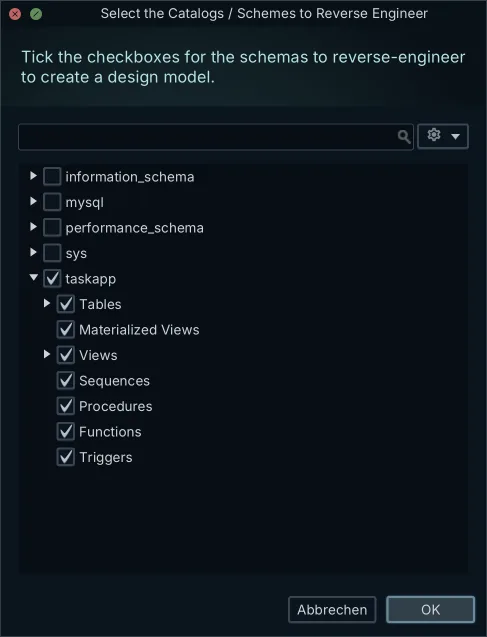
- In Reverse Engineer the Database, tick the database you want and press Import.
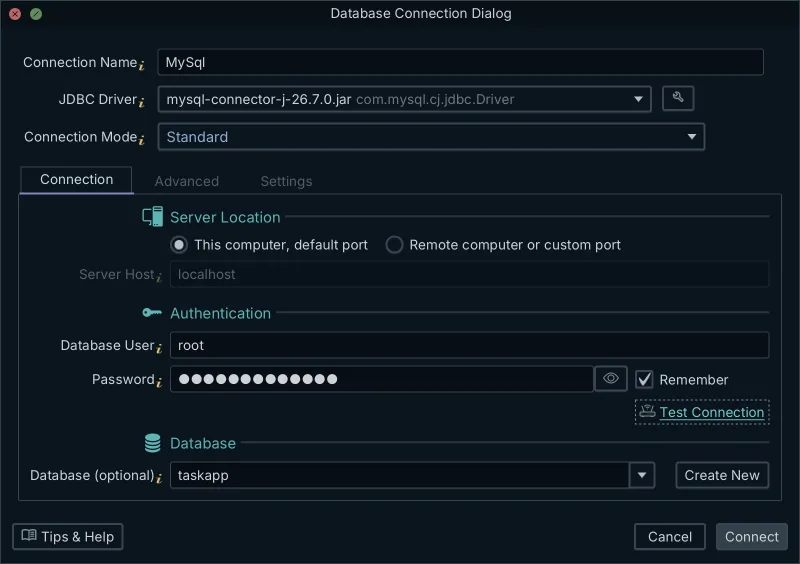
The import lists the system databases next to yours. MySQL keeps them as databases too, so leave information_schema, mysql, performance_schema and sys unticked.
DbSchema then draws every table and every declared foreign key. Connecting and importing only read from the database. The free Community Edition does all of this, because connecting needs no license. For arranging the diagram itself, see creating ER diagrams for MySQL.
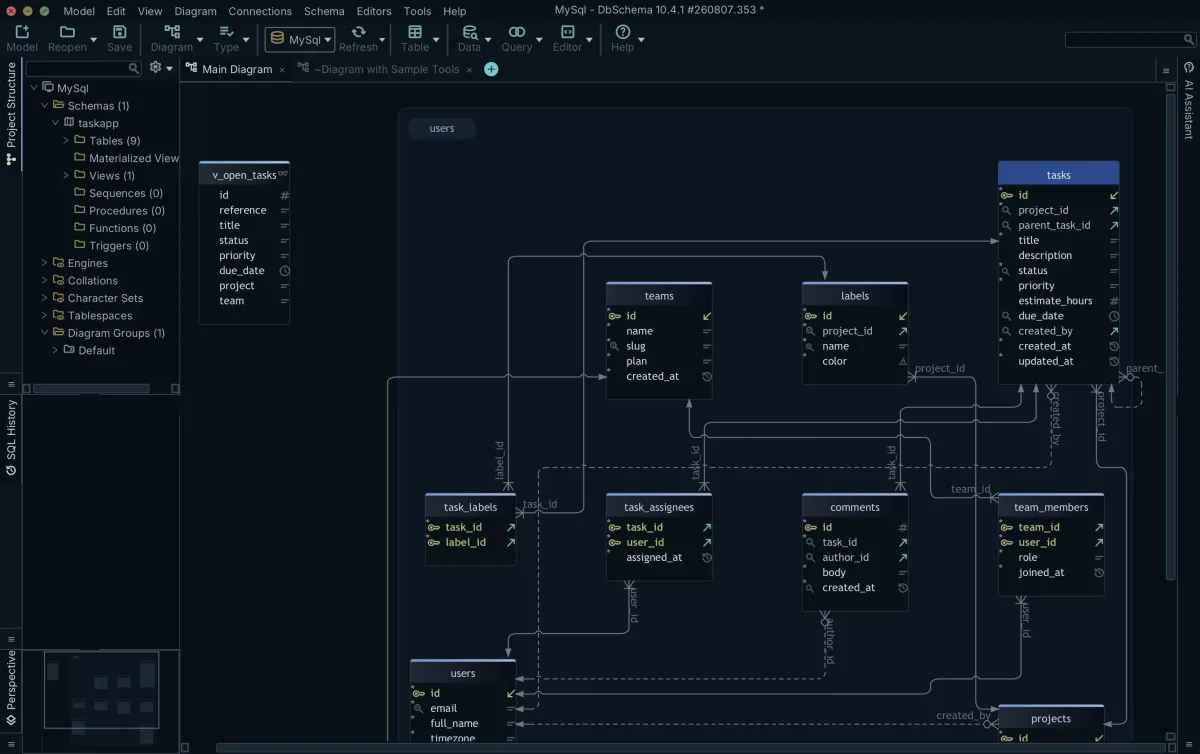
Why a MyISAM schema introspects with no relations
A MyISAM schema imports as a set of unconnected boxes. The reason is the storage engine. The MySQL 8.4 manual lists MyISAM with foreign key support: No[8]. InnoDB, the default storage engine in MySQL 8.4[3], stores and enforces them.
What MyISAM does with the clause is easy to miss. MySQL 8.4.11 accepted our FOREIGN KEY clause without an error or a warning, and then stored no constraint. It kept the index on customer\_id, as the STATISTICS table shows. The index survives. The constraint does not.
Without the constraint, MySQL stops nothing. We inserted an order for customer 3, who doesn't exist, and MyISAM took it:
SELECT o.id, o.customer_id, c.id AS matched_customer
FROM shop_legacy.orders AS o
LEFT JOIN shop_legacy.customers AS c ON c.id = o.customer_id
ORDER BY o.id;
Order 12 points at a customer that isn't there:
| id | customer_id | matched_customer |
|---|---|---|
| 10 | 1 | 1 |
| 11 | 1 | 1 |
| 12 | 3 | NULL |
The same insert into shop\_innodb.orders fails:
ERROR 1452 (23000): Cannot add or update a child row: a foreign key constraint fails (`shop_innodb`.`orders`, CONSTRAINT `orders_ibfk_1` FOREIGN KEY (`customer_id`) REFERENCES `customers` (`id`))
InnoDB tables can end up the same way. If an ORM or a sharding layer checks integrity in application code, the schema may declare no foreign keys at all.
So before you decide the diagram is broken, check the engine of each table:
SELECT TABLE_SCHEMA, TABLE_NAME, ENGINE
FROM information_schema.TABLES
WHERE TABLE_SCHEMA IN ('shop_legacy', 'shop_innodb')
ORDER BY TABLE_SCHEMA, TABLE_NAME;
MySQL lists each table with its engine:
| TABLE_SCHEMA | TABLE_NAME | ENGINE |
|---|---|---|
| shop_innodb | customers | InnoDB |
| shop_innodb | orders | InnoDB |
| shop_legacy | customers | MyISAM |
| shop_legacy | orders | MyISAM |
MyISAM tables, or InnoDB tables with no rows in REFERENTIAL_CONSTRAINTS, explain an empty diagram.
Drawing the relations with virtual foreign keys
A virtual foreign key puts the missing lines back. It exists only in the DbSchema model, and DbSchema never creates it in the database. So no ALTER TABLE runs, and no production table is locked.
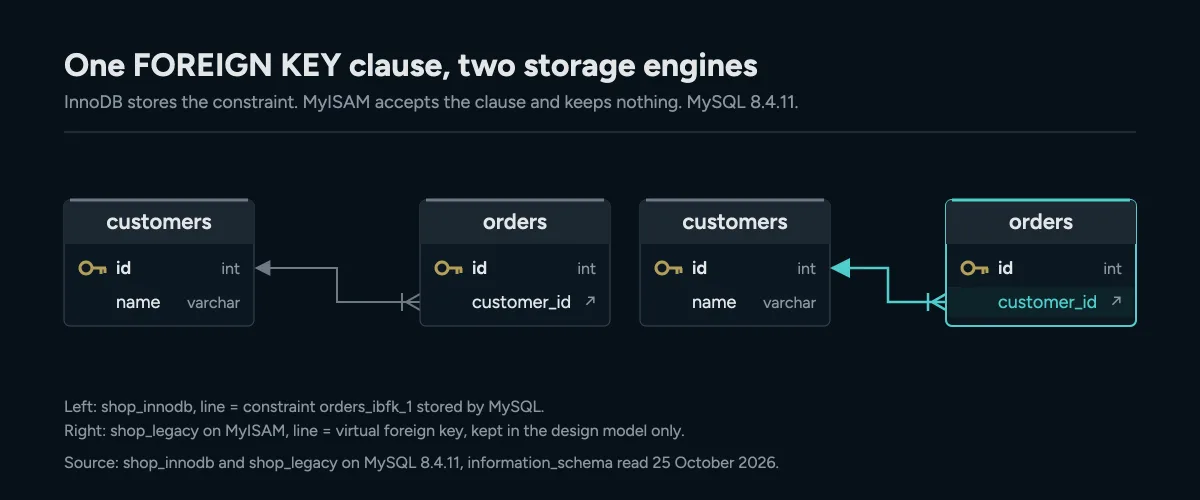
The same FOREIGN KEY clause on MySQL 8.4.11: InnoDB stores it, MyISAM keeps nothing, and a virtual foreign key draws the line in the model. Keeping it in a model file needs Pro.
For the MyISAM schema above, you link orders.customer\_id to customers.id:
- Drag
customer\_idin the orders table ontoidin the customers table. - Tick Virtual in the foreign key dialog.
- Press OK.
DbSchema draws the virtual foreign key in another color. The Find Virtual Foreign Keys dialog can also suggest them for columns with matching names. For more on how real and virtual keys differ, see foreign keys and virtual keys.
The virtual key also helps where a real one would fail. We copied shop\_legacy, switched both tables to InnoDB and added the real foreign key. MySQL refused with the same ERROR 1452, because of order 12. A virtual key documents the relation now. You can clean up orphan rows like order 12 before you add a real constraint.
Keeping a virtual foreign key means saving the model file, which needs DbSchema Pro. Pro also lets the Data Explorer follow it. Click a customer, and the orders table shows that customer's orders.
What the offline design model file holds
DbSchema saves the design in one model file with the extension .dbs. The documentation says it holds the whole design, tables, foreign keys and diagrams. Saving it needs DbSchema Pro.
The file is plain XML, so you can open it in a text editor and diff it. We looked at a model DbSchema saved for a 14-table MySQL schema. It is 18,547 bytes and holds:
- the tables, columns, indexes and foreign keys, including the table options such as
ENGINE=InnoDB; - the diagram layout, with an x and y position for each table;
- entries for the SQL Editor, the Relational Data Editor and the Query Builder.
The file stores a row count per table, but no row values. You can open it and work on the design with no connection to MySQL, and it carries no production data. Versioning that file in Git is covered in schema versioning for MySQL.
Download DbSchema, connect it to the MySQL database you were handed, and see which relations are really there. The free Community Edition connects, reverse engineers and draws the diagram. To keep virtual foreign keys in a model file and walk them in the Data Explorer, use DbSchema Pro.
Frequently asked questions
Does reverse engineering lock or change MySQL tables?
No. Connecting and importing only read the database's metadata. A virtual foreign key changes only the DbSchema model.
Can I turn MyISAM tables into InnoDB to get real foreign keys?
Yes, with ALTER TABLE ... ENGINE=InnoDB, then ALTER TABLE ... ADD FOREIGN KEY. Adding the key fails with ERROR 1452 while orphan rows exist, so find them with a LEFT JOIN first.
Why does SHOW CREATE TABLE show a KEY but no FOREIGN KEY?
On MyISAM, MySQL keeps the index that the FOREIGN KEY clause needs and drops the constraint itself. That KEY line can be the only trace left of the relation.
Sources
See what MySQL never told you about your schema
DbSchema reverse-engineers your MySQL database over JDBC and draws the relations MyISAM or your ORM never declared. Connecting and the diagrams are free in the Community Edition; saving the model file that holds the virtual keys is Pro.









