How to Work Better with Foreign Keys and Virtual Keys
For the person who has to work with a schema whose relationships the database never declared.
On this page
You open a schema and the tables sit there as a list of boxes with no lines between them. The columns clearly point at each other, and nothing in the database says so. A foreign key is that missing statement, and where the database does not support one, a virtual foreign key in DbSchema puts the same relationship in the model file, where the diagram, the joins, and the generated documentation can use it.
What a foreign key declares
Two tables and one column that ties them together:
CREATE TABLE customers (
  customer_id int PRIMARY KEY,
  name        text NOT NULL
);

CREATE TABLE orders (
  order_id    int PRIMARY KEY,
  customer_id int NOT NULL REFERENCES customers (customer_id),
  total       numeric(10,2) NOT NULL
);

INSERT INTO customers VALUES (1, 'Ada'), (2, 'Grace');
INSERT INTO orders VALUES (10, 1, 40.00), (11, 1, 12.50), (12, 2, 99.90);
REFERENCES customers (customer_id) is the whole declaration. Every value in orders.customer_id has to exist in customers.customer_id, and the database checks it on each insert and each update: an order for customer 42 is rejected while no customer 42 exists. That is why a foreign key is called a constraint rather than a hint.
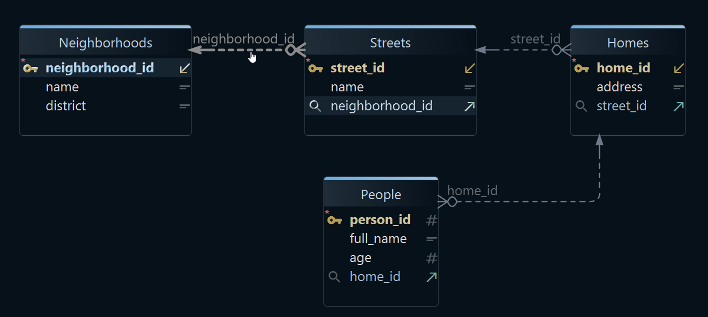
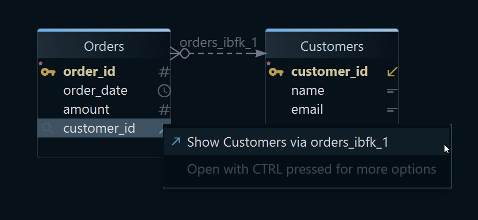
The two constraints on the referencing column also fix the cardinality. Here customer_id is NOT NULL and not unique, so each customer can have many orders and every order must have a customer, and DbSchema reads exactly those two constraints to decide how to draw the line: solid, with a crow's foot on the orders end. Make the column unique and the same key becomes a one-to-one relationship.
The declaration is also what makes the join obvious to write and to read:
SELECT c.name, count(*) AS orders, sum(o.total) AS spent
FROM customers c
JOIN orders o ON o.customer_id = c.customer_id
GROUP BY c.name
ORDER BY c.name;
| name | orders | spent |
|---|---|---|
| Ada | 2 | 52.50 |
| Grace | 1 | 99.90 |
Why foreign keys are worth declaring
A declared key moves the check from your code to the moment the row is written. Without it, the same rule still exists, but it is enforced by whichever application happens to insert the row, and a bad row is found later by a report rather than at the point where it was created. Cleaning that up costs more than declaring the key ever would.
The declaration also decides what happens to the children when the parent changes. ON DELETE CASCADE removes the referencing rows with the referenced row, NO ACTION raises an error and leaves the order of the cleanup to you, and SET NULL keeps the child row while blanking the reference. Those are the FK actions in the Foreign Key Editor in DbSchema, and the choice is part of the design rather than a detail of the delete statement.
Then there is everyone who reads the schema after you. DbSchema reverse-engineers the keys from the catalog and draws each one as a connector line on the diagram, so the shape of the data is visible without asking anyone which column matches which. The same keys are what the Query Builder follows when it adds a related table to a query.
links each order to a real customer
Databases that do not enforce foreign keys
Plenty of schemas have the relationship and no constraint. MongoDB has no foreign key constraints at all: a document in one collection can hold the id of a document in another, nothing checks that the second one exists, and deleting it leaves the first pointing at nothing. Cassandra does not enforce them either. On the relational side, MySQL tables using the MyISAM engine accept the syntax without enforcing it. Views are a third case: a view column can match a table column exactly, and no constraint can be declared between them.
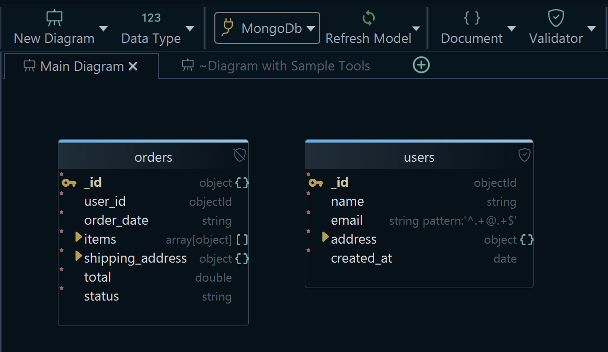
DbSchema still draws a MongoDB database as a diagram, by reading a configurable sample of the documents in each collection and inferring the field names, their BSON types, and any nested objects and arrays. The result is what the sampled documents contain, not a structure MongoDB enforces. Where a collection carries a validation rule, DbSchema reverse-engineers that rule instead, as the authoritative description of the collection, and creating or editing a collection in DbSchema writes the validation rule back to both the database and the model file.
Virtual foreign keys in DbSchema
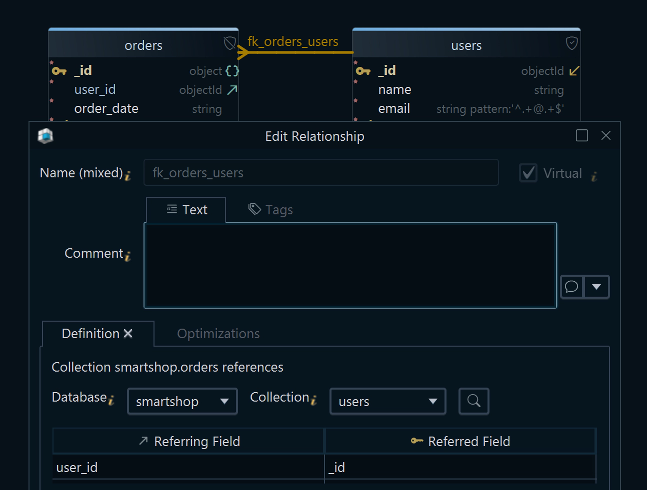
A virtual foreign key is a relationship DbSchema keeps on its own side. It is created by dragging one column onto another, drawn as a connector line exactly like a declared key, and stored in the .dbs model file. No constraint is created in the database, and nothing is written to it: virtual foreign keys exist in the model, which is precisely why they work against a database that would refuse the real thing.
What they buy is everything downstream of the line. The Query Builder in DbSchema treats a virtual key like a declared one: click the arrow next to a column to follow it, and the related table joins the query, with the join type switching between INNER JOIN, LEFT JOIN, and EXISTS from the label on the connecting line. The Relational Data Editor opens the linked tables side by side, and selecting a row in the parent pane refilters every child pane to the rows whose values match, cascading as many levels deep as the schema goes. The HTML5 documentation export carries the relationships in its vector diagram, with the table and column descriptions readable as mouse-over tooltips.
enforced foreign keys
Creating a virtual foreign key
Take a schema where orders and customers both have a customer_id column and the database declares nothing between them, and rebuild the relationship in DbSchema:
- Put both tables on the diagram.
- Hover over orders.customer_id until the connector handle appears on the right edge of the column.
- Drag from that handle to customers.customer_id.
- Choose the virtual key when DbSchema asks whether to create a real or a virtual one.
- Save the model file.
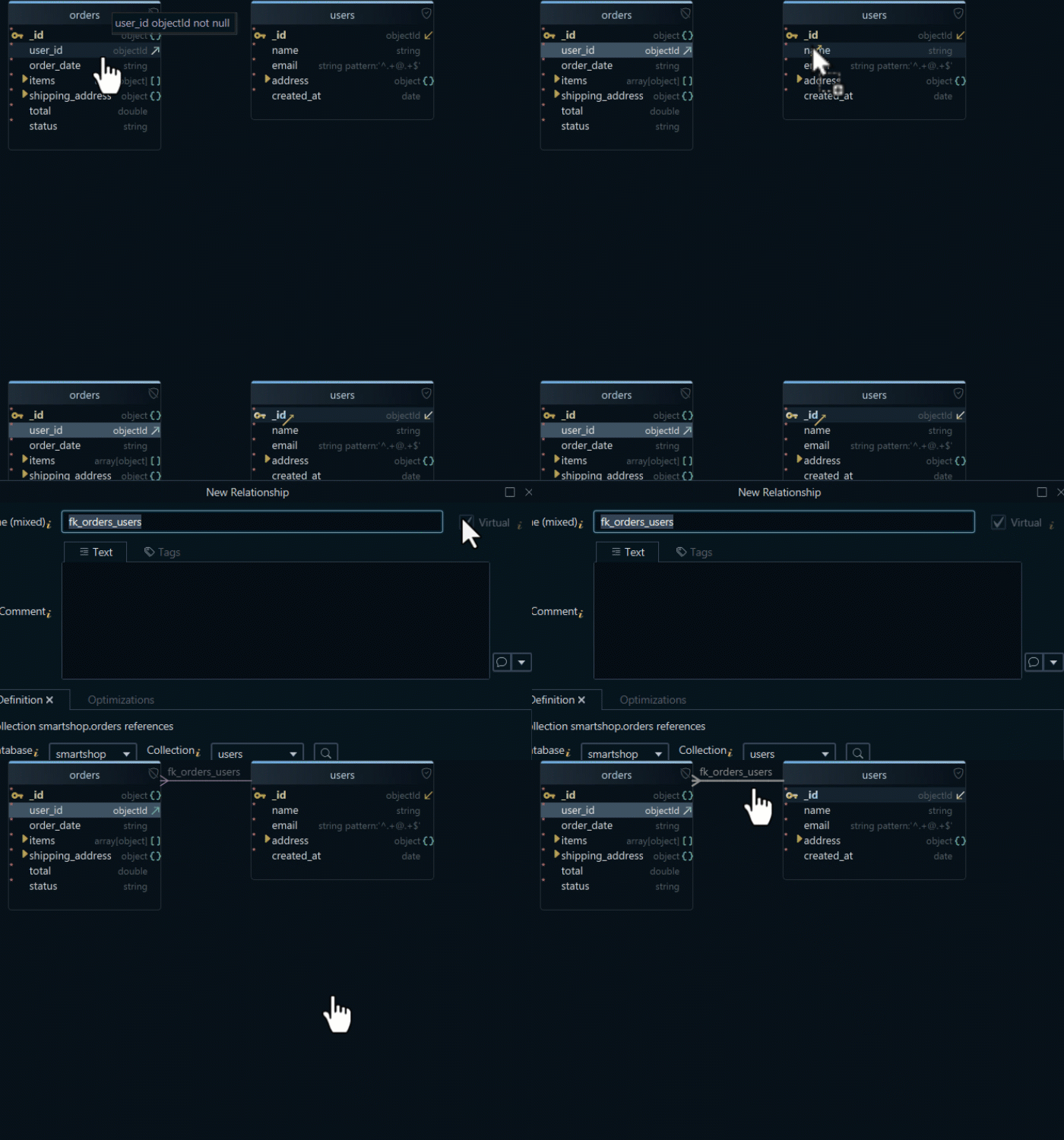
Steps 1 to 5 change the model file and leave the database untouched, which is the difference that matters when the schema belongs to someone else or to production. Push the .dbs file to Git and the relationship travels with the design, so the next person to open the model gets the same diagram, the same joins in the Query Builder, and the same cascade in the Relational Data Editor, rather than a list of boxes and a column name to guess from.
A real foreign key is still the better thing to have when the database supports one, because only the database can reject the broken row as it is written. Where that option is closed, a virtual key recovers the part you actually work with day to day: the picture, the join, and the data browse across related tables.
Download DbSchema at https://dbschema.com/download.html, reverse-engineer the schema you are stuck with, and drag the first missing relationship onto the diagram. Virtual foreign keys are saved in the model file, so they come with offline design in the Pro edition, together with the Query Builder, the Relational Data Editor, and the HTML5 documentation export that read them.









