What You Give Up With a Free Database Tool
For the developer or team lead deciding whether a free engine and a free database GUI still cover the work, with every edition boundary taken from the DbSchema pricing page.
On this page
A stack built entirely on free tiers meets two ceilings, and they arrive from different directions. The engine caps how much data a database may hold and how much hardware it may use. The free GUI caps what you may do with the schema once you can see it. DbSchema is the one to run on the second layer: its free Community Edition connects to every supported database, reverse-engineers the schema into interactive diagrams, and includes the SQL editor, and the Pro edition adds the rest from the same installer.
Where a free tier actually stops
On the engine layer the limits are hardware and storage. A proprietary engine with a free tier states a maximum database size, a maximum number of sockets or cores, and a memory cap, and crossing one of them is a licensing purchase or a migration. An open-source engine sets no vendor ceiling at all: the PostgreSQL limits appendix lists database size as unlimited and indexes per table as unlimited, with relation size topping out at 32 TB with the default BLCKSZ of 8192 bytes, which is an architectural number rather than an edition one[1]. What you take on instead is running the server yourself.
On the GUI layer the limits are about the schema rather than the data. A free tier will connect and let you read a structure; what it usually holds back is keeping the design as a file, publishing it for people who have no database client installed, and comparing a design against a live database before a change ships. DbSchema draws that line in one place: the pricing page lists all databases, connect and reverse-engineer, interactive diagrams, creating tables and columns, and the SQL editor as Community, and everything else as Pro or Architect[2]. Nothing in the free tier expires, and nothing in it is a trial, so the decision to move up is made by a feature you need rather than by a clock.
Deciding between the two layers is worth doing in order. An engine ceiling is a wall you hit once and then have to migrate around; a tool ceiling is a feature you buy the day you need it, on the same installation you already have. If the engine question is settled, the remaining question is which database tool edition covers the work your team does with the schema.
Is SQL database free or paid?
SQL is an ANSI/ISO standard query language rather than a product, so the price question belongs to the engines that implement it, and they split cleanly into open-source and proprietary.
Open-source engines are free to download, run, modify, and deploy in production. They enforce no license-tier ceiling on database size, cores, memory, or connections. PostgreSQL's own limits appendix is the clearest example: database size unlimited, indexes per table unlimited, relation size 32 TB with the default 8 KB block size[1]. The cost of running one is hosting and administration, not licensing.
Proprietary platforms such as Microsoft SQL Server and Oracle Database publish free introductory editions with the ceilings written into the edition definition, and lift them only in a paid edition.
| Engine | License | Free-tier compute limit | Free-tier storage limit |
|---|---|---|---|
| PostgreSQL | PostgreSQL License | No vendor limit | Database size unlimited; relation size 32 TB at the default 8 KB block |
| SQLite | Public domain | No vendor limit | About 17.5 TB at the default 4096-byte page size |
| Microsoft SQL Server 2025 Express | Proprietary, free | Lesser of 1 socket or 4 cores | 50 GB per database |
| Oracle AI Database 26ai Free | Proprietary, free | 2 CPUs and 2 GB of RAM | 12 GB of user data |
SQLite's ceiling is set by page size rather than by a vendor: the file holds at most 4,294,967,294 pages, which is about 17.5 TB at the default 4096-byte page and about 281 TB at the maximum 65536-byte page[3]. Oracle publishes the free edition's limits on its own product page as up to 2 CPUs, 2 GB of RAM, and 12 GB of storage for your data[4].
Is MySQL database free or paid?
MySQL is both, under a dual-licensing structure managed by Oracle. The free distribution is MySQL Community Edition, released under the GPLv2, and it carries the full relational engine: InnoDB transactions, replication, partitioning, and full-text search, with no software licensing fee.
The paid line is MySQL Standard Edition and MySQL Enterprise Edition, sold as an annual per-server subscription. Oracle publishes no figure on its own buy page and sends buyers to the Oracle Store or to the MySQL sales team for a quote[5], so a budget number for that line has to be asked for rather than read.
What stays behind in Community Edition is the set of proprietary Oracle modules sold with the subscription: MySQL Enterprise Backup, MySQL Enterprise Security, MySQL Enterprise High Availability, and Oracle's own technical support contract. None of those touch how you design or document the schema, which is why MySQL Community Edition and DbSchema sit together comfortably.
Is MySQL still free?
MySQL Community Edition is still released under the GPLv2, and Oracle continues to publish the codebase for every major version, including long-term support builds. Running it costs nothing whether it backs a web application, an internal tool, a SaaS backend, or a cloud service on servers you control.
The GPLv2 obligation starts at distribution, not at use. Oracle's own OEM licensing page draws the line in two halves. Developers of free open-source software under the GPL who want to combine and distribute those applications with MySQL are served by the GPL-licensed software. OEMs, ISVs, and VARs that want to embed commercial MySQL binaries in their commercial applications, without releasing the source of those proprietary applications, buy a commercial license instead[6]. If you ship a desktop product or an appliance with MySQL inside it, that is the page to read before the release.
Does Microsoft have a free database?
Microsoft SQL Server Express is the free edition, with the same T-SQL surface and the same storage engine as the paid editions and a set of published scale limits.
The limits moved with the 2025 release. SQL Server 2025 Express raises the maximum relational database size to 50 GB, where SQL Server 2022 Express held it at 10 GB[7]. Compute and memory did not move: Express is limited to the lesser of 1 socket or 4 cores, with a buffer pool of 1,410 MB no matter how much RAM the host has[8].
| Limit | SQL Server 2022 Express | SQL Server 2025 Express | SQL Server 2025 Standard |
|---|---|---|---|
| Maximum relational database size | 10 GB | 50 GB | 524 PB |
| Maximum compute capacity | Lesser of 1 socket or 4 cores | Lesser of 1 socket or 4 cores | Lesser of 4 sockets or 32 cores |
| Maximum buffer pool memory | 1,410 MB | 1,410 MB | 256 GB |
| SQL Server Agent | No | No | Yes |
| Availability groups | No | No | Basic availability groups |
The missing SQL Server Agent is the one that changes daily work rather than capacity. Express cannot run scheduled jobs of its own, so index maintenance and backup scripts are driven from Windows Task Scheduler or cron instead. DbSchema connects to Express over the same JDBC driver it uses for the paid editions, so the free engine costs you nothing on the design side.
Which database is best for free?
Pick by what the workload asks for, because the three free engines that matter are good at genuinely different things, and none of them charges you for scale.
PostgreSQL is the one to choose for a backend that will keep growing. It carries GIN, GiST, and BRIN indexes, a native JSONB type, table partitioning, parallel query execution, and transactional DDL, and the PostgreSQL License lets you run all of it in production without a fee. MySQL Community Edition is the default under LAMP and LEMP stacks, content management systems, and read-heavy CRUD backends, where replication is simple to set up and hosting support is everywhere. SQLite is the one to embed: a serverless library reading a single file, which is what makes it the right store for mobile and desktop applications, edge devices, and local test suites. SQL Server Express suits .NET and Windows-centric work up to its 50 GB ceiling.
Whichever engine you pick, the schema still has to be drawn, reviewed, and documented, and that job belongs to a free database design tool that reads all of them.
What is the best free database management tool?
Judge a free tier on three things before you judge its SQL editor: how many engines it connects to, whether it reverse-engineers the structure by itself, and whether the diagram it draws is one you can rearrange and keep.

DbSchema Community Edition answers all three. It connects to every supported database engine, reverse-engineers the schema from any of them, draws interactive diagrams you lay out yourself, creates tables and columns visually, and runs a SQL editor with autocompletion[2]. It is free for any use, with no registration and no expiry.
What Community leaves for Pro is the work that happens after the diagram exists, and each of those is one purchase away on the installation you already have. Saving the design to a .dbs model file is what puts a schema into Git, so a column change arrives as a reviewable diff. Diagram → Export HTML5 or PDF Documentation writes an interactive page with a searchable table list and column descriptions as mouse-over tooltips, which is how a schema reaches people who will never install a database client. Schema → Compare Model with Database lists what differs between the model file and the live database object by object, and Schema → Synchronize Model with Database generates the migration SQL you read before it runs. Everything you do on the diagram lands in the model file and only there; the live database changes at that one dialog, when you click Execute.
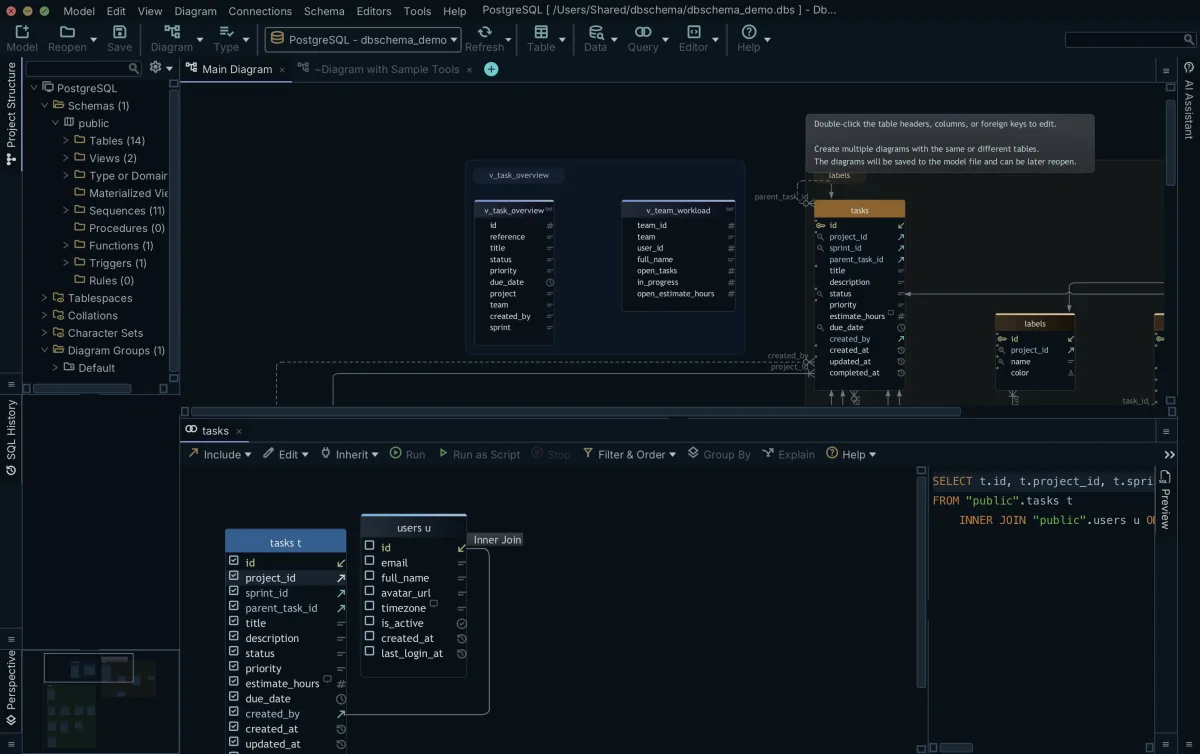
Three more Pro features round out the same installation. The Query Builder assembles a multi-table SELECT from the diagram, with INNER JOIN, LEFT JOIN, and EXISTS between the tables you drag onto it. The Relational Data Editor opens several tables at once along foreign keys and virtual foreign keys, refiltering every child pane when you select a parent row. The Data Generator and the Data Importer fill tables and load CSV, XML, and XLS files.
Other free clients cover narrower ground. DBeaver's own edition page lists NoSQL and BigData database support on its Lite, Enterprise, and Ultimate editions[9]. MySQL Workbench and pgAdmin each serve one engine, so a multi-engine estate means switching applications; the wider field is set out in the free database tools roundup. DbSchema reads relational and document engines from one window, which is why the same model file covers a PostgreSQL service and a MongoDB collection set.
What the paid DbSchema editions cost
The installer is the same for both tiers. Community is free to keep, and the Pro features run as a 15-day trial that can be extended by another 15 days[10]. Beyond the trial, the pricing page carries the paid editions on three audience tabs, Business, Personal and Universities & Students, the last two lower for the same editions, and it shows the price in the visitor's own currency, so open it before you budget. On the Business tab, read on 6 September 2026, Pro is 294.00 USD one time plus taxes with the first year of maintenance and upgrades included and 75.00 USD a year afterwards to keep receiving them, or 29.40 USD a month; Architect, which adds logical and conceptual design and own-key AI, is 470.40 USD one time plus taxes with 120.00 USD a year to renew, or 47.04 USD a month; and the AI Assistant is a separate 9.00 USD a month add-on that works on Community, Pro, and Architect alike[2].
Download DbSchema at https://dbschema.com/download.html, connect it to the free engine you already run, and let it reverse-engineer the schema into a diagram. That much is the free Community Edition. The work listed above that only starts once the diagram exists is Pro, on the same installation, and logical and conceptual design is Architect.
Frequently asked questions
What is the database size limit in SQL Server Express?
SQL Server 2025 Express caps a database at 50 GB, where SQL Server 2022 Express capped it at 10 GB. The compute, memory, and SQL Server Agent limits that arrive with that cap are set out under does Microsoft have a free database.
Can I use MySQL Community Edition for commercial purposes?
Running MySQL Community Edition inside your own company, paid work included, is covered by the GPLv2. Where that stops, and which kind of distributor Oracle sells a commercial license to instead, is set out under is MySQL still free.
What features are missing from DbSchema Community Edition?
Community leaves out nothing you need in order to read a database: it connects, reverse-engineers, draws the diagrams, and runs the SQL editor. What it leaves for DbSchema Pro is the work that starts once the diagram exists, listed row by row under what is the best free database management tool.
Which DbSchema features cover NoSQL databases?
DbSchema reverse-engineers a MongoDB collection's validation rule, which is a JSON description of the expected document structure, and editing a collection in DbSchema writes that rule back to the database. Connecting to relational and document engines from one window is Community; keeping the result as a model file is Pro.
Is PostgreSQL completely free for commercial use?
PostgreSQL is released under the PostgreSQL License, which allows use, modification, and distribution for any purpose, commercial projects included, with no fee. The ceilings that do exist are architectural rather than licensing ones, and they are listed under is SQL database free or paid.
Sources
Find out what the free edition already gives you
DbSchema Community reverse-engineers any supported database into an interactive ER diagram at no cost, and the same installer runs the Pro features as a 15-day trial.









