Perpetual or Subscription for Database Tooling
For engineering managers and team leads who buy database tool seats and choose between a perpetual and a subscription license.
On this page
Your team needs DbSchema seats, and the pricing page asks one question first: pay once or pay monthly. For a tool you keep longer than 10 months, the perpetual license costs less. DbSchema Pro costs 294.00 USD once or 29.40 USD a month. The DbSchema pricing page says perpetual "costs the same as 10 months of the subscription". A subscription wins when you need a seat for only a few months.
In short
A perpetual license is one payment that keeps working for good. A subscription is a monthly payment that includes every release and stops when you stop paying. For DbSchema Pro and Architect, perpetual is cheaper once you use DbSchema for more than 10 months.
Table of contents
- A perpetual license costs less after 10 months
- What happens when the update year or the subscription ends
- The disadvantages of a perpetual license
- A perpetual license is not ownership of the software
- The four types of software licenses
- When a subscription is the better choice
- The decision criteria that matter
- Frequently asked questions
- Sources
Key takeaways
- DbSchema Pro costs 294.00 USD once or 29.40 USD a month. Architect costs 470.40 USD once or 47.04 USD a month.
- Over three years on the latest release, Pro costs 444.00 USD perpetual and 1,058.40 USD monthly.
- A perpetual license keeps working when its free update year ends. Only newer releases need a renewal.
- An expired subscription turns the licensed features off. Your model files stay on your disk.
A perpetual license costs less after 10 months
The break-even is plain arithmetic. DbSchema prices the perpetual license at 10 monthly payments, so perpetual starts saving money in month 11. The pricing page lists these business prices on 25 October 2026, in US dollars before taxes.
| Edition | Perpetual, one-time | Monthly | Updates from year two |
|---|---|---|---|
| Pro | 294.00 USD | 29.40 USD | 75.00 USD a year |
| Architect | 470.40 USD | 47.04 USD | 120.00 USD a year |
The perpetual price includes the first year of updates. Renewals after that are optional. Even if you renew every year to stay on the latest release, perpetual stays cheaper. We calculated these totals from the list prices above:
| Years on the latest release | Pro perpetual and renewals | Pro monthly | Architect perpetual and renewals | Architect monthly |
|---|---|---|---|---|
| 1 | 294.00 USD | 352.80 USD | 470.40 USD | 564.48 USD |
| 2 | 369.00 USD | 705.60 USD | 590.40 USD | 1,128.96 USD |
| 3 | 444.00 USD | 1,058.40 USD | 710.40 USD | 1,693.44 USD |
| 5 | 594.00 USD | 1,764.00 USD | 950.40 USD | 2,822.40 USD |
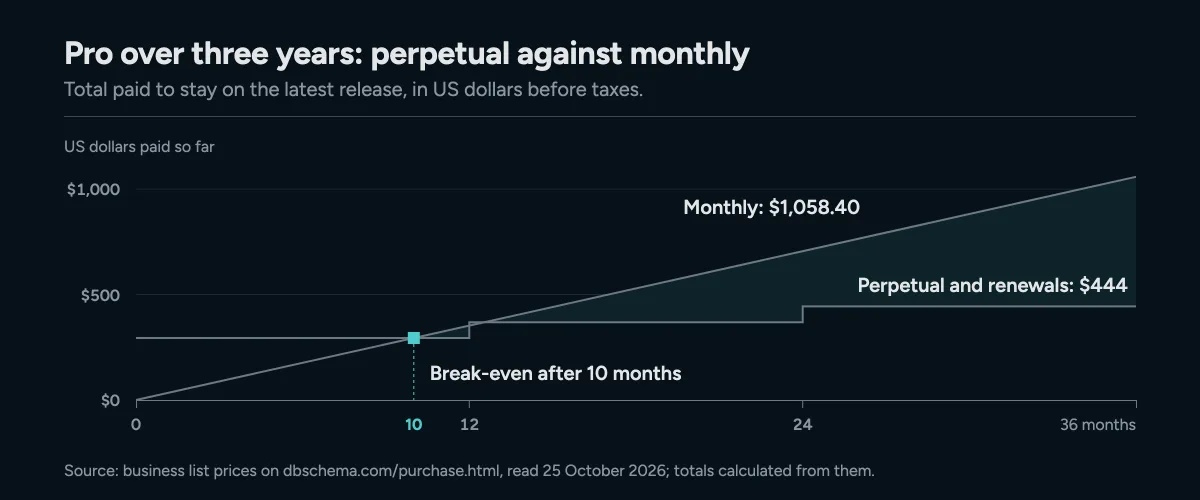
Pay monthly for Pro and you pass the perpetual price in month 11; renewing every year keeps perpetual cheaper over three years.
Licenses are per developer, so multiply by your seats. Each developer can install DbSchema on two computers and use one at a time. A team of five on Pro for three years pays 2,220.00 USD perpetual or 5,292.00 USD monthly.
What happens when the update year or the subscription ends
The two models differ most on the day the payments stop. Revenera's licensing glossary[1] describes the general rule. A subscriber who stops paying loses access to the product, its updates and its support. A perpetual licensee keeps the software but may lose upgrades and support after about a year without a support plan.
DbSchema follows the same split. The DbSchema licensing documentation says a perpetual license runs every version released within one year of its purchase. It keeps running those versions after the year ends. A monthly subscription runs every version for as long as you pay.
We read the renewal screen in the installed DbSchema 10.5.2 app on 25 October 2026. For a perpetual license whose update year has ended, it says:
Your license and this DbSchema version keep working after the expiration, nothing turns off.
Renewing extends the free upgrades to all new releases and the technical support for another year.
For an expired subscription, the same screen says:
Your subscription has expired, so the licensed features are currently disabled.
A renewal can be bought at any time, at the renewal price, and unlocks this version.
So the perpetual license loses nothing it already had. The expired subscription loses the Pro features, such as saving the model to a file, until you renew. Its Community features keep working, so you can still connect to your databases and run SQL.
The disadvantages of a perpetual license
A perpetual license stops at a version. You keep every release from your first year, and later releases need a renewal. For a database tool that matters, because new engine support arrives in new releases. The DbSchema renewal screen lists "New features, database versions and security fixes" as what a renewal brings.
If you install a newer version after your year, DbSchema shows "License expired: Renew your license". The licensing documentation says the start window names your cutoff date. You then have two options. Buy a renewal, or install a version released before the cutoff from the previous releases.
The second disadvantage is the upfront cost. Five Pro seats cost 1,470.00 USD on day one. The first month of five subscriptions costs 147.00 USD.
A third one depends on the vendor. Microsoft's Office comparison page[2] says the one-time Office purchase gets security updates but no new features. The next major release costs full price. DbSchema handles this with a renewal instead of a new license. A renewal costs 75.00 USD a year for Pro and keeps your license ID and activations.
A perpetual license is not ownership of the software
A perpetual license gives you a lasting right to use the software. It doesn't transfer the software to you. The DbSchema EULA says so directly: "The Software is licensed, not sold." The commercial grant is "limited, non-exclusive, non-transferable".
Your work is a different matter. The same EULA says the input and output data of the software remain your property. In DbSchema, the main output is the design model file. We checked our demo model file:
file dbschema_demo.dbs
dbschema_demo.dbs: XML 1.0 document text, ASCII text
The file is plain XML, 28,621 bytes for 14 tables. You can read it in any text editor and keep it in Git. That holds under both license models. The pricing page notes that Community cannot open saved project files. The files stay on your computer and open again once you have a license.
The four types of software licenses
Software licenses fall into four common types. Two are open source and two are commercial.
| Type | What you pay | What you may do |
|---|---|---|
| Permissive open source | Nothing | Use, change and redistribute the software |
| Copyleft open source | Nothing | The same, and copies you pass on keep those freedoms |
| Perpetual commercial | One payment | Use the licensed versions for good |
| Subscription commercial | A recurring fee | Use every version while you pay |
The Open Source Definition[3] sets the rules for both open source types. A license may not demand a fee for redistribution, and the program must include its source code. Copyleft adds one condition. The GNU Project[4] says anyone who redistributes the software must pass along the freedom to copy and change it.
Among commercial tools, subscriptions have become the common model. Revenera reports that many software vendors are switching from perpetual to subscription licensing. Its example is Adobe, which moved Creative Suite from perpetual licenses to a subscription. DbSchema still sells both, so you choose the model per seat.
When a subscription is the better choice
A subscription costs less when you need a seat for under 10 months. A contractor who joins for three months costs 88.20 USD on Pro monthly. A perpetual seat for the same person costs 294.00 USD. The pricing page says the monthly plan includes every update, and you can cancel anytime.
A subscription also fits a short modelling phase. Architect adds logical and conceptual design to Pro. Three months of Architect cost 141.12 USD. If you later want Architect for good, a perpetual Pro license upgrades to Architect for the price difference, 176.40 USD.
The AI Assistant follows its own rule. It is a 9.00 USD monthly add-on that works with every edition, whichever license model you pick.
The decision criteria that matter
Three questions settle the choice. The first is how long one person will use DbSchema. For more than 10 months, buy perpetual. For less, pay monthly.
The second is whether you need every new release. Perpetual covers the first year. After that you renew for 75.00 USD a year on Pro, or you stay on the versions you have. Monthly always runs the latest release.
The third is who uses the seat. Licenses are per developer, and commercial seats can be reassigned to a colleague. If several people share fewer seats across time zones, read How Floating Licences Work for a Database Team. For Pro against Architect, see Which Database Tool Edition a Team Actually Needs.
Download DbSchema and open the model against your own database during the 15-day trial. The trial unlocks every Pro and Architect feature. Save the model to a file, check which edition your team needs, and then choose perpetual or monthly on the purchase page.
Frequently asked questions
Does a perpetual DbSchema license stop working after a year?
No. It keeps running every DbSchema version released within a year of the purchase. Only versions released later need a renewal.
Can one developer use a DbSchema license on a laptop and a desktop?
Yes. A license is per developer and installs on two computers, used one at a time.
Do the DbSchema prices include tax?
No. The listed prices are before taxes, which are calculated at checkout. You pay in your own currency.
Who owns the model files I create?
You do. The DbSchema EULA says the input and output data of the software remain the property of the licensee.
Sources
Try DbSchema against your own database
Reverse-engineer your schema into an interactive ER diagram and keep the model in a file that versions cleanly in Git. The Community Edition is free; Pro and Architect are sold as a one-time licence or a monthly subscription.









