How Floating Licences Work for a Database Team
For the engineering manager buying DbSchema for a team that opens it in bursts, with every mechanism taken from the DbSchema licensing and pricing pages.
On this page
Twenty engineers can touch the schema while only three sit in it on a given afternoon, and twenty named seats then pay for seventeen closed windows. Buy a DbSchema floating licence instead: it goes per team rather than per person, the number of people who can work at the same time equals the purchased quantity, and the list of people allowed to draw from the pool can be as long as you like[1].
What a floating licence is
A DbSchema licence is either regular or floating. A regular licence is per person: each seat is assigned to one specific user by email address and is used only by that person. A floating licence is per team: a shared pool in which a fixed number of users work at the same time, while the team itself can be larger[1].
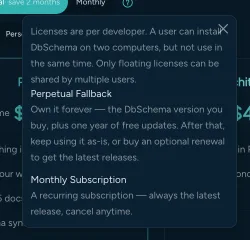
The pricing page states the same boundary from the other side: DbSchema licences are per developer, one user may install DbSchema on two computers but not use both at once, and only floating licences can be shared by multiple users[2]. Seats in the pool are checked out when someone starts DbSchema and released when they close it, which is what lets a team spread across shifts and time zones share the same seats through the day.
The two numbers to keep apart are the size of the allowed-user list and the purchased quantity. The list of allowed users can be as long as you like; the purchased quantity limits only how many of those people run DbSchema at the same moment[1].
How a DbSchema floating seat is checked out
There are two ways to run a floating licence, and using a DbSchema account is the recommended one because there is no server to install or maintain.
On the account route, the licence owner opens Manage Users & Keys on the floating subscription in the Customer Area and adds the allowed users' email addresses on the Manage Users tab. Each engineer then activates from Help → Register License, chooses DbSchema Account, and enters their own allowed-listed email address rather than the buyer's. DbSchema emails a one-time code, and signing in leases a seat from the DbSchema licensing service for that session[1]. No licence key is distributed and no key file ever reaches a developer's machine.
A seat comes back to the pool when the engineer closes DbSchema or runs Help → Unregister. A running application keeps its seat, because DbSchema applies no inactivity timeout, so a long modeling session is never interrupted halfway through. If an application crashes or loses connectivity, its seat is freed automatically once it stops contacting the server[1].
The second route is for networks with no direct internet access, such as air-gapped or locked-down environments, and it is a Floating License Server you host yourself. Download the floating licence key from the Customer Area with Download Key, then run the server either from the official Docker image on Docker Hub or from DbSchemaCLI, which is part of the standard DbSchema installation. From DbSchemaCLI the two commands are:
register -f "path/to/license-file"
license server -s
On each client machine, open Help → Register License, choose Floating License Server, and enter the server host and port. Setting two environment variables instead lets DbSchema find the server with no manual configuration in the dialog at all[1]:
DBSCHEMA_FLS_HOST=<server-host>
DBSCHEMA_FLS_PORT=<server-port>
The licensing page also carries a Kubernetes example with liveness and readiness probes, and a Windows batch file for starting the server from Task Scheduler.
The three ways a DbSchema licence is tied down
Naming, concurrency, and machine binding all exist in DbSchema, and which one you get follows from how you buy and how you activate.
| Licence | What it is bound to | Who can use it | Where it is managed |
|---|---|---|---|
| DbSchema floating | A pool, capped at the purchased number of concurrent users | Any allowed-listed user, one seat each while DbSchema is open | Customer Area, Manage Users tab |
| DbSchema regular seat | One person, by email address | That person only | Customer Area, Assign Users tab |
| DbSchema licence key | One computer | Whoever uses that computer | The key emailed after purchase |
The regular seat is the named model. When a regular licence is first generated, seat 1 is assigned automatically to the licence owner's email and the remaining seats start unassigned, and the assignee activates by signing in with their own address. Only commercial licences can be reassigned, an automatically assigned seat can be reassigned freely, and a seat assigned by hand is locked for three months from that date[1].
The licence key is the machine-bound model, for a standalone installation with no DbSchema account: paste the key sent by email after purchase and click Activate. A key activates DbSchema on a single computer, and moving it means running Help → Unregister on the old machine first. Where a machine has no internet access at all, the same dialog offers offline activation[1].
When a floating pool fits the team
Two things decide it, and both are about when people open DbSchema rather than how many of them there are.
The first is how the work is distributed through the day. Schema work tends to arrive in bursts: a table added during planning, a diff reviewed before a deployment, a diagram opened to answer a question. Where those bursts do not overlap, a shared pool covers more people than it has seats, and the allowed-user list costs nothing to extend. Where several engineers model full time in parallel, the pool has to be as large as that group anyway, and regular seats assigned by email are simpler to administer.
The second is the network. A self-hosted Floating License Server keeps activation entirely inside your own network, which is what makes DbSchema usable on machines that are not allowed to reach an external endpoint. Teams without that restriction should take the account route, since it removes the server from the picture and lets the owner add or remove users from the Customer Area without touching a developer's machine.
Onboarding is the third thing worth weighing, though it rarely decides on its own. Adding a contractor to a floating licence is adding an email address to the Manage Users tab, and removing them is deleting it.
Seeing who is holding a seat
Size the pool from what your own team does, and check it against what the licence server reports rather than against a rule of thumb.
On a self-hosted Floating License Server, DbSchemaCLI answers both questions directly. license server -l lists the users currently holding a seat, and license server -i shows the server status[1]:
license server -l
license server -i
Running the first command at the busiest part of your week is the measurement worth taking, because peak concurrency is the only number the purchased quantity has to cover. On the account route the equivalent view is the Customer Area, where the owner manages the allowed-user list for the floating subscription.
Sizing errors are cheap to correct in either direction. Seats return to the pool the moment someone closes DbSchema, and the allowed-user list can grow without any change to the licence, so a pool that turns out to be one seat short is a quantity change rather than a re-purchase of the whole arrangement.
DbSchema editions and what Community covers
The floating question and the edition question are separate: a floating licence decides how seats are shared, and the edition decides what those seats can do.
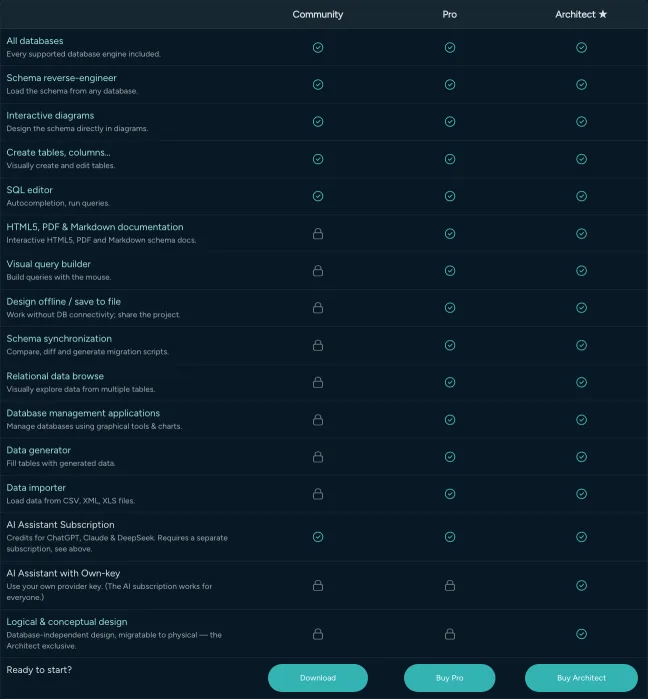
DbSchema Community Edition is free for any use and covers all supported databases, connect and reverse-engineer, interactive diagrams, creating tables and columns, and the SQL editor[2]. That is the whole of it, and it never expires.
Pro is where the team workflow starts, and every row it adds is available on the same installation. Saving the design to a .dbs model file is what puts the schema into Git as a readable XML diff. Schema synchronization compares the model file against a live database and generates the migration SQL from the difference, and nothing reaches the database until you read that script and run it. HTML5, PDF, and Markdown documentation exports the schema for people with nothing installed. The Query Builder, relational data browse, the database management applications, the Data Generator, and the Data Importer are in the same edition. Architect adds logical and conceptual design on top.
One row runs the other way. The AI Assistant is sold as its own subscription and works on every edition, Community included; only supplying your own AI provider key needs a Pro or Architect licence[2].
Three-year cost and perpetual renewal terms
Every DbSchema perpetual licence, floating included, includes the first year of updates, after which the annual renewal is optional and the purchased version keeps running either way[1].
| Licence | One-time, plus taxes | Optional annual renewal |
|---|---|---|
| DbSchema Community | Free | None; upgrades stay free |
| DbSchema Pro | 294.00 USD | 75.00 USD a year |
| DbSchema Architect | 470.40 USD | 120.00 USD a year |
| DbSchema Floating License | 1,168.00 USD | 280.00 USD a year |
Those are the figures on the Business tab of the pricing page, read on 6 September 2026, and the floating card appears on that tab only; the Personal and Universities & Students tabs show lower amounts for the three editions. The page prices in the visitor's own currency, and the checkout takes the quantity, so open both before the purchase order goes out[2].
Over three years the perpetual shape front-loads the spend and then flattens: the purchase, then two renewals you can take or skip. Skipping one costs you new releases and technical support. The alternative shape, a monthly subscription that keeps you on the latest release for as long as it runs, is compared in perpetual or subscription for database tooling.
Download DbSchema at https://dbschema.com/download.html and open a model against your own database before you decide how to buy the seats. Connecting, reverse-engineering, the diagrams, creating tables and columns, and the SQL editor are the free Community Edition; the model file, schema synchronization, the documentation export, and the data tools are Pro, running as a 15-day trial from the same installer; logical and conceptual design is Architect. Once you know which edition the team needs, the floating licence is the way to buy seats for people who open it in bursts.
Frequently asked questions
What is a floating license in DbSchema?
A DbSchema floating licence is sold per team rather than per person, so the purchased quantity caps how many people work at once rather than how many are on the list. The two numbers that decide whether that fits, and how they differ, are under what a floating licence is.
How does a DbSchema floating license server work?
The self-hosted Floating License Server runs from the dbschema/dbschema-license-server image on Docker Hub, or from DbSchemaCLI on a machine that already has DbSchema installed. Neither is needed on the account route, which leases seats from the DbSchema licensing service instead, and both routes are set out under how a DbSchema floating seat is checked out.
When is a floating seat released back to the pool?
A seat comes back when the engineer closes DbSchema or runs Help → Unregister, and a running application keeps its seat because DbSchema applies no inactivity timeout. What happens to the seat of a client that crashes is under how a DbSchema floating seat is checked out.
What is the difference between a regular and a floating DbSchema licence?
DbSchema's licensing page gives the rule of thumb: a team that finds itself reassigning seats frequently is usually a better fit for a floating licence. The mechanical difference, a seat tied to one email address against a pool capped on concurrency, is under the three ways a DbSchema licence is tied down.
How much does a DbSchema floating license cost?
The DbSchema Floating License is 1,168.00 USD one time plus taxes on the Business tab of the pricing page, which is the only tab that carries the floating card, and the quantity is chosen at checkout. The page prices in the visitor's own currency, so open it to see that amount in yours; the renewal and the other editions are under three-year cost and perpetual renewal terms.
What features are missing from DbSchema Community Edition?
Community connects, reverse-engineers, draws the diagrams, and runs the SQL editor, and nothing in it expires. What it leaves for DbSchema Pro and Architect, on the same installation, is listed under DbSchema editions and what Community covers.
Sources
Try DbSchema against your own database
Reverse-engineer your schema into an interactive ER diagram and keep the model in a .dbs file that versions cleanly in Git. Community Edition is free; Pro and Architect are sold as a one-time licence, and a floating pool shares concurrent seats across the team.









