Data Dictionary Tools Compared: An Architect Guide
For the architect who owns a schema whose column names mean nothing to anybody who did not write them, and has to turn that into something a new joiner can read.
On this page
A new joiner opens the reporting database and asks what one of the abbreviated status columns means. DbSchema answers that question from the schema itself: it reverse-engineers the live database over JDBC, gives every table and column a description field you fill in, and exports the result as interactive HTML5, PDF or Markdown that anybody can open without an account. Dataedo, Redgate SQL Doc, Alation and Atlan attack neighbouring versions of the same problem, and they divide it along one line: whether the dictionary is a file you own or a service somebody runs.
What is a data dictionary tool?
A data dictionary tool collects the technical metadata of a database and adds the meaning the database itself cannot store: tables, views, columns, native data types, nullability, constraints, default values and foreign keys on one side, and on the other the sentence that says what each one is for. The database enforces the constraint; the dictionary explains why the constraint is there.
Physical column names are usually shortened for storage or bent to an ORM convention, so a production schema is full of labels that carry no meaning outside the team that wrote them. The dictionary is where each of those gets a readable alias, a definition, and whatever classification your compliance work needs. That is what lets an engineer on another team write a correct join without opening the application source.
Half of what it holds comes out of the connected engine itself, which is why nobody has to type a column list by hand. Somebody who knows the schema writes the other half: a cryptic column gets the business name people say out loud, the relations the database never declared are recorded, and an audit finds who changed a definition and when.
When choosing among database documentation tools, the first question is whether you want a design tool that keeps the dictionary in a file, or an organization-wide metadata repository.
The two types of data dictionary tool
The field splits cleanly in two, and the split predicts the price. Modeling and desktop tools work on the schemas your team owns, during design, development and migration. Enterprise data catalogs index everything the company has, for people who mostly do not write SQL.
| Modeling and desktop dictionaries | Enterprise data catalogs | |
|---|---|---|
| Primary focus | Schema design, documentation, Git versioning | Metadata scanning, search, compliance |
| Deployment | Local desktop application | Cloud service or server cluster |
| Reader | Architects, backend developers, DBAs | Stewards, compliance teams, analysts |
| Schema refresh | On-demand JDBC introspection and two-way comparison | Scheduled crawlers |
| Licensing | Perpetual licence or per-seat monthly | Quoted annual subscription |
A desktop dictionary introspects the engine through a JDBC driver, draws the schema as an interactive ER diagram, and writes portable HTML5 or PDF you can hand over. Because the model is a file, it goes into Git next to the application code, and no metadata is sent anywhere to make that work. A catalog does the opposite by design: it crawls warehouses, object stores and BI platforms on a schedule so that a search box can answer questions about assets nobody on your team has ever opened.
A data dictionary entry, column by column
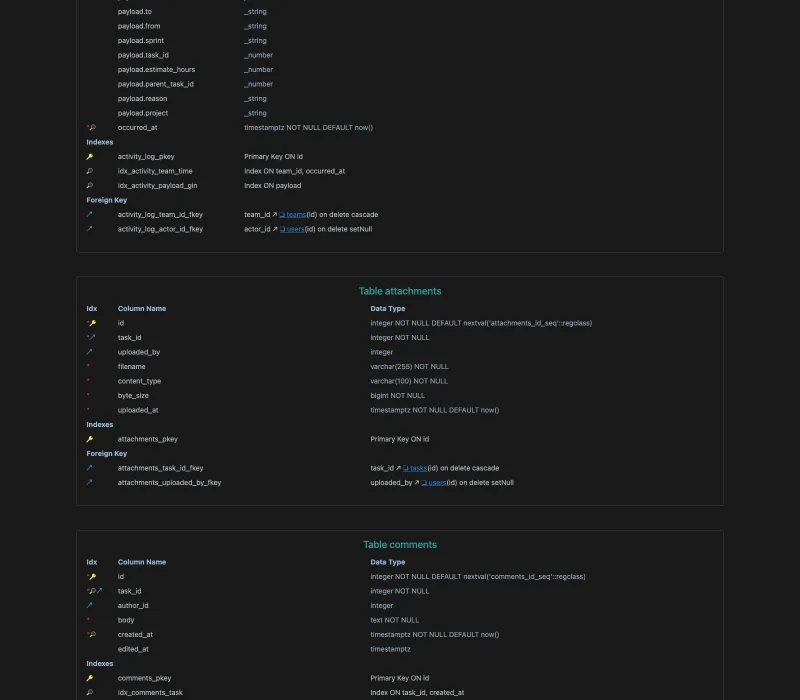
Five columns of a payments table, written out the way a dictionary holds them:
| Physical column | Data type | Nullable | Business alias | Description | Classification |
|---|---|---|---|---|---|
| cust_id | BIGINT | No | Customer identifier | Surrogate key assigned when the account is created | Internal ID |
| email_addr | VARCHAR(255) | No | Customer email | Used for login and for transaction receipts | PII |
| tx_sts_cd | CHAR(2) | No | Transaction status code | 'CR' created, 'PR' processing, 'ST' settled, 'FL' failed | Operational |
| amt_gross_usd | DECIMAL(12,2) | No | Gross amount in USD | Transaction value before processor fees and tax | Financial |
| crt_ts | TIMESTAMPTZ | No | Creation timestamp | Set by the column default when the row is inserted | Audit |
The first three columns come out of the catalog by themselves. The last three are what somebody has to write, and they are the reason the dictionary exists: without the fourth row of that table, an analyst summing the wrong amount column produces a report that looks right.
Some tools let you go past those fields. Dataedo allows up to a hundred custom fields per asset[1], which is where an ingestion pipeline name, a domain owner or a deprecation notice would sit. In DbSchema the equivalent is a comment tag, a key-value pair you attach to any table or column that then appears in the generated documentation.
Why do I need a data dictionary?
Without one, the design rules live in the memory of whoever wrote them, and every question about the schema costs somebody an afternoon of reading application code. That is the cost you are paying already, spread thin enough that nobody bills it anywhere.
Writing it down moves that knowledge out of one person's head, so it stays behind when the engineer who has it leaves. An analyst who hits an ambiguous foreign key or an undocumented status flag then checks the dictionary instead of guessing, and a new developer traces table dependencies and constraints without interrupting anybody. When an audit asks where personal data sits, the answer is a query against the dictionary rather than a survey of the team.
It also makes refactoring safe to plan. A dictionary generated from the live schema shows the deprecated columns and the foreign keys with no index behind them, and those are exactly the things a migration trips over.
How do I build a data dictionary?
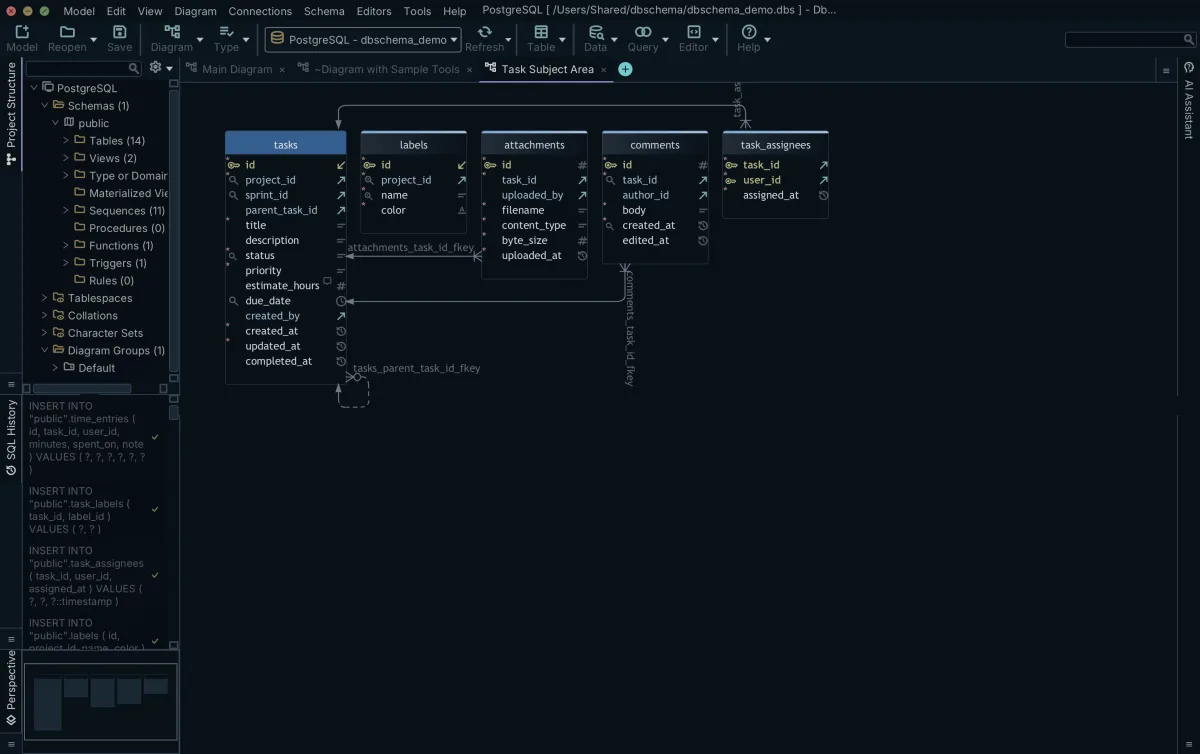
Five steps, in this order, working in DbSchema:
- Connect to the database with its JDBC driver and let DbSchema reverse-engineer the schema into a diagram. This reads the database and writes only the model.
- Split the schema across several diagrams in the same model file, one per subject area, so no single picture has to hold three hundred tables.
- Fill in the Description field on each table and column, spell out what the status codes mean, and add comment tags for the metadata that has no field of its own.
- Draw the relations the database never declared by dragging one column onto another. DbSchema saves these virtual foreign keys in the model file and sends nothing to the database.
- Export with Diagram → Export HTML5 or PDF Documentation and commit the model file, so the next export starts from the descriptions you already wrote.
Whether that model then lives on a workstation or in a browser tab is a separate decision, covered in desktop or browser. Saving the model to a file and the documentation export are Pro features; connecting, reverse-engineering and the diagrams are in the free Community Edition.
Desktop and modeling data dictionary tools
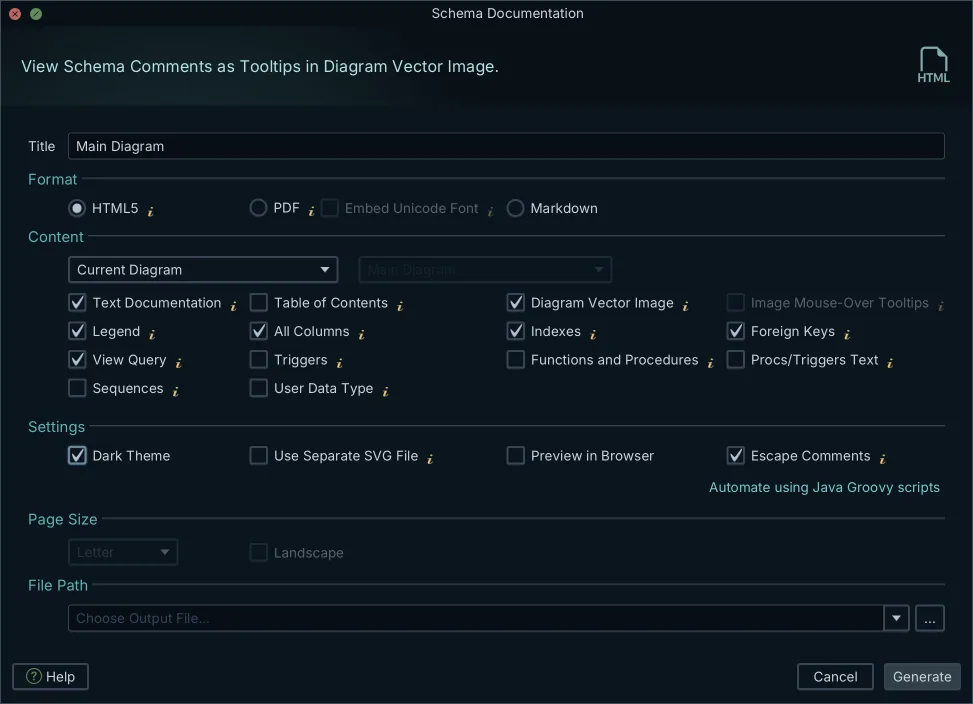
DbSchema is a visual design and documentation tool for 70+ SQL and NoSQL databases. It connects over JDBC, reverse-engineers the schema into ER diagrams you edit, and generates interactive HTML5, PDF and Markdown documentation in which a reader clicks a table to jump to its definition and hovers a column to read its description. The design lives in a .dbs XML file, which is what makes the dictionary reviewable: a changed description shows up as a line in a pull request. Pro is a one-time licence plus taxes, and Architect, which adds database-independent logical and conceptual design and own-key AI, sits above it; the first year of updates is included and the yearly renewal is optional in both cases, because the licence does not expire[2]. Both are also sold as a monthly subscription, and the purchase page carries the current figures for each of its audience tabs[2]. The Community Edition is free and covers every database, reverse-engineering, diagrams, creating tables and columns, and the SQL editor[2].
Redgate SQL Doc documents SQL Server databases from inside SQL Server Management Studio, reading the descriptions already held there as SQL Server extended properties. It is sold as a per-user annual subscription with volume tiers: one to four users, five to nine, ten to nineteen, and twenty or more quoted individually[3]. The page prices in the visitor's own currency, and today it listed 279 euros per user per year at the smallest tier, falling to 237 and then 222 euros as the count rises[3]. Where the estate holds PostgreSQL or MongoDB as well, DbSchema reads those into the same model and the same export, a move Redgate alternatives for Linux and macOS works through.
| Tool | Engines | Documentation output | Licence |
|---|---|---|---|
| DbSchema Pro | 70+ SQL and NoSQL databases | Interactive HTML5, PDF, Markdown | Perpetual one-time, or a monthly subscription |
| Redgate SQL Doc | SQL Server | HTML, PDF | Per-user annual subscription, volume tiers |
To match an edition to the engines and the team you actually have, see which database tool edition a team actually needs.
Enterprise data catalogs and dictionaries
A catalog is bought when the dictionary has to span systems no single team owns, and all three of the ones below are sold by quote rather than off a price list.
Dataedo keeps its metadata in a repository you deploy on-premises, self-host on AWS, Azure or Google Cloud, or have Dataedo run for you. Its three tiers are 18,000, 24,000 and 32,000 US dollars a year, each with three editor seats, unlimited viewers, unlimited connectors and up to a hundred custom fields; the higher tiers add automatic lineage, and then data profiling and data quality[1]. The pricing page has a currency selector, so those are the US dollar figures.
Alation is delivered as a cloud service, with an on-premises Alation Agent for sources behind a firewall and an Open Connector Framework covering data sources, BI tools, file systems and ELT pipelines. Its documentation describes data dictionaries, custom fields and templates, a Policy Center and a Workflow Center for stewards, lineage discovery for analysts, and a separate data quality product[4]. Alation publishes no list price: its pricing page is a form that starts a conversation with sales[5].
Atlan connects more than eighty data sources and tracks lineage across them, and its documentation adds context agents, an MCP server and conversational access on top[6]. Its pricing page is also a sales contact form, so the cost depends on seats, connectors and contract length rather than on a published tier.
The gap between a catalog and a modeling dictionary is not quality, it is which schemas you are answerable for. If the answer is the ones your team ships, the dictionary belongs in the same repository as the code that uses them.
Connect DbSchema to the database whose columns nobody can explain, and write the first descriptions straight onto the reverse-engineered diagram; the download is at https://dbschema.com/download.html. Reverse-engineering, the diagrams and the SQL editor are free in the Community Edition; saving the model to a file, the HTML5, PDF and Markdown export and relational data browse are Pro.
Frequently asked questions
What is the difference between a data dictionary and a business glossary?
A data dictionary is keyed on physical objects: this table, this column, this data type. A glossary is keyed on terms the business uses, such as what counts as an active customer, and one glossary term may map to columns in several systems. Dataedo carries both and links them; DbSchema holds the dictionary side, attached to the schema it was read from.
Can a visual modeling tool act as a data dictionary?
Yes, once the export is portable. DbSchema's HTML5 output is a self-contained page with a vector diagram, a searchable table list and every column description as a mouse-over tooltip, so a reader needs a browser and nothing else, not a licence and not an account.
How much do enterprise data catalogs cost?
Dataedo publishes 18,000 US dollars a year as its entry tier[1], while Alation and Atlan publish no figure at all and route their pricing pages to sales[5]. A one-time DbSchema Pro licence[2] is a different order of purchase entirely, because it covers one developer's schemas rather than a company's assets.
What is active metadata?
Metadata a platform keeps refreshing on its own: scheduled crawlers re-read the sources, lineage is recomputed, and quality checks fire alerts when something drifts. The contrast is a dictionary refreshed when somebody asks for it, which for a schema your own team deploys is usually the moment you run the comparison against the database.
Does Redgate SQL Doc support PostgreSQL?
No, it documents SQL Server. Adding a PostgreSQL database to the same DbSchema dictionary means picking it in the Connection Dialog, where DbSchema downloads the matching JDBC driver from its own driver repository. That schema then joins the model your descriptions already live in, and one HTML5 export covers both engines.
Sources
Build the data dictionary from the database itself
DbSchema reverse-engineers the live schema over JDBC and exports it as interactive HTML5, PDF or Markdown documentation, with your own aliases and comments on every column. Documentation generation is a Pro and Architect feature; reverse-engineering and the diagram are free in Community.









