IBM Db2 Design Tool: Browse Db2 Schemas and Model the Database Visually
For the developer or DBA who works on an established IBM Db2 database and needs its schemas on one page before changing anything.
On this page
A Db2 catalog ten years into production holds schemas, views, triggers, procedures and tablespaces that nobody has drawn on one page since the original project. The system catalog answers one query at a time, so finding out which schemas exist, then which tables are in them, then which foreign keys leave them, is three round trips before you have seen anything. DbSchema reads the Db2 catalog over JDBC, imports the SYSCAT metadata once, and draws every schema you select as an interactive ER diagram you can rearrange and edit.
What DbSchema does for IBM Db2
DbSchema keeps that diagram in a local model file you can edit with the database disconnected, compares the model against a live Db2 database and generates the migration DDL, exports HTML5 documentation, and browses table data across foreign keys. It runs as one desktop application for Windows, macOS and Linux.
- Reverse-engineer the schemas you select into an ER diagram.
- Edit the model disconnected, then generate the migration DDL.
- Export HTML5, PDF or Markdown documentation.
- Version the model file in Git.
- Build queries on a canvas, or write SQL with catalog-aware autocomplete.
- Browse and edit Db2 rows across foreign keys.
Connecting, reverse-engineering, the interactive diagrams and the SQL editor are in the free Community Edition. Saving the model to a file, documentation export, the Query Builder, schema synchronization, relational data browse and the Data Generator are Pro features.
Db2 schemas and objects
What a Db2 schema contains
IBM defines a Db2 schema as a collection of named objects[1] that provides a way to group those objects logically. A schema is also a name qualifier: it lets the same natural name exist several times without ambiguous references, which is how two applications keep a SALES table each in one database without a collision.
A Db2 schema can contain tables, views, nicknames, triggers, functions, packages and other objects[1], and the schema is itself a database object. That is wider than the table-and-view picture most diagrams stop at. DbSchema reverse-engineers more than the tables: views, triggers, functions, procedures, sequences and user-defined types come into the model too, and the documentation export carries a toggle for each.
Three rules from IBM's documentation decide what you will actually see when you connect.
- Schemas are created two ways. CREATE SCHEMA is explicit. A schema also appears implicitly when someone creates an object under a new qualifier while holding IMPLICIT_SCHEMA authority[1], and SYSIBM owns the result.
- The schema name is the high order part of a two-part object name. Unqualified objects resolve against the CURRENT SCHEMA special register[1], so one statement can hit different tables for different users.
- Some names are reserved. Built-in functions belong to SYSIBM and the pre-installed user-defined functions belong to SYSFUN[1]. That is catalog furniture, not yours.
Schema privileges sit on top of that. The schema owner controls who may create, alter and drop objects[1] inside it, which is how a large Db2 estate keeps a subset of objects under one team's control.
Browse a Db2 schema without writing SYSCAT queries
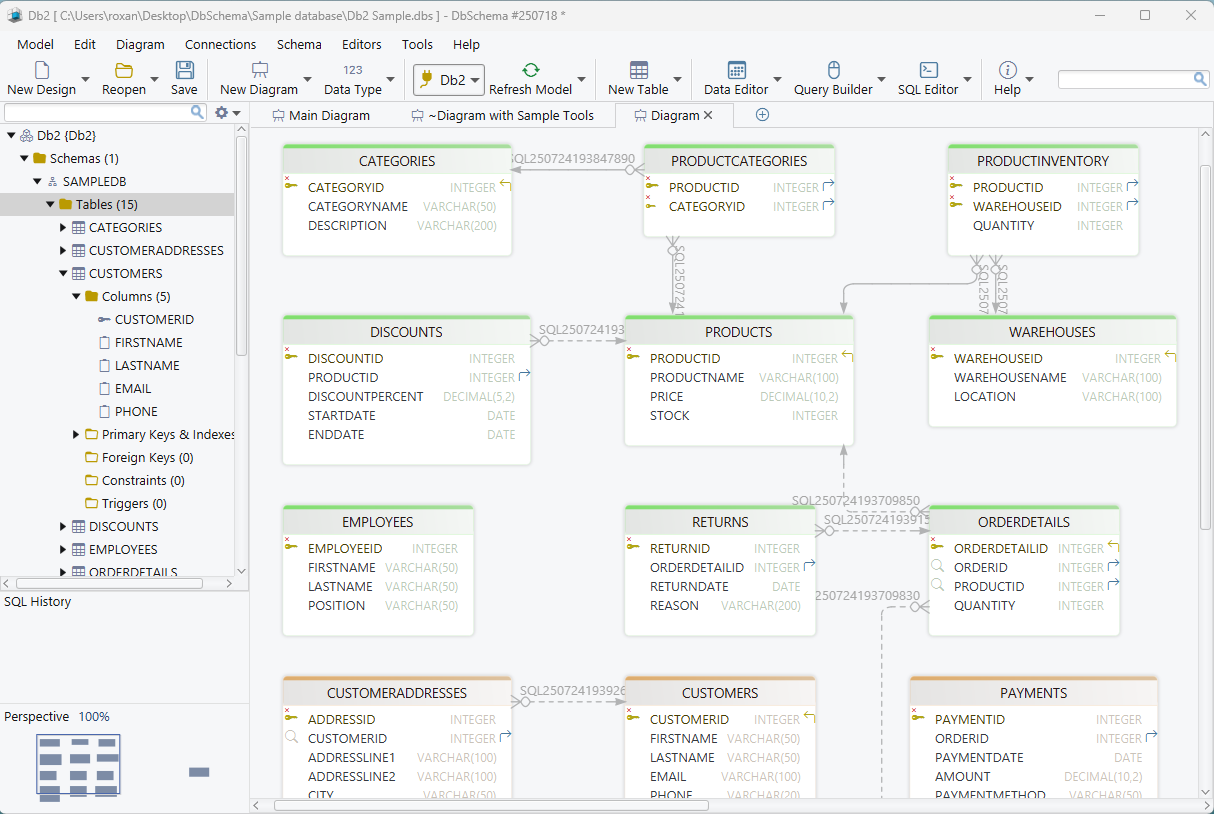
The schema picker in the connection dialog sets the scope. Tick the schemas you want, expand one to narrow it to individual object types or tables, and DbSchema reverse-engineers only those. Select several Db2 schemas and they land on one canvas, which is the fastest way to find undocumented cross-schema foreign keys.
Once the model is open, the diagram is the index. Double-click a table to edit it, follow a relationship line to the schema at the other end, and group tables the way the application does rather than the way the catalog lists them. The entity relationship diagram guide covers the notation if the symbols are new.
Connect DbSchema to Db2
Connecting takes IBM's JDBC driver and five fields.
- Open DbSchema and choose Connect to Database.
- Pick IBM Db2 from the engine list, or the AS400 entry if the database runs on IBM i.
- Open the JDBC Driver Manager from
Connections → Manage JDBC Driversand upload db2jcc4.jar from the extracted IBM driver archive. - Enter host, port, database name, user and password. Port 50000 is the common default on Linux, Unix and Windows, and the database name is case-sensitive.
- Click Test Connection, then Connect, and tick the schemas to reverse-engineer.
A Db2 instance does not always listen on TCP/IP. If the connection is refused, check that DB2COMM includes TCPIP and that SVCENAME names a port before looking at the DbSchema connection settings. The Db2 JDBC driver page has the exact db2set and dbm cfg commands, the URL format, and the SSH tunnel route for a server whose port is closed to the network.
Draw ER diagrams of the Db2 catalog
The diagram is the working surface, not an export. Tables arrive with their columns, data types, primary keys and foreign keys already drawn, and every element on the canvas is editable in place.
- Tables and columns, with Db2 data types and key markers.
- A connector line per foreign key, including the cross-schema ones.
- Layouts you rearrange and save, several named diagrams per model.
- Double-click any table, column or index to edit it.
Several diagrams per model is what makes a large Db2 catalog workable: billing on one tab and reference data on another, instead of one unreadable canvas of four hundred tables. Reading a real database rather than a drawing is also what separates DbSchema from a whiteboard tool, the argument the dbdiagram.io alternatives write-up works through.
Document a Db2 schema in HTML5
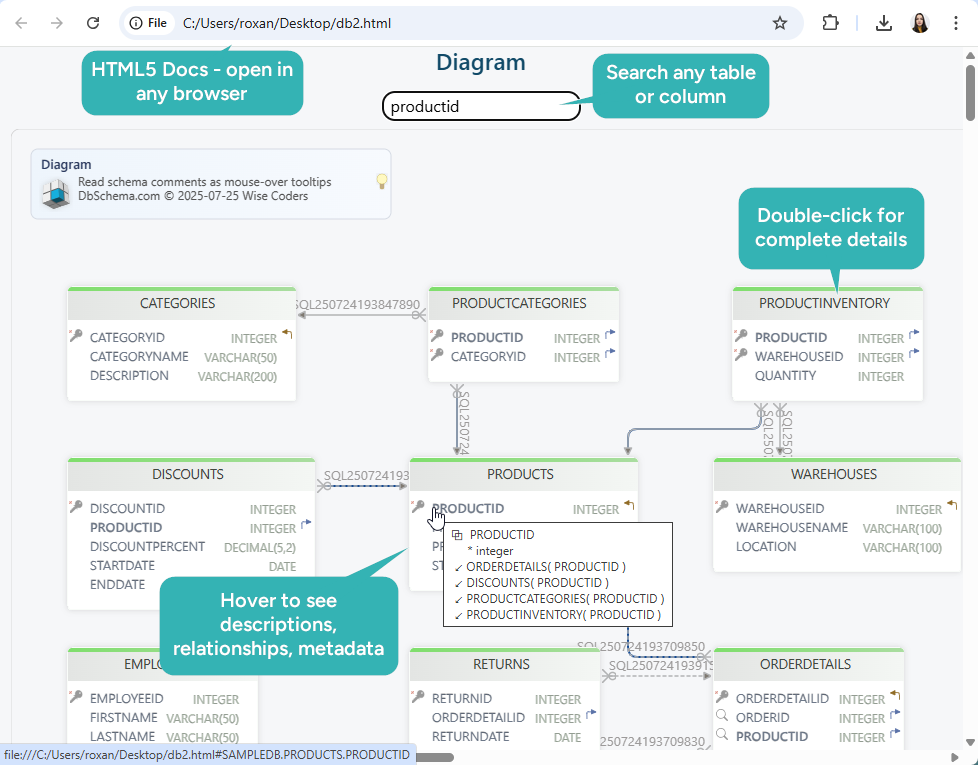
Diagram → Export HTML5 or PDF Documentation turns the current diagram or the whole model into HTML5, PDF or Markdown. The HTML5 output is a single file a colleague opens with no Db2 access and no client install: a scalable vector diagram with a searchable table list, a per-table data dictionary of column definitions, indexes and foreign keys, and toggles that decide whether triggers, functions, procedures, sequences and views come with it.
Table and column comments carry through. Text typed into the Description field appears in every format, and in HTML5 it also shows as a mouse-over tooltip on the diagram, which is how an auditor or a new team member reads the shape of a Db2 schema without asking anyone. Documentation export is a Pro feature, and the database documentation guide walks through the export dialog option by option.
Version the Db2 model in Git
The DbSchema model is a local XML file, so it goes into Git next to the application code and schema changes get what code changes have had for years: branches, diffs, review and an audit trail. Choose Git — Collaborative Design from the Model menu and the Git dialog opens, where you clone a repository into an empty folder; Stage, Commit and Push publish what you changed.
The useful part on Db2 is the separation. Review the diff between two versions of the model, branch to try a design and drop the branch if it fails, and share one file instead of mailing screenshots. Nothing in that loop reaches the database, which changes only when someone runs the synchronization below. The saved model file the workflow versions is a Pro feature.

Query Db2 visually or in SQL
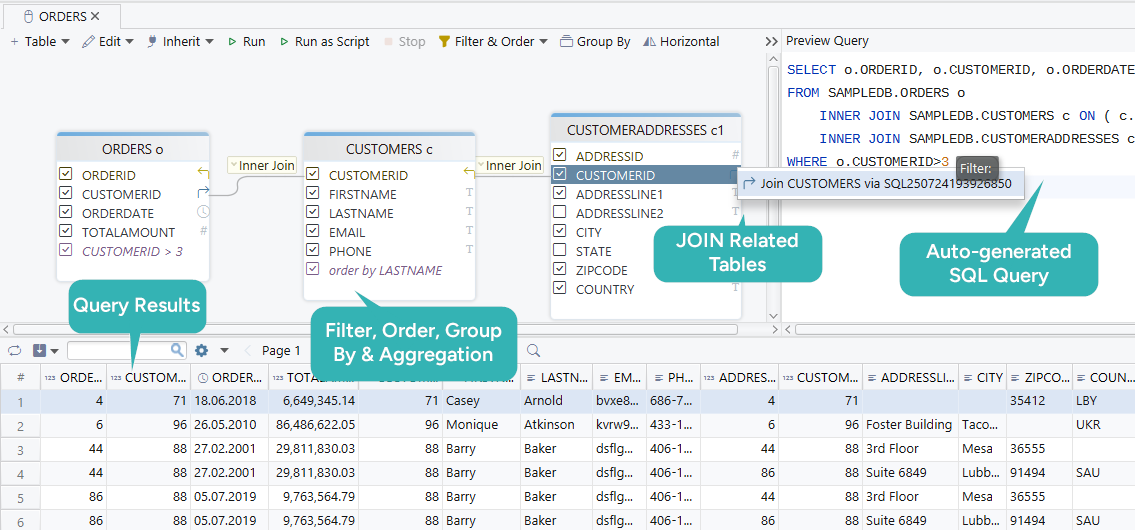
Two ways to get at the data. Drag tables onto the Query Builder canvas and DbSchema writes the SQL, or open the SQL editor and write it yourself with autocomplete over the Db2 catalog objects and built-in functions.
- Drag tables onto the canvas and link matching columns; DbSchema writes the join.
- Click the join label to switch between INNER JOIN, LEFT JOIN and EXISTS.
- Apply WHERE, GROUP BY, ORDER BY and aggregates from the panel.
- Watch the generated SQL update as you build.
- Run against the live connection and read the result in the result pane.
- Save the query to the model file and reopen it later.
The Query Builder is a Pro feature; the SQL editor is in Community. Reading a result set is one job and changing rows is another, and the SQL UPDATE statement guide covers the safe patterns for the second one.
Synchronize the model with the Db2 database
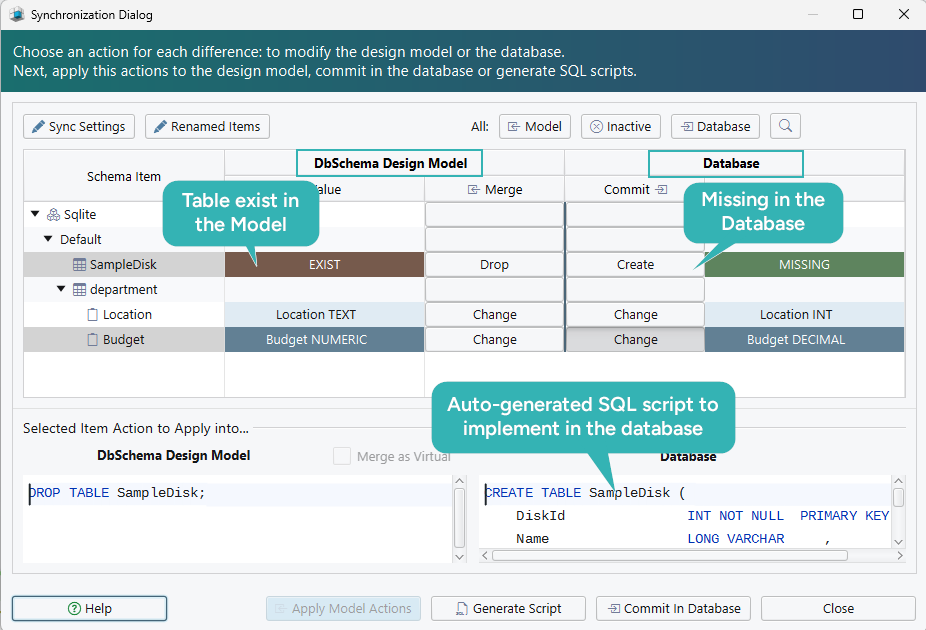
Schema → Compare Model with Database reports the differences between the design model and a Db2 database as a per-object tree, and each one is decided separately: update the model, push the change to the database, or skip it. Nothing is applied while you read.
Schema → Synchronize Model with Database then opens the Sync Dialog, which generates DDL covering exactly the approved changes. The statements are editable before they run, and you either execute them from the dialog or copy them into a change ticket for whoever owns the deployment. DbSchema can also open two model files at once and synchronize between them. Reverse-engineer a test environment into one file and production into another, and you can diff the two without connecting to both at the same time. Schema synchronization is a Pro feature.
Edit Db2 data like a spreadsheet
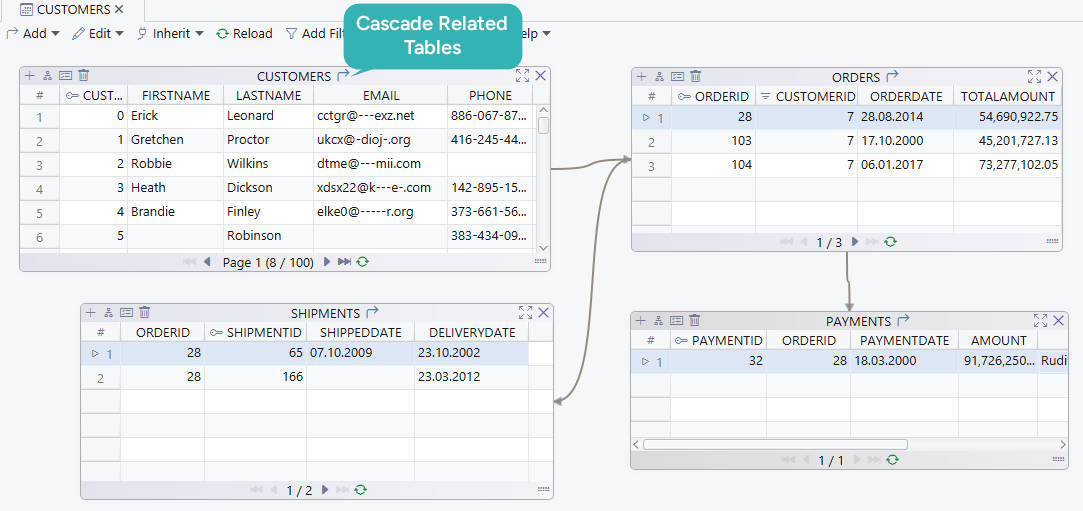
Right-click a table header in the diagram and choose Open in Relational Data Editor. The table opens as a grid, and the foreign key button on its header panel adds a child table as a second pane; select a row in the parent and the child pane refilters to the matching rows, as many levels deep as the relationships go.
- Browse and edit rows in a grid instead of writing INSERT, UPDATE and DELETE.
- Walk from a parent record to its children through the declared foreign keys.
- Filter and sort each pane independently.
- Export what you are looking at to CSV, XML or JSON.
Every change here goes to the Db2 database rather than to the model file. Relational data browse is a Pro feature, and the Relational Data Editor guide shows the multi-pane layout in action, including how the panes cascade.

Generate test data for Db2 tables
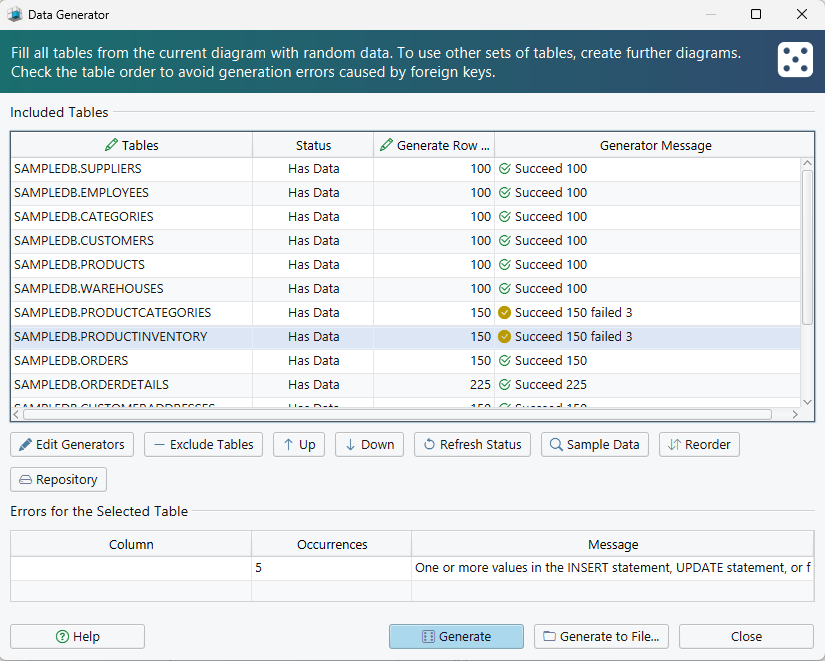
Open the Data Generator from Data Tools → Generate Random Data, set the number of rows per table, and give each column a pattern: a name, a date range, a reverse regular expression, or a Groovy script where none of the built-in ones fit. Reorder the tables in the dialog so a table referenced by a foreign key is populated before the table that references it.
Two settings decide whether the result is usable or merely large. A foreign key column takes the load_values_from_pk pattern, which draws its values from the primary keys already in the parent table, so the generated rows join to something. A seed makes a run repeatable, and two columns sharing a seed produce the same sequence, which keeps a pair consistent. Patterns are saved in the model file and reused, so the second run against a refreshed schema costs nothing. The Data Generator is a Pro feature.
FAQ
Can I model a Db2 schema offline?
Choose Disconnected from the connection menu and DbSchema saves every schema change to the .dbs file alone. On reconnecting, Refresh Model from Database is the step that detects what the file and the Db2 catalog now differ on, before any DDL exists.
How do I list the schemas in a Db2 database?
Db2 keeps one row per schema in the SYSCAT.SCHEMATA catalog view, which carries the schema name, its owner, and a flag saying whether that owner is the system[2]. DbSchema saves you the query: connect, and the picker in the connection dialog lists every schema your user can see, ready to tick.
Which Db2 platforms does DbSchema connect to?
Db2 for Linux, UNIX and Windows uses the DB2 connection entry and a jdbc:db2: URL. Db2 on IBM i, still widely called AS/400, uses the AS400 entry and the Toolbox driver instead, and the two are not interchangeable. Pick the right entry before troubleshooting anything else.
Start with your own Db2 catalog
IBM's own tooling covers administration, and DbSchema covers the design and documentation half, the same way an SQLite or Apache Derby project pairs a lightweight engine with a visual model. Download DbSchema at https://dbschema.com/download.html, connect with the Db2 JDBC driver, and tick the schemas you want. Connecting, reverse-engineering, the diagrams and the SQL editor are in the free Community Edition. The offline model file, schema synchronization, HTML5 documentation, the Query Builder, relational data browse and the Data Generator described above are Pro.
Sources
Draw your Db2 catalog as a diagram
DbSchema imports IBM Db2 catalog metadata from the SYSCAT views into interactive ER diagrams, keeps the model in a local file you can edit with the database disconnected, and exports HTML5 documentation. Connecting, reverse-engineering, the diagrams and the SQL editor are in the free Community Edition.









