On-Premise Data Modeling Software for Regulated Companies
What a data modeling tool has to do to pass a security review at a bank, an insurer or a public body, and how DbSchema keeps the model, the license and the documentation inside your network.
On this page
DbSchema keeps your data model inside your own network. It is a desktop app for Windows, macOS and Linux. The model is an XML file on your disk or your own Git server, and there is no cloud account and nothing is uploaded. The license works without internet access too. That makes DbSchema the data modeling software to pick when a security review decides where your schema may go.
Short answer
DbSchema runs on the workstation, connects to your database over JDBC, and saves the design as a file you control. Registration, driver downloads and update checks are the only traffic to dbschema.com, and each of them has an offline route.
- The model is a plain XML file that you keep in your own Git server, with its full history.
- Licenses activate offline or come from a floating license server on your own network.
- Auditors and reviewers read HTML5 documentation in a browser, with no seat and no account.
Ask what crosses your network, not what the security page says
A regulated company's review of a modeling tool comes down to four questions. Where does the model live? What does the tool send to its vendor? Can it run on a network with no internet access? And can you show an auditor who changed what in the schema, and when?
Figure 1 answers the first three for DbSchema. Everything a modeling session touches, the database, the model file and the license server, sits on your network.
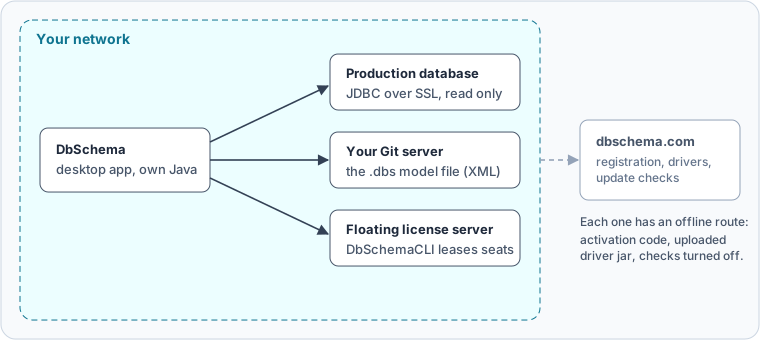
The licensing documentation is specific about the outside traffic: registration and activation connect to https://dbschema.com and to no other host. The AI Assistant is the one optional feature that talks to another provider. It sends only your question and the structure of the tables you attach, never table rows, query results or passwords. You can point it at a local Ollama model, so nothing leaves your computer. Or turn it off for everyone in Edit → Settings → AI Assistant.
Keep the model as a file in your own Git
DbSchema saves the whole design in one .dbs file, and the file is plain XML. That matters for an audit, because a schema change becomes a line in a diff that anyone on the review can read. We changed the type of one column in a copy of a published sample model, committed both versions, and asked Git what changed:
-			<column name="match_date" type="date" length="0" />
+			<column name="match_date" type="timestamptz" length="0" />
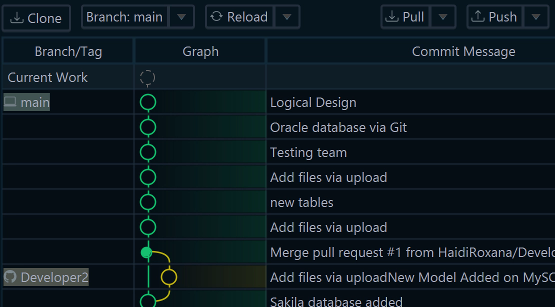
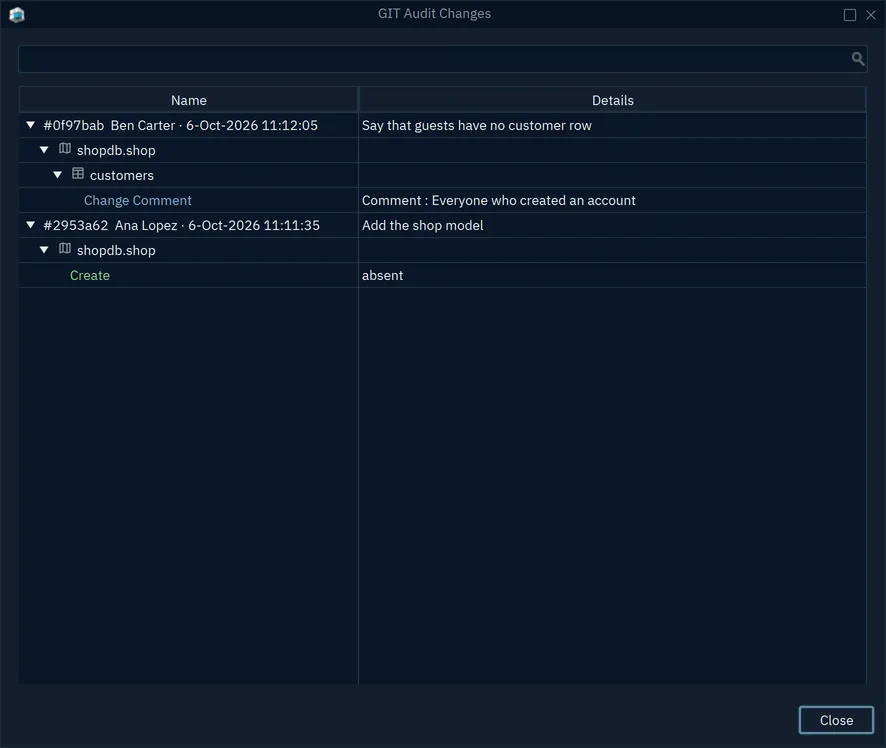
Git is built into DbSchema, and the remote can be your company's own server, not only GitHub or GitLab. Model History lists every commit that changed the model file, and under each commit DbSchema shows the tables it changed and what changed in them. That gives the reviewer a change log without a separate repository product. Saving the model to a file, and with it Git, needs DbSchema Pro.
Run DbSchema on a network without internet
DbSchema comes with its own Java, so the installer is the only thing you bring onto the network. Three more things need a plan on an air-gapped network: the license, the JDBC drivers and the update checks.
-
Activate the license from another computer
If DbSchema cannot reach the licensing server, the dialog Activate DbSchema from another computer opens. Copy its link, open it on any computer with internet access, and type the 5-character code it shows into Response Code.
-
Or run your own floating license server Pro
The server is DbSchemaCLI, which every installation includes. Load the floating key from the Customer Area and start the server. It answers plain HTTP on port 8080 and needs no internet access for the license. Set
DBSCHEMA_FLS_URLon each computer so DbSchema fills in the server address. -
Upload the JDBC driver yourself
DbSchema downloads a driver the first time you connect. Without internet, choose
Database → Manage → JDBC Drivers Manager, press Upload Driver Jar(s) and pick the.jarfrom the database vendor. -
Turn off the update checks
Choose
Help → Software Updates → Settingsand pick a schedule. On Windows, an administrator can set the check to never for every user through the registry, as the installation documentation shows.
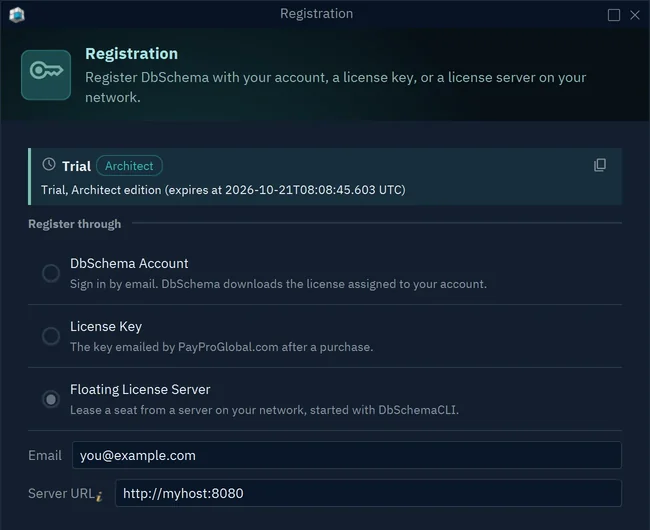
The license server has one rule worth putting in the rollout plan: run it at least as new as the DbSchema it serves. DbSchema 10.4 and later refuse an older server, so update the server before you hand out a new DbSchema version. How floating licenses work for a database team covers when a shared pool pays off.
Connect to production without changing it
A modeler that reverse-engineers production needs a connection a reviewer can trust. In the connection dialog, the Access and Model tab has Read Only Connection. Tick it, and DbSchema refuses to change the schema through this connection. It also asks the JDBC driver to open the connection read-only. Highlight colors the connection as Production, so nobody mistakes it for a test database. The connection itself can run over SSL or through an SSH tunnel to a jump host, as Firewall, Proxy and SSH Tunnel shows.
Reverse-engineering only reads the catalog. Changes reach a database only when you deploy them from the model, and DbSchema shows the SQL before it runs. Security questions to ask about a schema sync tool goes through that step for a change-approval process.
Desktop suites and browser modelers raise different review questions
Two kinds of modeling tools come up when a regulated company shops. Browser modelers keep the model on the vendor's servers. Redgate's product page describes Redgate Data Modeler as "No setup, no installation, all in the cloud". SqlDBM says on its security page that its server infrastructure is hosted on Amazon Web Services. That can still pass a review, but the review then has to cover the vendor's cloud, not only the tool.
The older enterprise suites install on premise, and they bring their own limits. Idera lists Windows 11 and 10 (64-bit) as the operating system for ER/Studio Data Architect 21.1. ER/Studio's feature comparison marks Git integrations as available through Team Server Core at an additional cost. We checked these vendor pages on 6 November 2026.
| DbSchema | Redgate Data Modeler | ER/Studio Data Architect | |
|---|---|---|---|
| Where the model lives | A file on your disk or Git server | Redgate's cloud | Installed on premise |
| Runs on | Windows, macOS, Linux | A browser | Windows (64-bit) |
| Model in your own Git | Pro, built in | No version control for files | Through Team Server Core, extra cost |
What to see: only DbSchema keeps the model as a file in your own Git, on every desktop operating system. Redgate's documentation says "We haven't implemented the Version Control for files". Replacing ER/Studio in a regulated environment walks through the move from a repository-based suite. SqlDBM alternatives for teams that work offline covers the move away from a browser modeler.
Give auditors documentation instead of a seat
An auditor or a compliance officer needs to read the schema, not edit it. DbSchema writes the documentation as one HTML5 file, a PDF or a Markdown file. It holds the diagram and a description of every table, column, index and foreign key. Choose File → Export As... → HTML5/PDF Documentation, and publish the file on an internal server. The reader opens it in a browser, with no install and no license. Generating it reads the model and changes neither the model nor the database, and it needs DbSchema Pro.
We build DbSchema under an ISO/IEC 27001:2022 certified information security management system, which gives your vendor review a certificate to file next to the tool.
Download DbSchema, install it on one workstation inside your network, and connect it read-only to a copy of production. The model file, Git, the floating license and HTML5 documentation on this page need DbSchema Pro.
Sources
Keep the model, the license and the docs inside your network
Every DbSchema download starts with a 15-day trial of all features. Saving the model to a file, Git, the floating license and HTML5 documentation are in DbSchema Pro.