Replacing ER/Studio in a Regulated Environment
For the data architect in a bank, a hospital or a defence supplier who has to replace ER/Studio and cannot run a repository server on the network.
On this page
ER/Studio keeps the shared model in a repository server, which is exactly the component a locked-down network makes hard to justify. DbSchema replaces it with a file: export the ER/Studio model as SQL DDL, import that script, and the tables, columns, data types, primary and foreign keys and constraints arrive in a human-readable XML .dbs file that you review in Git like any other artifact. Universal Mappings, User-Defined Properties and business glossaries do not come across.
Who makes ER/Studio?
Idera develops and sells ER/Studio, from Austin, Texas, as part of a portfolio built around enterprise data architecture, business glossaries and data governance[1]. The product line runs from a single-modeler workstation license up to an enterprise tier whose selling points are a web portal for cross-team collaboration, metadata import and export across platforms, and integration with governance catalogs such as Purview and Collibra.
That shape suits an organization with a data governance department. It fits less comfortably in a regulated engineering team whose constraints are different: a repository server needs its own database license, its own backups and its own patching, proprietary repository locks collide with distributed branches, and an air-gapped network makes every license handshake a question for the security review. The answer to all three in DbSchema is that the model is a file on disk, and the file is the only thing the team shares.
How much does an ER/Studio license cost?
Idera publishes the workstation prices on its own store. ER/Studio Data Architect is listed at 2,687.00 USD per user and ER/Studio Data Architect Pro, which adds change management and real-time collaboration, at 3,693.00 USD per user, both as subscriptions; the Enterprise tier is quote-only[1]. The page states the price per user without naming the subscription term, and notes that the final price at checkout may add VAT or local taxes.
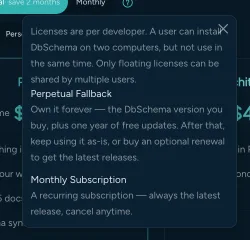
DbSchema is priced the other way round: you buy the license once and keep it. The purchase page prices in your own currency, and it shows the figures on three tabs: Business, the tab that applies to a bank, a hospital or a defence supplier, then Personal and Universities & Students, which list the same editions lower[2]. The Architect edition, which covers the logical and conceptual design layer an ER/Studio modeler expects, is a one-time licence per user plus taxes with the first year of updates included, and an annual renewal afterwards if you want to keep receiving them; that renewal is optional, because the version you bought does not expire. Pro is the same shape one tier down. A team that shares seats can buy a floating license instead, sold on the Business tab alone as a one-time purchase with an optional annual renewal, which allows concurrent use up to the purchased quantity rather than tying each key to a named person.
| Dimension | DbSchema Architect | ER/Studio Data Architect |
|---|---|---|
| Entry price per user | One time, on the purchase page | 2,687.00 USD, plus taxes |
| Billing | Perpetual, renewal optional | Subscription |
| Team model storage | Git repository | Repository server |
| Model file format | XML .dbs, human-readable | Proprietary |
| Shared seats | Floating license, no server to install | Per named user |
The floating license is the part worth reading twice in a locked-down network. The recommended setup needs no server at all, because the owner allows users by email from the Customer Area, and for machines with no direct internet access DbSchema ships a self-hosted Floating License Server you run from Docker or from DbSchemaCLI inside your own perimeter. Single machines with no connectivity activate through the offline option in the registration dialog. See how floating licences work for a database team for the day-to-day mechanics.
What is the difference between ERwin and ER/Studio?
Both are enterprise modeling suites built around a proprietary central repository, and both split the design into logical and physical layers. Erwin Data Modeler grew up around relational logical and physical modeling; ER/Studio puts more weight on enterprise metadata management and business glossaries, reached through Team Server, which Idera's own quick start guide describes as a web-based tool for accessing, searching, editing and managing that metadata[5]. For a migration the difference barely matters, because what you carry out of either one is the same SQL script.
Physical tables, column definitions, data types, primary keys, foreign keys, unique constraints, check constraints, index definitions and views all translate through standard DDL. What stays behind is the proprietary layer: ER/Studio's Universal Mappings, its User-Defined Properties and the business glossaries held in the repository, along with the diagram layouts, the submodel canvas coordinates and the repository permissions. The same audit applies to what carries over when you leave ERwin. In DbSchema the layout is redrawn once and then saved into the model file, so it survives every later reopen, and the governance context that lived in User-Defined Properties is re-recorded as table and column descriptions and as comment tags that reach the exported documentation.
Is ERwin still used?
Erwin Data Modeler is still sold, by Quest, as an annual subscription per named user in a Standard and a Workgroup edition, the latter adding the centralized model management repository[3]. Teams leave it for the same reason they leave ER/Studio, and the exit route is identical: a DDL script, imported into a file-based model.
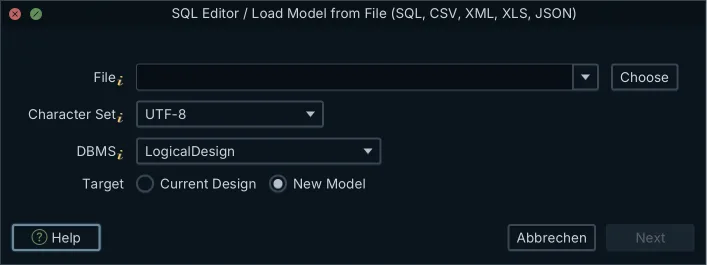
- Export the physical model from ER/Studio or Erwin as standard SQL DDL creation scripts.
- Open
Model → Import from External Formatin DbSchema and select those files. - Set the DBMS dropdown to the SQL dialect the exported script is written in. That dropdown chooses the parser, not the source tool.
- Arrange the imported tables into layout groups, one per module, and drag a column onto another where a relationship exists that the database never declared.
- Save the model as a
.dbsfile and commit it to the Git repository your team reviews in.
Nothing in that sequence needs database credentials or a reachable server: DbSchema reads the script as text, and none of its statements are executed. The model becomes a live thing only when you connect it and open Schema → Synchronize Model with Database, which is also the route for migrating from PowerDesigner.
Is there a replacement for Azure Data Studio?
Microsoft retired Azure Data Studio on 28 February 2026, and it no longer receives updates or security fixes; the documented path forward is Visual Studio Code with the MSSQL extension[4]. A regulated team that cannot install extensions from a public marketplace needs a self-contained desktop application instead, and that is the gap DbSchema fills for schema work.
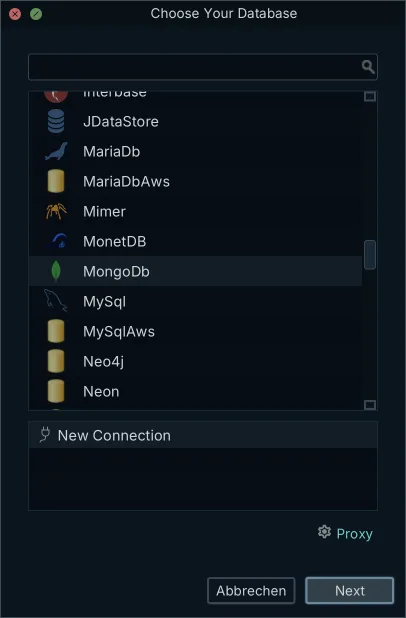
DbSchema installs on Windows, macOS and Linux and connects over JDBC to SQL Server, Azure SQL, PostgreSQL, Oracle, MySQL and the other engines in the Choose Your Database picker, from one installation rather than one product per engine. Reverse-engineering draws the ER diagram from the catalog; the SQL editor runs statements against the connection with autocompletion on Ctrl+Space; and switching the connection to disconnected mode lets you keep designing with no server reachable, because the changes are written to the model file. Connecting, reverse-engineering, the diagrams and the SQL editor are in the free Community edition; the Query Builder, the Relational Data Editor and design offline are Pro.
What are the top 5 data warehouses?
The analytical platforms that turn up most often next to a regulated operational estate are Snowflake, Google BigQuery, Amazon Redshift, Databricks and Microsoft Fabric. Each is a JDBC target for DbSchema, which means a warehouse schema is reverse-engineered into the same kind of diagram as an operational one, and the two can sit in the same model file: Databricks, Google BigQuery and the rest connect through the vendor's own driver.
The workflow that matters at this end is the diff. DbSchema compares the design model against the live warehouse, lists what differs object by object, and generates the SQL migration for the differences you select, which you can edit in the Synchronization Dialog before executing. Because analytical schemas usually carry no foreign keys at all, virtual foreign keys are what makes the diagram readable: drag one column onto another and the relationship is saved in the model file, never in the warehouse. Before you standardize on that workflow across environments, work through the security questions to ask about a schema sync tool.
Download DbSchema at https://dbschema.com/download.html, import the DDL you exported from ER/Studio, and commit the resulting .dbs file to your own repository. Connecting, reverse-engineering, the diagrams and the SQL editor are free in the Community edition; the offline model file, schema synchronization and the HTML5 documentation export are Pro; the logical and conceptual design layer that replaces an ER/Studio logical model is Architect.
Frequently asked questions
What is the concrete import path from ER/Studio to DbSchema?
Model → Import from External Format reads the exported DDL as single files, and it also takes a whole folder of migration scripts, replaying them in the order a database would have applied them so that one model comes out of the pile. The same dialog imports CSV and Excel files, so a data dictionary your team keeps in a spreadsheet can seed the model alongside the DDL.
What breaks when migrating away from ER/Studio?
Universal Mappings, User-Defined Properties, business term macros and the team repository configuration stay behind, because none of them is expressible in DDL. Diagram layouts have to be redrawn once in DbSchema, after which they live in the .dbs file and reopen exactly as saved.
How much does an ER/Studio license cost?
DbSchema's own figure moves with the audience tab you open on the purchase page, which carries a Business tab, a Personal tab and a Universities & Students tab and prices in your own currency. Architect is a one-time licence there, and it does not expire, so a renewal you skip costs you new versions rather than access[2]. Idera lists ER/Studio Data Architect at 2,687.00 USD per user and Data Architect Pro at 3,693.00 USD per user, as subscriptions[1].
Can DbSchema run on an air-gapped network?
On a single machine with no internet, Help → Register License offers an offline activation option alongside the key entry. For a whole locked-down network, run the self-hosted Floating License Server from Docker or from DbSchemaCLI and point each installation at its host and port; a seat is checked out when someone starts DbSchema and released when they close it, so the pool is sized by concurrent users rather than by headcount.
Sources
Open your ER/Studio model against your own database
DbSchema imports standard SQL DDL into an offline design model, keeps the .dbs project file in Git, and generates migration scripts from a diff against a live database.









