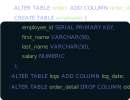
DbSchema lets you design, manage, and document Databricks databases. Create ER diagrams, define tables and columns, and generate SQL scripts - with or without a live database connection.
Use Git to share the design, compare it with the Databricks database, and deploy changes. DbSchema also includes a data editor, query builder, and HTML5 documentation - everything you need in one tool.
Download DbSchema Download Databricks JDBC Driver
Databricks Unity Catalog organizes objects in a three-level namespace: catalog, schema, and table. As Delta Lake deployments mature, this hierarchy can encompass dozens of catalogs and hundreds of schemas across a single workspace. DbSchema connects to a Databricks SQL Warehouse and renders the catalog-schema-table structure as an ER diagram, providing a navigable view that is difficult to obtain from the Databricks UI alone. Data architects use this to understand cross-schema dependencies, trace data lineage at the schema level, and plan restructuring work across the lakehouse.
DbSchema's visual query builder generates Spark SQL statements from your table and column selections, running them against a Databricks SQL Warehouse. Analysts get a point-and-click query interface without needing a notebook or knowledge of Spark SQL syntax.
The data explorer in DbSchema lets you browse rows in any Delta table, filter by column values, and page through results without opening a Databricks notebook. This is useful for verifying ingestion jobs, auditing data quality after pipeline runs, or sampling table contents during schema investigation.
DbSchema generates HTML schema documentation from your Databricks Unity Catalog metadata, embedding ER diagrams, table definitions, and column descriptions into a shareable export. Share a single build with team members who need schema context without direct Databricks access.
Download the Databricks JDBC driver from the Databricks driver download page and register it in DbSchema's driver manager. The JDBC URL format is jdbc:databricks://workspace.azuredatabricks.net:443/default;httpPath=/sql/1.0/warehouses/warehouse_id, where httpPath points to your SQL Warehouse. Authenticate using a Personal Access Token as the JDBC password field. To target a specific Unity Catalog namespace, set the catalog and schema properties in DbSchema's advanced connection parameters panel.