What Carries Over When You Leave ERwin
For the data architect who has to move an Erwin Data Modeler schema into a tool the whole team can open, and wants to know in advance what the export leaves behind.
On this page
Three things in an Erwin Data Modeler project have no representation in SQL at all: the diagram layouts, the diagram groupings, and the User-Defined Properties. Everything else forward-engineers to a DDL script, and DbSchema reads that script into a .dbs model file you keep in Git next to the application code, with the tables, columns, data types, keys, indexes and constraints intact. Rebuilding the other three is the work to budget for.
What an Erwin project holds
An Erwin model, whether it sits in a local .erwin file or in a shared Mart, holds several layers at once. The physical layer is the one a database recognizes: table definitions, column names, engine-specific data types, primary keys, foreign key constraints, unique indexes, default values and check constraints. On top of it sits the data dictionary, the business descriptions and technical definitions attached to entities and attributes, and above that the logical and conceptual models that describe the business entities without naming a storage engine.
Two more layers exist only inside Erwin. The diagram groupings segment a large enterprise schema into focused views, and the User-Defined Properties carry the compliance classification, the data owner, the retention period or the ETL flag that a governance programme attached to an object class. Erwin's own documentation is explicit about where those end up: "UDPs are not generated into your database"[1]. Model version history, user permissions and forward-engineering templates round out the repository metadata.
Getting the schema out means running Erwin's forward-engineering path to produce the physical SQL DDL script. The Metadata Integration wizard is a different feature: Erwin's own help describes it as embedded Meta Integration technology covering about 100 metadata products, and its SQL DDL script bridges are listed as import rather than export[2]. Erwin's Save As list offers its native format, its template format and its own XML metamodel. The DDL script is the format that carries the schema itself.
What carries over when you import the schema
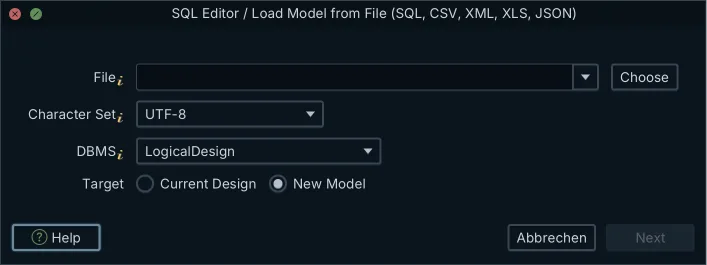
Standard SQL is what the two tools have in common, so standard SQL is what travels. Open Model → Import from External Format in DbSchema, select the forward-engineered script, and set the DBMS dropdown to the dialect the script is written in: that dropdown picks the parser, not the source tool. DbSchema parses the CREATE TABLE statements straight into a new design model and draws the diagram from them. Connecting to a database that already runs the Erwin-generated schema and reverse-engineering it over JDBC produces the same model.
| Erwin artifact | Carried by the DDL script |
|---|---|
| Tables, columns, nullability | Yes |
| Data types and defaults | Yes |
| Primary and foreign keys | Yes |
| Unique, check and index definitions | Yes |
| Table and column comments | Only where the script emits them |
| Views, triggers and sequences | As the script declares them |
| Diagram layouts and groupings | No |
| User-Defined Properties | No |
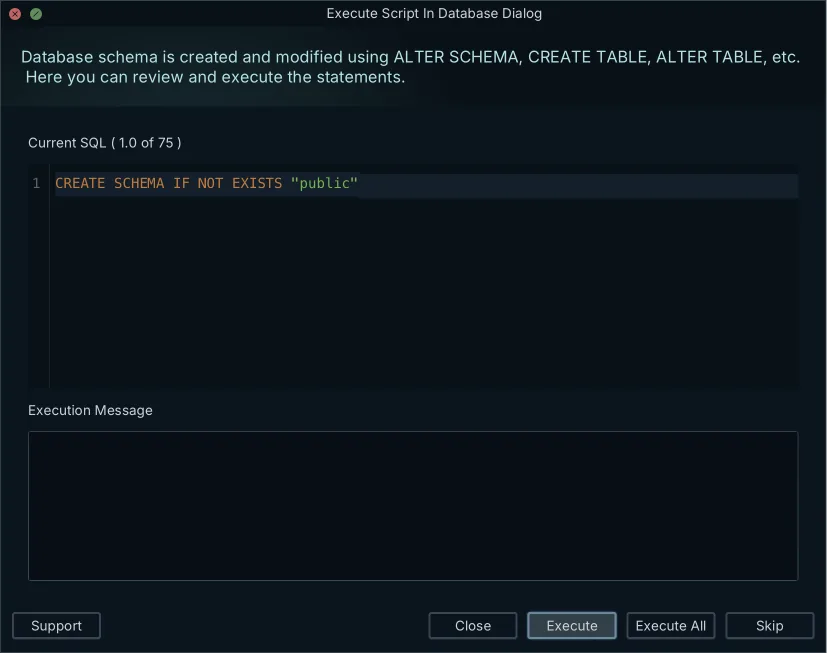
Verify the parse against the source model rather than assuming it. If the DDL file opens with a comment line, delete that line before importing and check that the first CREATE TABLE is in the model; serial columns arrive without their sequence objects, which the Table Dialog lets you add back in a few clicks. Everything the import produces lands in the .dbs file and nowhere else, so nothing you do at this stage touches a database.
What you rebuild after the import
Layout is the first job, and it is quick. DbSchema auto-arranges the imported tables, and from there you drag them into the arrangement the reviews used, group related tables into a named colored group, and split a large schema into several diagrams that share one schema definition. Where the old schema documented a relationship the database never enforced, drag one column onto another to create a virtual foreign key: it is saved in the model file, it is never written to the database, and the diagram, the Query Builder and the Relational Data Editor treat it like a real one.
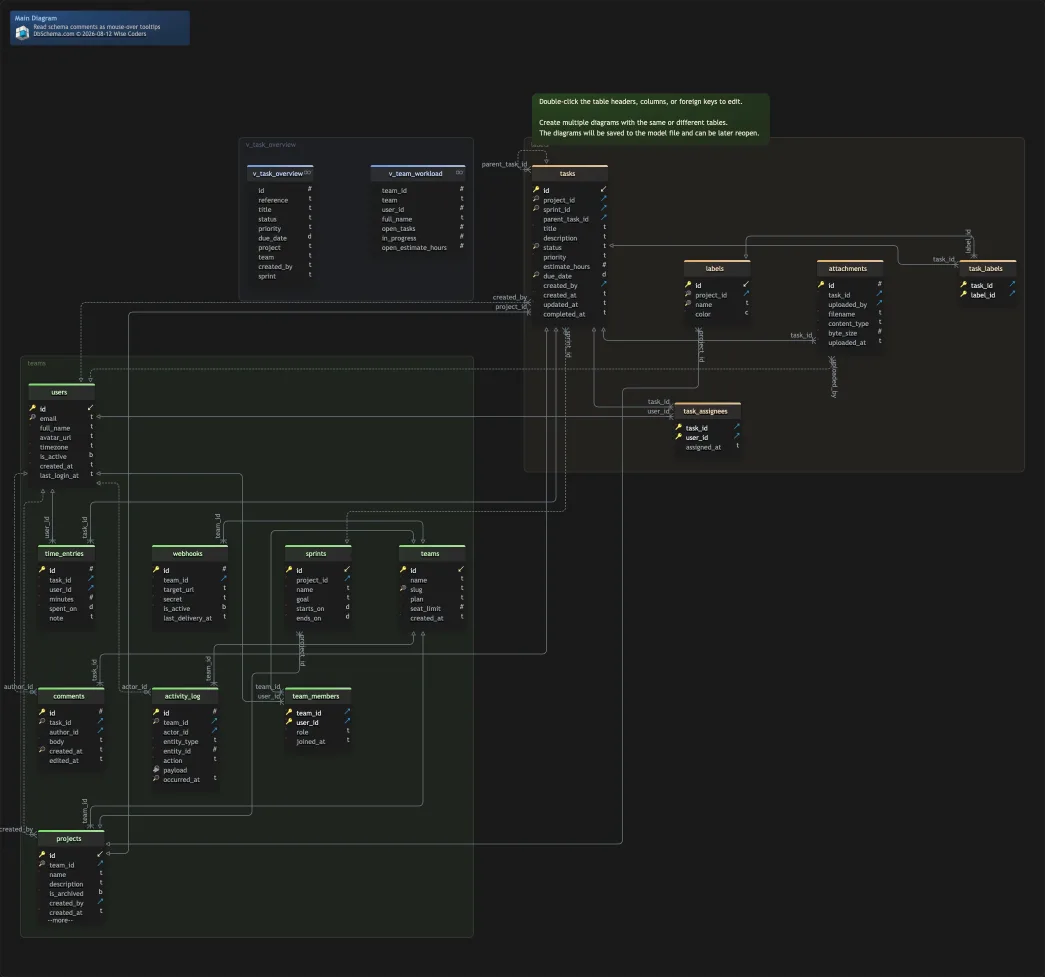
The second job is the governance context that lived in User-Defined Properties. In DbSchema it goes into the Description field of a table or column and into comment tags, the key-value pairs that hold an owner, a sensitivity level or a deprecation status. Both reach the export: Diagram → Export HTML5 or PDF Documentation writes an interactive HTML5 page with a vector diagram, a searchable table list and the descriptions as mouse-over tooltips, which is what replaces a report served from a repository portal. Saving the model to a file, the documentation export and schema synchronization are Pro features.
Erwin Data Modeler and ER/Studio side by side
Erwin Data Modeler and Idera's ER/Studio Data Architect were both built for top-down enterprise data governance: large data dictionaries, formal modeling methodology, compliance reporting, and a shared model that lives in a dedicated repository. Erwin's repository is served by erwin Mart Portal, and the ER/Studio Repository is reached through Team Server, which Idera's own quick start guide describes as a web-based tool for accessing, searching, editing and managing enterprise metadata[3]. That architecture is the main structural difference from a file-based modeler, because it decides where the model lives and who has to keep it running.
| Dimension | DbSchema | erwin Data Modeler and ER/Studio |
|---|---|---|
| Model storage | XML .dbs file | Native model file or a central repository |
| Team sharing | Git branches and pull requests | A repository server |
| Server to install | None | erwin Mart Portal, on Windows Server |
| Documentation output | HTML5, PDF and Markdown from the model | Reports from the repository |
The server row is the one with a hard requirement behind it. Quest's installation prerequisites say to install erwin Mart Portal on a Windows operating system, and list Windows Server 2016, 2019 and 2022[4]. DbSchema has nothing equivalent to install: it runs on Windows, macOS and Linux, and the shared artifact is the model file in the Git repository the team already has.
Is Erwin Data Modeler still widely used?
Erwin Data Modeler is an actively sold product. Quest positions it as enterprise data modeling that connects models to governed metadata and business context through erwin Data Intelligence and the rest of the Quest Data Management Platform, so that what ships in production matches the design[5]. Quest's own store sells it as an annual subscription per named user, in two editions: the Standard Edition, which includes model templates, domains, automation macros, naming and datatype standards and the model integration bridges, and the Workgroup Edition, which adds the centralized model management repository, collaborative modeling with conflict resolution, and change management with auditing[6]. The store lists 3,130.89 EUR and 4,379.20 EUR respectively, checked on 6 September 2026; it prices in the visitor's currency, so the figure you see depends on where you open it.
Teams that do move off it give consistent reasons, and none of them is about the modeling. A repository database has to be maintained, backed up and upgraded by someone. New backend developers and data engineers take time to learn a suite built around check-in and check-out. And a binary model behind a repository lock does not travel through the pull request workflow the rest of the codebase uses, which is the point where a .dbs file in Git changes the day-to-day.
The alternative to Liquibase for visual schema management
DbSchema is the visual alternative to a changelog-driven migration tool. You edit the design model, compare it against the live database, and let DbSchema generate the migration SQL from the differences you select. Liquibase runs the other way round: you write the change first, in a changelog whose formats are SQL, XML, YAML or JSON, and a root changelog that references others with the include or includeAll tags must itself be XML, YAML or JSON[7]. Both approaches replay reliably; they differ in where the change is authored and in what you get to look at before it runs.
| Capability | DbSchema | Liquibase |
|---|---|---|
| Change is authored | On the ER diagram | In a changelog file |
| Change format | XML .dbs model file | SQL, XML, YAML or JSON |
| Differences shown as | Object-by-object diff | Command-line output |
| Offline design | Full, in the model file | Changelog authored by hand |
| Deployment | Synchronization Dialog | Command-line pipeline |
The visual schema diff is what an architect arriving from Erwin recognizes first. Schema → Compare Model with Database lists the added, removed and modified tables, columns, indexes and foreign keys, and for each difference you choose to update the model, push the change to the database, or skip it. The generated statements are editable in the Synchronization Dialog before you click Execute, so the script that reaches the database is one a person has read.
Alternatives to Lucidchart for database design
Lucidchart draws an ER diagram quickly on a freeform canvas, with shape libraries and an import that turns SQL DDL into table boxes. Its documented workflow runs one way: import a schema onto the canvas, then export the diagram to a MySQL, PostgreSQL, SQL Server or Oracle database. What it does not describe is the return leg, reading a live staging or production instance back and diffing it against the diagram.
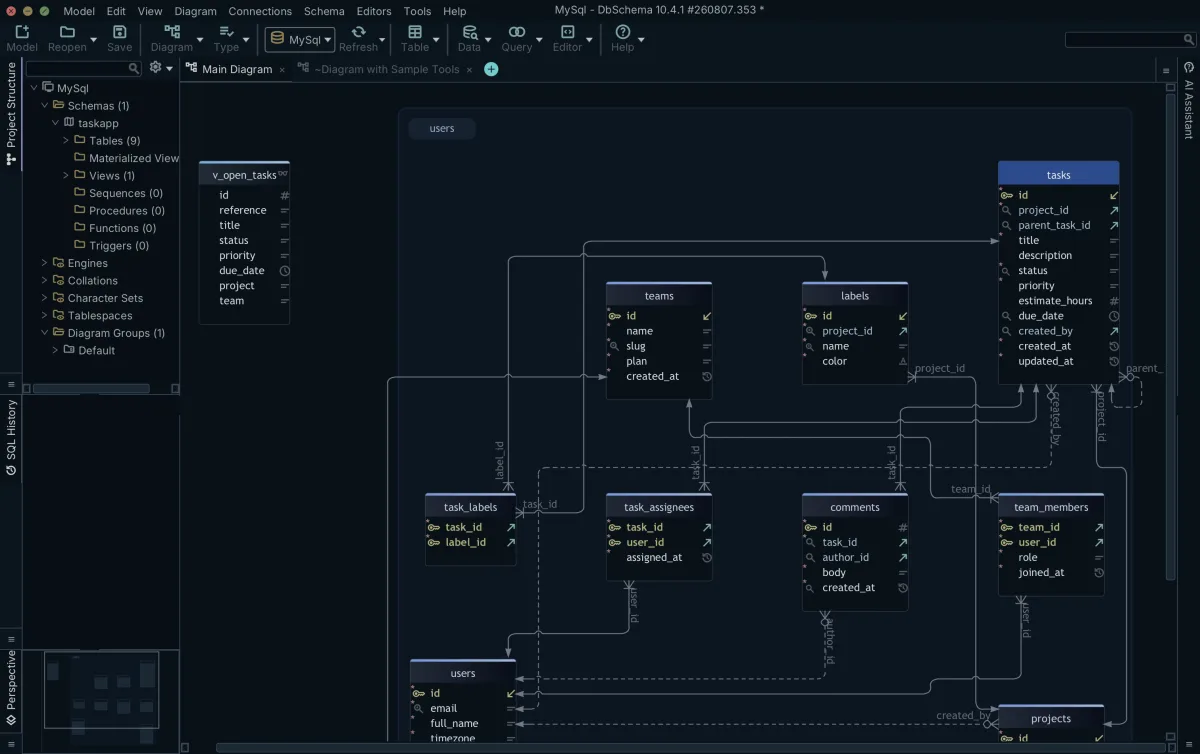
DbSchema closes that loop, which is why it heads the field of Lucidchart alternatives for anyone who has to keep a diagram honest. It connects over JDBC, reverse-engineers the catalog into diagrams, holds the design in a file that opens with no connection, and generates engine-specific DDL when the model moves ahead of the database. Data types, keys and foreign key references are schema objects on the canvas rather than text inside a box, so what you edit is the schema, not a picture of it.
Erwin's physical schema travels as a forward-engineered SQL DDL script; the layouts, the groupings and the User-Defined Properties do not, and that is the half-day of work at the other end. Download DbSchema at https://dbschema.com/download.html, work through the installation and registration steps, then open the model against your own database: reverse-engineer the live catalog, or import the script you forward-engineered out of Erwin. Connecting, reverse-engineering, the diagrams and the SQL editor are in the free Community edition; the offline model file, the documentation export and schema synchronization are Pro; the database-independent logical and conceptual layer is Architect.
Frequently asked questions
What is the alternative to Liquibase for database migrations?
DbSchema compares a design model against a live database and generates the migration SQL from the differences you pick, instead of replaying changelogs you wrote by hand. It also reads an existing migration folder: point it at the scripts, and DbSchema replays them in the order a database would have applied them and builds one model from the result.
What is the alternative to Lucidchart for database design?
DbSchema is the closer replacement, because it reads the database the diagram is supposed to describe rather than being drawn on top of it. The section on alternatives to Lucidchart for database design sets out the round trip and where Lucidchart's documented workflow stops.
What is the difference between Erwin Data Modeler and ER/Studio?
Team Server is the web-based tool Idera documents for accessing, searching, editing and managing the enterprise metadata that the ER/Studio Repository holds[3]; Erwin's counterpart is the Mart Portal. Beyond which server holds the model, the two suites cover the same ground: a central repository, formal modeling methodology and metadata governance. DbSchema replaces the repository with a .dbs file in Git and runs on Windows, macOS and Linux.
Is Erwin Data Modeler still used by enterprise teams?
Yes, and the shared-repository half of it is a database you run yourself: Quest's prerequisites put the Mart Portal on Windows Server and its repository on SQL Server 2017 to 2022, Oracle 18c to 21c, or PostgreSQL 12 to 16[4]. The repository arrives with the Workgroup edition, which Quest sells as an annual subscription per named user like the Standard edition below it[6].
What is the best way to export a model out of Erwin?
Forward-engineer the physical model to a SQL DDL script, which is the format DbSchema reads through Model → Import from External Format. Erwin can also save its own XML metamodel, but that XML exchanges entity and attribute names rather than a deployable schema, and DbSchema has no importer for it.
Sources
Open your Erwin model against your own database
DbSchema imports the SQL DDL you forward-engineer out of Erwin and lays the schema out as an ER diagram you can keep in Git. Community Edition is free; offline design and schema synchronization are Pro.









