MongoDB $lookup: Join Collections with Examples, Pipelines, and $unwind
For the developer who writes SQL joins and now needs the same result across two MongoDB collections; the aggregation pipeline stages are explained where they appear.
On this page
The rows you want live in two collections, and the query has to return them together. MongoDB has no JOIN keyword, so the join happens inside an aggregation pipeline: the $lookup stage reads a second collection and attaches the matching documents to each document that comes through it, as an array field you name.
db.collection.aggregate([
  {
    $lookup: {
      from: "<otherCollection>",
      localField: "<field_in_current>",
      foreignField: "<field_in_other>",
      as: "<output_array_field>"
    }
  }
])
fromnames the collection you join to, in the same databaselocalFieldis the field of the documents entering the stageforeignFieldis the field of thefromdocuments that has to equal itasnames the new array field that receives the matches
This page is lesson 9 of the DbSchema MongoDB course. The lessons before it:
- Introduction to MongoDB
- Installation & Database Creation
- CRUD operations in MongoDB
- Embedded Documents and Arrays
- Validation rules that enforce structure in MongoDB
- Visualize MongoDB Relationships (Embedded vs Referenced)
- What Is an Index in MongoDB?
- Aggregation Pipeline Explained
Join movies to their reviews
Every example on this page runs against these three collections:
db.movie.insertMany([
  { _id: 1, title: "Inception",    year: 2010, genre: "Sci-Fi" },
  { _id: 2, title: "The Matrix",   year: 1999, genre: "Action" },
  { _id: 3, title: "Interstellar", year: 2014, genre: "Sci-Fi" }
])

db.users.insertMany([
  { _id: 10, name: "Ada" },
  { _id: 11, name: "Grace" }
])

db.reviews.insertMany([
  { _id: 100, movie_id: 1, user_id: 10, rating: 5 },
  { _id: 101, movie_id: 1, user_id: 11, rating: 4 },
  { _id: 102, movie_id: 2, user_id: 10, rating: 3 }
])
Inception has two reviews, The Matrix has one, and Interstellar has none. Each review points at its movie through movie_id, so the join matches that field against the movie's _id:
db.movie.aggregate([
  {
    $lookup: {
      from: "reviews",
      localField: "_id",
      foreignField: "movie_id",
      as: "movie_reviews"
    }
  }
])
[
  { _id: 1, title: 'Inception', year: 2010, genre: 'Sci-Fi',
    movie_reviews: [
      { _id: 100, movie_id: 1, user_id: 10, rating: 5 },
      { _id: 101, movie_id: 1, user_id: 11, rating: 4 }
    ] },
  { _id: 2, title: 'The Matrix', year: 1999, genre: 'Action',
    movie_reviews: [ { _id: 102, movie_id: 2, user_id: 10, rating: 3 } ] },
  { _id: 3, title: 'Interstellar', year: 2014, genre: 'Sci-Fi',
    movie_reviews: [] }
]
Three movies went in and three came out. Each carries its whole review documents, _id and movie_id included, because nothing told the stage to trim them. Interstellar matched nothing and still came out, with an empty movie_reviews.
That is what the MongoDB manual means when it calls $lookup a left outer join. A LEFT OUTER JOIN in SQL keeps every row on the left too, but it returns one row per match and fills the missing side with NULL. $lookup returns one document per input document, with the matches nested inside it:
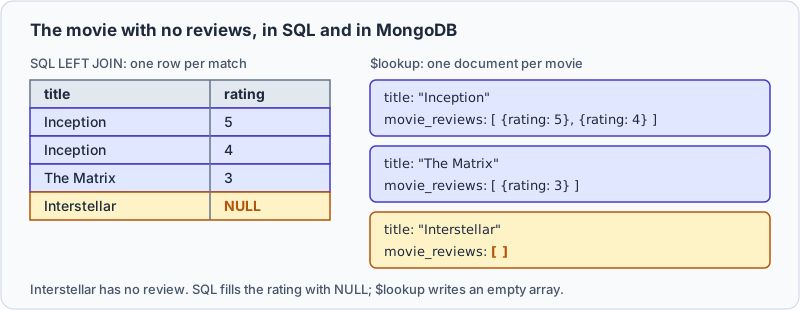
Two more rules decide what the stage returns. The as name replaces any field of that name already in the document, so as: "title" would overwrite each movie's title with its reviews. And a localField that holds an array matches each of its elements, so a document holding a list of movie ids joins to those movies without an extra stage. Any pair of fields can be joined, and neither side has to be unique.
One document per review with $unwind
An array per movie suits an application that shows a movie with its reviews. A report wants one row per review. The $unwind stage does that: it outputs one copy of the document for each element of an array.
db.movie.aggregate([
  { $lookup: { from: "reviews", localField: "_id",
               foreignField: "movie_id", as: "movie_reviews" } },
  { $unwind: "$movie_reviews" }
])
| title | movie_reviews._id | movie_reviews.rating |
|---|---|---|
| Inception | 100 | 5 |
| Inception | 101 | 4 |
| The Matrix | 102 | 3 |
Inception now appears twice, and movie_reviews holds a single review instead of an array. Interstellar is gone: by default, $unwind outputs nothing for a document whose array is empty, null or missing. To keep it, pass the option preserveNullAndEmptyArrays:
{ $unwind: { path: "$movie_reviews", preserveNullAndEmptyArrays: true } }
The same three documents come back, plus { _id: 3, title: 'Interstellar', year: 2014, genre: 'Sci-Fi' }, which has no movie_reviews field at all. That one option decides whether the result reads like a left join or an inner join.
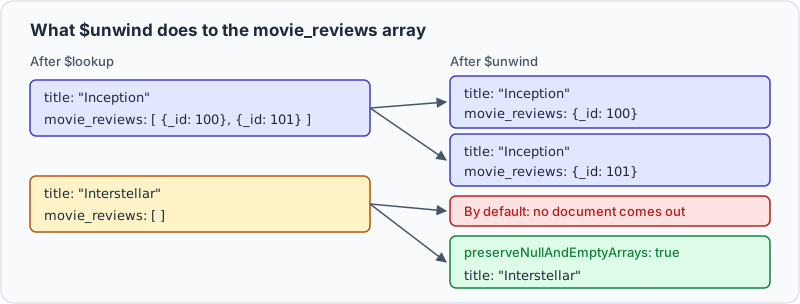
Keep the array when the application wants a movie with its reviews attached. Unwind when the output feeds a table, a chart or a $group stage.
Chain a second $lookup for the reviewer
A later $lookup can join on a field that an earlier one brought in. Going from movie to reviews to users puts each reviewer's name next to their rating:
db.movie.aggregate([
  { $lookup: { from: "reviews", localField: "_id",
               foreignField: "movie_id", as: "movie_reviews" } },
  { $unwind: "$movie_reviews" },
  { $lookup: { from: "users", localField: "movie_reviews.user_id",
               foreignField: "_id", as: "review_user" } },
  { $unwind: "$review_user" }
])
| title | movie_reviews.rating | review_user.name |
|---|---|---|
| Inception | 5 | Ada |
| Inception | 4 | Grace |
| The Matrix | 3 | Ada |
The first $unwind is what pairs each rating with its author. Without it, movie_reviews.user_id is an array of ids, and the second $lookup matches all of them at once. Inception then gets both users in one review_user array, in no fixed order, and nothing says who wrote which rating. After the unwind, each document holds one review, so its one user lands beside it.
Filter the joined documents with let and pipeline
The four-field form matches on equality and takes everything it finds. To filter or trim what comes back, give $lookup a pipeline to run on the joined collection, and a let block that passes fields of the source document into it:
db.movie.aggregate([
  {
    $lookup: {
      from: "reviews",
      let: { movieId: "$_id" },
      pipeline: [
        { $match: { $expr: { $eq: ["$movie_id", "$$movieId"] } } },
        { $project: { user_id: 1, rating: 1, _id: 0 } }
      ],
      as: "filtered_reviews"
    }
  }
])
The pipeline can't see the movie's fields. That is what let is for: it names the variable movieId, and $$movieId reads it, while a single $ still reads a field of the review being tested. The manual says a $match needs $expr to use a variable, and the other stages don't.
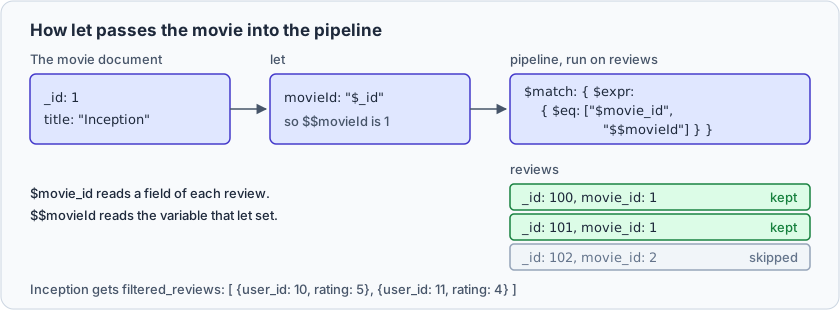
Inception gets [ { user_id: 10, rating: 5 }, { user_id: 11, rating: 4 } ], The Matrix its one review, and Interstellar []. The $project is why each entry now holds two fields instead of four.
Since MongoDB 5.0, localField and foreignField can sit beside a pipeline, which the manual calls the concise syntax for a correlated subquery. The join condition stays an equality, and the pipeline filters and trims the matches. Keeping the reviews rated 4 or more:
db.movie.aggregate([
  {
    $lookup: {
      from: "reviews",
      localField: "_id",
      foreignField: "movie_id",
      pipeline: [
        { $match: { rating: { $gte: 4 } } },
        { $project: { _id: 0, user_id: 1, rating: 1 } }
      ],
      as: "good_reviews"
    }
  }
])
| title | good_reviews |
|---|---|
| Inception | [ { user_id: 10, rating: 5 }, { user_id: 11, rating: 4 } ] |
| The Matrix | [] |
| Interstellar | [] |
The Matrix's only review is rated 3, so it fails the filter, and the movie still comes out, with an empty array.
Make $lookup fast
Index the field that the join searches in the other collection. The manual warns that an equality $lookup without an index on the foreignField "will likely have poor performance". Here that field is reviews.movie_id:
db.reviews.createIndex({ movie_id: 1 })
explain() shows whether the join uses the index:
db.movie.explain().aggregate([
  { $lookup: { from: "reviews", localField: "_id",
               foreignField: "movie_id", as: "movie_reviews" } }
])
On MongoDB 8.2, the plan holds an EQ_LOOKUP stage under queryPlanner.winningPlan.queryPlan. Its strategy field changed with the index:
| strategy | indexName | |
|---|---|---|
before createIndex | HashJoin | none |
after createIndex | IndexedLoopJoin | movie_id_1 |
The explain results page doesn't list these strategy names, so read them as what MongoDB 8.2 printed for this data. Look for the index name, which says the join used it.
A few habits keep the rest of the pipeline cheap. Put a $match before the $lookup, so the join runs only for the documents you want: { $match: { genre: "Sci-Fi" } } first leaves two movies to join instead of three. In the pipeline form, add a $project when the joined documents are wide, so only the fields the result needs travel with it. And watch $unwind, because it multiplies documents: a movie with two hundred reviews becomes two hundred documents, and every stage after it pays for them.
The pipeline form has one more limit. Inside $expr, the manual says $eq, $lt, $lte, $gt and $gte can use an index on the joined collection, but a multikey, partial or sparse index is not used for those comparisons.
When to join and when to embed
A relational engine pushes you towards joins. MongoDB doesn't, so the real decision comes earlier: whether the reviews live in their own collection at all. Keep them separate when they change on their own schedule, when the array would grow without a ceiling, or when another part of the application reads reviews without loading a movie. Embed them in the movie when they are small, bounded, and read together with it.
Use $lookup when | Use embedding when |
|---|---|
| related data changes independently | related data is read together |
| the embedded array would be unbounded | the child data stays small |
the entity is shared, such as users | the array is part of the parent's shape |
| the joined values change often | fewer reads matter more |
One limit settles the unbounded case. A BSON document can't exceed 16 mebibytes, so an array that gains an entry every time a user acts eventually breaks the write that appends to it. Below that ceiling the choice is about reads, writes and how often the child data changes. MongoDB schema design and Visualize MongoDB Relationships cover it in more depth.
Build $lookup pipelines in DbSchema
A pipeline written against collections you can't see is guesswork about field names. DbSchema connects to MongoDB and introspects a configurable sample of documents per collection, inferring the field names, BSON types, nested objects and arrays. The diagram it draws approximates what the sampled documents contain; it is not a structure MongoDB enforces. Where a collection has a validation rule, DbSchema reverse-engineers that rule instead, as the authoritative structure, and creating or editing a collection in DbSchema writes the rule back to both the database and the model file.
With the three collections from this page, the work in DbSchema goes in this order:
- Connect DbSchema to the database and reverse-engineer the collections into a diagram. Check the exact names of the fields you'll pass as
localFieldandforeignField. - Drag
reviews.movie_idontomovie._id, thenreviews.user_idontousers._id. DbSchema draws a virtual relation for each, a link that MongoDB neither declares nor enforces. Each shows as a connector line and is saved in the model file, and the database is left unchanged. - Paste the pipeline into the DbSchema Query Editor, which takes native MongoDB syntax, and run it.
- Open movie, reviews and users in the DbSchema Relational Data Editor to check the output. Select Inception in the first pane, and the second pane filters to its two reviews and the third to the users who wrote them, as many levels deep as the relations go.

Exporting the model as interactive HTML5 documentation carries the diagram as a vector image, with collection and field comments readable as mouse-over tooltips, so whoever inherits the pipeline can see which field points where. The inferred schema, the validation rule where one exists, the virtual relations, the browsing across them and the HTML5 export form one chain in DbSchema; other tools cover parts of it.
Reach for $lookup when the related data belongs in its own collection, add $unwind when the output needs one document per match, and switch to the pipeline form when the join has to filter or trim what it brings back. Download DbSchema at https://dbschema.com/download.html, connect to your MongoDB database, and draw the virtual relation between the two collections you're joining before you write the pipeline. Connecting, reverse-engineering, the diagram and the Query Editor are in the free Community Edition. Saving the model with its virtual relations, the Relational Data Editor and the HTML5 documentation are in Pro.









