MongoDB Aggregation Pipeline Tutorial for Beginners in 2025
For the MongoDB beginner who can already insert documents and run find; every stage and operator used here is explained where it appears.
On this page

A find call hands back the documents as they are stored, one by one. The number your report needs is not in any single document: it is an average across a group of them, or a count per month. MongoDB computes that with an aggregation pipeline. You pass db.collection.aggregate() an array of stages, each stage receives the documents the stage before it produced, and the documents leaving the last stage are the answer.
- Introduction to MongoDB
- Installation and database creation
- CRUD operations on documents
- Embedded documents and arrays
- Validation rules that enforce structure
- Visualize MongoDB relationships
- What is an index in MongoDB?
- Aggregation pipeline explained (you are here)
What an aggregation pipeline is
A pipeline is one or more stages that process documents, as the MongoDB manual defines it. Each stage performs one operation and passes its output to the next stage. A stage does not have to return one document per input document: some stages drop documents, and some build documents that were never stored. The same stage may appear several times in one pipeline, with $out, $merge and $geoNear as the exceptions.
Nothing in the collection changes while a pipeline runs. db.collection.aggregate() leaves the stored documents alone unless the pipeline ends in $merge or $out, so you can try a pipeline on production data and read the answer without writing anything back.
These are the stages this lesson uses, plus the two you will reach for next.
| Stage | What it does |
|---|---|
$match | keeps the documents that match a condition |
$group | groups documents and computes values per group |
$sort | orders the documents |
$project | chooses which fields come back |
$limit | passes on a fixed number of documents |
$addFields | adds or overwrites a field |
$lookup | pulls in documents from another collection |
Operators do the arithmetic inside a stage. Four of them appear below.
| Operator | What it computes |
|---|---|
$sum | a total, or a count with $sum: 1 |
$avg | the average of a numeric field |
$month | the month of a date, 1 to 12 |
$toDate | a date from a string or a number |
The basic structure of an aggregate call
The call itself is an array of stage documents, in the order MongoDB should apply them.
db.collection.aggregate([
  { stage1 },
  { stage2 }
])
Every stage name begins with a dollar sign, and the position of a stage in that array is part of what the pipeline means. MongoDB runs the array from top to bottom, so a sort placed before a filter sorts documents that the filter is about to throw away, and the same two stages in the other order sort only what survives. The answer is the same either way; the work is not.
Two collections carry the examples: five reviews of one movie, and the movie itself.
db.reviews.insertMany([
  { _id: 1, movie_id: ObjectId("000000000000000000001000"), rating: 5,
    comment: "Absolutely stunning", created_at: ISODate("2024-05-01T00:00:00Z") },
  { _id: 2, movie_id: ObjectId("000000000000000000001000"), rating: 4,
    comment: "Great movie, but a bit hard to follow", created_at: ISODate("2024-05-02T00:00:00Z") },
  { _id: 3, movie_id: ObjectId("000000000000000000001000"), rating: 3,
    comment: "Not bad", created_at: ISODate("2021-01-02T00:00:00Z") },
  { _id: 4, movie_id: ObjectId("000000000000000000001000"), rating: 2,
    comment: "Didn't like it", created_at: ISODate("2023-08-03T00:00:00Z") },
  { _id: 5, movie_id: ObjectId("000000000000000000001000"), rating: 1,
    comment: "The worst movie ever", created_at: ISODate("2019-02-01T00:00:00Z") }
])

db.movie.insertOne({
  _id: ObjectId("000000000000000000001000"),
  title: "Inception",
  genre: "Sci-Fi",
  release_year: 2010,
  details: { duration_min: 148, rating: "PG-13", language: "English" }
})
The created_at values are real dates rather than strings, which matters in the third example: $month accepts a Date, a Timestamp or an ObjectId, and raises an error on a string.
Filtering, sorting and grouping the reviews
Start with the two stages that have a direct equivalent in find. $match narrows the set the way a WHERE clause does, and $sort orders what survives.
db.reviews.aggregate([
  { $match: { movie_id: ObjectId("000000000000000000001000") } },
  { $sort: { rating: -1 } }
])
All five reviews belong to that movie, so all five come back, whole, ordered by rating descending:
| _id | rating | comment | created_at |
|---|---|---|---|
| 1 | 5 | Absolutely stunning | 2024-05-01 |
| 2 | 4 | Great movie, but a bit hard to follow | 2024-05-02 |
| 3 | 3 | Not bad | 2021-01-02 |
| 4 | 2 | Didn't like it | 2023-08-03 |
| 5 | 1 | The worst movie ever | 2019-02-01 |
Put $match first whenever you can. Every later stage then works on a smaller set of documents.
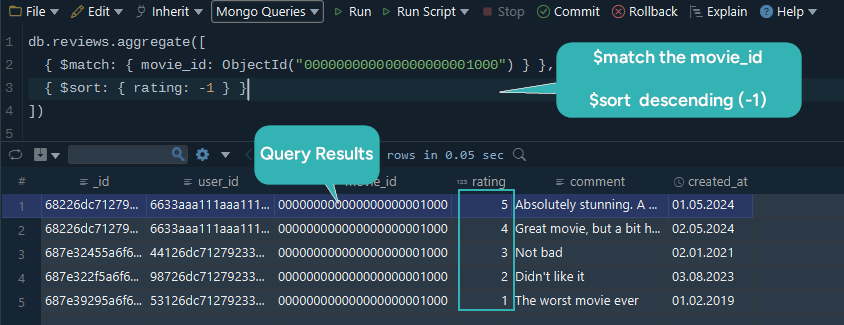
The screen above shows the same pipeline typed into the DbSchema Query Editor and run against a fuller reviews collection, with the documents it returned printed in a grid under the editor.
Averaging a field with $group and $avg
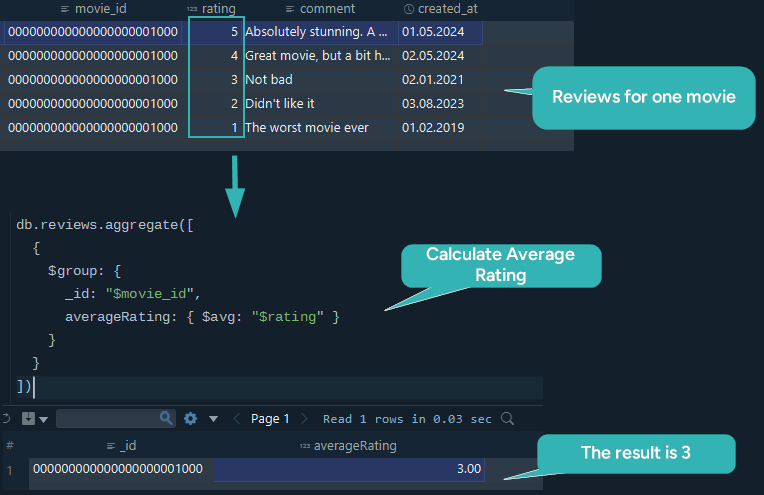
$group collects documents that share a key and computes a value for each group. The key goes in _id, and every other field of the stage output is an accumulator.
db.reviews.aggregate([
  {
    $group: {
      _id: "$movie_id",
      averageRating: { $avg: "$rating" }
    }
  }
])
The five ratings are 5, 4, 3, 2 and 1, so one group comes back with their mean:
[ { _id: ObjectId("000000000000000000001000"), averageRating: 3 } ]
In the output of $group, _id holds the group key. Write _id: null instead of a field path and every document falls into a single group, which is how you average a whole collection.
Counting per month with $month and $sum
An expression is allowed as the group key, so the month extracted from a date groups the reviews by month. $sum: 1 adds one for every document that lands in the group.
db.reviews.aggregate([
  {
    $group: {
      _id: { $month: "$created_at" },
      totalReviews: { $sum: 1 }
    }
  },
  { $sort: { _id: 1 } }
])
Two reviews were written in May and one each in January, February and August:
[
  { _id: 1, totalReviews: 1 },
  { _id: 2, totalReviews: 1 },
  { _id: 5, totalReviews: 2 },
  { _id: 8, totalReviews: 1 }
]
The $sort at the end is not decoration. $group does not order its output documents, so without it the four groups arrive in whatever order MongoDB produced them. Note also that $month returns 1 to 12 and drops the year: reviews from May 2024 and May 2025 would share the key 5. Group on year and month together when that matters.
How $project picks the fields that come back
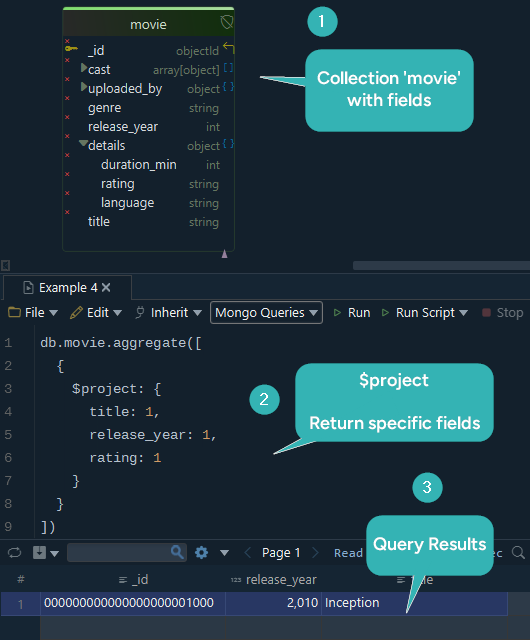
$project decides which fields leave the stage. A field set to 1 is included, a field set to 0 is excluded, and _id comes along unless you exclude it explicitly.
db.movie.aggregate([
  {
    $project: {
      title: 1,
      release_year: 1,
      rating: 1
    }
  }
])
[ { _id: ObjectId("000000000000000000001000"), title: "Inception", release_year: 2010 } ]
There is no rating in the answer, and the pipeline asked for one. The movie document keeps its rating inside the details object, and rating: 1 names a top-level field that does not exist, so nothing is added for it. Write the path to reach a nested field.
db.movie.aggregate([
  { $project: { _id: 0, title: 1, "details.rating": 1 } }
])
[ { title: "Inception", details: { rating: "PG-13" } } ]
One restriction is worth knowing before you mix the two forms: once you exclude a field other than _id, that $project stage may not also include fields, rename them, or add new ones. Excluding _id alongside inclusions, as above, is allowed.
Reports, monthly summaries and per-group averages are all built from these four stages, and the work happens on the server instead of in a loop in your application. The next lesson adds $lookup, the stage that reads documents out of a second collection, which is how a pipeline does what a SQL join does. Download DbSchema at https://dbschema.com/download.html, connect it to your MongoDB database, and paste any pipeline above into the Query Editor to see the documents it returns. Connecting, reverse-engineering the collections and running queries in the Query Editor are covered by the free Community Edition.









