Introduction to MongoDB Tutorial (2025)
For the beginner opening MongoDB for the first time, who has written SQL against a relational database; documents, BSON, replica sets and sharding are explained where they appear.
On this page
You know how to put a row in a table, and MongoDB has no tables. MongoDB is a document database: each record is a document, a set of field and value pairs stored as BSON, a binary form of JSON. Documents are grouped into collections, which put no field list on them. A replica set keeps copies of the data on several servers, and sharding splits a large collection across several replica sets.
Documents, collections and BSON
Most of the vocabulary maps onto the relational one. The manual's SQL to MongoDB mapping chart pairs the terms like this:
| SQL | MongoDB |
|---|---|
| database | database |
| table | collection |
| row | document |
| column | field |
| primary key | _id field |
| index | index |
| table join | embedded document, or $lookup |
Here is one record written to MongoDB from mongosh, the MongoDB shell. use switches to a database, and the first insert creates both the database and the collection, because MongoDB creates them when you first store data in them:
use shop
db.users.insertOne({
  _id: ObjectId("507f1f77bcf86cd799439011"),
  name: "Albert Einstein",
  age: 55,
  address: { street: "123 Main St", city: "New York", zip: "10001" }
})
db.users.find() reads it back as it was stored:
[
  {
    _id: ObjectId('507f1f77bcf86cd799439011'),
    name: 'Albert Einstein',
    age: 55,
    address: { street: '123 Main St', city: 'New York', zip: '10001' }
  }
]
The _id field is the primary key. Every document in an ordinary collection needs a unique one, and when the insert leaves it out, MongoDB generates an ObjectId. The manual's page on documents adds that _id is always the first field, and that one document may not exceed 16 mebibytes. Once written, _id cannot change, so this update fails:
db.users.updateOne({ name: "Albert Einstein" }, { $set: { _id: 1 } })
MongoDB refuses it with this error:
Uncaught MongoServerError: Plan executor error during update :: caused by :: Performing an update on the path '_id' would modify the immutable field '_id'
The document is stored as BSON, which carries types that JSON lacks, such as ObjectId, Date, 64-bit integers and binary data. The type decides how a value sorts. Here are two signups, each with its date stored twice, once as a string and once as a Date:
db.signups.insertMany([
  { name: "Ana", signedUpText: "9/1/2025",  signedUp: ISODate("2025-09-01") },
  { name: "Ben", signedUpText: "10/1/2025", signedUp: ISODate("2025-10-01") }
])
db.signups.find({}, { _id: 0, name: 1, signedUpText: 1 }).sort({ signedUpText: 1 })
Sorted by the string, Ben's October signup comes first, because the character "1" sorts before "9":
| name | signedUpText |
|---|---|
| Ben | 10/1/2025 |
| Ana | 9/1/2025 |
db.signups.find({}, { _id: 0, name: 1, signedUp: 1 }).sort({ signedUp: 1 })
Sorted by the Date, the order is the calendar's:
| name | signedUp |
|---|---|
| Ana | 2025-09-01T00:00:00.000Z |
| Ben | 2025-10-01T00:00:00.000Z |
A collection has no fixed shape
By default, documents in a collection do not share a schema, so fields and data types can vary from one document to the next. A second user can carry an email address and no address at all:
db.users.insertOne({ name: "Edy", age: 25, email: "[email protected]" })
MongoDB accepts it and returns the _id it generated:
{
  acknowledged: true,
  insertedId: ObjectId('6aa365bbe4e966b84dd851a9')
}
The collection now holds two documents of different shapes:
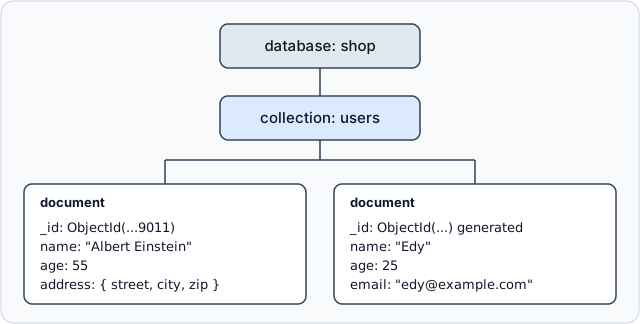
Adding a field means writing it on the next insert. The documents already stored keep their old shape until something rewrites them, so there is no ALTER TABLE and no migration over every record. The cost is that a misspelled field name, such as emial, is stored as a new field instead of failing.
Where you want that check back, give the collection a validation rule. This one requires an email string:
db.createCollection("customers", {
  validator: { $jsonSchema: {
    bsonType: "object",
    required: ["email"],
    properties: { email: { bsonType: "string" } }
  } }
})
db.customers.insertOne({ name: "Edy", emial: "[email protected]" })
The misspelled insert is rejected, and the error names the missing field:
Uncaught:
MongoServerError: Document failed validation
Additional information: {
  failingDocumentId: ObjectId('6aa365bce4e966b84dd851aa'),
  details: {
    operatorName: '$jsonSchema',
    schemaRulesNotSatisfied: [
      {
        operatorName: 'required',
        specifiedAs: { required: [ 'email' ] },
        missingProperties: [ 'email' ]
      }
    ]
  }
}
By default, MongoDB rejects any insert or update that would produce an invalid document. A collection can instead be set to accept such a document and log a warning.
Related data lives inside the document
The address in the first document is an embedded document, not a row in a second table. The manual's introduction gives the reason to store it this way: embedded documents and arrays reduce the need for joins, which are expensive. The read that fetches a user fetches the address in the same operation:
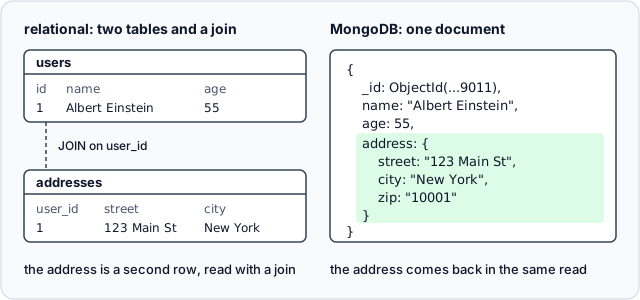
An embedded field can still be queried and indexed. Dot notation names the path, in quotes:
db.users.createIndex({ "address.city": 1 })
db.users.find({ "address.city": "New York" }, { name: 1 })
The query returns the one user in New York:
[
  { _id: ObjectId('507f1f77bcf86cd799439011'), name: 'Albert Einstein' }
]
Adding .explain() to the query shows that MongoDB used the index. At the bottom of the winning plan is an IXSCAN, an index scan on address.city_1:
winningPlan: {
  isCached: false,
  stage: 'PROJECTION_SIMPLE',
  transformBy: { name: 1 },
  inputStage: {
    stage: 'FETCH',
    inputStage: {
      stage: 'IXSCAN',
      keyPattern: { 'address.city': 1 },
      indexName: 'address.city_1',
      ...
Data that many documents share, such as a product that appears in many orders, can live in its own collection instead, referenced by its _id. The $lookup stage of an aggregation joins it back at query time.
Replica sets and sharding
A replica set is a group of mongod processes that hold the same data. One member is the primary, which takes every write, and the others are secondaries, which copy the primary's changes. When the secondaries lose contact with the primary for longer than the election timeout, 10 seconds by default, one of them calls an election, and the winner becomes the new primary. Nobody has to step in. With the default settings, the manual expects the median election to take no more than 12 seconds, and the replica set accepts no writes until it completes.
Sharding splits one collection across several replica sets, called shards. The shard key, a field or several fields in the documents, decides which shard holds each document. Applications connect to a router called mongos, which sends each query to the shards that hold the data, and config servers keep the cluster's metadata. Each shard must be deployed as a replica set, and so must the config servers:
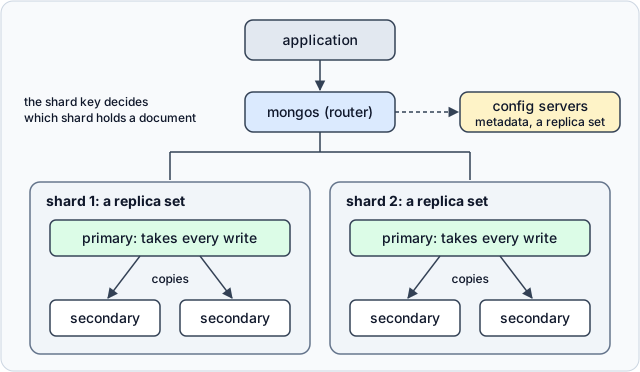
The manual states the trade-off plainly. Dividing the load over more servers can cost less than one high-end machine, and the price is more infrastructure to run and maintain. So shard when one replica set can no longer hold the data or keep up with the writes, not before, because every shard is one more replica set to operate.
Who uses MongoDB, and for what
MongoDB's own site names customers and what each of them runs on MongoDB. Here are four, one for each use in the first column, with the page that says so:
| use | company | what runs on MongoDB | MongoDB's page |
|---|---|---|---|
| content management | Forbes | the CMS it rebuilt in 2011 for its contributor network | blog post, 2020 |
| e-commerce catalog | eBay | the product catalog and other applications of ebay.com | blog post, 2017 |
| content repository | Adobe | a persistence layer for Adobe Experience Manager 6.0 | press release, 2014 |
| real-time events | Toyota Financial Services | its event log, which records millions of events a week | customer page |
Each row fits MongoDB for a reason from the sections above. The pages of a CMS are alike but never identical, and a collection with no fixed shape stores each kind as it is. In a catalog, a laptop and a shirt share little besides a price, so each product document carries its own attributes, and an index can still sit on any of them. Adobe's press release is about size: it describes content repositories that hold petabytes, which is the case sharding exists for. An event arrives complete and is written once, as one document.
Mobile and web applications fit MongoDB for the reason the manual's introduction gives: documents correspond to the native data types of many programming languages, so an object in the app maps onto one document.
See a whole MongoDB database in DbSchema
find shows one collection at a time. DbSchema connects to MongoDB and reverse-engineers every collection into a diagram, nested objects and arrays included:
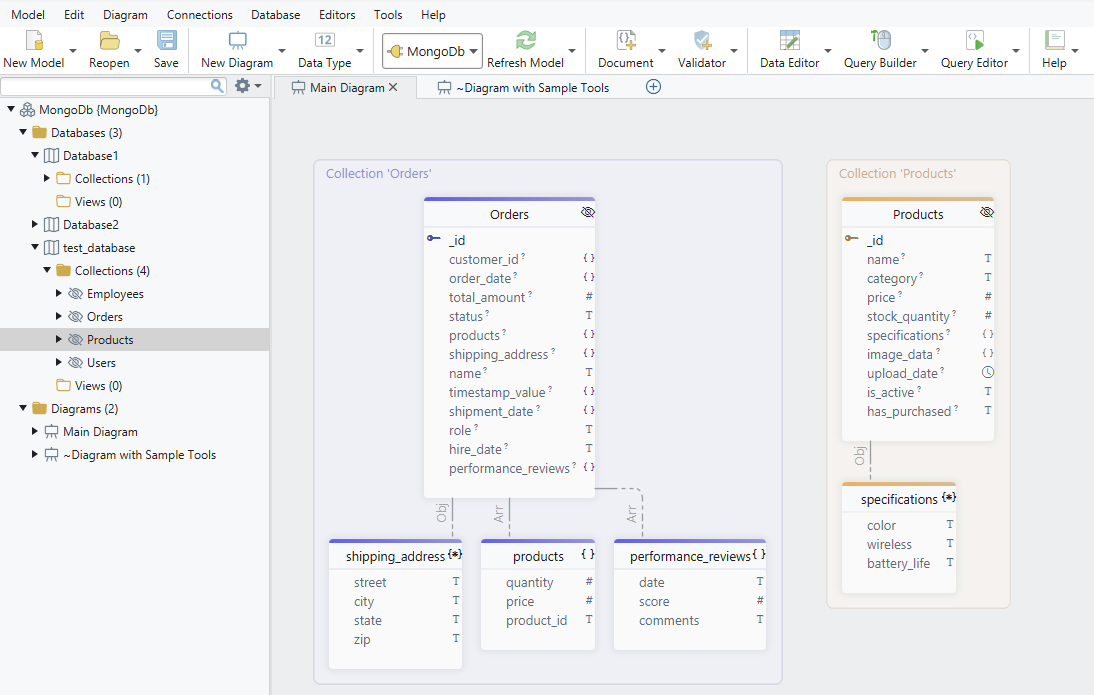
The field list in that diagram is inferred. DbSchema introspects a configurable sample of documents per collection and derives the field names, the BSON types, the nested objects and the arrays from what the sample holds. The diagram is therefore an approximation of what the documents contain, not a schema that MongoDB enforces. Where a collection has a validation rule, DbSchema reverse-engineers the rule instead and treats it as the authoritative structure. Creating or editing a collection in DbSchema writes the rule back to the database and to the model file.
A field that holds another collection's _id is a link MongoDB does not record. In DbSchema you draw it as a virtual foreign key by dragging one field onto the other. DbSchema saves the relation in its model file and leaves the database unchanged. The Relational Data Editor then opens collections side by side over those relations: selecting a document in the parent pane filters the child pane to the documents that match, and the filtering cascades through several levels. The model also exports as interactive HTML5 documentation, a vector diagram that shows collection and field comments as mouse-over tooltips.
The lessons in this series
- Introduction to MongoDB (this page)
- Installing MongoDB and creating a database
- CRUD operations
- Embedded documents and arrays
- Validation rules
- Embedded and referenced relationships
- Indexes
- The aggregation pipeline
The next lesson installs MongoDB and creates a first database and its collections. Download DbSchema from https://dbschema.com/download.html, connect it to that instance, and reverse-engineer the collections as you create them. Connecting, reverse-engineering and the interactive diagrams are in the free Community Edition. Saving the model with its virtual foreign keys, the Relational Data Editor and HTML5 documentation are in DbSchema Pro.









