MongoDB Embedded Documents and Arrays, With Query Examples
For the MongoDB beginner who can insert and find documents; nesting, dot notation, elemMatch and multikey indexes are explained where they appear.
On this page

A record that a relational schema would spread over four tables and three joins can be one document in MongoDB. A field can hold another document, and a field can hold a list of values or of whole documents. One read then returns the record entire, and the joins are not written because there is nothing to join.
- Introduction to MongoDB
- Installation and database creation
- CRUD operations on documents
- Embedded documents and arrays (you are here)
- Validation rules that enforce structure
- Visualize MongoDB relationships
- What is an index in MongoDB?
- Aggregation pipeline explained
What is an embedded document in MongoDB?
An embedded document is a document nested directly inside another document as the value of a field. It keeps related data in one place, so you retrieve, update or delete it without a second query and without a join.
{
  "user_id": 1,
  "profile": {
    "age": 30,
    "status": "active"
  }
}
Here profile is the embedded document. It has no _id of its own, it is not a row in a second collection, and it exists only as part of its parent. Delete the parent and it goes with it.
A passenger with an embedded address
The examples from here on use the Flights database from the earlier lessons, and every one of them is a passenger document, so a single collection carries the definitions, the queries and the index. A Passenger carries its Address as an embedded document: the address is read whenever the passenger is read, and it is written by the same insert.
db.passengers.insertMany([
  {
    "name": "Jennifer",
    "age": 30,
    "address": {
      "street": "123 Elm St",
      "city": "Springfield",
      "zip": "12345"
    }
  }
])
Passport information behaves the same way. It belongs to exactly one passenger, it stays small, and it is queried alongside the passenger, so it is embedded rather than referenced. Both documents go in with the ordinary insert commands from the CRUD lesson.
{
  "_id": ObjectId("..."),
  "name": "Mark",
  "passport": {
    "passport_number": "X123456",
    "issue_country": "USA"
  }
}
Array fields in MongoDB replace the child table and the join
An array field is a field whose value is a list of elements. The elements can be any BSON type, strings, numbers, or whole embedded documents, and they do not have to share a type.
The array field is where the distance from a relational design shows. A table that has to hold several rows per parent needs a child table and a join to read them back. MongoDB holds them under one field name inside the parent, and a query reaches them without leaving the document.
{
  "user_id": 1,
  "roles": ["admin", "editor"]
}
Here roles is an array of strings. An array of embedded documents works the same way, with documents in place of the scalars, and the elements keep the order they were inserted in.
A passenger with an array of baggage items
A passenger in the Flights database can check several bags. Rather than one document per bag, the bags are stored as an array of embedded documents inside the passenger document.
db.passengers.insertMany([
  {
    name: "Alice",
    baggage: [
      { item: "Backpack", weight: 8 },
      { item: "Trolley", weight: 18 }
    ]
  },
  {
    name: "Bob",
    baggage: [
      { item: "Duffel Bag", weight: 10 }
    ]
  },
  {
    name: "Carol",
    baggage: [
      { item: "Backpack", weight: 8 },
      { item: "Suitcase", weight: 25 }
    ]
  }
])
Bookings are modelled the same way: one passenger, several bookings, one array, so the whole itinerary comes back with the passenger.
{
  "_id": ObjectId("..."),
  "name": "Alice",
  "bookings": [
    { "flight_id": "AF123", "seat": "12A" },
    { "flight_id": "AF124", "seat": "14B" }
  ]
}
Querying and indexing the combined document
A single passenger document holds both shapes at once. The passport is an embedded document, the bookings are an array of embedded documents, and one read returns all of it.
{
  "name": "Alice",
  "passport": {
    "passport_number": "X123456",
    "issue_country": "USA"
  },
  "bookings": [
    { "flight_id": "AF123", "seat": "12A" },
    { "flight_id": "AF124", "seat": "14B" }
  ]
}
How deeply to nest before the shape starts to hurt is a schema design question in its own right. What the rest of this section covers is reading that document back and indexing what it contains. Embedded fields and array elements are read with the same find call as any top-level field. What changes is the path you write, and, for arrays, which element has to satisfy which condition.
Dot notation for embedded fields
Reach a field inside an embedded document with dot notation[1], written as field.nestedField. The whole path has to sit inside quotation marks.
// Passengers whose passport was issued in the USA
db.passengers.find({ "passport.issue_country": "USA" })

// Passengers with a booking on flight AF123
db.passengers.find({ "bookings.flight_id": "AF123" })
The first of those returns Mark, the only passenger with a passport document, and the second returns Alice, whose bookings array holds an element with that flight id.
Matching a whole embedded document instead of one of its fields is an exact match, and the field order has to match as well[1]. MongoDB does not recommend that comparison for exactly that reason.
// Exact match, where field order is part of the comparison
db.passengers.find({ passport: { passport_number: "X123456", issue_country: "USA" } })
Matching inside an array
A query written against an array field matches when at least one element matches[2]. Pass the full array instead and it matches only documents whose array is identical, elements and order included[2].
// Any passenger carrying a bag called "Trolley"
db.passengers.find({ "baggage.item": "Trolley" })

// Only users whose roles array is exactly this, in this order
db.users.find({ roles: ["admin", "editor"] })
Alice is the only passenger carrying a Trolley, so the first query returns her document alone. The second returns a user whose roles are exactly admin and editor in that order, and skips one whose roles are editor and admin.
Two conditions written side by side on an array can be satisfied by two different elements. The $elemMatch[2] operator forces a single element to satisfy all of them, which is usually what was meant.
// Matches if ANY bag is over 10 and ANY bag is under 20, possibly two different bags
db.passengers.find({ "baggage.weight": { $gt: 10, $lt: 20 } })

// Matches only if ONE bag is both over 10 and under 20
db.passengers.find({ baggage: { $elemMatch: { weight: { $gt: 10, $lt: 20 } } } })
The three passengers above split the two queries apart. The first query returns Alice, whose 18 is over 10 while her 8 is under 20, and Carol, whose 25 is over 10 while her 8 is under 20. The second returns Alice alone, because her Trolley at 18 satisfies both conditions by itself, and neither of Carol's bags does. Bob is absent from both: 10 is not greater than 10.
Dot notation also takes a position[3], so "baggage.0.item" addresses the first element of the array.
Indexing embedded fields and array elements
An index on an embedded field is created exactly like an index on a top-level field. You index the dotted path.
db.passengers.createIndex({ "passport.issue_country": 1 })
db.passengers.createIndex({ "baggage.item": 1 })
Index a field that holds an array and MongoDB creates the index as a multikey index automatically[4]; there is no separate type to ask for. For each distinct value in the array[4], MongoDB creates a separate entry in the index, and each entry points back to the same document, so a single document can have multiple entries in a multikey index.
One limit matters as soon as you combine fields: in a compound multikey index, each indexed document can have at most one indexed field whose value is an array[4]. Two array fields in the index specification and the create fails; build the index first and an insert that would violate the restriction fails instead. Hashed indexes cannot be multikey[4] at all.
Index types, compound keys and reading an execution plan are covered in the indexes lesson.
Embedded documents and arrays on a DbSchema diagram
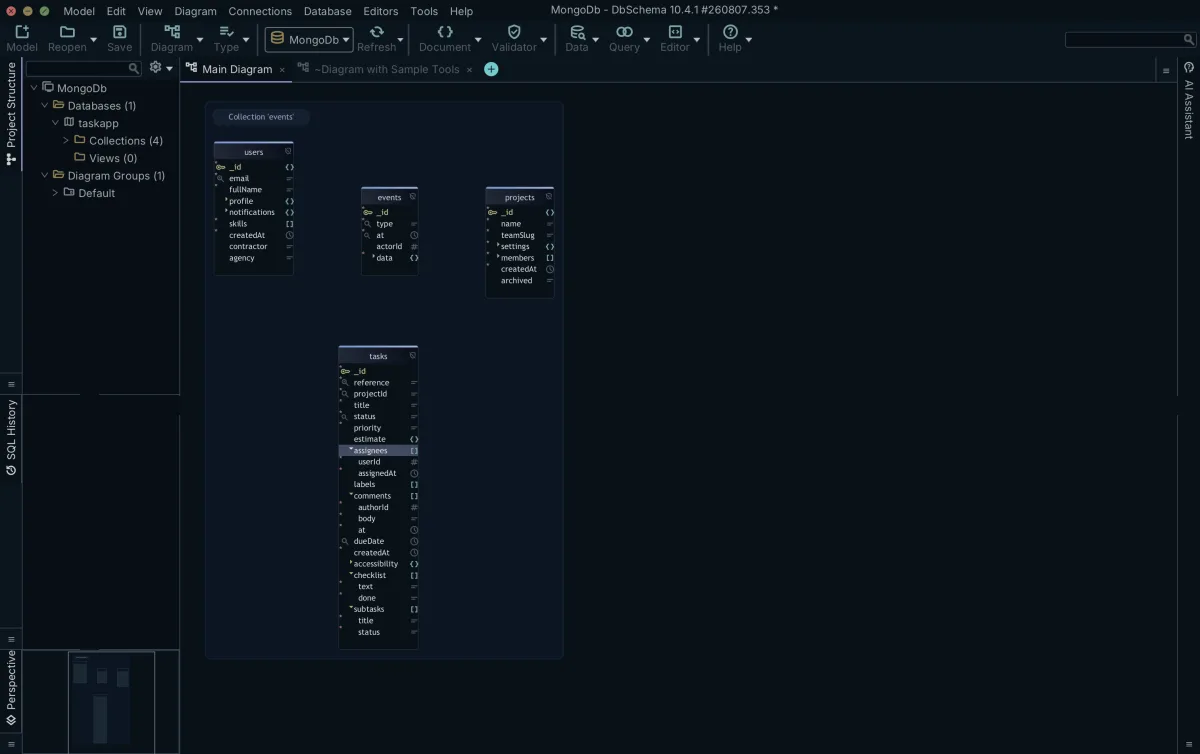
Once the documents are inserted, DbSchema draws each collection as a diagram box and lists the fields it found there. Embedded documents appear as nested fields under the parent collection, array fields carry a [] marker and object fields a {} marker, and both open in place on the diagram, so the sub-fields are readable without writing a query.
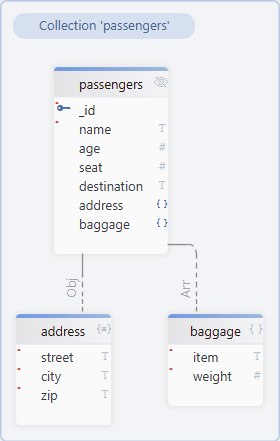
The baggage[] field is an array of embedded documents, and address appears as a nested structure inside the passengers collection.
What DbSchema infers and what MongoDB enforces
The field list on the diagram is inferred rather than declared. DbSchema introspects a configurable sample of documents per collection and derives the field names, the BSON types, the nested objects and the arrays from what the sample holds, so the diagram approximates what the sampled documents contain and is never a structure MongoDB enforces.
A document that omits a field, or that stores a string where the last thousand documents stored an array, still inserts. Structure is enforced only once a collection validator is written and applied to the database. Where a collection does carry one, DbSchema reverse-engineers that validation rule instead of sampling and treats it as the authoritative structure, and creating or editing a collection in DbSchema writes the rule back to the database and to the model file together.
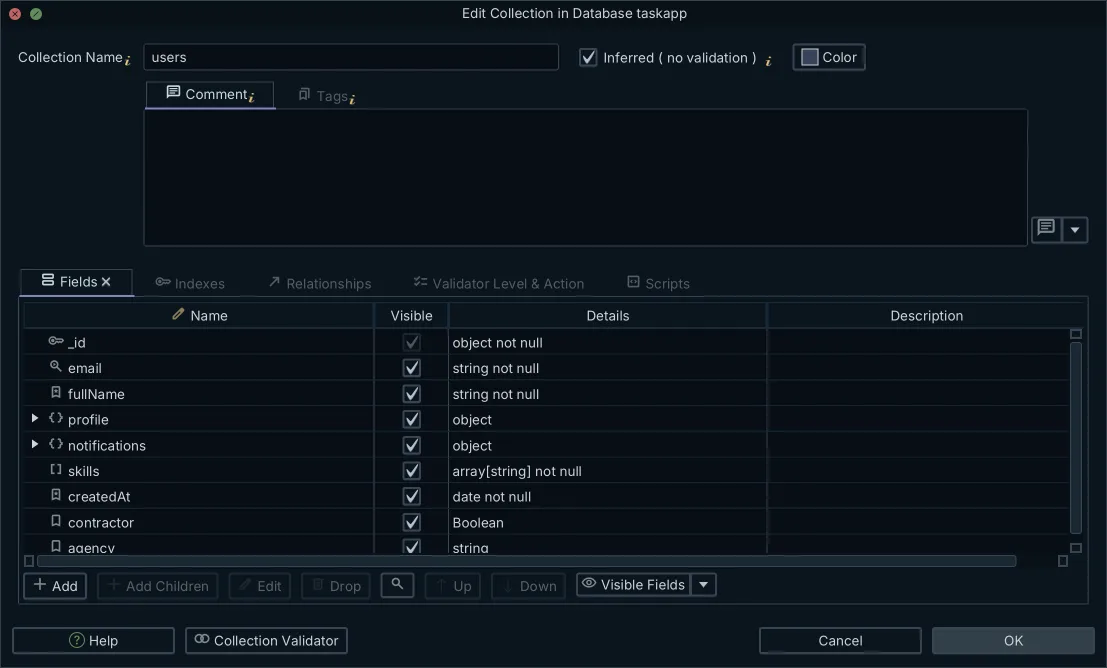
The diagram is one link in a chain: the structure inferred from the documents, the validation rule where one exists, the virtual relations you draw between collections, the Relational Data Editor that opens related collections side by side over them, and the interactive HTML5 documentation whose vector diagram shows collection and field comments as mouse-over tooltips. Other tools cover parts of it. Drawing a relation writes to the model file alone; editing a collection writes to the database as well.
Why embedded documents and arrays are useful
Embedding keeps related data together, so a single read returns all of it. Retrieving a Passenger brings back the Address and the Baggage in the same document, which removes a round trip per related record and removes the join a relational schema would have needed. That trade, denormalised reads against duplicated data, is the main structural difference between the two models.
Documents in one collection also do not have to share a shape. Some passengers carry baggage, some do not, and an empty array is a valid value for the ones that do not.
{
  "_id": ObjectId("..."),
  "name": "Alice",
  "baggage": []
}
Three conditions tell you when to embed. Embed data that is tightly related to its parent and read with it: a passenger's baggage is always fetched with the passenger, so it belongs in the passenger document. Embed data that changes rarely: an address is short, it belongs to one passenger, and it is rewritten seldom. Embed data a relational design would have reached through a join, when the read path is what matters, because MongoDB then returns everything relevant in one operation.
When to reference instead of embedding
Two conditions push data out of the parent document. The first is size. An embedded document or array that grows without a bound eventually meets the ceiling: the maximum BSON document size is 16 mebibytes[5], and BSON supports no more than 100 levels of nesting[5]. Data that grows per event, a message history or an audit log, belongs in its own collection. The second is the write pattern. Data updated on its own schedule is easier to keep separately, because updating one element inside a large array rewrites the whole parent document.
The decision reads as one sentence in each direction. Embed when the data is always read with its parent, belongs to exactly one parent, and stays bounded: the passport, the address, a short list of bags. Reference when it is read on its own, shared between many parents, or unbounded: flights, airports and airlines are shared across passengers and updated on their own schedule, and anything unbounded is out on the 16 mebibyte limit alone.
The full decision, worked through on this same Flights database and drawn out on a diagram, is the next lesson on embed versus reference. When the data does end up in a second collection, the aggregation stage $lookup joins it back at query time. After that comes data validation, where the shape you settled on becomes a rule the collection applies to every insert.
To see the shape of your own collections, open the database in DbSchema. Download it at https://dbschema.com/download.html, connect to your MongoDB instance, and reverse-engineer the collections: the embedded documents and arrays appear as expandable nested fields on the diagram. Connecting, reverse-engineering and the interactive diagrams are covered by the free Community Edition, and the Relational Data Editor and the HTML5 documentation are in Pro.
Sources
See your MongoDB collections as a diagram
DbSchema connects to MongoDB, infers the field structure from a sample of documents, and draws embedded documents and arrays as expandable nested fields. Connecting, reverse-engineering and the interactive diagrams are in the free Community Edition.









