What Is an Index in MongoDB? Beginner Guide with Examples
For a developer following this MongoDB series whose queries have slowed down as the collections grew; indexes are explained from the beginning.
On this page
- Introduction to MongoDB
- Installation and database creation
- CRUD operations
- Embedded documents and arrays
- Validation rules, enforcing structure in MongoDB
- Visualize MongoDB relationships, embedded against referenced
- What is an index in MongoDB? (this chapter)
- Aggregation pipeline explained
A query that returned instantly against a few hundred documents takes seconds once the collection holds a few million. Nothing changed except the number of documents MongoDB has to look at, and that is exactly what an index fixes: it is a sorted structure over one or more fields, kept up to date by the server, that lets a query jump to the matching documents instead of reading the collection from one end to the other.
The examples continue the StreamFlix series and run against two collections. A review document looks like this:
{
  _id: ObjectId("6512a1f0c2e4b81a3f0d9a11"),
  user_id: ObjectId("6512a1f0c2e4b81a3f0d9b02"),
  movie_id: ObjectId("6512a1f0c2e4b81a3f0d9c03"),
  rating: 4
}
And a movie document like this:
{
  _id: ObjectId("6512a1f0c2e4b81a3f0d9c03"),
  title: "The Second Sunrise",
  description: "A superhero drama set in a flooded city"
}
What a MongoDB index is and what it costs
An index works the way the index at the back of a book does. Looking for a term without one means turning every page; with one you read a sorted list, find the term, and go straight to the page it names. MongoDB keeps such a list for the fields you choose, in sorted order, and updates it whenever a document changes.
Without a matching index, a query is answered by a collection scan: the server reads every document and tests it against the filter. With one, it reads the index, finds the entries that satisfy the filter, and fetches only those documents. The gap between the two grows with the collection, which is why a query nobody worried about during development turns into the slow one in production.
An index is not free, and the price is paid on writes. Every insert, update and delete that touches an indexed field has to maintain the index as well as the document, and the index occupies disk and memory of its own. That is the trade you are making: faster reads on the fields you index, slower writes on all of them.
Index the fields your application actually filters, sorts and joins on. In the reviews collection that means user_id if you list the reviews of one user, and movie_id with rating if you show the highest-rated reviews of a film. A field nobody queries does not need an index.
The three index types you create in mongosh
Single-field index
The simplest index covers one field. This one covers user_id in the reviews collection:
db.reviews.createIndex({ user_id: 1 })
Queries that filter on that field now use it:
db.reviews.find({ user_id: ObjectId("6512a1f0c2e4b81a3f0d9b02") })
The 1 is the direction of the index, ascending; -1 is descending. On a single-field index the direction does not matter for lookups, because MongoDB can read the index from either end. With no name option, MongoDB builds the index name by concatenating the indexed field names and their sort orders. Running createIndex again for an index that already exists does not recreate it, so the command is safe to keep in a setup script.
Compound index
A compound index covers several fields, in the order you list them, and one index may hold up to 32 of them. This one lets you find the reviews of a film and sort them by rating at the same time:
db.reviews.createIndex({ movie_id: 1, rating: -1 })
db.reviews.find({ movie_id: ObjectId("6512a1f0c2e4b81a3f0d9c03") }).sort({ rating: -1 })
Direction matters here in a way it does not on a single-field index. A compound index supports a sort whose fields appear in the same order as the index, and whose directions either match the index or are the complete reverse of it. For the index above:
| Sort specification | Supported by the index |
|---|---|
{ movie_id: 1, rating: -1 } | yes, the index order |
{ movie_id: -1, rating: 1 } | yes, the exact reverse |
{ movie_id: 1, rating: 1 } | no, the directions are mixed |
{ rating: -1, movie_id: 1 } | no, the fields are in the wrong order |
The field order also decides which filters the index can serve. MongoDB's guideline for that order is Equality, Sort, Range: the fields tested for equality first, then the fields the query sorts by, then the fields it searches over a range.
Text index
A text index searches for words inside string fields. It is created by giving the fields the value "text" instead of a direction:
db.movies.createIndex({ title: "text", description: "text" })
The $text query operator then searches every field the index covers, and $search carries the words you are looking for:
db.movies.find({ $text: { $search: "superhero" } })
That query matches the movie document above through its description, and a film with that word in its title would match through the title instead, because one text index spans both fields. A collection can carry only one text index, so the decision is which fields it covers rather than how many indexes to create. Two more properties are worth knowing before you rely on it: a text index is always sparse, and it cannot cover a query on its own, so MongoDB fetches the matching documents afterwards.
The same index created in DbSchema



DbSchema connects to MongoDB and draws every collection on a diagram. Where a collection carries a validation rule, DbSchema reverse-engineers that rule as its structure; where it carries none, DbSchema introspects a configurable sample of documents per collection and infers the field names, BSON types, nested objects and arrays from the sample, which approximates what the documents contain rather than a schema MongoDB enforces. The indexes are read from the collection itself either way, so what you see on the diagram is what the database has.
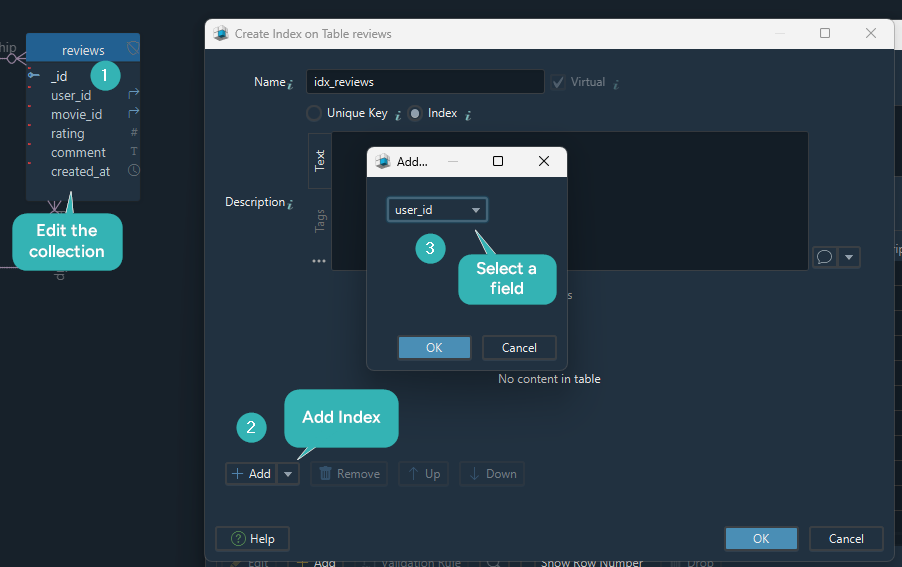
Double-click the collection header to open its editor, where the Indexes tab lists the indexes that exist and adds new ones. Pick the fields the index covers, in order, and DbSchema writes the corresponding MongoDB script.
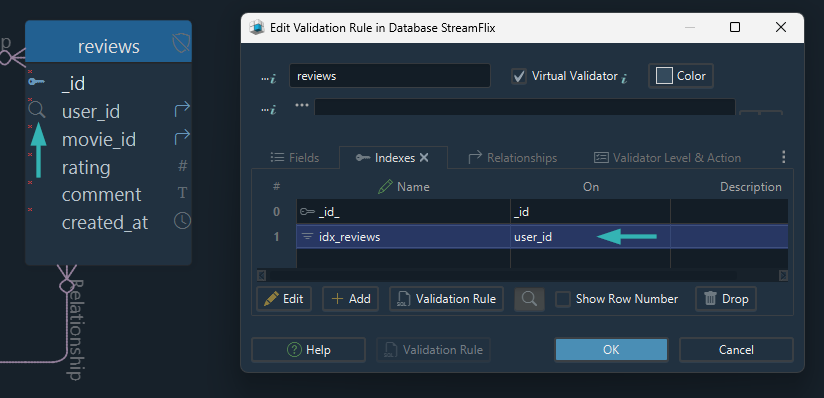
That script is the part worth watching for the difference between the design and the database. Adding the index in the diagram changes the model; the index exists in MongoDB once the script runs, and DbSchema either runs it against the connected database for you, through the schema synchronization the Pro edition carries, or hands it to you to run and to commit alongside the application code.
Aggregation pipelines are the next chapter, where the same reviews collection is grouped, counted and averaged inside the database, using stages such as $match, $group and $sort instead of application code. The indexes from this chapter are what keep the $match stage at the front of a pipeline cheap.
Your busiest collection probably already carries indexes nobody remembers creating. Open it in DbSchema, available at https://dbschema.com/download.html, and read them off the diagram before you add another. Connecting, reverse-engineering and the interactive diagrams are in the free Community Edition; writing an index change back to the connected database is schema synchronization, which is Pro.









