MongoDB Validation Rules Explained with Examples
For a developer whose MongoDB collection has started collecting documents of different shapes, and who wants the database itself to refuse the next one.
On this page
- Introduction to MongoDB
- Installation and database creation
- CRUD operations
- Embedded documents and arrays
- Validation rules, enforcing structure in MongoDB (this chapter)
- Visualize MongoDB relationships, embedded against referenced
- What is an index in MongoDB?
- Aggregation pipeline explained
A collection takes whatever your application sends it. One document holds a number where the next holds a string, a third leaves the field out altogether, and MongoDB stores all three without a word. A validation rule ends that: you attach a JSON Schema document to the collection as its validator, and the server checks every insert and update against it before writing.
What a validation rule is
The rule lives on the collection, not in your application code, so it holds for every client that writes to the database: your backend, a migration script, a person typing into mongosh. It is written in JSON Schema, which lets you list the fields a document must carry and the BSON type each one may hold.
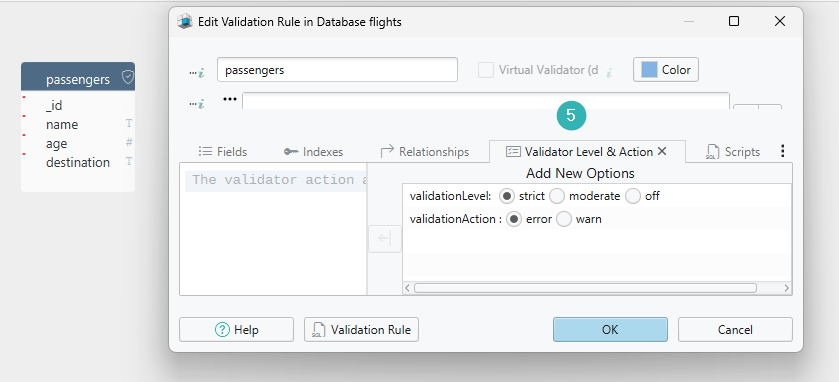
Two collection settings decide how hard the rule bites. validationLevel decides which documents it is applied to, and validationAction decides what happens to a write that breaks it. Both have defaults, so a validator with neither of them set already rejects bad writes.
A booking application stores one document per passenger. Create the collection with the rule attached:
db.createCollection("passengers", {
  validator: {
    $jsonSchema: {
      bsonType: "object",
      required: ["name", "age", "destination"],
      properties: {
        name: {
          bsonType: "string",
          description: "must be a string and is required"
        },
        age: {
          bsonType: "int",
          minimum: 0,
          description: "must be a non-negative integer"
        },
        destination: {
          bsonType: "string",
          description: "must be a string and is required"
        }
      }
    }
  },
  validationLevel: "strict",
  validationAction: "error"
})
required names the three fields a passenger document cannot go without. properties gives each of them a bsonType, and age carries a minimum on top of its type, so a negative age is rejected along with a textual one. The description on each field is not decoration: MongoDB includes the title and description from the schema in the error it returns when a document fails validation, so a description that names the field tells you which rule you broke.
What happens to a write that breaks the rule
The insert below leaves out destination, which is one of the required fields, so MongoDB refuses it:
db.passengers.insertOne({ name: "Jennifer", age: 30 })
Add the missing field and the same insert goes through:
db.passengers.insertOne({ name: "Jennifer", age: 30, destination: "Lisbon" })
The age value passes because of how the shell types numbers. mongosh stores a number that fits in 32 bits as Int32 and anything else as Double, so 30 satisfies bsonType: "int" while 3000000000 would arrive as a double and be rejected by the same rule. Where you need the type regardless of the value, write Int32(30).
To see the rule that is currently on a collection, ask the server for the collection's definition. The answer carries the options you passed to createCollection, the validator among them:
db.runCommand({ listCollections: 1, filter: { name: "passengers" } })
Attaching a rule to a collection that is already full of documents is the case where the two settings matter. MongoDB does not go back and check what is already stored, so the question is only what happens on the next write to an old document.
| Setting | Value | What MongoDB does |
|---|---|---|
| validationLevel | strict | Applies the rule to every insert and update. The default. |
| validationLevel | moderate | Applies it to inserts, and to updates of documents that already match the rule |
| validationAction | error | Rejects the write. The default. |
| validationAction | warn | Performs the write and records the violation in the log |
With moderate, an update to a document that already breaks the rule is allowed through, which is what lets you tighten a collection without blocking writes to the records you have not cleaned up yet. MongoDB 8.1 added a third action, errorAndLog, which rejects the write and writes the violation to the mongod log as well.
The same rule designed in DbSchema

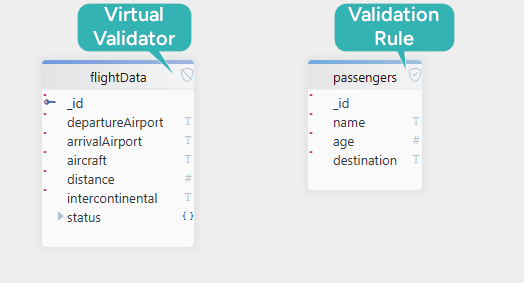
DbSchema connects to MongoDB and reverse-engineers the collection validation rules into its own model, where the rule becomes the collection you see on the diagram: each field with its BSON type, nested objects and arrays included. Where a collection carries no validator, DbSchema falls back on introspecting a configurable sample of documents per collection and inferring the field names and BSON types from what it finds, which approximates what the documents contain rather than anything the database enforces. The validation rule, where one exists, is the authoritative structure.
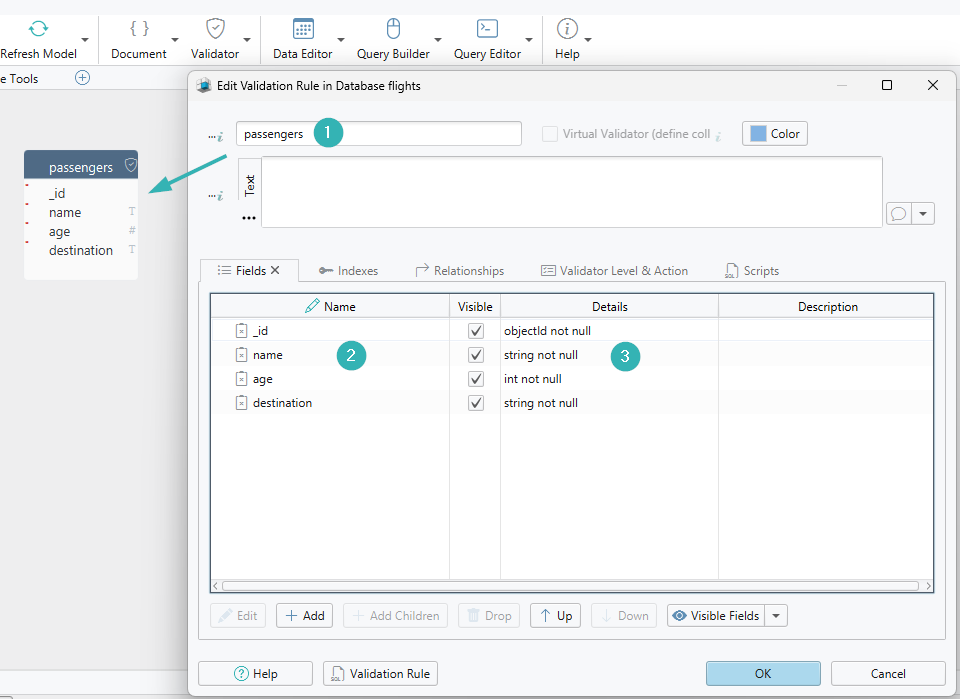
Designing the passengers collection in DbSchema means declaring the same four fields:
| Field | BSON type | Mandatory |
|---|---|---|
_id | ObjectId | generated by MongoDB |
name | String | yes |
age | Integer | yes |
destination | String | yes |
Double-click a collection header in the diagram to open its validation rule, or create a new collection to write one from scratch, then add each field with its type and mark the ones that may not be missing.
The validation level and the action are set on the same rule, so the choice between strict and moderate and between error and warn is made here rather than in a collMod command.
Creating or editing a collection in DbSchema writes the validation rule to both the connected database and the local model file, so the design and the running collection stay the same thing. The diagram distinguishes the collections whose structure came from a validation rule from the ones inferred by sampling, which is a quick way to see how much of a database is actually described.
Fields, BSON types and mandatory flags are what you set on the diagram. A constraint such as minimum or pattern, and a rule nested several documents deep, is typed into the rule itself, and DbSchema then carries it to the database and the model file with the rest of the collection.
The next chapter takes the same collections and asks how they connect: MongoDB has no joins, so a relationship is either an embedded document or a reference, and DbSchema draws both.
Download DbSchema at https://dbschema.com/download.html, connect to your MongoDB instance and open a collection header to read the rule it already carries. Connecting, reverse-engineering and the interactive diagrams are in the free Community Edition; saving the model to a file, so the validator lives in version control next to your code, is Pro, and so is writing an edited rule back to the connected database.









